
Text to Image
4-Panel SaaS Ad Banner Variations — AI Image Prompt
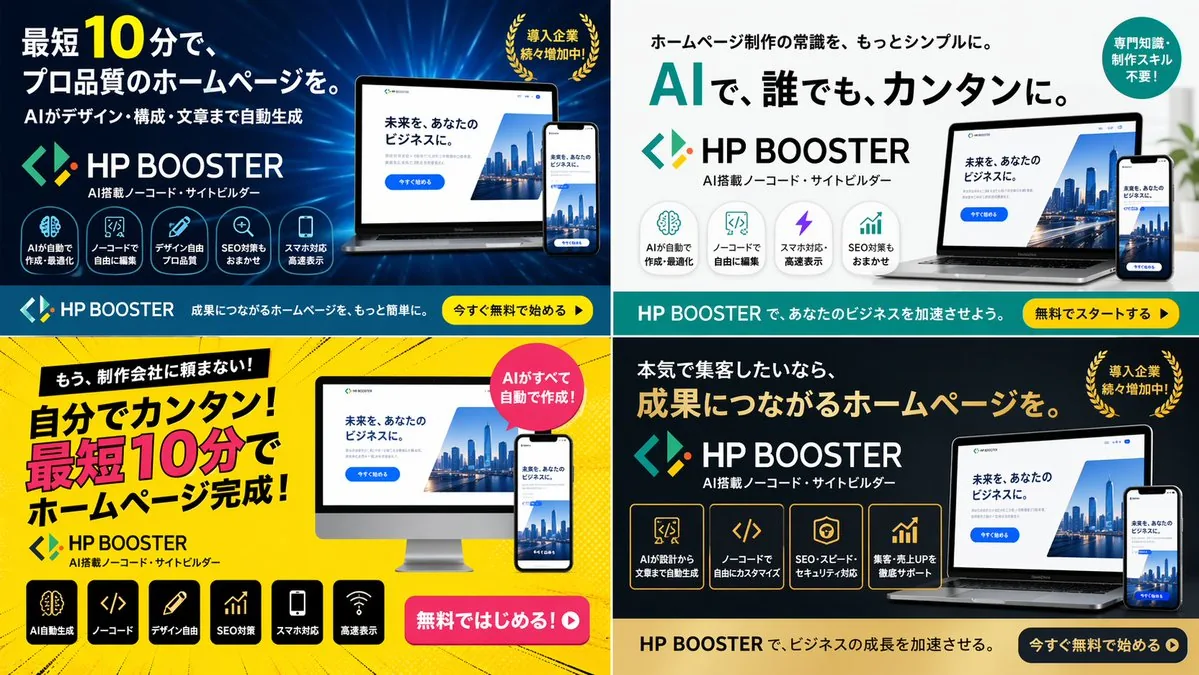
Generates a 2x2 grid of digital advertising banners for a software product, featuring different color themes, layouts, and marketing copy variations.
Prompt
{
  "type": "4-panel ad banner variation grid",
  "product": {
    "name": "{argument name=\"product name\" default=\"HP BOOSTER\"}",
    "subtitle": "AI搭載ノーコード・サイトビルダー",
    "logo": "blue and green angle brackets with a diamond"
  },
  "common_elements": {
    "device_mockups": "laptop and smartphone (desktop monitor in bottom-left panel) displaying a website with a city skyline, text '未来を、あなたのビジネスに。', and a blue '今すぐ始める' button"
  },
  "layout": {
    "grid": "2x2",
    "panels": [
      {
        "position": "top-left",
        "theme": "dark blue gradient with tech lines",
        "headline": "{argument name=\"main headline 1\" default=\"最短10分で、プロ品質のホームページを。\"}",
        "sub_headline": "AIがデザイン・構成・文章まで自動生成",
        "badge": "gold laurel wreath with text '導入企業続々増加中!'",
        "icon_count": 5,
        "icon_labels": ["AIが自動で作成・最適化", "ノーコードで自由に編集", "デザイン自由プロ品質", "SEO対策もおまかせ", "スマホ対応高速表示"],
        "bottom_bar": "teal background, yellow button '今すぐ無料で始める ▶'"
      },
      {
        "position": "top-right",
        "theme": "white and light gray",
        "headline": "{argument name=\"main headline 2\" default=\"AIで、誰でも、カンタンに。\"}",
        "pre_headline": "ホームページ制作の常識を、もっとシンプルに。",
        "badge": "teal circle with text '専門知識・制作スキル不要!'",
        "icon_count": 4,
        "icon_labels": ["AIが自動で作成・最適化", "ノーコードで自由に編集", "スマホ対応・高速表示", "SEO対策もおまかせ"],
        "bottom_bar": "teal background, yellow button '無料でスタートする ▶'"
      },
      {
        "position": "bottom-left",
        "theme": "bright yellow with comic-book action lines",
        "headline": "{argument name=\"main headline 3\" default=\"自分でカンタン!最短10分でホームページ完成!\"}",
        "pre_headline": "もう、制作会社に頼まない!",
        "badge": "pink circle with text 'AIがすべて自動で作成!'",
        "icon_count": 6,
        "icon_labels": ["AI自動生成", "ノーコード", "デザイン自由", "SEO対策", "スマホ対応", "高速表示"],
        "call_to_action": "pink pill button '無料ではじめる!▶'"
      },
      {
        "position": "bottom-right",
        "theme": "dark gray and black",
        "headline": "{argument name=\"main headline 4\" default=\"成果につながるホームページを。\"}",
        "pre_headline": "本気で集客したいなら、",
        "badge": "gold laurel wreath with text '導入企業続々増加中!'",
        "icon_count": 4,
        "icon_labels": ["AIが設計から文章まで自動生成", "ノーコードで自由にカスタマイズ", "SEO・スピード・セキュリティ対応", "集客・売上UPを徹底サポート"],
        "bottom_bar": "gold background, dark blue button '今すぐ無料で始める ▶'"
      }
    ]
  }
}Prompt breakdown
- Subject
- 4-panel 2x2 grid of HP BOOSTER ad banners featuring laptop/smartphone mockups, city skyline website, Japanese headlines, feature icons, and varied badges/CTAs
- Style
- Four contrasting themes: dark blue gradient with tech lines, white/light gray minimalist, bright yellow with comic-book action lines, dark gray/black premium
- Composition
- Strict 2x2 grid layout with consistent device mockups and bottom-placed CTAs across all panels
- Mood
- Professional SaaS marketing with energetic accents via gold laurels, pink buttons, and comic action lines
Remix ideas
- Replace the bottom-left comic yellow theme with a deep purple gradient while keeping the six icon labels and pink pill button
- Move the desktop monitor mockup from the bottom-left panel into the top-right white panel alongside the laptop and smartphone
- Swap the top-left icon set for the bottom-right's four labels focused on SEO/speed/security while retaining the gold laurel badge
Reference images
How to use this AI Image prompt template
 1
1Copy the prompt — grab this template’s prompt and negative prompt.  2
2Pick a model — choose a recommended AI model for the best match.  3
3Generate — open the studio with one click and create your result.
Related templates
Fitness SaaS Landing Page UI
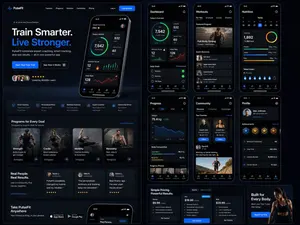
Design a modern, high-end fitness app (app type) landing page and product UI for a brand called PulseFit (brand name). Create a clean web design mockup that looks like a real SaaS fitness platform and mobile companion app. The design should feel premium, motivating, and easy to use, with a polished UI/UX style similar to top-tier health and wellness apps. Include: - A hero section with bold headline, short subheadline, strong call-to-action button, and app preview - Dashboard UI showing daily activity, calories burned, workout streak, heart rate, step count, and progress rings - Workout program cards for strength, cardio, mobility, and recovery - Nutrition tracking section with macro breakdown and water intake - Progress charts and analytics widgets - Trainer/community section with profile cards and testimonials - Pricing section and download/app store callout - Mobile app screens shown alongside the web design for a cohesive product ecosystem Style direction: - Sleek, minimal, modern interface - Premium fitness brand aesthetic - Smooth spacing, strong hierarchy, rounded cards, soft shadows - Dark mode UI with energetic accent colors like electric blue, neon green, or vibrant orange - Crisp typography, realistic charts, polished buttons, beautiful onboarding feel - Highly detailed, dribbble-worthy, startup-quality product design - Realistic UX case study presentation, not a cartoon or illustration Composition: - Full website homepage mockup - Multiple UI sections visible in one polished presentation - Slight perspective or straight-on product showcase - Clean background with subtle gradients and professional lighting - Ultra-detailed, sharp text rendering, visually balanced layout Output: A stunning, realistic UI/UX design concept for a fitness app website and dashboard that looks ready for development. Make it look like a real Figma product design presentation for a premium startup.
Productivity App UI Mockup
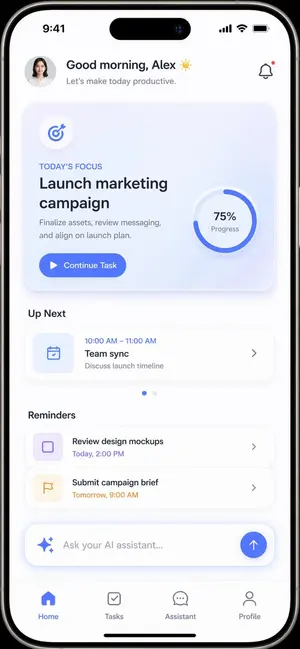
{ "type": "mobile app UI mockup", "device": "modern smartphone with dynamic island", "theme": "light mode, minimalist, {argument name=\"primary color\" default=\"soft blue\"} accents, soft drop shadows", "layout": { "header": { "profile": "small circular photo of a woman", "greeting": "Good morning, {argument name=\"user name\" default=\"Alex\"} ☀️", "subtitle": "Let's make today productive.", "icon": "notification bell with red dot" }, "hero_card": { "title": "TODAY'S FOCUS", "headline": "{argument name=\"focus task\" default=\"Launch marketing campaign\"}", "description": "Finalize assets, review messaging, and align on launch plan.", "button": "Continue Task", "graphic": "circular progress ring showing 75% Progress" }, "sections": [ { "title": "Up Next", "count": 1, "items": ["Team sync (10:00 AM - 11:00 AM)"] }, { "title": "Reminders", "count": 2, "items": ["Review design mockups", "Submit campaign brief"] } ], "bottom_elements": { "ai_input": "pill-shaped text field with sparkle icon and placeholder '{argument name=\"ai placeholder\" default=\"Ask your AI assistant...\"}'", "navigation_bar": { "count": 4, "tabs": ["Home", "Tasks", "Assistant", "Profile"] } } } }

Cartoon Sneaker Advertising Campaign
Create a creative image of Cartoon Sneaker Advertising Campaign. Style: photorealistic. Composition: balanced and well-framed. Lighting: natural with cinematic mood. Category: photography. Reference: cartoon-sneaker-advertising-campaign-19420.

Editable Matcha Banner in PowerPoint
Goal: Create a realistic desktop screenshot of Microsoft PowerPoint in Japanese, showing an editable banner advertisement design for a matcha drink. The scene should look like the banner is being built from separate selectable PowerPoint objects, with many resize handles, rotation icons, and bounding boxes visible. Canvas: 16:9 widescreen screenshot, approximately 1200×675 px, with the full PowerPoint application window visible. Use a light gray Windows/Office interface, Japanese ribbon labels, one slide thumbnail on the left, the main slide centered, status bar at the bottom, and a zoom level around 107%. PowerPoint interface: Show the Home tab active with Japanese menu items across the top such as File, Home, Insert, Draw, Design, Transitions, Animations, Slide Show, Record, Review, View, Help, plus contextual Shape Format and Picture Format tabs. Include a search box near the top, a red Share button at top right, and a single slide thumbnail in the left navigation pane. The filename area should suggest a saved presentation named similar to “premium_editable_matcha_banner”. Main slide layout: The slide itself is a premium café banner split into two visual halves. The left half is a cream paper-like advertisement panel over a warm blurred café/table background, and the right half is a close-up photo of an iced matcha latte in a clear glass on a wooden tray, with soft natural window light, green leaves above, a bamboo whisk in the background, and warm brown tones. Add a subtle vertical division between the cream text panel and the photo. Use a dark green, cream, beige, and warm wood color palette. Visible editable objects: Show many individual PowerPoint selection boxes and handles on the banner, as if almost every text box, line, shape, icon, and photo is selected or editable. Include white circular resize handles, rotation arrows, thin gray bounding boxes, and overlapping object outlines. Count and show exactly 13 selected/editable object groups: 1 large slide background/image frame, 1 cream left panel, 1 small brand text group, 1 English subtitle text box, 1 large Japanese headline text group, 1 round dark-green badge, 1 description paragraph text box, 1 price box, 1 green call-to-action button, 1 date text box, 1 limited-quantity text box, 1 store information label on the photo, and 1 small dotted decorative icon group. Text content on the banner: Preserve Japanese text accurately where visible. Brand area: “KISSA AOI” and “SEASONAL CAFE DRINK”. Main headline: “初摘み抹茶の” on the first line and “アイスラテ” on the second line. Round badge: “初夏限定”. Description paragraph: “香り高い抹茶に、きなこの余韻。涼やかな苦みと、やさしい甘さを一杯に。” Price: “¥680”. CTA button: “近くの店舗を見る”. Date: “6.7 SAT - 7.21 MON”. Small note: “数量限定”. Store label over the photo: “青井珈琲 淀屋橋店” and below it “本日 11:00 販売開始”. Design details: Use elegant Japanese typography with a dark forest-green headline, thin decorative horizontal rules around the headline, cream rectangles with fine green borders, rounded dark-green buttons, and small dotted white decorations on green shapes. The badge should be a dark-green circle near the upper right of the cream panel. The store label should be a dark-green rounded rectangle near the bottom right of the drink photo. The overall ad should feel premium, calm, seasonal, and café-like. Customization slots: Use the drink concept as 初摘み抹茶のアイスラテ (drink name), brand as KISSA AOI (brand name), price as ¥680 (price), CTA as 近くの店舗を見る (call to action), and store as 青井珈琲 淀屋橋店 (store name). Constraints: Make it a screenshot of PowerPoint, not a clean exported poster. Keep the editing handles and object outlines highly visible. Do not add extra slides, extra products, watermarks, or unrelated UI panels. Keep the photo realistic and the ad elements editable-looking rather than flattened.39:T1073,Goal: Create a realistic desktop screenshot of Microsoft PowerPoint in Japanese, showing an editable banner advertisement design for a matcha drink. The scene should look like the banner is being built from separate selectable PowerPoint objects, with m

Pastel Running App UI with Sloth Mascot
{"type":"mobile fitness app UI mockup","style":"clean modern pastel app design, soft beige and warm white surfaces, muted sage green accents, rounded cards and buttons, subtle shadows, thin minimalist line icons, friendly playful branding with a sloth mascot, dribbble-style presentation on a dark brown dotted background","theme":"running tracker app","layout":{"device_count":3,"arrangement":"three tall smartphone screens side by side, evenly spaced, front view","background":"very dark brown with a faint evenly spaced dot grid","screens":[{"position":"left","screen_type":"home dashboard","header":{"greeting":"Good morning, Runner! 👋","left_icon":"none","right_icon":"notification bell"},"hero_card":{"headline":"Ready for a great day?","subcard_text_line_1":"Every step forward is a win.","subcard_text_line_2":"Let's make it count. 🌱","illustration":"cute sloth wearing a cream headband and mint-green workout outfit, standing and waving inside the card on the right"},"sections":[{"title":"This Week","position":"upper middle","count":3,"labels":["Runs","Distance","Time"],"values":["3","12.6 km","1h 45m"],"presentation":"single rounded stats card with three equal columns and pale green circular icons"},{"title":"NEXT GOAL","position":"middle lower","count":1,"labels":["20 km this month"],"values":["63%"],"presentation":"rounded progress card with green progress bar and small waving sloth illustration on the right"},{"title":"Recent Activity","position":"lower","count":1,"labels":["Recent Activity"],"presentation":"top edge of another rounded card visible, cropped by the bottom navigation"}],"bottom_nav":{"count":4,"labels":["Home","Run","Progress","Profile"],"active":"Home"}},{"position":"center","screen_type":"run summary","header":{"left_icon":"back chevron","center_text":"Great job!","subtext":"You did it. Time to celebrate. 🎉","right_icon":"share"},"hero_illustration":"cute sloth wearing a headband, mint athletic outfit, and a gold medal, both arms raised in celebration","stats_row":{"count":3,"labels":["DISTANCE","TIME","PACE"],"values":["5.00km","32:15","6:27"],"presentation":"three rounded statistic pills"},"achievement_card":{"count":1,"title":"New Personal Best! 🌟","subtitle":"You shaved 1:12 off your previous 5K.","icon":"small gold medal badge"},"table_section":{"title":"Splits","count":2,"columns":["KM","PACE","TIME"],"rows":[["1","6:35","6:35"],["2","6:23","12:58"]],"presentation":"rounded white table card with light dividers"}},{"position":"right","screen_type":"run goal setup","header":{"left_icon":"close x","center_text":"Time to run!","subtext":"You've got this. We'll take it slow. 🦥","right_icon":"settings gear"},"goal_visual":{"type":"circular progress selector","top_label":"CHOOSE A GOAL","main_value":"5.00","unit":"kilometers","ring":"thick partial sage-green arc on a pale beige circle","illustration":"small sloth stretching on the upper-right edge of the circle"},"goal_options":{"count":4,"labels":["2 km","5 km","10 km","Half"],"active":"5 km"},"primary_cta":{"label":"Start Run","style":"large rounded sage-green button"},"secondary_action":{"label":"Just Track","icon":"location pin"},"bottom_nav":{"count":4,"labels":["Home","Run","Progress","Profile"],"active":"Run"}}]}}

Inflatable Surreal Product Poster
Design a '4:5' product poster for an 'orange (fruit)' juice 3d bottle using playful inflatable-plastic packaging surrealism where the bottle behaves like a squeezed toy object mid-pressure. The poster should communicate juiciness, tension, and tactile freshness through a bottle that visibly bulges, stretches, and compresses like a soft object being squeezed from the inside out. SUBJECT: A single bottle dominates the center-left, illustrated in a semi-3D stylized form (not photoreal). The bottle is visibly distorted—its midsection bulges outward while the neck is slightly compressed, as if internal juice pressure is pushing against the container walls. The liquid inside exaggerates this effect, forming rounded convex surfaces pressing against the plastic. The cap is slightly tilted from pressure. The bottle feels elastic, alive, and reactive rather than rigid. COMPOSITION: The composition mechanic is “internal pressure distortion”. The eye enters through the most inflated part of the bottle (center bulge), then follows curved tension lines outward toward stretched typography on the right side. The camera uses a slightly low, close-up perspective with mild fisheye distortion, amplifying the sense of pressure and expansion. The bottle leans diagonally into the frame as if pushing against invisible resistance. Negative space on the right is intentionally stretched and warped, echoing the bottle’s deformation. TYPOGRAPHY: Headline: “SQUEEZE BACK (headline)” in thick, rounded, inflated lettering that mimics air-filled plastic. The type is physically distorted—letters stretch horizontally near the bottle and compress toward the edges, as if affected by the same pressure force. The headline sits to the right of the bottle but partially overlaps its bulging edge. Subheadline: “Juice that pushes back.” in a narrow condensed sans, straight and rigid, contrasting the soft headline. Small circular microcopy labels (e.g., “100% organic”, “no added sugar”) appear like printed stickers slightly warped by the surface tension. LIGHTING / GRAPHIC TREATMENT: Soft studio lighting adapted for stylized rendering—broad diffused highlights across curved surfaces, subtle specular streaks that follow the deformation. No realistic reflections—only controlled, simplified highlight bands that emphasize volume and elasticity. COLORS: 'orange' juice bottle color and 3d header text. Small accents of 'bright lime green' for sticker elements. High contrast between glowing orange and dark surroundings. BACKGROUND: A smooth dark gradient field with subtle radial tension lines expanding outward from the bottle, like invisible pressure waves. No texture clutter—clean but dynamically warped space. STYLE: Neo-pop surreal product illustration with inflatable material logic, playful distortion, and high-impact commercial clarity. FINISH: Soft plastic-like rendering, clean edges, controlled gradient transitions, no noise or grain, polis39:Tbe5,Design a '4:5' product p
Explore more prompts
Browse more AI image and video prompts by category.
FAQ
- What Japanese text appears on the device screens in every panel?
- The website mockups display '未来を、あなたのビジネスに。' above a blue '今すぐ始める' button.
- Which panel uses a bright yellow background with comic-book action lines?
- The bottom-left panel features the bright yellow theme, a pink circle badge, six icons, and a pink pill CTA button.
- Is the 4-Panel SaaS Ad Banner Variations prompt free to use?
- Yes, this prompt is completely free on AI Pin Maker and you can copy it directly with no signup or payment required.
- How do I use the 4-Panel SaaS Ad Banner Variations prompt to generate an image or video?
- Copy the prompt, tweak the subject or style to fit your idea, then paste it into AI Pin Maker and generate your image or video in one click.
- Can I change the 4-Panel SaaS Ad Banner Variations prompt into my own version?
- Absolutely, just replace the subject, style, or parameters in AI Pin Maker to make the prompt entirely your own.