
Text to Image
Productivity App UI Mockup — AI Image Prompt
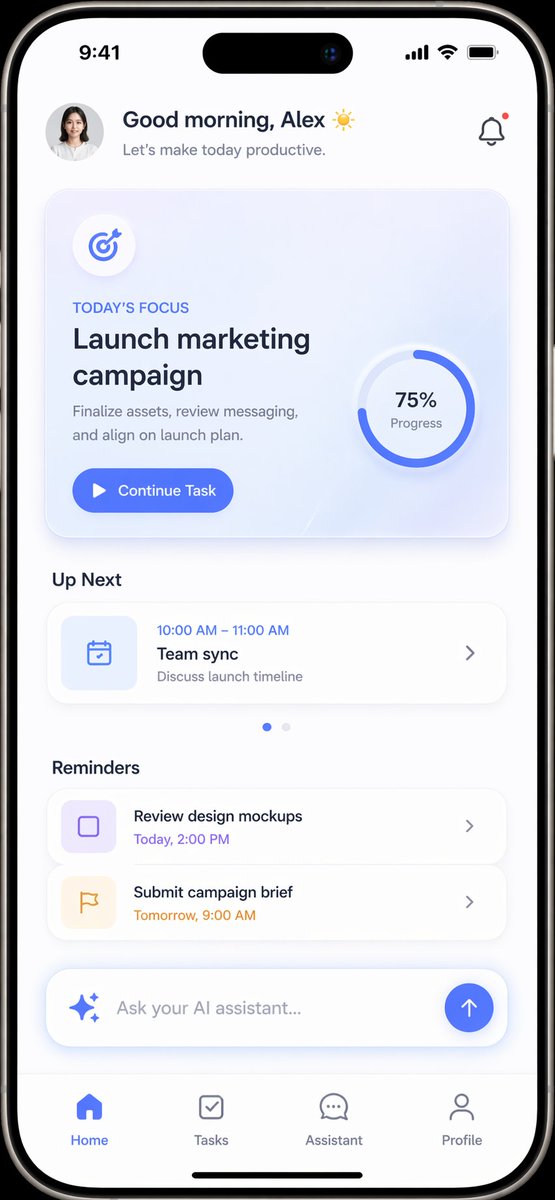
A modern, light-themed mobile app interface for task management featuring a daily focus card, schedule, and AI assistant integration.
Prompt
{
  "type": "mobile app UI mockup",
  "device": "modern smartphone with dynamic island",
  "theme": "light mode, minimalist, {argument name=\"primary color\" default=\"soft blue\"} accents, soft drop shadows",
  "layout": {
    "header": {
      "profile": "small circular photo of a woman",
      "greeting": "Good morning, {argument name=\"user name\" default=\"Alex\"} ☀️",
      "subtitle": "Let's make today productive.",
      "icon": "notification bell with red dot"
    },
    "hero_card": {
      "title": "TODAY'S FOCUS",
      "headline": "{argument name=\"focus task\" default=\"Launch marketing campaign\"}",
      "description": "Finalize assets, review messaging, and align on launch plan.",
      "button": "Continue Task",
      "graphic": "circular progress ring showing 75% Progress"
    },
    "sections": [
      {
        "title": "Up Next",
        "count": 1,
        "items": ["Team sync (10:00 AM - 11:00 AM)"]
      },
      {
        "title": "Reminders",
        "count": 2,
        "items": ["Review design mockups", "Submit campaign brief"]
      }
    ],
    "bottom_elements": {
      "ai_input": "pill-shaped text field with sparkle icon and placeholder '{argument name=\"ai placeholder\" default=\"Ask your AI assistant...\"}'",
      "navigation_bar": {
        "count": 4,
        "tabs": ["Home", "Tasks", "Assistant", "Profile"]
      }
    }
  }
}Prompt breakdown
- Subject
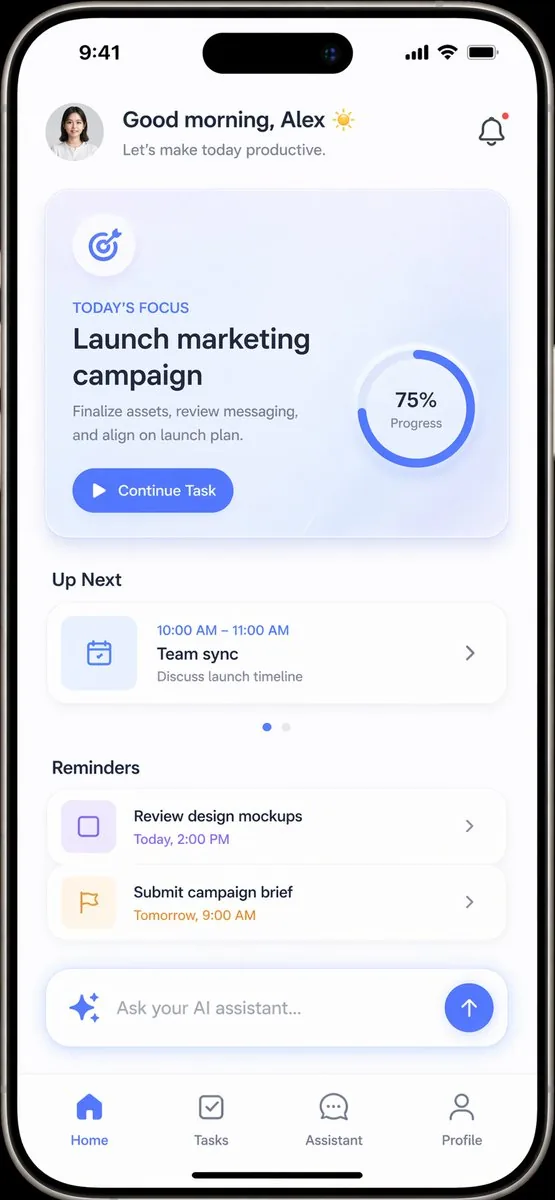
- modern smartphone UI showing header with woman's circular profile photo, greeting, notification bell with red dot, hero focus card for marketing campaign at 75% progress, up next and reminders sections, plus pill-shaped AI input
- Style
- light mode minimalist design with soft blue accents and soft drop shadows
- Composition
- top header with profile and greeting, central hero card, stacked sections for tasks and reminders, bottom AI text field and four-tab navigation bar
- Mood
- calm, organized morning productivity
Remix ideas
- swap the focus task to "Finalize Q3 budget" and lower progress ring to 35%
- change primary accent from soft blue to warm coral while keeping light mode
- replace the single up-next item with three entries and add a second reminder
Reference images
How to use this AI Image prompt template
 1
1Copy the prompt — grab this template’s prompt and negative prompt.  2
2Pick a model — choose a recommended AI model for the best match.  3
3Generate — open the studio with one click and create your result.
Related templates

AI Model Router App Store Screenshot
Create a polished App Store promotional screenshot in a warm beige and golden-orange brand palette, portrait orientation, with a premium friendly startup aesthetic. The layout is a single vertically composed marketing graphic with a soft cream background and an orange gradient floor at the bottom. On the left upper side, place a very large elegant black serif headline split across 3 lines reading Powered by leading AI models (headline text). To the right of the headline, add a small white jagged starburst badge with a subtle drop shadow containing 2 lines of serif text: Best models (badge text). Beneath the headline on the left, show a vertical list of exactly 4 AI providers with icon plus name, evenly spaced: Claude with an orange sunburst icon, Gemini with a multicolor four-point sparkle icon, OpenAI with a black knot logo, and Seedance with a purple-blue gradient S icon. Below that, add a left-aligned serif body copy block with 2 parts: first a black text list on 4 lines reading "Claude, Gemini, OpenAI, Seedance.", then a final brand-colored orange line reading Empowered by Merl. (tagline text). On the right half, place a large realistic modern smartphone angled slightly left, with a reflective silver frame, black screen border, dynamic-island style top cutout, visible side button, and soft shadow. The phone screen should show a clean cream-colored app UI for an AI model-routing app. At the very top of the phone display, include the status time 9:41 and standard signal, wifi, and battery icons. Inside the app, show a tiny greeting line "HEY BESTIE.", then a bold serif question title What are we casting? (screen title), followed by a short sans-serif subtitle about routing the request to the best AI model for the job. Add a small rounded badge in the upper right of the app content reading "+ 8 credits". Below that, include a section label "The model stack" and a stack of exactly 4 rounded cards, each in a lightly tinted pastel background. Card 1: Claude, with orange sunburst icon, description "writing, reasoning, voice-matched outputs", and a small pill label "BEST FOR WRITING". Card 2: Gemini, with multicolor sparkle icon, description "image generation, research, visual tasks", and pill label "BEST FOR IMAGES". Card 3: OpenAI, with black knot icon, description "headshots, image generation, smart creation", and pill label "BEST FOR CREATION". Card 4: Seedance, with purple-blue gradient S icon, description "video generation, motion, AI UGC clips", and pill label "BEST FOR VIDEO". Under the cards, place a large rounded yellow-orange CTA button reading "Start Casting ✦", with a small line below saying "8 credits per session". At the bottom of the phone UI, create a black tab bar with exactly 4 navigation items: home icon, a selected center pill with a small mascot face and the label Merl (app name), a clock/history icon, and a profile icon. In front of the lower left of the phone, place a cute 3D mascot character: a rounded cream-colored blob with tiny feet, dark brown dot eyes, rosy cheeks, and a smiling mouth, wearing a golden wizard hat and matching cape tied with a round clasp. The mascot should overlap the phone slightly and sit on the orange floor, casting a soft shadow. Overall style: luxury-friendly tech branding, crisp typography, subtle realism, soft shadows, clean app mockup, App Store screenshot quality, consistent visual branding, highly legible, high resolution.3c

Futuristic Stockings Product Overview
Goal: Create a futuristic ecommerce product overview poster for sheer black stockings (product type), styled like a high-tech product launch page. Canvas: Square 1:1 composition, glossy silver-gray studio background with soft gradients, faint transparent HUD lines, corner brackets, neon blue and violet accents, subtle sci-fi interface overlays, premium clean lighting. Layout: Right side features the main fashion model occupying about 60% of the image. Left side contains the product information panel, product packaging, rolled stocking display, fabric stretch demo image, and a feature list card. Keep the composition balanced, luxurious, and minimal. Main subject: A seated adult female fashion model on a metallic silver cube, wearing sheer black stockings, black high heels with small gold toe accents, and a fitted black dress with long sleeves, white pointed collar, and a small gold brooch. She sits with legs crossed to clearly show the stockings’ sheer texture and slim fit. Long brown hair, elegant pose, one hand near her hair. The face is intentionally obscured by a soft square blur for anonymity. Product elements: Include exactly 3 visible product/demo elements on the left: 1 tall translucent silver product box with a silhouette of a leg wearing stocking, 1 rolled black stocking with a loose sheer section extending forward, and 1 inset close-up photo showing two hands stretching the stocking fabric horizontally. Text content: Large English headline at upper left: “PRODUCT OVERVIEW”. Below it, show the Chinese product slogan 薄透丝袜,显瘦有质感 (Chinese slogan). Under that, add the English descriptor line: “Sheer Texture / Slim Fit / Soft Matte Glow”. Use modern condensed sans-serif typography in dark gray. Feature list card: At bottom left, include exactly 5 feature rows with small circular line icons and English labels: 1) Sheer Texture, 2) Slim Fit, 3) Soft Matte Glow, 4) High Elasticity, 5) Commuter Styling. Use thin dividers and a translucent frosted-glass panel. Visual style: Premium fashion-tech advertising, photorealistic model and product, clean futuristic UI details, soft reflections on floor and cube, black stockings rendered semi-transparent with subtle matte glow, elegant commercial lighting, sharp focus on legs and product materials. Constraints: No extra feature rows, no extra product demos, no watermark, no messy background text, keep all typography legible, keep the model modestly posed and fashion-catalog oriented.39:T9fd,Goal: Create a futuris

Luxury Watch Fashion Ad
Create a fashion image of Luxury Watch Fashion Ad. Style: photorealistic. Composition: balanced and well-framed. Lighting: natural with cinematic mood. Category: photography. Reference: luxury-watch-fashion-ad-16209.

Luxury Handbag Exploded View Animation Prompt
Create a fashion image of Luxury Handbag Exploded View Animation Prompt. Style: photorealistic. Composition: balanced and well-framed. Lighting: natural with cinematic mood. Category: photography. Reference: luxury-handbag-exploded-view-animation-prompt-6087.
Spicy Snack Bag Product Ad
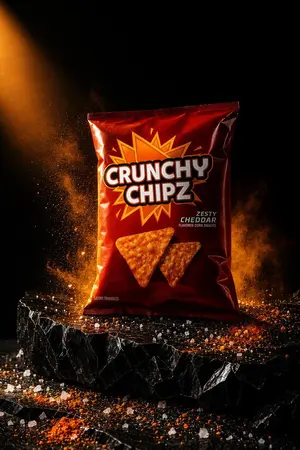
A dramatic studio product photograph of a standing bag of CRUNCHY CHIPZ (brand name) centered on a rough black stone pedestal against a deep black background. The packaging is a glossy dark red metallic snack bag with a large orange-yellow comic-style starburst behind the main logo, bold oversized white block letters with black outline for the brand name, and flavor text on the right reading ZESTY CHEDDAR (flavor text) with smaller subtitle text below it. Show exactly 2 triangular orange corn chips printed on the lower front of the bag. Add small fine-print text near the bottom left of the bag reading SAVORY TRIANGLES (small label). Light the scene with intense warm orange side lighting from the upper left, creating strong highlights and glossy reflections on the bag. Surround the product with airborne orange seasoning dust and smoky spice clouds, especially behind the bag and to the left side. Scatter coarse salt crystals and orange-red seasoning powder across the pedestal and foreground surface. The pedestal should be a thick, jagged, matte-black rock slab with sharp fractured edges. Emphasize high contrast, cinematic shadows, crisp product focus, premium commercial advertising style, dramatic food photography, vertical composition, ultra-detailed texture, realistic packaging, and a fiery zesty cheddar mood.
Premium Earbuds Ad Poster
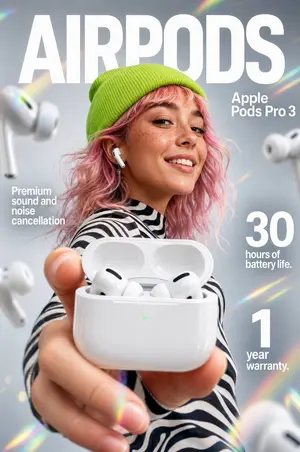
Create a high-end futuristic product advertisement poster for Apple Pods Pro 3 (product name), styled like a premium tech magazine cover. Vertical composition, clean soft gray studio background with subtle rainbow prism lens flares around the edges. A fashionable young person is centered in the background, face obscured by a simple rectangular blur block, wearing a bright neon-lime knit beanie, wavy shoulder-length pink hair, and a black-and-white zebra striped top. One white wireless earbud is visible in their ear. In the extreme foreground, their hand is extended toward the camera holding an open glossy white charging case, shot with dramatic shallow depth of field and forced perspective so the case dominates the frame. Inside the open case, exactly 2 white earbuds are visible. Add 4 larger floating earbuds around the composition: 2 on the left side and 2 on the right side, softly blurred as if suspended in space. Place huge bold white sans-serif headline text across the top reading AIRPODS (headline text). On the upper right, add smaller stacked white sans-serif product text reading Apple Pods Pro 3 (product label). On the left middle, add a white feature callout in stacked text: Premium sound and noise cancellation (left feature text). On the right side, add 2 large numeric feature blocks in white: one reading "30" with smaller text "hours of battery life." beneath it, and one reading "1" with smaller text "year warranty." beneath it. Sleek commercial lighting, glossy reflections on the case, crisp product detail, modern fashion-tech aesthetic, polished Apple-inspired ad design, photorealistic, premium editorial finish.
Explore more prompts
Browse more AI image and video prompts by category.
FAQ
- Can the notification bell be removed or altered?
- Yes, edit the header icon field to hide the red dot or replace the bell entirely with another symbol like a calendar.
- How is the 75% progress visualized?
- A circular progress ring overlays the hero card graphic, clearly displaying completion status for the marketing campaign task.
- Is the Productivity App UI Mockup prompt free to use?
- Yes, this prompt is completely free on AI Pin Maker and you can copy it directly with no signup or payment required.
- How do I use the Productivity App UI Mockup prompt to generate an image or video?
- Copy the prompt, tweak the subject or style to fit your idea, then paste it into AI Pin Maker and generate your image or video in one click.
- Can I change the Productivity App UI Mockup prompt into my own version?
- Absolutely, just replace the subject, style, or parameters in AI Pin Maker to make the prompt entirely your own.