
Text to Image
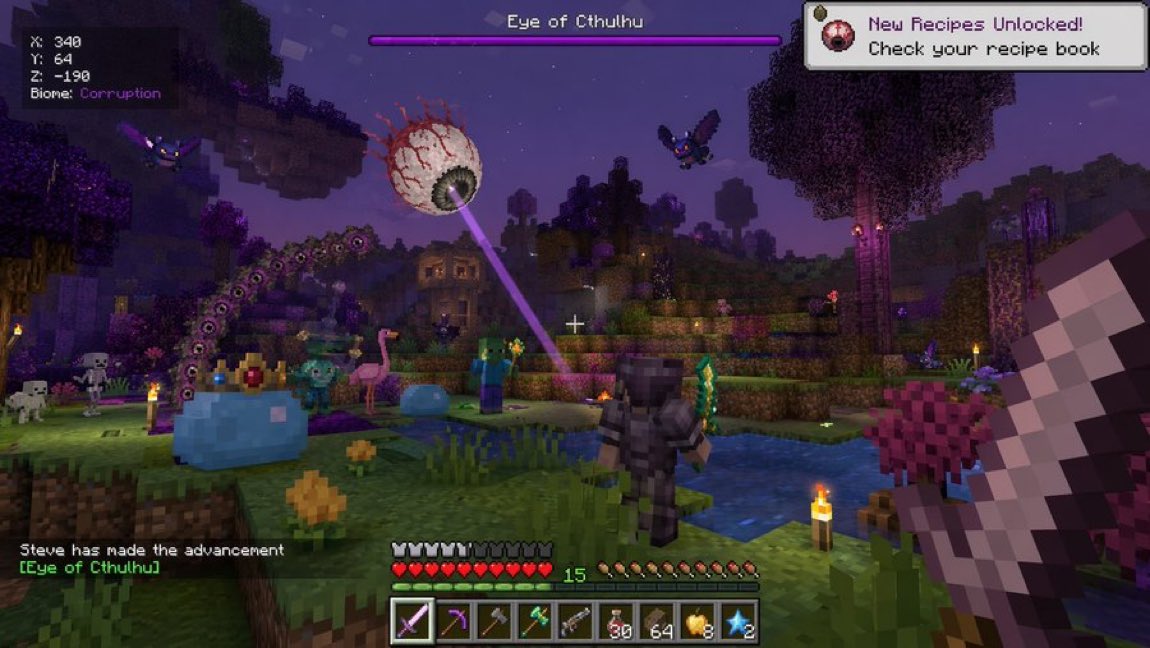
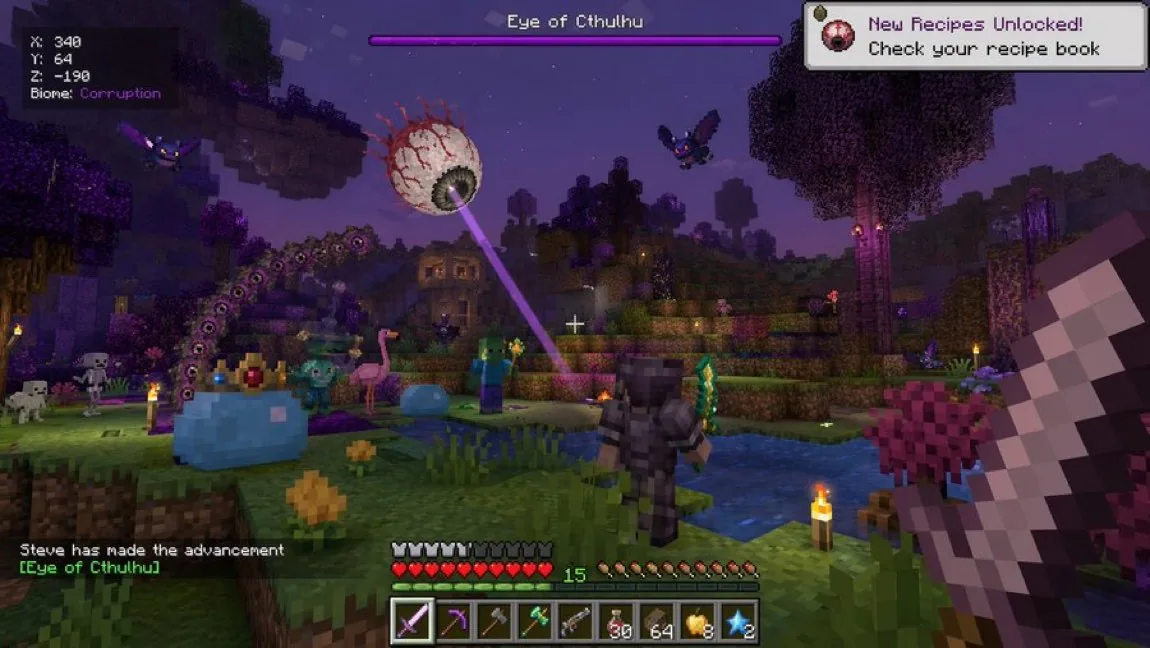
Voxel Survival Game Crossover UI — AI Image Prompt
Generates a complex first-person video game screenshot blending block-building and 2D survival game elements, featuring custom bosses, biomes, and detailed HUDs.
Prompt
{
  "type": "first-person video game screenshot",
  "style": "voxel-based 3D blocky graphics mixed with 2D sprite elements",
  "environment": {
    "setting": "nighttime blocky landscape with purple-tinted lighting",
    "terrain": "grass blocks, water pools, purple-leaved trees, torches"
  },
  "entities": [
    "1 giant floating eyeball boss {argument name=\"boss action\" default=\"shooting a purple laser beam\"}",
    "1 giant blue slime wearing a jeweled gold crown",
    "1 regular blue slime",
    "1 zombie",
    "2 skeletons",
    "2 flying purple bat creatures",
    "1 pink flamingo",
    "1 player character wearing {argument name=\"player armor\" default=\"dark iron armor\"}"
  ],
  "first_person_view": {
    "right_hand": "holding a {argument name=\"main weapon\" default=\"large iron sword\"}"
  },
  "user_interface": {
    "top_left": ["X: 340", "Y: 64", "Z: -190", "Biome: {argument name=\"biome name\" default=\"Corruption\"}"],
    "top_center": "purple boss health bar labeled {argument name=\"boss name\" default=\"Eye of Cthulhu\"}",
    "top_right": "white notification popup: New Recipes Unlocked! Check your recipe book",
    "bottom_left": "chat text: Steve has made the advancement [{argument name=\"boss name\" default=\"Eye of Cthulhu\"}]",
    "bottom_center": {
      "stats": "10 red hearts, 10 armor icons, 10 hunger shanks, experience level 15",
      "hotbar_items": [
        "purple sword",
        "pickaxe",
        "axe",
        "green staff",
        "musket",
        "30 red potions",
        "64 wood blocks",
        "8 golden apples",
        "2 blue stars"
      ]
    }
  }
}Prompt breakdown
- Subject
- Player in dark iron armor facing Eye of Cthulhu boss plus crowned giant blue slime, regular blue slime, zombie, two skeletons, two purple bats and pink flamingo in first-person view holding large iron sword
- Style
- voxel-based 3D blocky graphics mixed with 2D sprite elements
- Lighting
- nighttime blocky landscape with purple-tinted lighting from torches and boss beam
- Composition
- first-person view with top-left coordinates, top-center purple boss health bar, top-right recipe notification, bottom-left chat text and bottom-center 10 hearts, 10 armor, 10 hunger plus nine-slot hotbar
- Mood
- tense chaotic nighttime battle in corrupted voxel world
Remix ideas
- swap main weapon to musket and change boss action to a sweeping charge
- replace purple-leaved trees with more water pools and add floating purple stars
- alter biome name to Crimson and recolor the health bar red while keeping the same hotbar items
Reference images
How to use this AI Image prompt template
 1
1Copy the prompt — grab this template’s prompt and negative prompt.  2
2Pick a model — choose a recommended AI model for the best match.  3
3Generate — open the studio with one click and create your result.
Related templates

Vertical Pixel Space Shooter Background
Create a vertical retro pixel-art space shooter scrolling background, designed as a seamless mobile game asset. The canvas is a tall 9:16 portrait frame with a dark central flight corridor left mostly open for gameplay. Fill the scene with a deep black starfield, hundreds of tiny white, blue, and violet pixel stars, and two luminous vertical nebula streams: one winding down the left side in electric purple and blue, and one winding down the right side in purple with cyan highlights. Add exactly 3 visible planets: a large purple cratered planet near the upper left edge, a large blue-purple rim-lit planet partially cropped on the lower right edge, and a small purple moon just below that lower-right planet. Add exactly 22 rocky asteroids of varied sizes, irregular cratered gray-brown forms with purple shadowing, distributed around the border while keeping the center mostly clear: 1 huge asteroid near the upper right, 1 medium asteroid at the right-middle edge, 1 medium asteroid at the lower left edge, 1 large asteroid cropped at the bottom left corner, 1 large asteroid cropped at the lower right corner, plus 17 smaller asteroids scattered near the top edge, side edges, and lower border. Use crisp pixel-art rendering with high-detail dithering, chunky jagged silhouettes, bright rim highlights, no outlines that look vector-smooth, no ships, no UI, no text, no watermark. Color palette: black space, violet and magenta nebula clouds, electric blue accents, white star glints, gray rocky asteroids with cool purple shadows. The image should feel production-ready as a vertical shoot ’em up background tile, dramatic but readable, with the gameplay lane clear in the center.39

Pixel Mosaic Jungle Parrot
A pixel-art style mosaic illustration of a tropical parrot perched on a short brown branch in the middle of dense jungle foliage, created as if assembled from a tight uniform square grid of tiny colored tiles with thin dark outlines around every square. The single bird is shown in side profile facing right, with a large curved black beak, a pale cream face, a bright red-orange forehead and throat, a vivid yellow neck, a bright green body, and long wings and tail feathers in saturated blue and cyan. The parrot is centered vertically and slightly left of center, standing upright on the branch, with the tail extending downward. Surround the bird with lush layered leaves in many shades of green, from deep forest green to lime, filling the entire frame with no sky visible. Use strong contrast, crisp black contouring, and a glowing light green area behind the parrot to separate it from the darker foliage. The overall image should look like retro pixel art or stained-glass mosaic, highly detailed, colorful, square format, and edge-to-edge tiled texture.
Retro 1998 Japanese Geocities Homepage
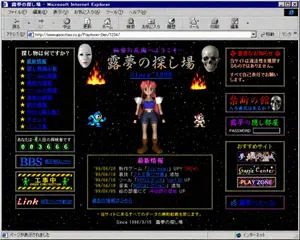
A retro late-1990s Japanese personal homepage displayed inside a Windows-era Microsoft Internet Explorer window, captured as a full browser screenshot. The page title bar reads "露夢の探し場 - Microsoft Internet Explorer" and the browser chrome is authentic to classic Internet Explorer, including menu bar, navigation icons, address bar, and status bar. The website itself has a black starfield space background with tiny colorful stars, framed by dotted gold borders and glowing pixel-style decorative boxes. The page header area shows purple Japanese text "秘密の花園へようこそ…" above a large ornate title "露夢の探し場" with the subtitle "Since 1998" in bright blue italic serif text. In the center is a low-polygon 3D anime girl with pink-red hair, blue crop top, dark shorts, white shoulder armor, brown boots, and a neutral front-facing pose. Count 4 game-like character or effect elements around her: 2 flames near the upper left and upper right of the center area, 1 blue pixel-art robot character on the lower left of the center area, and 1 small red-and-white pixel-art character on the lower right of the center area. Count 2 silver metallic hanging capsule ornaments near the upper center left and upper center right. Build the page in a dense old-web layout with 3 main columns. The left column contains 5 boxed sections: 1 navigation box titled "探し物は何ですか?" with exactly 10 star-bulleted blue links, labeled "最新情報", "怪し物掲示板", "ゲームの部屋", "教授の部屋", "ツールの部屋", "音楽の部屋", "絵の部屋", "BBS(掲示板)", "チャット", "リンク集"; 1 visitor counter box reading "あなたは、◯人目の探検者です" with green digital-style digits "003666"; 1 large blue "BBS" banner button with smaller text "掲示板はこちら"; 1 black-and-yellow caution-style "工事中 UNDER CONSTRUCTION" banner with tiny green worker figures; and 1 black banner with red script text "Link" plus blue text "相互リンク大歓迎!!". The center lower area contains 1 large news box with a gold dotted border and magenta heading "最新情報", listing exactly 5 dated update lines: "'99/06/20 新作ゲーム『Evil Heart』UP!! (NEW)", "'99/06/18 裏技『ストⅡ裏ワザ集』追加。", "'99/06/15 ツール『RPGエディタ Ver1.20』UP", "'99/06/10 音楽『MIDIコレクション』追加", "'99/06/05 絵の部屋にて『神秘師の巫女』UP"; below it add the blue link "過去の情報はこちら". The right column contains 5 boxed sections: 1 red warning box headed "◎ 重要なお知らせ ◎" with text "当サイトは違法性を推奨するものではありません。 すべて自己責任でお願いします。"; 1 dark purple box titled "禁断の館" with subtitle "入る勇気はあるか?" and a realistic skull image on the right; 1 purple box titled "露夢の隠し部屋" with the label "PASSWORD" and an empty white password field; 1 recommendations box titled "おすすめサイト" containing exactly 3 stacked banner buttons labeled "夢魔幻の城", "Game Center", and "PLAY ZONE"; and 1 bottom purple mail button labeled "✉ 露夢へメール". Add small footer text centered near the bottom: "※当サイトにあるすべてのデータの無断転載を禁じます。" and beneath it "Since 1998/3/15 露夢の探し場". Make the whole image feel like an authentic nostalgic Geocities-style Japanese web page from 1998–1999: garish colors, beveled buttons, bitmap fonts, glowing borders, amateur HTML layout, MIDI-homepage energy, slightly compressed screenshot quality, and uncanny period-accurate internet aesthetics.3c:Te6d,A retro late-1990s Japanese personal homepage displayed inside a Windows-era Microsoft Internet Explorer window, captured as a full browser screenshot. The page title bar reads "露夢の探し場 - Microsoft Internet Explorer" and the browser chrome is authentic to classic Internet Explorer, including menu bar, navigation icons, address bar, and status bar. The website itself has a black starfield space background with tiny colorful stars, framed by dotted gold borders and glowing pixel-style decorative boxes. The page header area shows purple Japanese text "秘密の花園へようこそ…" above a large ornate title "露
Crystal Golem Card Comparison UI
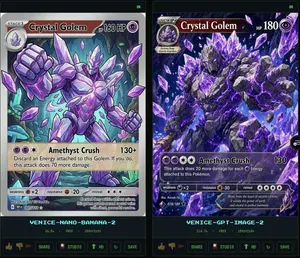
Goal: Create a dark comparison screenshot showing two fantasy trading-card designs side by side, as if from an image generation benchmark UI. Canvas: Landscape 16:9 composition, black/dark charcoal background with thin neon-green outlines. Two tall vertical panels fill the frame, left and right, separated by a narrow gap. Each panel contains one collectible monster card preview above a small status/control area. Layout: Use exactly 2 main panels. The left panel is labeled at the bottom in cyan pixel text “VENICE-NANO-BANANA-2”; the right panel is labeled “VENICE-GPT-IMAGE-2”. Each panel has a tiny green “OK” indicator in its top-right corner. Under each label, show a small metadata row with time, “FREE”, and “1500x2100”. At the very bottom of each panel, include a row of small UI buttons/icons: thumbs up, thumbs down, red flag, “SHARE”, “STUDIO”, “HD” with an up-arrow, a refresh icon, and “SAVE”. Subject: Both cards depict the same Pokémon-inspired character, Crystal Golem (character name), a massive humanoid golem made of jagged gray stone and glowing purple amethyst crystals, with violet energy cracks, crystal spikes, clenched fists, and floating crystal shards. The card type uses a purple psychic/eye symbol. Make the cards look like polished fantasy trading cards, but not an exact copy of any real copyrighted card template. Left card details: A Stage 1 card with a silver-gray border and slightly older illustrated-card look. Header text reads “STAGE 1”, Crystal Golem (card title), and “HP 160 HP”. Include a small circular evolution portrait at top left. The artwork shows the golem from the waist up inside an underground crystal cavern with teal mushrooms and glowing green cave lights, one fist raised toward the viewer, many purple crystal shards floating around. Use clean anime/comic line art, pale lavender highlights, and a holographic sheen. Attack area contains exactly 1 attack: “Amethyst Crush” with damage “130+”. Attack text: “Discard an Energy attached to this Golem. If you do, this attack does 70 more damage.” Bottom stats show weakness “×2”, resistance “-20”, and retreat with three star/colorless symbols. Include tiny illustrator/collector text and a short flavor line near the bottom. Right card details: A Stage 2 card with a darker, more cinematic high-detail look and a black/purple border. Header text reads “STAGE 2”, Crystal Golem (card title), and “HP 180”. Include a small evolution box at upper left reading “Evolves from Quartz Guardian”. The artwork fills more of the card and shows the golem lunging forward through an explosive cavern of purple crystals, with one huge open hand reaching toward the viewer, intense glowing violet eyes, black rock texture, luminous amethyst veins, and many floating crystal shards. Attack area contains exactly 1 attack: “Amethyst Crush” with damage “130”. Attack text: “This attack does 20 more damage for each Energy attached to this Pokémon.” Bottom stats show weakness “×2”, resistance “-30”, and retreat with four star/colorless symbols. Add tiny illustrator/collector text and a flavor quote: “Born from the heart of ancient caverns, it wields the power of earth and crystal in perfect harmony.” Visual style: High-contrast digital art, glossy trading-card foil effects, purple crystal magic, dark cave backgrounds, sharp details, cyan pixel UI labels, neon green UI outlines. The left card should appear cleaner and more cartoon/anime, while the right card should appear more dramatic, dense, and rendered. Constraints: Include exactly 2 card panels and exactly 1 trading card in each panel. Include exactly 1 attack on each card. Preserve all visible English labels named above. Do not add extra cards, characters, logos, watermarks, or real brand names.38:Tf6a,Goal: Create a dark comparison screenshot showing two fantasy trading-card designs side by side,

Pixel Art Dragon on Castle
Create a creative image of Pixel Art Dragon On Castle. Style: photorealistic. Composition: balanced and well-framed. Lighting: natural with cinematic mood. Category: photography. Reference: pixel-art-dragon-on-castle-15276.

Minimalist Festive Greeting Illustration
Create a creative image of Minimalist Festive Greeting Illustration. Style: photorealistic. Composition: balanced and well-framed. Lighting: natural with cinematic mood. Category: photography. Reference: minimalist-festive-greeting-illustration-24619.
Explore more prompts
Browse more AI image and video prompts by category.
FAQ
- Which games does the prompt mash up through its UI and entities?
- Minecraft supplies the voxel blocks, coordinate display, hearts, armor, hunger, experience level and hotbar while Terraria contributes the Eye of Cthulhu, Corruption biome, crowned slime and purple bat sprites.
- How do I change the notification popup text without breaking the layout?
- Edit the top_right string value from New Recipes Unlocked! Check your recipe book to any other message while keeping the white popup styling and position intact.
- Is the Voxel Survival Game Crossover UI prompt free to use?
- Yes, this prompt is completely free on AI Pin Maker and you can copy it directly with no signup or payment required.
- How do I use the Voxel Survival Game Crossover UI prompt to generate an image or video?
- Copy the prompt, tweak the subject or style to fit your idea, then paste it into AI Pin Maker and generate your image or video in one click.
- Can I change the Voxel Survival Game Crossover UI prompt into my own version?
- Absolutely, just replace the subject, style, or parameters in AI Pin Maker to make the prompt entirely your own.