
Text to Image
Retro Pixel Space Shooter HUD — AI Image Prompt
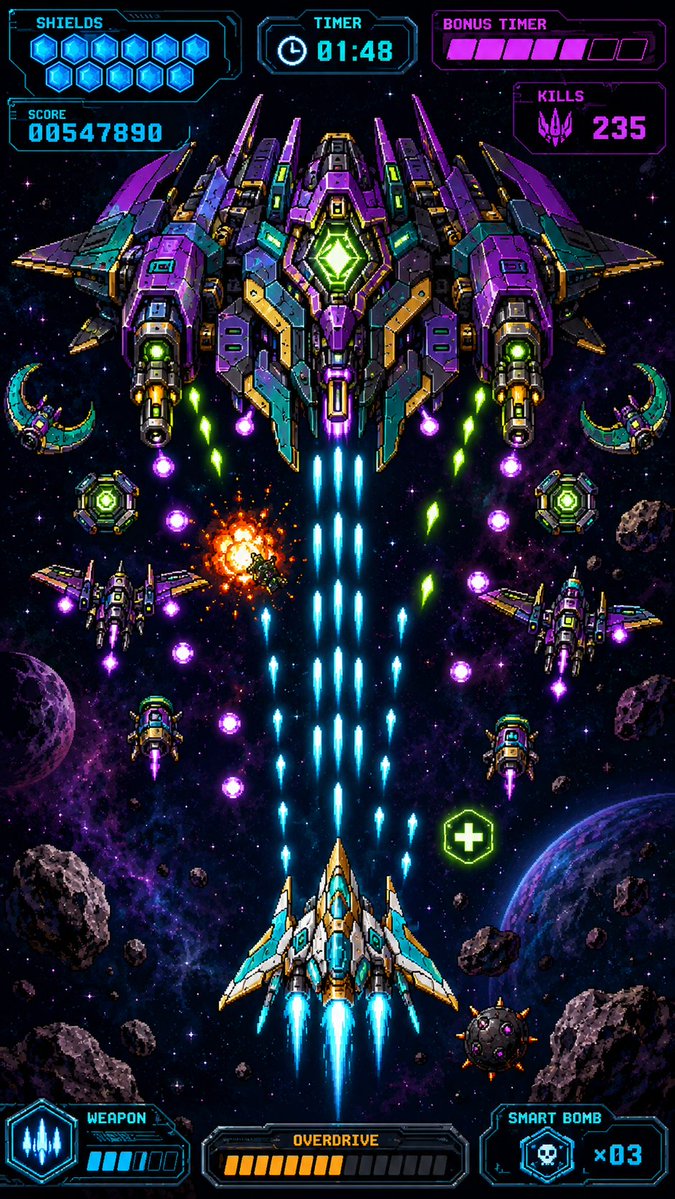
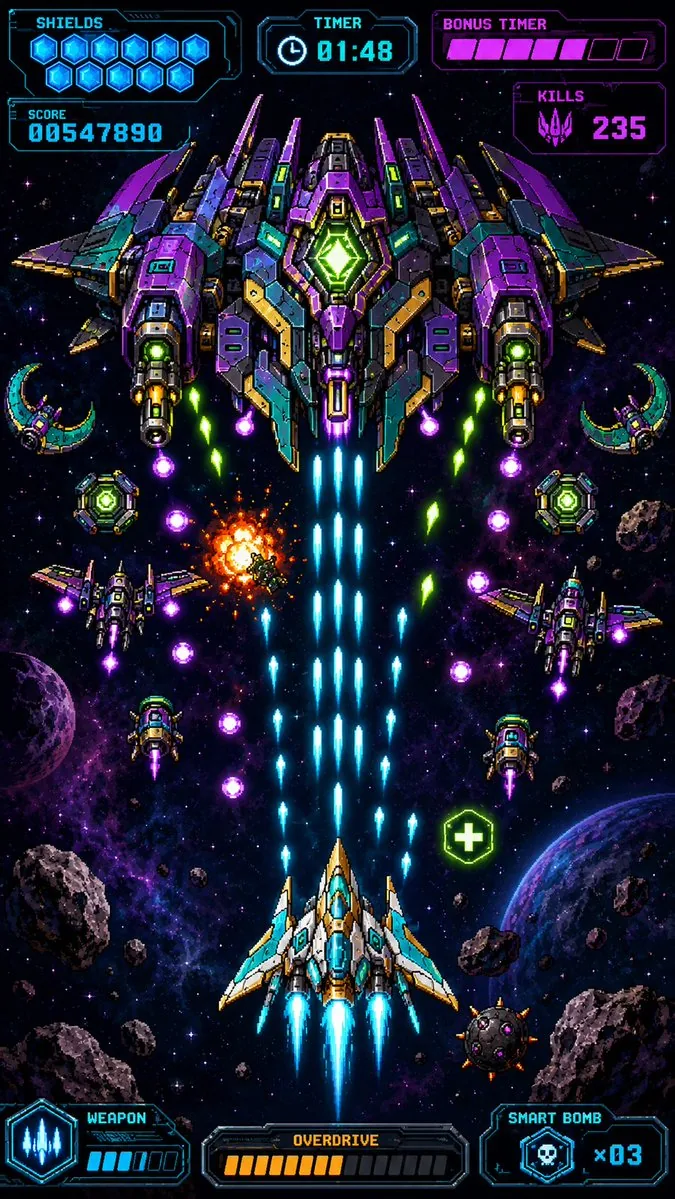
Generates a vertical pixel-art mobile game screenshot showing a neon bullet-hell space shooter boss battle with detailed HUD elements.
Prompt
Create a premium vertical mobile game screenshot for a retro pixel-art space shooter, portrait 9:16. The image must look like an actual in-game scene, not a poster or asset sheet. Use crisp high-resolution pixel art with dense neon detail, black space background, purple nebula clouds, star field, scattered asteroids, and two visible planets near the lower left and lower right edges. Center the action vertically: at the bottom center is the player ship, a white, cyan, and gold angular fighter with three bright cyan engine flames and blue cockpit glass, firing a thick central stream of cyan laser bullets upward. At the top center is one enormous symmetrical boss battleship in purple, teal, dark gray, gold, and neon green, with wide wings, many armor panels, two large side cannons, glowing green core diamond in the middle, and blue exhaust trails beneath it. The scene shows intense bullet-hell combat: exactly 1 player ship, exactly 1 giant boss ship, exactly 4 smaller enemy fighters around the middle area, exactly 2 crescent-shaped drones near the upper left and upper right sides, exactly 2 round green shield drones near the mid-left and mid-right, exactly 1 orange explosion slightly left of center, exactly 1 green health pickup icon with a plus sign on the lower right, many cyan player shots rising in columns, and multiple purple and green enemy projectiles descending diagonally. Overlay a futuristic cyan and magenta pixel HUD with transparent dark panels and sharp sci-fi borders. Top left HUD: label “SHIELDS” with exactly 10 glowing blue hex shield icons, and below it a score panel reading “SCORE” and {argument name="score value" default="00547890"}. Top center HUD: label “TIMER” with a clock icon and {argument name="timer value" default="01:48"}. Top right HUD: label “BONUS TIMER” with a segmented magenta bar showing exactly 6 filled pink segments and 3 empty dark segments, and below it a “KILLS” panel with a purple alien skull icon and {argument name="kills value" default="235"}. Bottom left HUD: “WEAPON” panel with a cyan three-shot weapon icon and a small charge meter with exactly 4 filled cyan bars and 2 empty bars. Bottom center HUD: “OVERDRIVE” panel with exactly 10 filled orange bars and 8 empty dark bars. Bottom right HUD: “SMART BOMB” panel with a skull bomb icon and {argument name="smart bomb count" default="x03"}. Keep all UI text pixelated, legible, and aligned to the screen edges like a real mobile arcade game interface. Use vibrant cyan, violet, magenta, green, and orange glow effects, strong contrast, symmetrical composition, no watermark, no extra logos, no realistic 3D rendering, no blurred painterly style.38:Ta8f,Create a premium verticaPrompt breakdown
- Subject
- Player ship firing cyan lasers at enormous symmetrical boss battleship, plus 4 enemy fighters, 2 crescent drones, 2 green shield drones, orange explosion, green health pickup, asteroids, and planets in black space with purple nebulae
- Style
- Crisp high-resolution retro pixel art with dense neon detail, no 3D rendering or painterly blur
- Lighting
- Vibrant cyan, violet, magenta, green, and orange glow effects with strong contrast on black background
- Composition
- Symmetrical portrait 9:16, action centered vertically, HUD panels aligned to top and bottom edges like a real mobile game
- Mood
- Intense bullet-hell combat with descending enemy projectiles and rising player shots
Remix ideas
- Swap the boss exhaust trails from blue to magenta to shift its power signature
- Move the orange explosion to the upper right while keeping the health pickup placement
- Change the bonus timer bar to show 8 filled segments instead of 6 for higher urgency
Reference images
How to use this AI Image prompt template
 1
1Copy the prompt — grab this template’s prompt and negative prompt.  2
2Pick a model — choose a recommended AI model for the best match.  3
3Generate — open the studio with one click and create your result.
Related templates
Crystal Golem Card Comparison UI
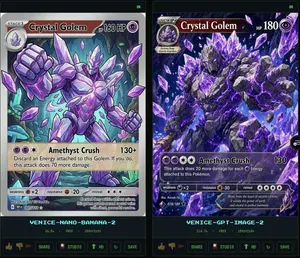
Goal: Create a dark comparison screenshot showing two fantasy trading-card designs side by side, as if from an image generation benchmark UI. Canvas: Landscape 16:9 composition, black/dark charcoal background with thin neon-green outlines. Two tall vertical panels fill the frame, left and right, separated by a narrow gap. Each panel contains one collectible monster card preview above a small status/control area. Layout: Use exactly 2 main panels. The left panel is labeled at the bottom in cyan pixel text “VENICE-NANO-BANANA-2”; the right panel is labeled “VENICE-GPT-IMAGE-2”. Each panel has a tiny green “OK” indicator in its top-right corner. Under each label, show a small metadata row with time, “FREE”, and “1500x2100”. At the very bottom of each panel, include a row of small UI buttons/icons: thumbs up, thumbs down, red flag, “SHARE”, “STUDIO”, “HD” with an up-arrow, a refresh icon, and “SAVE”. Subject: Both cards depict the same Pokémon-inspired character, Crystal Golem (character name), a massive humanoid golem made of jagged gray stone and glowing purple amethyst crystals, with violet energy cracks, crystal spikes, clenched fists, and floating crystal shards. The card type uses a purple psychic/eye symbol. Make the cards look like polished fantasy trading cards, but not an exact copy of any real copyrighted card template. Left card details: A Stage 1 card with a silver-gray border and slightly older illustrated-card look. Header text reads “STAGE 1”, Crystal Golem (card title), and “HP 160 HP”. Include a small circular evolution portrait at top left. The artwork shows the golem from the waist up inside an underground crystal cavern with teal mushrooms and glowing green cave lights, one fist raised toward the viewer, many purple crystal shards floating around. Use clean anime/comic line art, pale lavender highlights, and a holographic sheen. Attack area contains exactly 1 attack: “Amethyst Crush” with damage “130+”. Attack text: “Discard an Energy attached to this Golem. If you do, this attack does 70 more damage.” Bottom stats show weakness “×2”, resistance “-20”, and retreat with three star/colorless symbols. Include tiny illustrator/collector text and a short flavor line near the bottom. Right card details: A Stage 2 card with a darker, more cinematic high-detail look and a black/purple border. Header text reads “STAGE 2”, Crystal Golem (card title), and “HP 180”. Include a small evolution box at upper left reading “Evolves from Quartz Guardian”. The artwork fills more of the card and shows the golem lunging forward through an explosive cavern of purple crystals, with one huge open hand reaching toward the viewer, intense glowing violet eyes, black rock texture, luminous amethyst veins, and many floating crystal shards. Attack area contains exactly 1 attack: “Amethyst Crush” with damage “130”. Attack text: “This attack does 20 more damage for each Energy attached to this Pokémon.” Bottom stats show weakness “×2”, resistance “-30”, and retreat with four star/colorless symbols. Add tiny illustrator/collector text and a flavor quote: “Born from the heart of ancient caverns, it wields the power of earth and crystal in perfect harmony.” Visual style: High-contrast digital art, glossy trading-card foil effects, purple crystal magic, dark cave backgrounds, sharp details, cyan pixel UI labels, neon green UI outlines. The left card should appear cleaner and more cartoon/anime, while the right card should appear more dramatic, dense, and rendered. Constraints: Include exactly 2 card panels and exactly 1 trading card in each panel. Include exactly 1 attack on each card. Preserve all visible English labels named above. Do not add extra cards, characters, logos, watermarks, or real brand names.38:Tf6a,Goal: Create a dark comparison screenshot showing two fantasy trading-card designs side by side,

Vertical Pixel Space Shooter Background
Create a vertical retro pixel-art space shooter scrolling background, designed as a seamless mobile game asset. The canvas is a tall 9:16 portrait frame with a dark central flight corridor left mostly open for gameplay. Fill the scene with a deep black starfield, hundreds of tiny white, blue, and violet pixel stars, and two luminous vertical nebula streams: one winding down the left side in electric purple and blue, and one winding down the right side in purple with cyan highlights. Add exactly 3 visible planets: a large purple cratered planet near the upper left edge, a large blue-purple rim-lit planet partially cropped on the lower right edge, and a small purple moon just below that lower-right planet. Add exactly 22 rocky asteroids of varied sizes, irregular cratered gray-brown forms with purple shadowing, distributed around the border while keeping the center mostly clear: 1 huge asteroid near the upper right, 1 medium asteroid at the right-middle edge, 1 medium asteroid at the lower left edge, 1 large asteroid cropped at the bottom left corner, 1 large asteroid cropped at the lower right corner, plus 17 smaller asteroids scattered near the top edge, side edges, and lower border. Use crisp pixel-art rendering with high-detail dithering, chunky jagged silhouettes, bright rim highlights, no outlines that look vector-smooth, no ships, no UI, no text, no watermark. Color palette: black space, violet and magenta nebula clouds, electric blue accents, white star glints, gray rocky asteroids with cool purple shadows. The image should feel production-ready as a vertical shoot ’em up background tile, dramatic but readable, with the gameplay lane clear in the center.39

PC-98 Gothic Visual Novel UI
{"type":"PC-98 style retro Japanese adventure game screenshot","style":"late 1980s to early 1990s Japanese visual novel interface, 640x480, 4:3 aspect ratio, black background with limited neon green and pale pink dithering, high-contrast 1-bit and 16-color pixel art, ornate gothic frame, CRT-like pixel texture","scene":{"setting":"dark Victorian gothic bedroom or parlor at night","background":"symmetrical room with tall arched windows glowing green, heavy draped curtains, candle sconces on both sides, antique table and chair on the left, ornate sofa on the right, carved furniture, floral and vine decorations, deep shadows","palette":"mostly black and acid green linework with small white and pink highlights"},"character":{"position":"center foreground bust-up, facing viewer","description":"androgynous anime rabbit-eared character with long upright bunny ears, fluffy layered hair, pale lavender-white hair with lime green shadows, dressed in a black gothic lolita-inspired blouse and fitted vest with ruffles, puff sleeves, ribbon bow at the collar, green jewel brooch, belted waist with three small buckles, hands resting near the lower frame","face":"covered by a square pixelated mosaic censor block over the central face area","hair color":"{argument name=\"hair color\" default=\"pale lavender-white with lime green shadows\"}","outfit color":"{argument name=\"outfit color\" default=\"black gothic formalwear\"}"},"layout":{"main image panel":{"position":"upper left and center","description":"large framed illustration window containing the character and room"},"command menu":{"position":"right side vertical panel","title":"COMMAND","count":8,"labels":["TALK","LOOK","MOVE","USE","ITEM","LOAD","SAVE","SYSTEM"],"highlight":"TALK is selected with a rectangular outline"},"dialogue box":{"position":"bottom left","description":"large black text box with ornate green corners and a small green triangular continue marker at lower right","text":"{argument name=\"dialogue text\" default=\"はぁ♡ 今日も推しカプが尊い♡\"}"},"logo panel":{"position":"bottom right","description":"decorative title logo with bat wings, roses, swirls, and a heart emblem","text":"{argument name=\"game title\" default=\"今日のミナレイズ\"}"}},"ornaments":"thin neon-green botanical border around the whole interface with roses, vines, curls, bats, and lace-like corner details","rendering instructions":"make the UI atmosphere extremely authentic to a PC-98 adventure game: sharp low-resolution pixels, dithering patterns, minimal animation-frame composition, Japanese game screenshot feeling, no modern gradients, no photorealism"}
Retro Pixel Space Shooter Sprites
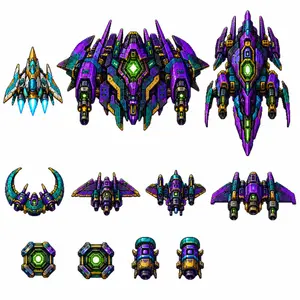
Create a clean sprite-sheet style asset image for a vertical retro pixel-art space shooter, on a plain white background with no grid and no labels. Show exactly 11 separate pixel-art spaceship and power-up sprites arranged in three rows, all with crisp black outlines, high-contrast shading, metallic panels, tiny vents, glowing cores, and 16-bit arcade detailing. Use a saturated sci-fi palette dominated by deep violet purple (main ship color), teal/cyan, dark navy, black, gold/orange armor accents, and neon green energy lights. Layout: top row contains exactly 3 large player/enemy ships: left is a small blue-white-and-gold triangular fighter with three bright cyan engine flames; center is the largest wide boss ship, symmetrical and heavily armored, purple and teal with multiple wing spikes, twin side cannons, gold trim, and a large glowing green hexagonal reactor in the middle; right is a tall vertical purple capital ship with pointed nose, side fins, teal panels, gold details, and a glowing green central reactor. Middle row contains exactly 4 medium enemy ships: a crescent-shaped teal and purple craft with two upward curved horns and a green cockpit glow; a compact rear-view purple winged fighter with side thrusters; a squat central gunship with teal cockpit dome, purple wings, gold barrels, and twin cannons; a broad purple bomber with swept wings, side engine pods, and a large dark central intake. Bottom row contains exactly 4 small collectible or module sprites: two square neon-green reactor power-up tiles with beveled purple/teal/gold frames, followed by two identical small cylindrical engine or booster pods with teal top caps, purple bodies, gold front panels, black exhausts, and tiny side fins. Style constraints: production-ready pixel art, orthographic/top-down view, transparent-asset feel but rendered on white, sharp square pixels, no anti-aliased painterly look, no text, no watermark, no shadows beyond pixel-art contact shading, consistent scale hierarchy and spacing, like a polished mobile shoot’em-up tileset.38
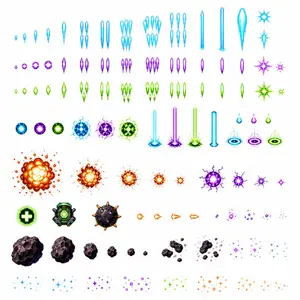
Retro Space Shooter VFX Sprite Sheet
Goal: Create a clean white-background production asset sheet for a vertical retro pixel-art space shooter, showing separate glowing projectile, explosion, pickup, asteroid, and particle-effect sprites in a consistent 2D pixel-art style. Canvas: Square 1:1 sprite sheet, about 768×768 px, pure white background, no grid, no labels, no borders, sprites evenly spaced in horizontal rows with transparent-looking whitespace around each asset. Visual style: High-resolution retro pixel art with crisp edges, neon glow, saturated colors, arcade shoot’em-up VFX, black or dark outlines only where needed, additive bloom-like halos, no text. Color palette: Use three main energy colors: electric cyan (cyan energy color), magenta violet (purple energy color), and lime green (green energy color), plus orange/yellow fire for explosions and gray-brown rocks for asteroids. Layout and exact asset count: Arrange exactly 103 visible sprites in 8 rows. Row 1: 17 cyan player-shot sprites, including tiny bullets, small teardrop shots, medium diamonds, paired vertical bolts, triple clusters, grouped shard volleys, three narrow exclamation-like bolts, two long laser beams, one large missile-like glowing spear, and two cyan starburst impact flashes. Row 2: 16 purple enemy-shot sprites, including small round bullets, larger orbs, a thin diamond bolt, paired bolts, triple grouped bolts, clustered shards, three vertical capsules, three single vertical bolts, and two purple starburst impacts. Row 3: 16 green enemy-shot sprites matching the purple row types: small diamonds, larger diamonds, a bright spear bolt, paired bolts, triple grouped bolts, clustered shards, three capsules, three single vertical bolts, and two green starburst impacts. Row 4: 15 special energy sprites: three circular neon orbs in cyan, purple, and green; three larger cracked plasma orbs in cyan, purple, and green; three vertical ground-strike laser columns in cyan, purple, and green with splashing bases; one solid cyan vertical beam; and three droplet-over-ring portal effects in cyan, purple, and green. Row 5: 9 explosion and impact sprites: five orange fire explosions decreasing from very large to tiny, followed by four purple electric impact bursts decreasing from medium to tiny plus a small diamond sparkle at the end. Row 6: 10 gameplay objects and small shots: one green health pickup icon with a white plus sign, one green mechanical power-up module, one dark spiked mine, four orange arrow/fireball projectile frames facing right, and three purple homing/particle projectile clusters. Row 7: 10 asteroid/debris sprites: six rocky asteroids decreasing from large to pebble size, followed by four broken debris clusters of scattered rock fragments. Row 8: 10 particle sparkle clusters: two cyan sparkle clusters, two purple sparkle clusters, two green sparkle clusters, two orange sparkle clusters, and two sparse orange trailing sparkle clusters. Subject details: Make the projectiles readable as individual game sprites, each centered in its own whitespace area. Energy bullets should be symmetrical, vertically oriented where appropriate, and glow softly. Explosions should use layered yellow cores, orange petals, red outlines, and scattered sparks. Asteroids should be irregular dark rock forms with pixel highlights and shadows. Pickups should be bolder and more icon-like than projectiles. Constraints: Generate only the sprite sheet assets, not a gameplay screenshot. No background scene, no UI, no characters, no ships, no typography, no watermark. Keep every asset isolated and production-ready for cutting into tiles or sprites.39:

Pixel Art Bonsai Game UI
{"type":"pixel art mobile game UI mockup","theme":"cozy Japanese bonsai cultivation simulator","style":{"rendering":"detailed 2D pixel art, polished retro game aesthetic, crisp sprites, warm lighting, soft atmospheric background","aspect_ratio":"9:16 portrait","camera":"straight-on view of a traditional Japanese room interior framing the bonsai in the center"},"subject":{"main_object":"bonsai tree in a rectangular dark blue ceramic pot","bonsai":{"species_look":"pine-like bonsai with layered rounded foliage pads","trunk":"thick twisted brown trunk with exposed roots","placement":"on a low wooden display table","soil":"mossy green surface with 2 small visible stones"}},"environment":{"setting":"traditional Japanese tatami room with open shoji view to a garden","background_elements":["wooden beams and wall trim","hanging lantern on the left","mountains in the distance","stone lantern in the garden","pink cherry blossom tree on the right","soft blue sky with clouds"],"mood":"calm, handcrafted, meditative"},"ui":{"top_bar":{"count":5,"elements":["small bonsai icon button at top left","level badge showing \"Lv.12\"","coin counter showing \"2,450\"","blue gem counter showing \"120\"","pink blossom currency counter showing \"35\""],"top_right":"menu button with 3 horizontal lines"},"status_panel":{"position":"upper left below top bar","count":3,"rows":[{"label":"健康度","icon":"leaf","filled":5,"total":8,"color":"green"},{"label":"水分","icon":"water droplet","filled":5,"total":8,"color":"blue"},{"label":"美しさ","icon":"sparkle flower","filled":4,"total":8,"color":"gold"}]},"action_buttons":{"position":"right side vertical stack","count":5,"buttons":[{"label":"水やり","icon":"watering can","color":"blue"},{"label":"剪定","icon":"shears","color":"green"},{"label":"日光","icon":"sun","color":"gold"},{"label":"肥料","icon":"fertilizer jar","color":"purple"},{"label":"道具","icon":"pot or tools container","color":"cream"}]},"info_panel":{"position":"lower middle above navigation","count":2,"sections":[{"label":"Day 12 / 春","subitems":["flower icon","hourglass icon","text \"次の成長まで\"","countdown timer \"02:14:32\""]},{"label":"成長記録","subitems":["small bonsai thumbnail","text \"+2cm\"","green bar chart with 10 ascending bars"]}]},"bottom_navigation":{"position":"bottom","count":5,"tabs":["ホーム","図鑑","ショップ","実績","設定"],"icons":["bonsai","book","shop awning","trophy","gear"],"active_tab":"ホーム"}},"composition":"central bonsai hero object, UI panels framing the scene without covering the tree, game-ready mockup that looks like a screenshot from a finished mobile app","color_palette":{"dominant":["warm wood brown","tatami beige","moss green","sky blue","cherry blossom pink","muted gold"],"accent_buttons":["dusty blue","sage green","mustard gold","soft purple","cream"]},"quality":"clean, legible interface, professional indie game prototype, charming and highly cohesive"}
Explore more prompts
Browse more AI image and video prompts by category.
FAQ
- Why does the prompt specify exact counts like 4 smaller fighters and 2 crescent drones?
- To guarantee a balanced, non-cluttered bullet-hell scene that still reads clearly at mobile resolution without overlapping key HUD elements.
- How are the HUD values like score 00547890 and timer 01:48 handled?
- They appear as literal pixelated text in the generated image, matching the default arguments provided in the prompt for consistent arcade authenticity.
- Is the Retro Pixel Space Shooter HUD prompt free to use?
- Yes, this prompt is completely free on AI Pin Maker and you can copy it directly with no signup or payment required.
- How do I use the Retro Pixel Space Shooter HUD prompt to generate an image or video?
- Copy the prompt, tweak the subject or style to fit your idea, then paste it into AI Pin Maker and generate your image or video in one click.
- Can I change the Retro Pixel Space Shooter HUD prompt into my own version?
- Absolutely, just replace the subject, style, or parameters in AI Pin Maker to make the prompt entirely your own.