
Text to Image
Monochrome Hand-Drawn Sketch Transformation — AI Image Prompt
A prompt designed to transform an uploaded image into a high-contrast, hyper-detailed monochrome hand-drawn sketch. It specifies using an artistic blend of graphite pencil and charcoal shading, focusing only on the main subject, and incorporating visible cross-hatching and expressive line work.
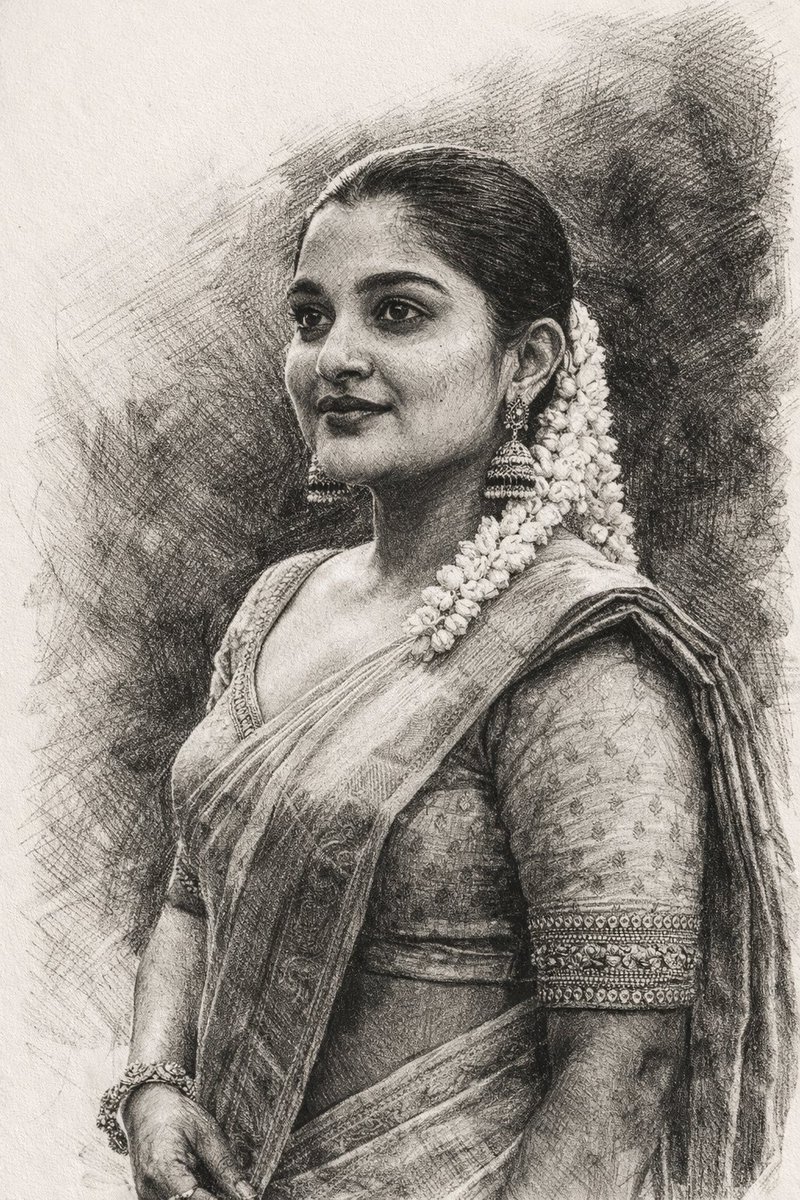
Prompt
Create a cinematic image of Monochrome Hand Drawn Sketch Transformation. Style: photorealistic. Composition: balanced and well-framed. Lighting: natural with cinematic mood. Category: cinematic-video. Reference: monochrome-hand-drawn-sketch-transformation-1864.
Prompt breakdown
- Subject
- Monochrome hand-drawn sketch transforming into photorealistic detail
- Style
- Photorealistic
- Lighting
- Natural with cinematic mood
- Composition
- Balanced and well-framed
- Mood
- Cinematic
Remix ideas
- Increase line density on the left side so the transformation reads as left-to-right progression
- Add faint paper grain texture that fades as the sketch resolves into photoreal surfaces
- Tighten the frame around a single facial feature to make the sketch-to-detail shift more intimate
How to use this AI Image prompt template
 1
1Copy the prompt — grab this template’s prompt and negative prompt.  2
2Pick a model — choose a recommended AI model for the best match.  3
3Generate — open the studio with one click and create your result.
Related templates

Creative Doodled Image Overlay
Edit this image while STRICTLY preserving the original subject, composition, background, lighting, and perspective. Do not replace or alter the environment — the real-world setting must remain fully intact and realistic. Slightly enhance the overall mood to feel more cinematic and calm — subtly deepen shadows, soften highlights, and introduce a gentle moody or rainy atmosphere while keeping it natural. Now transform the image by adding a highly expressive, hand-drawn overlay that creates a sense of a “living micro world” around the product. Use a crayon + marker + pencil sketch style (art style) that feels playful, slightly messy, but intentional and artistic — not overly chaotic, but rich and layered. Add controlled chaos elements: Hand-drawn arrows pointing to key product details (texture, shine, layers), Scribble circles and highlight marks to guide attention, Energetic lines, swirls, and sketch marks that enhance focus (not random placement). Introduce tiny doodle characters interacting with the product: Small illustrated figures climbing, sitting, sliding, or reacting to the product. Keep them minimal but expressive. Add small speech bubbles with playful reactions like “BRO???”, “THIS IS CRAZY”, or “WE STAYING HERE”. Ensure all doodles feel integrated into the scene and follow the product’s shape and perspective. Create a strong emotional contrast: Background remains calm, soft, and slightly moody; Overlays are lively, bright, and energetic. Add layered handwritten notes in a natural human style (not clean fonts), such as: “this part tho…”, “wait—look at this”, “why is this so good”. Optionally include a bold handwritten phrase like: “LAST DANCE (slogan)” as a statement element. The final result should feel like a real photograph infused with imagination — a quiet scene brought to life by chaotic, playful thoughts.39:T79d,Edit this image while STRICTLY preserv

Nano Banana Pro torn paper style-switching edit prompt - Nano Banana Pro AI Prompt for Social Media Post
task: "edit-image: add widened torn-paper layered effect" base_image: use_reference_image: true preserve_everything: - character identity - facial features and expression - hairstyle and anatomy - outfit design and colors - background, lighting, composition - overall art style rules: - Only modify the torn-paper interior areas. - Do not change pose, anatomy, proportions, clothing details, shading, or scene elements. effects: - effect: "torn-paper-reveal" placement: "across chest height" description: - Add a wide, natural horizontal tear across the chest area. - The torn interior uses the style defined in `interior_style`. - effect: "torn-paper-reveal" placement: "lower abdomen height" description: - Add a wide horizontal tear across the lower abdomen. - The torn interior uses the style defined in `interior_style`. interior_style: mode: line-art (画風モード) style_settings: line-art: palette: "monochrome" line_quality: "clean, crisp" paper: "notebook paper with subtle ruled lines" sumi-e: palette: "black ink tones" brush_texture: "soft bleeding edges" paper: "plain textured paper" figure-render: material: "PVC-like" shading: "semi-realistic highlights" paper: "plain smooth surface" colored-pencil: stroke_texture: "visible pencil grain" palette: "soft layered hues" paper: "rough sketchbook paper" watercolor: palette: "soft transparent pigments" blending: "smooth bleeding" edges: "soft contours" paper: "watercolor paper texture" pencil-drawing: graphite_texture: "visible pencil grain" shading: "smooth gradients" line_quality: "mixed sharp and soft" tone: "gray-scale" paper: "notebook paper with faint ruled lines"3f:T770,ta

Pencil Sketch to MS Paint Abomination
Create a creative image of Pencil Sketch To Ms Paint Abomination. Style: photorealistic. Composition: balanced and well-framed. Lighting: natural with cinematic mood. Category: photography. Reference: pencil-sketch-to-ms-paint-abomination-17554.

Minimal Black Ink Illustration Blueprint Prompt
Create a creative image of Minimal Black Ink Illustration Blueprint Prompt. Style: photorealistic. Composition: balanced and well-framed. Lighting: natural with cinematic mood. Category: photography. Reference: minimal-black-ink-illustration-blueprint-prompt-2891.

Fairy Tale Woodcut Engraving Style
Create a creative image of Fairy Tale Woodcut Engraving Style. Style: photorealistic. Composition: balanced and well-framed. Lighting: natural with cinematic mood. Category: photography. Reference: fairy-tale-woodcut-engraving-style-23630.

Funny Ugly Doodle Sketch
Create a creative image of Funny Ugly Doodle Sketch. Style: photorealistic. Composition: balanced and well-framed. Lighting: natural with cinematic mood. Category: photography. Reference: funny-ugly-doodle-sketch-20481.
Explore more prompts
Browse more AI image and video prompts by category.
FAQ
- How does the photorealistic treatment affect the original sketch lines?
- The lines remain visible at the edges but gradually sharpen and gain tonal depth, preserving the hand-drawn origin while achieving realistic form.
- Is this prompt suited for sequential animation?
- Its cinematic-video category and balanced composition make it ideal for frame-by-frame morphs that show the sketch resolving over time.
- Is the Monochrome Hand-Drawn Sketch Transformation prompt free to use?
- Yes, this prompt is completely free on AI Pin Maker and you can copy it directly with no signup or payment required.
- How do I use the Monochrome Hand-Drawn Sketch Transformation prompt to generate an image or video?
- Copy the prompt, tweak the subject or style to fit your idea, then paste it into AI Pin Maker and generate your image or video in one click.
- Can I change the Monochrome Hand-Drawn Sketch Transformation prompt into my own version?
- Absolutely, just replace the subject, style, or parameters in AI Pin Maker to make the prompt entirely your own.