
Text to Image
Chibi Matrix Sentinel Animation — AI Image Prompt
A creative video prompt generating a chibi-style Matrix Sentinel performing a face-palm emoji motion with a zoom-out effect.
Prompt
Now zoom out to a sentinel from the movie “matrix” but chibi style doing a smacks himself in the face emoji
Prompt breakdown
- Subject
- Chibi Sentinel from The Matrix performing a face-smack gesture like the emoji
- Style
- Chibi anime with exaggerated head-to-body proportions and retained mechanical details
- Composition
- Zoomed-out view revealing full tentacles and body in frame
- Mood
- Humorous and playful
Remix ideas
- Add falling green code rain behind the Sentinel
- Make one eye larger to emphasize the chibi facepalm
- Swap the tentacles for more angular Matrix-style probes
How to use this AI Image prompt template
 1
1Copy the prompt — grab this template’s prompt and negative prompt.  2
2Pick a model — choose a recommended AI model for the best match.  3
3Generate — open the studio with one click and create your result.
Related templates
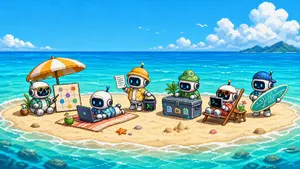
Cute Pixel Art Sandbank Robot Team
Create a cute wide pixel-art promotional illustration for Sandbank Agent (project name), showing a tiny tropical sandbank island in the middle of bright turquoise ocean under a sunny blue sky. Canvas: 16:9 landscape, retro 16-bit pixel art, crisp blocky pixels, high saturation, charming game-art aesthetic, no text overlays or watermark. Scene: a small oval sandy island surrounded by shallow aqua water, white surf rings, coral and rocks visible below the water, distant green island on the far right horizon, huge puffy pixel clouds, tiny white birds, sparkling sea highlights. Main subjects: exactly 6 adorable chibi robots with rounded white bodies, black glass screen faces, cyan glowing eyes, small antennas, and beach/workspace accessories, arranged left to right across the sand. Robot 1 sits under a large orange-and-white beach umbrella wearing sunglasses and a turquoise Hawaiian shirt, next to a coconut drink and a standing planning board showing connected colored nodes. Robot 2 lies on a striped beach towel using an open laptop, wearing blue tropical swim shorts, with a coconut drink beside the towel. Robot 3 stands in the center wearing a yellow-orange explorer jacket and yellow hardhat, holding a clipboard in one hand and a small black terminal cube with a green command prompt symbol in the other. Robot 4 sits behind a large dark equipment chest, wearing a green bucket hat and green outfit; the chest has three colorful file/app icons on the front. Robot 5 lounges in a wooden beach chair wearing orange sunglasses and red swimwear, using a black laptop with a green command prompt symbol; a small side table holds a green drink and a vertical board or paddle rests behind the chair. Robot 6 stands at the far right wearing a blue cap and holding a turquoise surfboard decorated with circuit-board lines, suggesting playful developer infrastructure. Add small beach details: exactly 1 orange starfish near the center foreground, several small shells and pebbles, a small sandcastle mound near the equipment chest, and soft shadows under every object. Mood: cheerful, cute, collaborative, techy beach-vacation workspace harness vibe. Use cyan (robot face glow color) screen glows, bright turquoise (ocean color) water, orange and white (umbrella color), and 16-bit retro game art (pixel art style). Keep all elements clearly readable at small size, with clean silhouettes and balanced spacing.

Cinematic Excalibur Space Knight Opera
A majestic wide cinematic shot in the epic 1981 Excalibur film style by John Boorman reimagined as hard sci-fi space opera, dramatic chiaroscuro lighting with intense rim light and glowing energy accents. A noble space knight stands center in gleaming polished silver-white power armor with intricate medieval-inspired plate detailing, glowing blue energy lines, and a futuristic greatsword with plasma blade planted in the cracked alien ground. He wears a crowned helmet with glowing visor, intense heroic expression. Beside him stands a regal space queen in ornate white-gold futuristic gown with flowing energy-embroidered fabric, jeweled crystalline accents, and elegant sci-fi veil headdress, hands on hips, ethereal and commanding. Flanking them are armored space knights in shining metallic armor, hooded tech-mystics, and a crowd of lords, warriors, and alien courtiers in rich robes on the steps of a ruined ancient alien temple. Dramatic cosmic background with starry nebula sky, atmospheric haze, deep space blacks mixed with rich gold and electric blue highlights, metallic reflections, filmic grain, anamorphic lens feel, epic mythic sci-fi atmosphere, masterpiece, 8k cinematic still
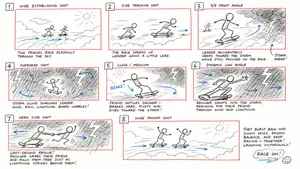
Hand-Drawn Storyboard Previs Sketch
Create a rough hand-drawn PREVIS + rescue chase storyboard page in 16:9 horizontal format. Use an extremely simple 2D previs sketch style: - stick figures / mannequin silhouettes only - no facial detail, no costume detail, no anatomy detail - no texture, no shading, no polished rendering - black loose sketch lines - red boxes for camera framing only - blue arrows for motion / force / breath / direction only - rough director thumbnails, not concept art - if unsure, draw less detail, not more Show 8 numbered panels on one page with slightly irregular but readable placement. Subject: two close friends racing on skateboards through the sky above the clouds (subject) Environment: bright open sky, fluffy cloud pathways, floating cloud banks, distant sunlight, then a darker storm-cloud zone with wind, rain and lightning (environment) Mood: playful, adventurous, fast, funny, suspenseful for a moment, then uplifting and triumphant Sequence: during a fun cloud-skate race, one friend accidentally drifts into dangerous storm clouds and loses control, then the other friend makes a last-second rescue Beats: 1. Wide establishing shot. Two friends on skateboards surf above the clouds, side by side, racing playfully through the sky. 2. Side tracking shot. The race speeds up. One friend leans forward and gains a little lead while the other follows close behind. 3. 3/4 front angle. The leading friend accidentally veers toward a dark storm-cloud area ahead while still focused on the race. 4. Overhead shot. The storm cloud swallows the lead friend. Strong wind arrows, rain and lightning. The skateboard wobbles violently. 5. Close-up / medium action shot. The second friend notices the danger, brakes hard for a split second, then pivots and dives toward the storm. 6. Dynamic low angle. The rescuer shoots into the storm clouds on the skateboard, reaching forward through wind and lightning toward the trapped friend. 7. Hero side shot. Last-second rescue. The rescuer grabs the other friend by the arm or hoodie and pulls them free from the storm cloud just as lightning strikes behind them. 8. Wide payoff shot. Both friends burst back into the sunny clouds, regain balance, keep riding together and continue the race laughing, now side by side. Use varied camera angles: close-up, wide, low angle, overhead, side profile, rear, 3/4. Add short handwritten notes near panels. Maintain clear continuity of subject, props, environment and movement direction. Focus on staging, camera, motion, timing and continuity. Prioritize readability over drawing quality. Avoid detailed illustration, clean UI and infographic design. Tone target: fun family-animation energy, clear visual storytelling, simple readable action be
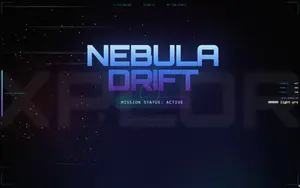
Parallax scrolling homepage with explosive visual effects
Create a parallax scrolling website with explosive visual effects: layered backgrounds that move at different speeds on scroll, fluid transitions, and interactive elements that pop up with animations
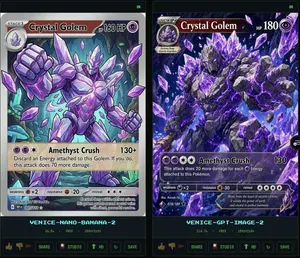
Crystal Golem Card Comparison UI
Goal: Create a dark comparison screenshot showing two fantasy trading-card designs side by side, as if from an image generation benchmark UI. Canvas: Landscape 16:9 composition, black/dark charcoal background with thin neon-green outlines. Two tall vertical panels fill the frame, left and right, separated by a narrow gap. Each panel contains one collectible monster card preview above a small status/control area. Layout: Use exactly 2 main panels. The left panel is labeled at the bottom in cyan pixel text “VENICE-NANO-BANANA-2”; the right panel is labeled “VENICE-GPT-IMAGE-2”. Each panel has a tiny green “OK” indicator in its top-right corner. Under each label, show a small metadata row with time, “FREE”, and “1500x2100”. At the very bottom of each panel, include a row of small UI buttons/icons: thumbs up, thumbs down, red flag, “SHARE”, “STUDIO”, “HD” with an up-arrow, a refresh icon, and “SAVE”. Subject: Both cards depict the same Pokémon-inspired character, Crystal Golem (character name), a massive humanoid golem made of jagged gray stone and glowing purple amethyst crystals, with violet energy cracks, crystal spikes, clenched fists, and floating crystal shards. The card type uses a purple psychic/eye symbol. Make the cards look like polished fantasy trading cards, but not an exact copy of any real copyrighted card template. Left card details: A Stage 1 card with a silver-gray border and slightly older illustrated-card look. Header text reads “STAGE 1”, Crystal Golem (card title), and “HP 160 HP”. Include a small circular evolution portrait at top left. The artwork shows the golem from the waist up inside an underground crystal cavern with teal mushrooms and glowing green cave lights, one fist raised toward the viewer, many purple crystal shards floating around. Use clean anime/comic line art, pale lavender highlights, and a holographic sheen. Attack area contains exactly 1 attack: “Amethyst Crush” with damage “130+”. Attack text: “Discard an Energy attached to this Golem. If you do, this attack does 70 more damage.” Bottom stats show weakness “×2”, resistance “-20”, and retreat with three star/colorless symbols. Include tiny illustrator/collector text and a short flavor line near the bottom. Right card details: A Stage 2 card with a darker, more cinematic high-detail look and a black/purple border. Header text reads “STAGE 2”, Crystal Golem (card title), and “HP 180”. Include a small evolution box at upper left reading “Evolves from Quartz Guardian”. The artwork fills more of the card and shows the golem lunging forward through an explosive cavern of purple crystals, with one huge open hand reaching toward the viewer, intense glowing violet eyes, black rock texture, luminous amethyst veins, and many floating crystal shards. Attack area contains exactly 1 attack: “Amethyst Crush” with damage “130”. Attack text: “This attack does 20 more damage for each Energy attached to this Pokémon.” Bottom stats show weakness “×2”, resistance “-30”, and retreat with four star/colorless symbols. Add tiny illustrator/collector text and a flavor quote: “Born from the heart of ancient caverns, it wields the power of earth and crystal in perfect harmony.” Visual style: High-contrast digital art, glossy trading-card foil effects, purple crystal magic, dark cave backgrounds, sharp details, cyan pixel UI labels, neon green UI outlines. The left card should appear cleaner and more cartoon/anime, while the right card should appear more dramatic, dense, and rendered. Constraints: Include exactly 2 card panels and exactly 1 trading card in each panel. Include exactly 1 attack on each card. Preserve all visible English labels named above. Do not add extra cards, characters, logos, watermarks, or real brand names.38:Tf6a,Goal: Create a dark comparison screenshot showing two fantasy trading-card designs side by side,
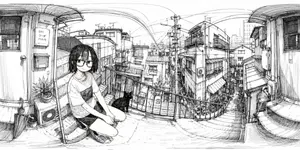
Ink 360 Panorama of Tokyo Backstreet
A monochrome black-ink line drawing designed specifically as a 360-degree panorama in equirectangular projection, with strong panoramic warping and curved architectural lines across the entire extra-wide frame. The scene is a narrow outdoor landing or walkway in a dense Japanese urban residential neighborhood, viewed from eye level, with the left and right edges bending upward as if wrapped for VR or polar panorama conversion. In the left foreground, a young woman with a deliberately blurred face crouches on the concrete floor near a metal railing, wearing a loose short-sleeve T-shirt with a dark chest pocket, shorts, and sneakers; her medium-length dark hair hangs forward. Next to her, exactly 1 black cat sits on the ground facing toward the city view. Also in the left foreground are exactly 1 closed umbrella leaning against the wall, exactly 2 plant pots, exactly 1 outdoor air-conditioning unit, exactly 1 mailbox, exactly 1 doorbell/intercom, and exactly 1 vertical apartment sign reading “201 コーポ ハルカ.” The midground opens to a descending staircase and tightly packed houses and apartment buildings with balconies, awnings, windows, utility boxes, and narrow alleyways. The background is filled with an intricate web of power poles, transformers, and overhead electrical wires stretching across the sky in dramatic arcs. Render everything with fine pen-and-ink hatching, sketchbook crosshatching, architectural detail, and a quiet observational manga-travel-sketch aesthetic on a clean white background, no color, no gray wash except the intentional face blur. Emphasize everyday realism, dense city texture, slight fisheye distortion, and the feeling of standing inside a hand-drawn panoramic slice of Tokyo. Use 2:1 (aspect ratio) panoramic composition and preserve the image as a seamless 360 environment illustration suitable for conversion into a polar panorama. Optionally let the crouching subject be young woman in casual summer clothes (character description) and the neighborhood be dense Japanese residential backstreet (location style).3a:T86f,A monoch
Explore more prompts
Browse more AI image and video prompts by category.
FAQ
- How does chibi style change the Sentinel?
- It shrinks the body while enlarging the head, softening the terrifying squid design into something cute yet still recognizable with red eyes and tentacles.
- Why include the zoom-out command?
- It ensures the full chibi figure and its pose are visible rather than a close-up crop, highlighting the emoji action in context.
- Is the Chibi Matrix Sentinel Animation prompt free to use?
- Yes, this prompt is completely free on AI Pin Maker and you can copy it directly with no signup or payment required.
- How do I use the Chibi Matrix Sentinel Animation prompt to generate an image or video?
- Copy the prompt, tweak the subject or style to fit your idea, then paste it into AI Pin Maker and generate your image or video in one click.
- Can I change the Chibi Matrix Sentinel Animation prompt into my own version?
- Absolutely, just replace the subject, style, or parameters in AI Pin Maker to make the prompt entirely your own.