
Text to Image
4-Panel Image of a Falling and Breaking Teacup — AI Image Prompt
A complex prompt requiring a 4-panel sequence showing a teacup falling, breaking, and shattering, with an emphasis on maintaining consistency of the cup and accurately representing the physics of the breaking parts.
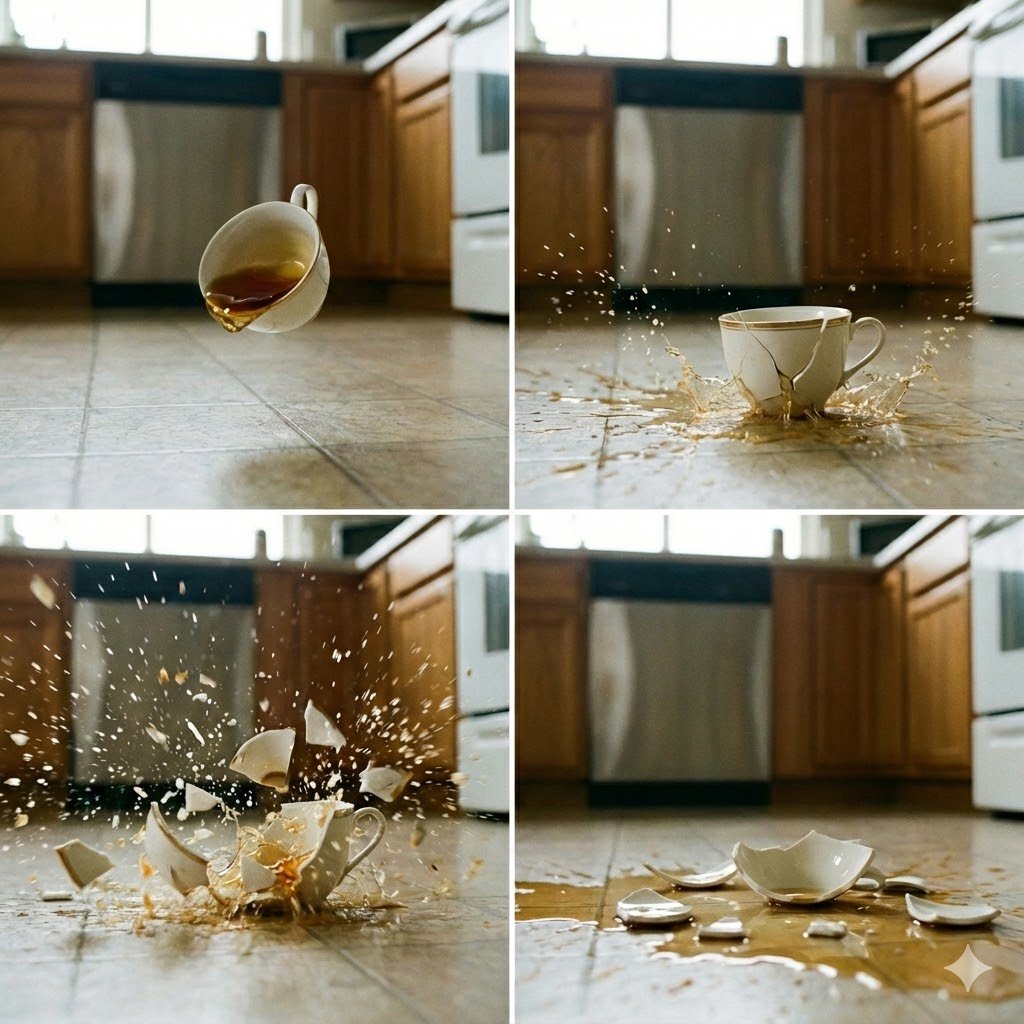
Prompt
Create a creative image of 4 Panel Image Of A Falling And Breaking Teacup. Style: photorealistic. Composition: balanced and well-framed. Lighting: natural with cinematic mood. Category: photography. Reference: 4-panel-image-of-a-falling-and-breaking-teacup-1860.
Prompt breakdown
- Subject
- 4-panel sequence of a falling and breaking teacup
- Style
- photorealistic
- Lighting
- natural with cinematic mood
- Composition
- balanced and well-framed
- Mood
- cinematic
Remix ideas
- Replace the plain teacup with one featuring delicate blue floral transferware
- Change the impact surface to dark slate so the white shards stand out sharply
- Add faint steam trails in the first two panels to imply the cup was full of hot tea
How to use this AI Image prompt template
 1
1Copy the prompt — grab this template’s prompt and negative prompt.  2
2Pick a model — choose a recommended AI model for the best match.  3
3Generate — open the studio with one click and create your result.
Related templates

Nano Banana Image Generation Prompt Rules (JSON Schema) - Nano Banana Pro AI Prompt for Photography
# Nano Banana Image Generation Prompt Rules When generating images using Nano Banana, the prompt must ALWAYS strictly follow the JSON format defined below. ## Prompt Schema ```json { "image_type": "Define the specific medium, art style, or format of the source image.", "time_period_and_year": "Estimate the specific year or decade based on fashion, technology, image quality, and color grading visible in the photo.", "mood_and_vibe": "Describe the emotional atmosphere, energy, and intangible 'feeling' evoked by the image (e.g., the specific psychological impression it gives).", "subject": "Describe the main character(s) focusing on demographics, body morphology, distinct physical features, and posture.", "clothing": "Describe the outfit in detail, strictly specifying garment names, fabric textures, patterns, colors, and how the clothes fit on the subject.", "hair": "Describe the hair color, specific hairstyle name, length, and texture.", "face": "Describe facial features, skin texture, makeup details, and the exact facial expression.", "accessories": "List all visible accessories, jewelry, glasses, or held items, including their material and design details.", "action": "Describe the specific activity, movement, or interaction occurring in the scene.", "location": "Describe the environment, visible background elements, architectural style, and spatial context.", "lighting": "Analyze the light source, direction, color temperature, hardness/softness of the light, and shadow characteristics.", "camera_angle_and_framing": "Describe the vertical and horizontal angle of the camera relative to the subject (e.g., eye-level, low-angle), and the shot composition size.", "camera_equipment": "Estimate the likely camera type, lens focal length (e.g., wide-angle vs telephoto), aperture effect (depth of field), and film stock or digital sensor characteristics.", "style": "Describe the overall aesthetic, color palette, artistic technique, and visual processing style.", "negative_prompt": "List visual defects or unwanted elements to be excluded to ensure high quality." } ``` ## Instructions 1. **Output Format**: The output must be a single valid JSON object. 2. **Completeness**: All fields are required. If a field is not applicable, provide a reasonable default or describe it as "neutral" or "standard". 3. **Detail**: Be descriptive and specific in each field to ensure high-quality image generation. 4. **Language**: The values in the JSON should be in English (as most image generation models are optimized for English prompts), unless otherwise specified.
Hopelessly Cluttered Desktop Screen
Create a creative image of Hopelessly Cluttered Desktop Screen. Style: photorealistic. Composition: balanced and well-framed. Lighting: natural with cinematic mood. Category: photography. Reference: hopelessly-cluttered-desktop-screen-14809.

GPT Image 1.5 Multi-Image Consistency Prompt
Create a creative image of Gpt Image 15 Multi Image Consistency Prompt. Style: photorealistic. Composition: balanced and well-framed. Lighting: natural with cinematic mood. Category: photography. Reference: gpt-image-15-multi-image-consistency-prompt-2882.
Four-Panel Editorial Grid Generation
Create a fashion image of Four Panel Editorial Grid Generation. Style: photorealistic. Composition: balanced and well-framed. Lighting: natural with cinematic mood. Category: photography. Reference: four-panel-editorial-grid-generation-2223.
Japanese News Interview Broadcast
Create a creative image of Japanese News Interview Broadcast. Style: photorealistic. Composition: balanced and well-framed. Lighting: natural with cinematic mood. Category: photography. Reference: japanese-news-interview-broadcast-22571.
Menu
Create a creative image of Menu. Style: photorealistic. Composition: balanced and well-framed. Lighting: natural with cinematic mood. Category: photography. Reference: menu-20245.
Explore more prompts
Browse more AI image and video prompts by category.
FAQ
- How are the four panels arranged to show the teacup's progression?
- They read left to right in chronological order: tilt and release, full descent, first contact, and final shatter with scattered pieces.
- What details help the breaking teacup look convincingly real?
- Accurate physics of the handle snapping, individual shard trajectories, subtle motion blur, and natural light catching wet edges where tea spills.
- Is the 4-Panel Image of a Falling and Breaking Teacup prompt free to use?
- Yes, this prompt is completely free on AI Pin Maker and you can copy it directly with no signup or payment required.
- How do I use the 4-Panel Image of a Falling and Breaking Teacup prompt to generate an image or video?
- Copy the prompt, tweak the subject or style to fit your idea, then paste it into AI Pin Maker and generate your image or video in one click.
- Can I change the 4-Panel Image of a Falling and Breaking Teacup prompt into my own version?
- Absolutely, just replace the subject, style, or parameters in AI Pin Maker to make the prompt entirely your own.