
Text to Image
Voxel-art pagoda garden single-file HTML scene — AI Image Prompt
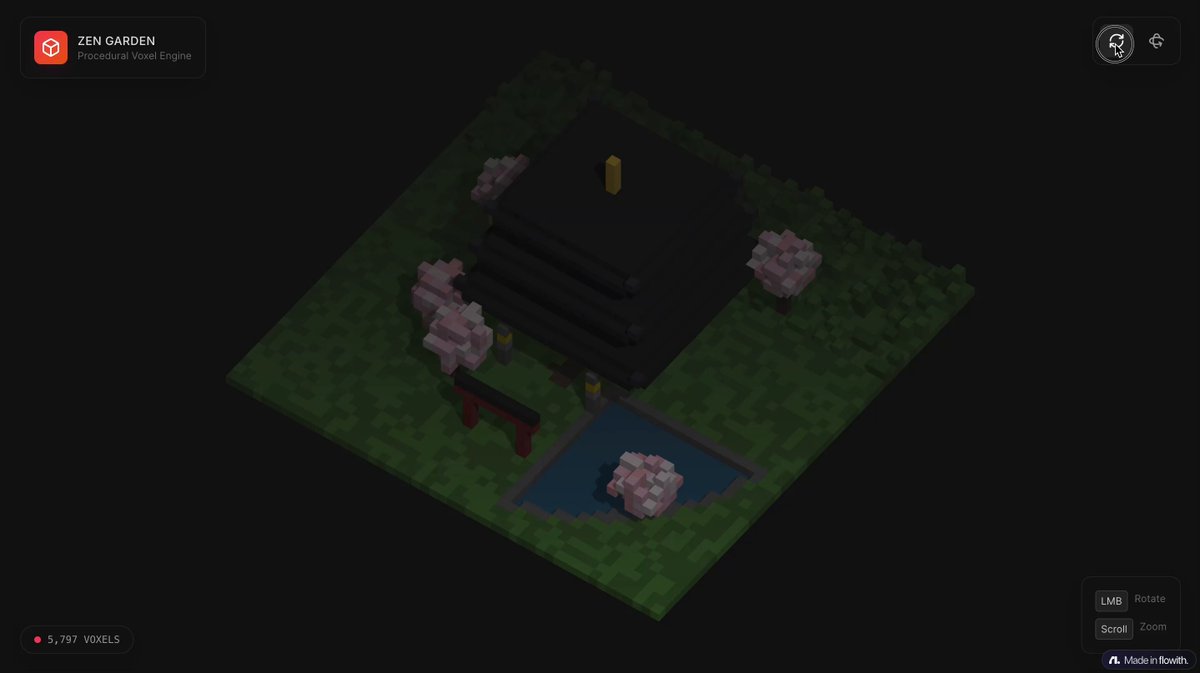
An English prompt to design a colorful voxel-art pagoda garden environment as a fully self-contained HTML file that runs in Chrome, using any voxel/WebGL libraries.
Prompt
Design a richly crafted voxel-art environment featuring an ornate {argument name="main_structure" default="pagoda"} set within a vibrant garden.
 Include diverse vegetation—especially {argument name="key_tree" default="cherry blossom trees"}—and ensure the composition feels lively, colorful, and visually striking.
Use any voxel or WebGL libraries you prefer, but deliver the entire project as a single, self-contained HTML file that I can paste and open directly in ChromePrompt breakdown
- Subject
- ornate pagoda set in vibrant garden with cherry blossom trees and diverse vegetation
- Style
- richly crafted voxel-art
- Composition
- lively colorful and visually striking arrangement
- Mood
- vibrant and dynamic
Remix ideas
- Swap pagoda voxels for a torii gate structure while keeping the same cherry blossom placement
- Add WebGL-based petal particle system that falls from the key trees on load
- Increase garden density by inserting extra voxel fern and lantern blocks around the main path
How to use this AI Image prompt template
 1
1Copy the prompt — grab this template’s prompt and negative prompt.  2
2Pick a model — choose a recommended AI model for the best match.  3
3Generate — open the studio with one click and create your result.
Related templates

Origami Living Room Architecture Concept
A large-scale origami-style living room cutaway in color, filling most of the frame. The entire space is constructed from folded paper planes: sofa, coffee table, floor, walls, window, shelving, and decor, all formed with crisp, architectural folds. Soft pastel palette (warm beige walls, muted gray sofa, soft terracotta accents, light wood tones (color palette)). Visible paper texture throughout. Natural daylight, gentle shadows between folds, clean geometry, premium modern interior feel.
Mediterranean Villa Film Panorama
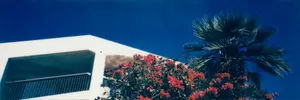
Create an ultra-wide 3:1 panoramic photograph with a nostalgic analog film look, showing a sunlit white modernist stucco villa (building style) cropped across the lower left, with a deep shadowed balcony opening and thin vertical metal railing. In the foreground, dense bright red (flower color) flowering bougainvillea climbs along the roofline and lower edge, partially obscuring the architecture. On the right side, a tall fan palm (tree type) rises dramatically against a rich deep cobalt blue (sky color) cloudless sky. Use harsh Mediterranean midday sunlight, strong contrast, saturated colors, slight underexposure in shadows, soft lens blur at the edges, subtle film grain, faint dust specks, and a vintage slide-film or disposable-camera aesthetic. Compose the scene low-angle, with the building occupying the left half, the flowers across the lower center, and the palm filling the upper right, no people, no text, dreamy travel-photography mood.
Ultra-Photorealistic Luxury Pop-Up Store Prompt - Nano Banana Pro AI Prompt for Product Marketing
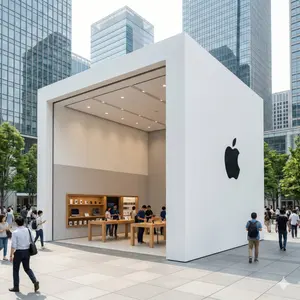
{ "type": "image_generation", "style": "ultra_photorealistic", "aspect_ratio": "1:1", "resolution": "8K", "quality": "high_detail_realism", "scene": { "location": "modern city business district", "environment": "open plaza surrounded by glass skyscrapers", "atmosphere": "busy urban lifestyle, premium commercial vibe" }, "subject": { "structure": "luxury brand pop-up store", "design": "minimalist modern architecture with bold geometric shape", "material": "wood, glass, metal finishes", "branding": "large clean logo on outer wall", "interior": "well-lit showroom with product displays" }, "people": { "crowd": "realistic people walking, shopping, interacting", "style": "casual urban clothing", "motion": "natural movement, candid poses" }, "lighting": { "type": "natural daylight", "quality": "soft cinematic lighting", "shadows": "realistic soft shadows", "reflections": "glass and metal reflections visible" }, "camera": { "device": "DSLR", "lens": "24mm wide angle", "aperture": "f/4", "iso": 100, "focus": "sharp foreground with deep clarity", "depth_of_field": "natural depth" }, "rendering_details": { "texture": "high-detail materials and surfaces", "color_grading": "clean, premium, realistic", "sharpness": "ultra clear", "noise": "none", "artifacts": "none" }, "mood": "premium brand experience, futuristic yet realistic", "negative_prompt": [ "cartoon", "anime", "illustration", "cgi look", "low quality", "blur", "distorted buildings", "fake lighting", "over-saturated colors" ] }
Futuristic Mumbai Sunset Skyline
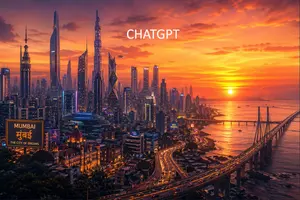
A cinematic ultra-detailed wide-angle cityscape of Mumbai (city name) reimagined as a futuristic megacity at sunset, viewed from an elevated overlook above the coastline. The skyline is packed with dozens of towering futuristic skyscrapers of varied silhouettes, including 6 especially prominent supertall towers with sleek glass facades, sharp angular forms, and neon accents, mixed with dense mid-rise urban buildings below. On the right side, a long sea bridge resembling the Bandra-Worli Sea Link curves dramatically from the foreground into the distance over calm coastal water, with flowing streams of headlights and taillights. The sun sits low near the horizon over the Arabian Sea, casting glowing golden reflections across the water and bathing the scene in intense orange, amber, pink, and magenta light under richly layered clouds. In the lower left foreground, include a grand historic domed building inspired by South Mumbai heritage architecture, warmly illuminated, juxtaposed against the futuristic skyline; above it, add a hovering circular UFO-like platform with blue light. Also place 2 visible illuminated billboards in the lower-left and center-right urban area: one large sign reading "MUMBAI", "मुंबई", and "THE CITY OF DREAMS", and one smaller sign reading "NAVI MUMBAI". Add 1 small flying vehicle or drone near the central towers. Place large clean white uppercase text near the top center reading CHATGPT (top text). The overall mood is epic, aspirational, glossy, highly detailed, vibrant, cinematic sci-fi urban fantasy, with atmospheric haze, glowing windows, reflective glass, dramatic contrast, and a polished concept-art finish.39:T6bc,A
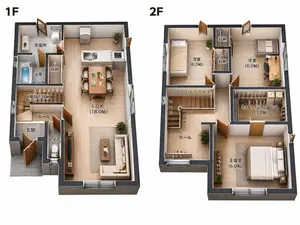
Two-Story Japanese House Floor Plan
{"type":"clean 3D isometric residential floor plan rendering","scene":"two separate cutaway floor plans of a compact two-story Japanese house on a plain white background, presented side by side like a real-estate layout diagram","style":"high-resolution architectural visualization, realistic miniature model, orthographic/isometric top-down view, cutaway exterior walls with dark charcoal thickness, light wood flooring, warm natural lighting, crisp shadows, furniture and fixtures included, readable Japanese room labels in black","layout":{"section_count":2,"sections":[{"title":"1F","position":"left","description":"first-floor plan with entrance, bathroom area, storage, stair hall, toilet, and open living dining kitchen","visible_labels_count":7,"visible_labels":["洗面所","浴室","収納","階段下収納","ホール","玄関","トイレ","L.D.K (18.0帖)"],"rooms_and_features":"gray tiled genkan entrance at lower left, small toilet room beside entrance, hall and stairs with numbered stair markings, bath with blue water tub, washroom with sink and laundry machine, narrow storage closet, large open LDK occupying the right side with white kitchen island/counter, dining table for four, sofa, coffee table, TV console, plants, sliding glass openings"},{"title":"2F","position":"right","description":"second-floor plan with three bedrooms, two storage closets, walk-in closet, hall, and stairs","visible_labels_count":7,"visible_labels":["洋室 (6.0帖)","収納","収納","洋室 (6.0帖)","ウォークインクローゼット (3.0帖)","ホール","主寝室 (6.0帖)"],"rooms_and_features":"upper left bedroom with single bed, upper middle two vertical storage closets, upper right bedroom with desk and chair, central stair void with numbered steps and arrow, hall at lower left with plant and railing, large walk-in closet at mid-right with hanging clothes and shelves, lower right master bedroom with double bed, nightstands, plants, and wide window"}]},"text_requirements":"Use exact Japanese labels as shown, with bold large floor labels 1F and 2F above each plan. Keep all labels legible and placed inside their corresponding rooms.","customization":{"house type":"{argument name=\"house type\" default=\"compact two-story Japanese house\"}","floor label style":"{argument name=\"floor label style\" default=\"large bold black 1F and 2F labels\"}","flooring material":"{argument name=\"flooring material\" default=\"light natural wood flooring\"}","wall color":"{argument name=\"wall color\" default=\"white interior walls with dark charcoal exterior wall edges\"}","background":"{argument name=\"background\" default=\"plain white background\"}"},"camera":"top-down isometric orthographic architectural view, both floors fully visible with no perspective distortion","quality":"sharp, professional real-estate brochure quality, realistic scale, neat composition, no people, no watermark"}
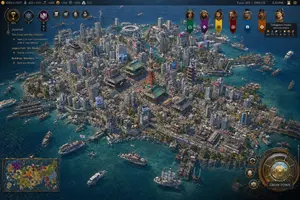
Civilization-Style Tokyo Bay Screenshot
A highly detailed grand-strategy game screenshot in the visual style of a modern Civilization-like city view, showing an isometric aerial perspective of a dense coastal Japanese metropolis built on a compact island surrounded by deep blue ocean. The city should feel like late-20th-century Tokyo Bay, with a believable mix of real-world-inspired landmarks and stylized strategy-game worldbuilding. In the center, place a red-orange steel broadcast tower resembling Tokyo Tower, surrounded by several traditional temple and pagoda complexes with green-tiled roofs, embedded seamlessly inside a forest of tightly packed mid-rise and high-rise concrete and glass buildings. Include exactly 1 red lattice tower, exactly 3 prominent traditional temple or shrine complexes, exactly 2 multi-tier pagodas, exactly 1 large waterside stadium near the upper center shoreline, and exactly 1 monumental statue on a headland at the left edge of the island. The urban fabric should be extremely dense, with narrow streets, elevated roads, billboards, rooftop details, cherry blossom trees scattered through districts, commercial signage, docks, piers, warehouses, and mixed residential and office blocks. The shoreline must be irregular and heavily developed with harbors and ferry terminals, and the surrounding water should contain exactly 12 visible vessels of mixed types: ferries, small motorboats, workboats, yachts, and 1 tall-masted sailing ship near the lower right. Render the water in rich teal-to-navy gradients with shallow coastal transparency and detailed wakes. Present it explicitly as a video game interface screenshot. Add a thin top status bar with resource counters and turn information; the upper right should read Turn: 103, 1992 CE, 2:51 PM. Place exactly 7 leader banners across the upper right, each with a different color and emblem, and include a diplomacy panel naming Tokugawa Ieyasu (leader name) of the Japanese Empire (civilization name). On the left side, add a vertical journal panel titled Journal with 3 quest entries and small circular icons. In the lower left, include exactly 1 minimap framed in ornate UI styling. In the lower right, include a large circular command interface with metallic bronze-and-gold ornamentation and a button labeled GROW TOWN (button text); around it place exactly 3 smaller circular action buttons. The overall interface should feel premium, intricate, and historically flavored rather than futuristic. The city itself should evoke Tokyo, Japan (location) in 1992 CE (era), recreated as a lush, polished, slightly idealized 4X strategy game screenshot with cinematic lighting, crisp miniature-like detail, realistic urban density, authentic Japanese transportation and waterfront infrastructure, and a color palette of ocean blue, concrete gray, greenery, copper UI metals, and pops of neon signage. Use a high-angle three-quarter camera, sharp focus across the whole city, and richly textured, painterly-realistic rendering consistent with gpt-image-2 game concept screenshot output.
Explore more prompts
Browse more AI image and video prompts by category.
FAQ
- What voxel library keeps the pagoda HTML truly single-file?
- Three.js with a minimal inline build or pure WebGL with hardcoded voxel cubes both work without external script tags.
- How do I change the cherry blossom color in the generated file?
- Locate the tree mesh material definition in the script and edit the hex color array for the blossom voxels before reloading.
- Is the Voxel-art pagoda garden single-file HTML scene prompt free to use?
- Yes, this prompt is completely free on AI Pin Maker and you can copy it directly with no signup or payment required.
- How do I use the Voxel-art pagoda garden single-file HTML scene prompt to generate an image or video?
- Copy the prompt, tweak the subject or style to fit your idea, then paste it into AI Pin Maker and generate your image or video in one click.
- Can I change the Voxel-art pagoda garden single-file HTML scene prompt into my own version?
- Absolutely, just replace the subject, style, or parameters in AI Pin Maker to make the prompt entirely your own.