
Text to Image
Vintage Photo to Graphite Sketch — AI Image Prompt
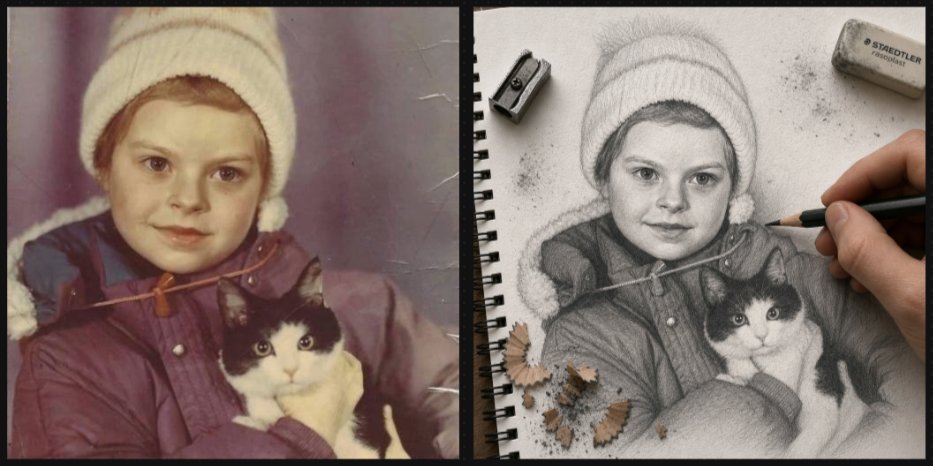
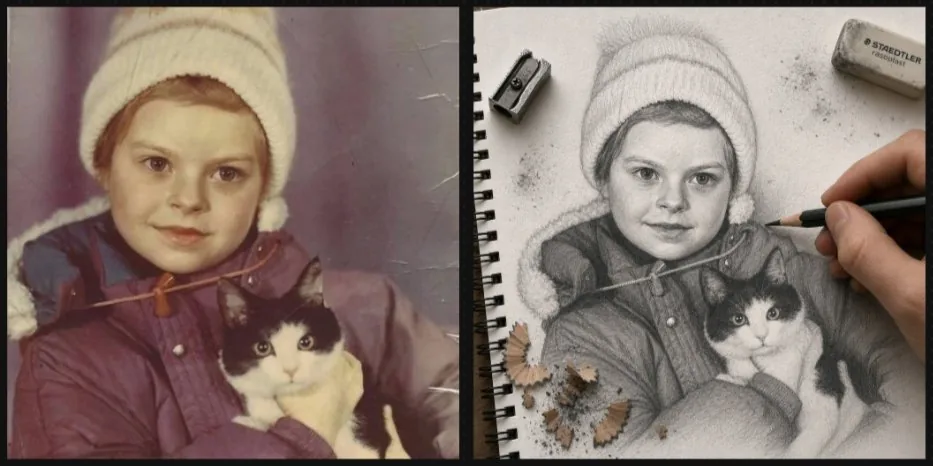
Generates a nostalgic before-and-after layout where a childhood pet photo becomes an actively drawn graphite notebook sketch.
Prompt
Create a realistic side-by-side comparison image showing a meaningful childhood photo being transformed into a hand-drawn graphite sketch. Canvas: wide horizontal 2-panel layout with a thick black vertical divider and thin dark border, like a before-and-after social media post. Left panel: a faded vintage color photograph with muted purple-brown tones, light scratches, and aged film texture. Show {argument name="child subject" default="a small child wearing a cream knit winter hat and a dark puffy coat"} holding {argument name="pet" default="a black-and-white rescue cat with bright eyes"}. The child's face is hidden by a centered plain beige square privacy block. Right panel: the same scene reimagined as an ultra-detailed 3D graphite pencil sketch on textured white spiral notebook paper, viewed from above at a slight angle. The notebook has black spiral binding along the left edge, visible paper grain, subtle fibers, smudges, graphite dust, and eraser crumbs. Show a realistic adult hand actively drawing with a dark pencil near the child's shoulder, making the drawing feel unfinished and in progress. Include exactly 3 drawing tools or debris groups around the sketch: 1 metal pencil sharpener near the upper left, 1 gray STAEDTLER-style eraser near the upper right with small graphite smudges, and 1 cluster of pencil shavings near the lower left. The sketch should preserve the winter hat, coat, and cat pose from the photo, with the cat's face carefully rendered and expressive. The child's face in the sketch is also hidden by a centered plain light gray square privacy block. Style: photorealistic mixed-media transformation, high detail, tactile paper texture, soft natural lighting, shallow shadows, no extra text except the small eraser branding. Use {argument name="overall mood" default="warm nostalgic and sentimental"}.Prompt breakdown
- Subject
- small child in cream knit winter hat and dark puffy coat holding black-and-white rescue cat, faces hidden by centered privacy blocks in both panels
- Style
- photorealistic mixed-media transformation showing ultra-detailed 3D graphite pencil sketch on textured white spiral notebook paper with visible fibers and eraser crumbs
- Lighting
- soft natural lighting with shallow shadows across the notebook surface
- Composition
- wide horizontal 2-panel layout divided by thick black vertical bar, left panel vintage photo, right panel angled notebook view with black spiral binding on left edge
- Mood
- warm nostalgic and sentimental
Remix ideas
- move the adult drawing hand to the lower right so it appears to shade the cat's face instead of the child's shoulder
- swap the metal pencil sharpener for a small wooden ruler placed along the top edge of the notebook
- change the eraser to a pink pearl style with a faint red smudge while keeping the three debris groups in their original corners
Reference images
How to use this AI Image prompt template
 1
1Copy the prompt — grab this template’s prompt and negative prompt.  2
2Pick a model — choose a recommended AI model for the best match.  3
3Generate — open the studio with one click and create your result.
Related templates

Turn children’s drawings into comic-style characters
Create a anime image of Turn Childrens Drawings Into Comic Style Characters. Style: photorealistic. Composition: balanced and well-framed. Lighting: natural with cinematic mood. Category: anime. Reference: turn-childrens-drawings-into-comic-style-characters-347.

Minimalist Hand-Drawn Children Illustration
Create a creative image of Minimalist Hand Drawn Children Illustration. Style: photorealistic. Composition: balanced and well-framed. Lighting: natural with cinematic mood. Category: photography. Reference: minimalist-hand-drawn-children-illustration-21281.

12-Style Anime Photo Collage
Using the provided reference photo as the subject base, create a vertical 3-column by 4-row comparison collage that transforms the same child-and-dog scene into exactly 12 popular animation/game-inspired visual styles. Keep the child and dog recognizable in pose, relative placement, clothing, and outdoor park feeling, and preserve any existing face anonymization/privacy masking from the reference rather than inventing facial details. Add a bold style-title logo at the top of each panel. Canvas and layout: Use a tall poster layout with 12 equal rectangular panels separated by thin white grid lines, arranged as 3 columns x 4 rows. Each panel should show the same subject pairing from the reference but redrawn in a different style, with bright saturated colors and clean promotional collage composition. Panels, in order from top-left to bottom-right, exactly 12: 1. “STUDIO GHIBLI” — soft hand-painted fantasy countryside look. 2. “PIXAR” — polished 3D animated movie look. 3. “DRAGON BALL” — dynamic action-anime look with speed lines and rocky landscape. 4. “ONE PIECE” — adventurous nautical anime look with ship/sea elements. 5. “NARUTO” — ninja-anime look with village background and orange/black outfit influence. 6. “ドラえもん” — cheerful rounded Japanese cartoon suburb style. 7. “サザエさん” — classic family-anime neighborhood style. 8. “Lilo&Stitch” — tropical island cartoon look with beach and palm trees. 9. “POKÉMON” — bright monster-adventure world look; add a cap/backpack vibe to the child and a cute creature-like treatment for the dog. 10. “鬼滅の刃” — dramatic sword-anime look with purple lighting and patterned haori influence. 11. “クレヨンしんちゃん” — simple cute children’s cartoon style with big expressive shapes. 12. “MINECRAFT” — blocky voxel game style with cubic characters and environment. Customizable text: Use anime style comparison poster (collage title style) as the overall design intent, and keep the panel labels exactly as listed unless replaced by STUDIO GHIBLI, PIXAR, DRAGON BALL, ONE PIECE, NARUTO, ドラえもん, サザエさん, Lilo&Stitch, POKÉMON, 鬼滅の刃, クレヨンしんちゃん, MINECRAFT (panel label set). Constraints: Do not add extra panels, extra people, or extra pets. Keep the dog’s happy expression and fluffy tan appearance consistent across panels. Keep the child close to the dog in every panel. Maintain visible privacy blocks/anonymization over faces if present in the reference. Make the final image look like a shareable social media collage showcasing one photo converted into many animation styles.38:Taba,Using the provided reference photo as the subject base, create a vertical 3-column by 4-row comparison collage that transforms the same child-and-dog scene into e

Children's Marker Drawing Style Transfer
Create a creative image of Childrens Marker Drawing Style Transfer. Style: photorealistic. Composition: balanced and well-framed. Lighting: natural with cinematic mood. Category: photography. Reference: childrens-marker-drawing-style-transfer-23484.

12-Style Anime Pet Collage
Using the provided reference image as the subject base, transform it into a 3-column by 4-row comparison collage showing the same child-and-dog pose reimagined in exactly 12 different famous animation/game-inspired visual styles. Preserve the composition relationship between the child and the dog, and preserve any existing face-obscuring privacy blocks rather than revealing or inventing facial details. Canvas and layout: Create a vertical poster collage with 12 equal square panels, thin white dividers, bright cheerful colors, and each panel labeled at the top with the corresponding style title. Panels, in order from left to right, top to bottom: 1. STUDIO GHIBLI (style label 1) — soft hand-painted Japanese fantasy animation look with lush park greenery. 2. PIXAR (style label 2) — polished 3D family animation look, closest to the original photo composition. 3. DRAGON BALL (style label 3) — bold action-anime lines, dynamic blue sky and rocky background. 4. ONE PIECE — adventurous pirate-anime style with ships, seagulls, and ocean elements. 5. NARUTO — ninja-anime style with orange/black outfit accents, village rooftops, leaves in the air. 6. ドラえもん — clean rounded children’s anime style with a sunny suburban street. 7. サザエさん — retro family-anime style with simple expressive linework and neighborhood houses. 8. Lilo & Stitch — tropical island cartoon style with beach, palm trees, and bright ocean colors. 9. Pokémon — monster-adventure anime style with a trainer-like cap and backpack, path and Poké Ball-like scenery details. 10. 鬼滅の刃 — dramatic dark fantasy anime style with glowing purple forest lighting and patterned cloak accents. 11. クレヨンしんちゃん — simple playful children’s cartoon style with rounded faces and suburban background. 12. MINECRAFT (style label 12) — voxel/blocky game style with cubic characters, blocky dog, village and trees. Constraints: Keep the child and dog recognizable from the reference in every panel, keep the dog cheerful, do not add extra panels, do not change the 3x4 grid, and make the style names large and readable.37:T8ce,Using the provided reference image as the subject base, transform it

Minimalist Hand-Drawn Childrens Illustration
Create a creative image of Minimalist Hand Drawn Childrens Illustration. Style: photorealistic. Composition: balanced and well-framed. Lighting: natural with cinematic mood. Category: photography. Reference: minimalist-hand-drawn-childrens-illustration-21681.
Explore more prompts
Browse more AI image and video prompts by category.
FAQ
- Why does the prompt specify both a beige and a light gray privacy block?
- The beige block matches the faded photo aesthetic on the left while the light gray block blends with the graphite tones on the right, keeping the child's identity hidden in both media without breaking visual continuity.
- How are the three drawing tools positioned to feel realistic?
- The metal sharpener sits upper left, the STAEDTLER eraser upper right with graphite smudges, and the pencil shavings cluster lower left, framing the active hand and unfinished sketch area without overlapping the main subject.
- Is the Vintage Photo to Graphite Sketch prompt free to use?
- Yes, this prompt is completely free on AI Pin Maker and you can copy it directly with no signup or payment required.
- How do I use the Vintage Photo to Graphite Sketch prompt to generate an image or video?
- Copy the prompt, tweak the subject or style to fit your idea, then paste it into AI Pin Maker and generate your image or video in one click.
- Can I change the Vintage Photo to Graphite Sketch prompt into my own version?
- Absolutely, just replace the subject, style, or parameters in AI Pin Maker to make the prompt entirely your own.