
Text to Image
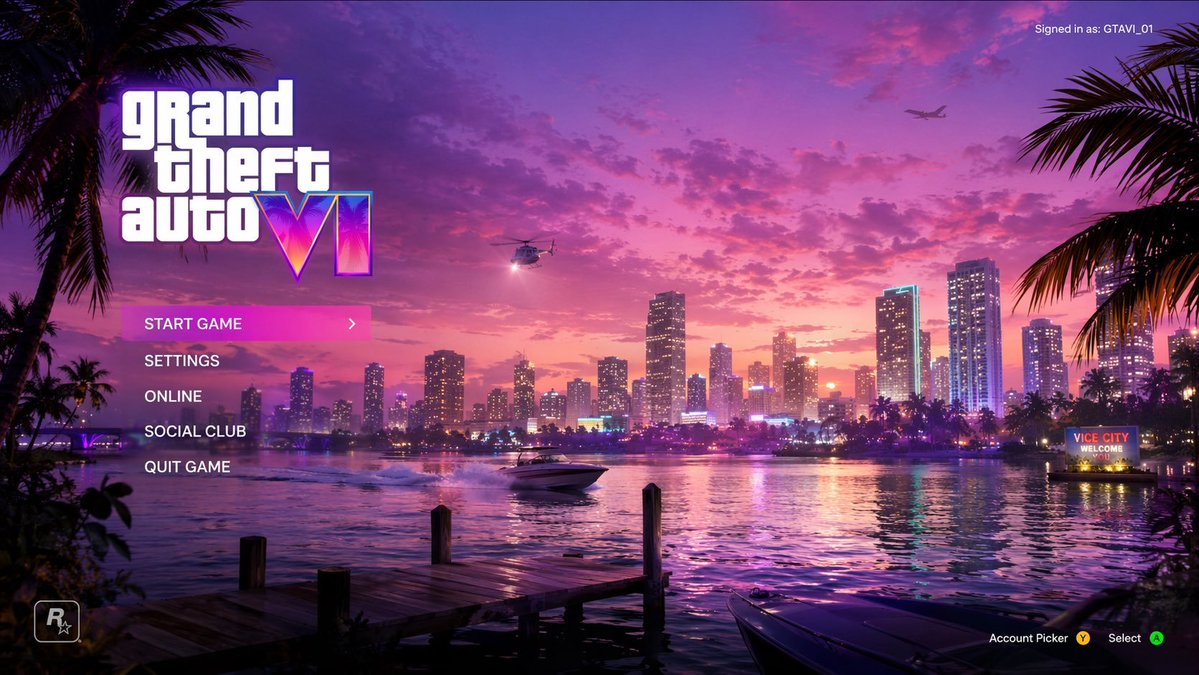
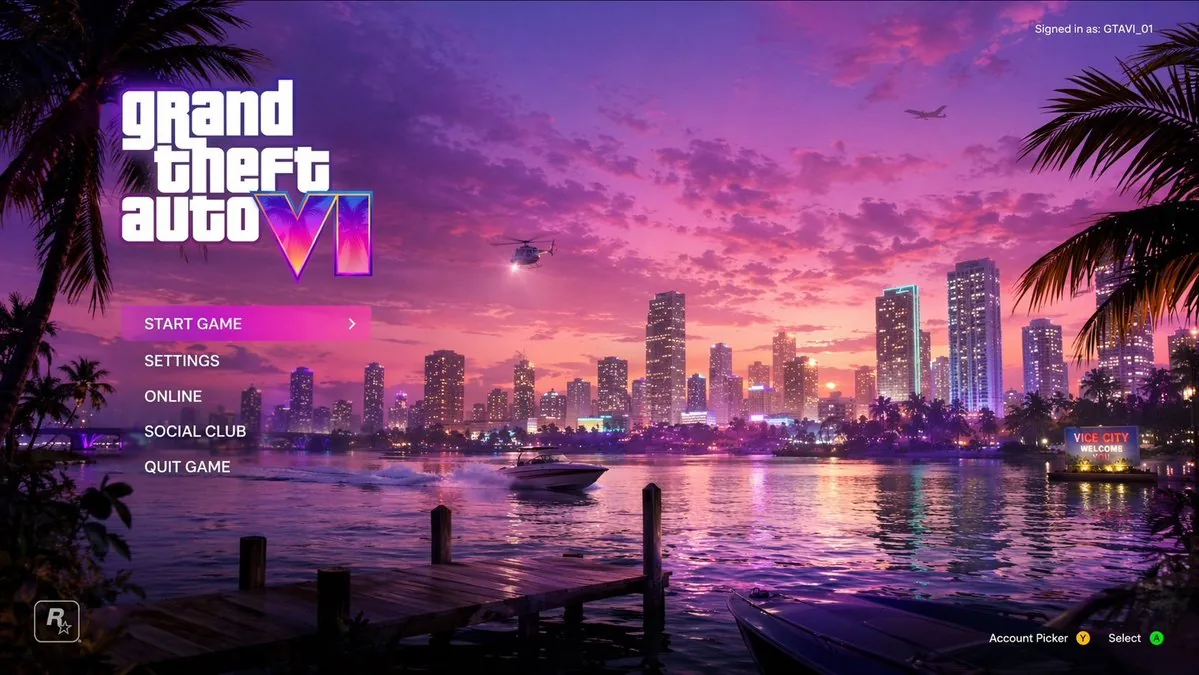
Vice City Sunset Game Menu Mockup — AI Image Prompt
Generates a vibrant, synthwave-style video game main menu screen featuring a coastal city sunset and customizable UI elements.
Prompt
{
  "type": "video game main menu UI mockup",
  "background": {
    "setting": "Miami-style city skyline across water at sunset",
    "sky": "vibrant pink and purple with scattered clouds",
    "elements": [
      "wooden dock in foreground left",
      "boat bow in foreground right",
      "palm trees framing left and right edges",
      "helicopter with spotlight",
      "airplane in distance",
      "speedboat on water",
      "neon sign on right shore reading '{argument name=\"city sign text\" default=\"VICE CITY WELCOME YOU\"}'"
    ]
  },
  "ui_layout": {
    "top_left": {
      "logo": "{argument name=\"game title\" default=\"grand theft auto VI\"}",
      "style": "stacked white text, 'VI' is a neon pink/purple gradient with palm tree silhouettes"
    },
    "top_right": {
      "text": "Signed in as: {argument name=\"username\" default=\"GTAVI_01\"}"
    },
    "mid_left": {
      "menu_count": 5,
      "menu_items": [
        "{argument name=\"highlighted menu item\" default=\"START GAME\"} (highlighted with pink gradient bar and '>' arrow)",
        "SETTINGS",
        "ONLINE",
        "SOCIAL CLUB",
        "QUIT GAME"
      ]
    },
    "bottom_left": {
      "logo": "R* icon"
    },
    "bottom_right": {
      "text": "Account Picker Y, Select A"
    }
  }
}Prompt breakdown
- Subject
- video game main menu UI mockup with GTA VI logo over Miami skyline at sunset
- Style
- cinematic 3D render featuring stacked white text logo, neon pink-purple gradient on 'VI', and realistic foreground elements like dock and boats
- Lighting
- vibrant pink-purple sunset sky with scattered clouds plus helicopter spotlight cutting across the water
- Composition
- layered scene with foreground dock left and boat bow right, palm trees on edges, skyline across water, speedboat and distant airplane, UI elements overlaid top and bottom
- Mood
- nostalgic yet energetic Vice City atmosphere blending tropical dusk colors with classic game menu tension
Remix ideas
- swap the neon sign text to "WELCOME TO PARADISE" while keeping the same red glow
- move the helicopter spotlight to illuminate the speedboat instead of the skyline
- change the highlighted menu item to "ONLINE" and shift the pink gradient bar to a deeper purple
Reference images
How to use this AI Image prompt template
 1
1Copy the prompt — grab this template’s prompt and negative prompt.  2
2Pick a model — choose a recommended AI model for the best match.  3
3Generate — open the studio with one click and create your result.
Related templates
Video Game Main Menu UI Mockup
{ "type": "video game main menu UI mockup", "theme": "{argument name=\"color palette\" default=\"purple, pink, and orange synthwave\"}", "background": { "setting": "coastal city skyline at {argument name=\"time of day\" default=\"sunset\"}", "elements": [ "water reflecting city lights", "wooden dock in foreground", "speedboat on the water", "helicopter with spotlight", "airplane in the sky", "palm trees framing left and right edges", "neon sign reading '{argument name=\"city name\" default=\"VICE CITY\"} WELCOME'" ] }, "ui_layout": { "top_left": "Large logo '{argument name=\"game title\" default=\"grand theft auto VI\"}' with neon gradient roman numerals", "middle_left": { "type": "vertical menu", "count": 5, "items": [ "START GAME (highlighted with pink gradient and > arrow)", "SETTINGS", "ONLINE", "SOCIAL CLUB", "QUIT GAME" ] }, "top_right": "Text 'Signed in as: {argument name=\"username\" default=\"GTAVI_01\"}'", "bottom_left": "Developer star logo 'R*'", "bottom_right": "Controller prompts 'Account Picker Y, Select A'" } }
Parallax scrolling homepage with explosive visual effects
Create a parallax scrolling website with explosive visual effects: layered backgrounds that move at different speeds on scroll, fluid transitions, and interactive elements that pop up with animations

Psychedelic Surreal Cosmic Meltdown
Create a creative image of Psychedelic Surreal Cosmic Meltdown. Style: photorealistic. Composition: balanced and well-framed. Lighting: natural with cinematic mood. Category: photography. Reference: psychedelic-surreal-cosmic-meltdown-5478.

Retro Open-World Seaplane Screenshot
A third-person gameplay screenshot styled exactly like an early-2000s open-world crime game, showing a small white and burgundy seaplane flying low over a tropical coastal city. The camera is positioned directly behind the aircraft, centered on its tail, with the plane heading toward a cluster of mid-rise buildings near the waterfront. The city below has flat-roofed buildings, palm-lined streets, canals, and bright turquoise water, with a hazy blue sky and light atmospheric fog that softens the distance. A tall striped office tower stands near the center background, and a glowing pink checkpoint ring floats in front of the buildings. On the right side, a curving shoreline and canal are lined with dense palm trees. Add a retro video game HUD in the top-right corner with the time reading 13:27, green money text reading 500045605, two lines of white health and armor values both reading 100, a row of 6 wanted stars with 2 lit and 4 unlit, a small weapon icon in a rounded square, and ammo text reading 2076-30. Beneath that, display the mission text “SKIMMER FUEL!” with a small horizontal blue progress bar. In the bottom-left corner, include a circular minimap with a pink border, black streets, pale land, blue water, a north marker labeled N, and a small player arrow. In the bottom-right corner, overlay the location name Little Havana (location name) in elegant green cursive script. Use low-polygon vehicles and buildings, simple textures, soft shadows, saturated tropical colors, slight screen blur, and the unmistakable nostalgic look of a PlayStation 2-era action game screenshot with a 16:9 frame.3c:T

Tokyo Time-Blend Split-Screen - Nano Banana Pro AI Prompt for Comic / Storyboard
Horizontal split-screen cinematic wide shot of Tokyo city (city) seamlessly blending two eras: 1920s (era 1) on the left and present day (era 2) on the right, merging organically in the center with transitional materials and interactions between people from both times., "subject": "Tokyo city split between 1920s and present day with people interacting across eras", "environment": "Urban Tokyo streetscape transitioning from wooden machiya shops, tiled roofs, narrow alleys, rickshaws, vintage trams and paper lanterns on the left to glass-and-steel skyscrapers, neon-lit storefronts, elevated train lines, LED billboards, sleek cafes, bicycles, taxis and compact cars on the right; wet reflective pavement and blended center where gates, tracks and lighting morph into modern equivalents", "style": "photorealistic, cinematic, ultra-detailed, historically accurate period detail on left and crisp contemporary detail on right", "lighting": "mixed cinematic lighting: soft warm sepia fill on the 1920s left with subtle film-grain texture, cool neon backlight and high-contrast illumination on the present-day right, volumetric city fog and atmospheric particles across the scene, balanced color grading to preserve both eras", "camera": { "angle": "eye-level wide-angle", "distance": "wide shot (cinematic 4:3 composition)", "depth_of_field": "dynamic depth of field (selective focus across planes)", "focus": "primary focus on the midground center where era interactions occur, with layered focus into foreground and background details" }, "composition": { "framing": "horizontal split-screen blended composition, cinematic wide 4:3 framing", "subject_placement": "left half dominated by 1920s elements, right half by modern elements, central seam blended organically with key human interactions placed near center rule-of-thirds points", "foreground": "wet pavement reflections, close pedestrians from both eras, rickshaw wheel and modern bicycle tire, scattered period props newspapers and modern items smartphones", "background": "left: narrow alleys, vintage trams, tiled roofs and paper signs; right: elevated train lines, skyscrapers, LED billboards and neon storefronts; distant atmospheric fog and city lights unifying the skyline", "negative_space": "subtle open sky and upper building massing to avoid clutter while maintaining cinematic breadth" }, "mood": "cinematic, nostalgic on the left, vivid and energetic on the right, overall sense of curiosity and surprise from human interactions, narrative and time-travel intrigue", "color_palette": [ "sepia brown", "warm amber", "cool cyan", "neon magenta", "neutral concrete grays" ], "technical": { "render_type": "photorealistic photo", "post_processing": [] }
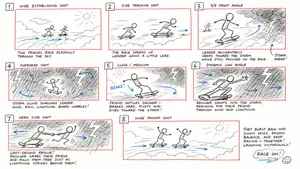
Hand-Drawn Storyboard Previs Sketch
Create a rough hand-drawn PREVIS + rescue chase storyboard page in 16:9 horizontal format. Use an extremely simple 2D previs sketch style: - stick figures / mannequin silhouettes only - no facial detail, no costume detail, no anatomy detail - no texture, no shading, no polished rendering - black loose sketch lines - red boxes for camera framing only - blue arrows for motion / force / breath / direction only - rough director thumbnails, not concept art - if unsure, draw less detail, not more Show 8 numbered panels on one page with slightly irregular but readable placement. Subject: two close friends racing on skateboards through the sky above the clouds (subject) Environment: bright open sky, fluffy cloud pathways, floating cloud banks, distant sunlight, then a darker storm-cloud zone with wind, rain and lightning (environment) Mood: playful, adventurous, fast, funny, suspenseful for a moment, then uplifting and triumphant Sequence: during a fun cloud-skate race, one friend accidentally drifts into dangerous storm clouds and loses control, then the other friend makes a last-second rescue Beats: 1. Wide establishing shot. Two friends on skateboards surf above the clouds, side by side, racing playfully through the sky. 2. Side tracking shot. The race speeds up. One friend leans forward and gains a little lead while the other follows close behind. 3. 3/4 front angle. The leading friend accidentally veers toward a dark storm-cloud area ahead while still focused on the race. 4. Overhead shot. The storm cloud swallows the lead friend. Strong wind arrows, rain and lightning. The skateboard wobbles violently. 5. Close-up / medium action shot. The second friend notices the danger, brakes hard for a split second, then pivots and dives toward the storm. 6. Dynamic low angle. The rescuer shoots into the storm clouds on the skateboard, reaching forward through wind and lightning toward the trapped friend. 7. Hero side shot. Last-second rescue. The rescuer grabs the other friend by the arm or hoodie and pulls them free from the storm cloud just as lightning strikes behind them. 8. Wide payoff shot. Both friends burst back into the sunny clouds, regain balance, keep riding together and continue the race laughing, now side by side. Use varied camera angles: close-up, wide, low angle, overhead, side profile, rear, 3/4. Add short handwritten notes near panels. Maintain clear continuity of subject, props, environment and movement direction. Focus on staging, camera, motion, timing and continuity. Prioritize readability over drawing quality. Avoid detailed illustration, clean UI and infographic design. Tone target: fun family-animation energy, clear visual storytelling, simple readable action be
Explore more prompts
Browse more AI image and video prompts by category.
FAQ
- How does the logo styling reference Vice City themes?
- The 'VI' portion uses a neon pink-purple gradient filled with tiny palm tree silhouettes that echo the foreground palms and classic Vice City branding.
- What foreground details help sell the waterfront setting?
- The wooden dock on the left, boat bow on the right, and speedboat cutting through the water create depth and tie directly into the Miami Vice City aesthetic.
- Is the Vice City Sunset Game Menu Mockup prompt free to use?
- Yes, this prompt is completely free on AI Pin Maker and you can copy it directly with no signup or payment required.
- How do I use the Vice City Sunset Game Menu Mockup prompt to generate an image or video?
- Copy the prompt, tweak the subject or style to fit your idea, then paste it into AI Pin Maker and generate your image or video in one click.
- Can I change the Vice City Sunset Game Menu Mockup prompt into my own version?
- Absolutely, just replace the subject, style, or parameters in AI Pin Maker to make the prompt entirely your own.