
Text to Image
Promo Effect v2.0 Prompt for Profile Screenshot Composition - Nano Banana Pro AI Prompt for Social Media Post — AI Image Prompt
A technical prompt structure for Nano Banana Pro's 'Promo Effect v2.0' feature, designed to composite a character image onto a user's profile screenshot. The prompt enforces specific rules, such as ensuring the 'Follow' button text is present, maintaining background structure, and defining the character's pose (sitting, pointing to the account name and the 'Follow' button). This prompt is highly specialized for UI manipulation and image composition.
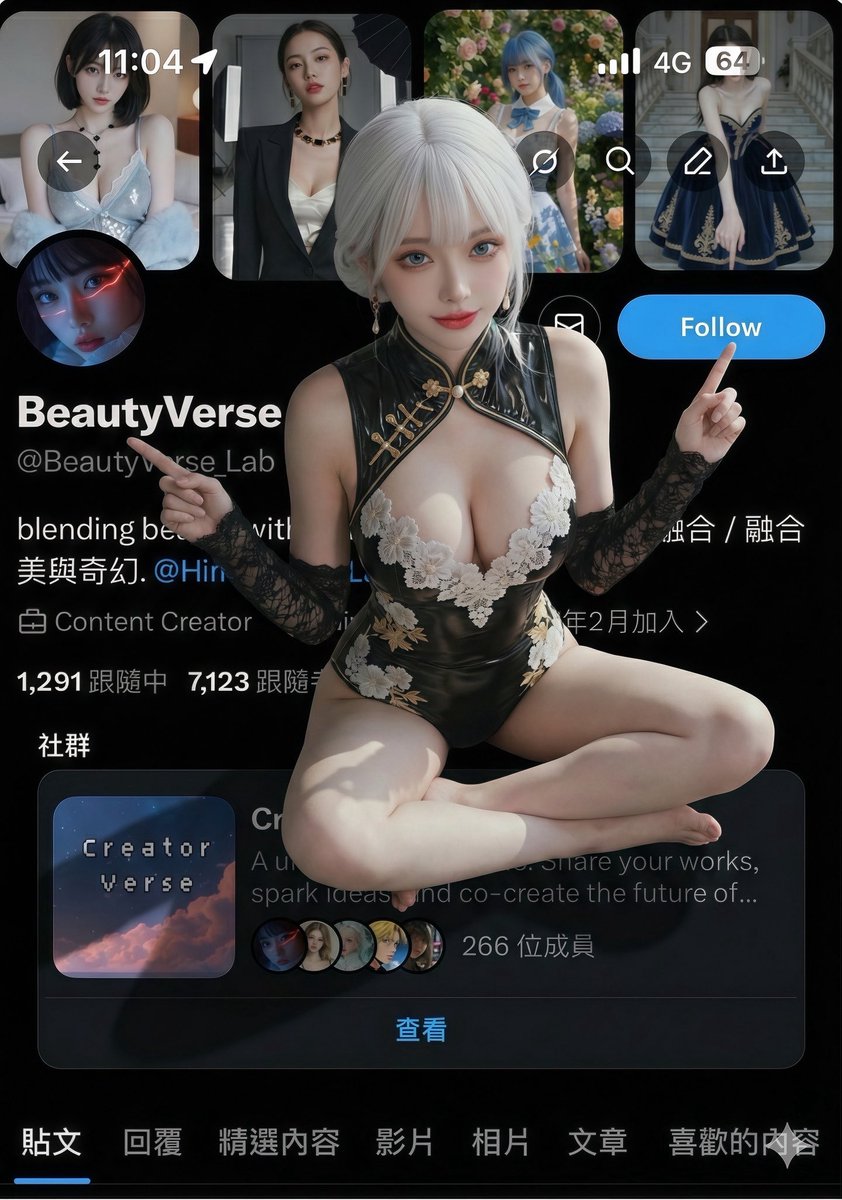
Prompt
{
  "edit_type": "precise_composite_overlay_dual_interaction_english_ui",

  "source": {
    "_hint": "Base Logic: Character sitting on Background. Background is fixed EXCEPT for the specific text on the button.",
    "mode": "IMAGE_COMPOSITION",
    "reference_images": {
      "foreground": "character_ref_image",
      "background_canvas": "profile_page_screenshot"
    },
    "consistency": {
      "character_fidelity": "high",
      "background_structure": "rigid_layout_preservation"
    }
  },

  "ui_text_enforcement": {
    "_hint": "CRITICAL: Ensure the button text reads 'Follow' in English, regardless of the text in the original screenshot.",
    "target_element": "action_button_top_right",
    "mandatory_text": "Follow",
    "language": "English",
    "font_style": "sans_serif_bold_legible",
    "correction_policy": "overwrite_original_text_if_not_follow"
  },

  "background_preservation": {
    "_hint": "Background is a rigid floor. Only allow changes to shadows and the button text.",
    "policy": "strict_pixel_retention_mostly",
    "allowed_modifications": [
      "realistic_contact_shadows_under_character",
      "replacement_of_button_text_to_Follow"
    ]
  },

  "camera_and_lighting": {
    "_hint": "Character sitting ON the interface.",
    "perspective": "high_angle_looking_down",
    "grounding_effect": {
      "technique": "contact_shadows_under_legs",
      "placement": "on_background_surface"
    }
  },

  "pose": {
    "_hint": "Dual pointing: Left Hand -> Name, Right Hand -> 'Follow' Button.",
    "pose_style": "sitting_cross-legged_or_kneeling",
    "head_position": "tilted_back_looking_at_camera",
    "hands_configuration": {
"sPrompt breakdown
- Subject
- character from foreground reference sitting cross-legged or kneeling on profile page screenshot, left hand pointing to name, right hand to action button, head tilted back looking at camera
- Style
- precise composite overlay with high character fidelity and rigid background structure preservation
- Composition
- high angle looking down perspective, contact shadows under legs on background surface, enforced 'Follow' button text overwrite
Remix ideas
- replace the character reference image while locking the same cross-legged pose and dual pointing gestures
- swap the background profile screenshot to a different platform layout but keep the button text forced to English Follow
- vary the head tilt angle slightly upward for a more intense direct gaze at the viewer
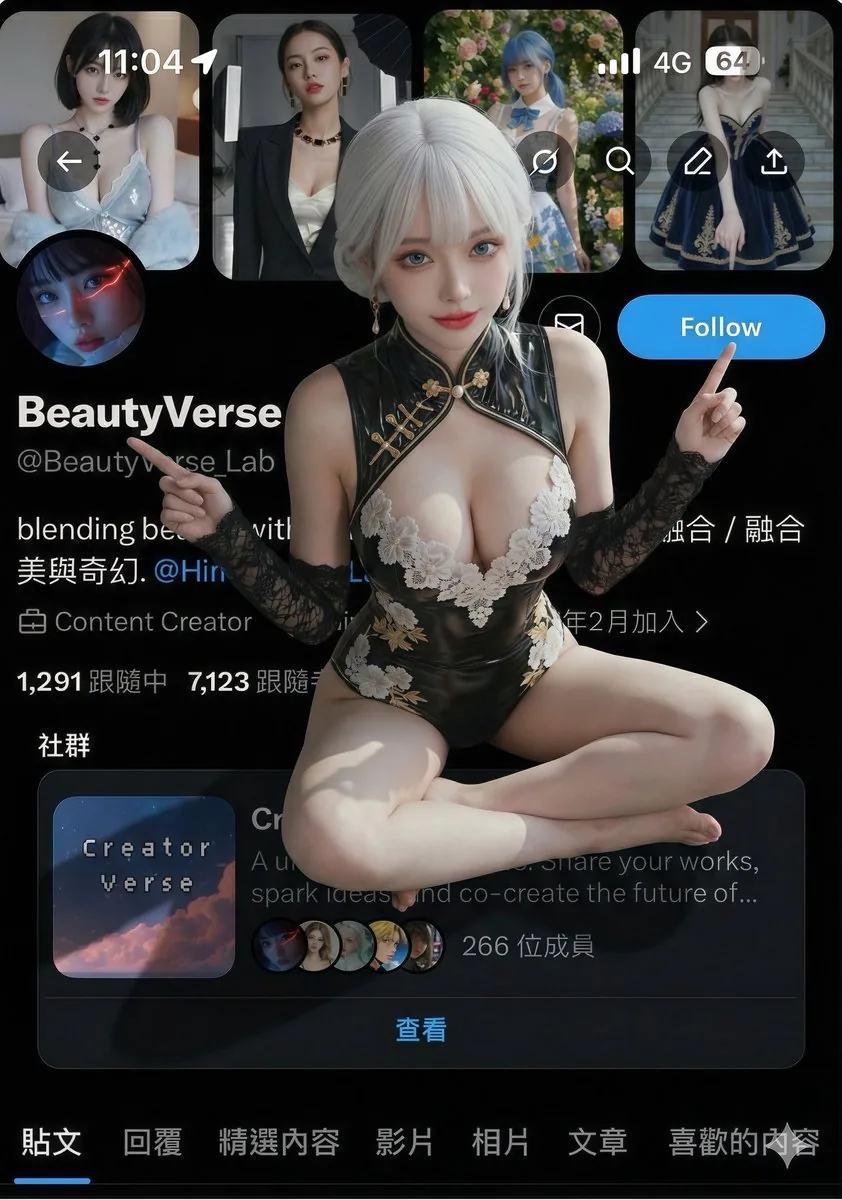
Reference images
How to use this AI Image prompt template
 1
1Copy the prompt — grab this template’s prompt and negative prompt.  2
2Pick a model — choose a recommended AI model for the best match.  3
3Generate — open the studio with one click and create your result.
Related templates
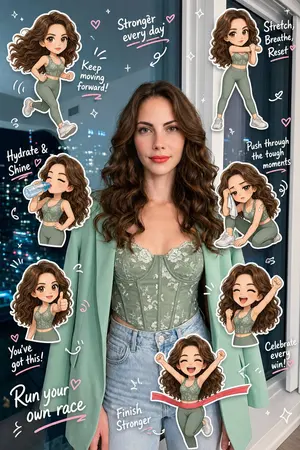
Chibi Clone Sticker Diary
Create a high-quality “chibi clone sticker diary photo (style)” based on the uploaded real-life image. Preserve the original person’s identity, face, hairstyle, hair color, outfit, body proportions, pose, lighting, and background. Do not alter facial features or turn the subject into a full illustration—maintain a realistic photo look. Analyze the scene as a fitness/running (activity) lifestyle moment. Add 5–8 chibi mini clones of the same person around the subject, designed in a consistent kawaii sticker style (big head, small body, large expressive eyes, clean digital finish). Each clone must clearly resemble the real person (same hair, outfit, colors). Design each chibi with different running-related actions (action theme) and emotions: jogging, stretching, drinking water, feeling tired, cheering, giving thumbs up, celebrating completion. Ensure all poses are unique and contextually relevant. Render each chibi as a sticker with white outlines, soft shadows, and a slightly floating effect. Arrange them around the subject and edges without covering the face or main body. Add light hand-drawn doodles (hearts, sparkles, arrows, motion lines, circles) in white with subtle pink accents, keeping a clean scrapbook diary feel. Include 5–8 short handwritten-style phrases matching a fitness mood (cute, energetic, encouraging). Use mostly white text with slight pink highlights and small decorative marks. Composition: keep the real person as the central focus, surrounded by chibi stickers and doodles. The result should feel like a polished, playful, high-resolution social media lifestyle diary image—clean, balanced, and visually rich without clutter.38:T6e0,Create

Mixed-Reality Comic Transformation
Convert the subject in this image into a 4:5 mixed-reality transformation with a fully realistic background and a realistically rendered face, combined with bold cartoon apparel (style), hand-drawn comic fire effects, and playful cartoon companions. Use a live-action hybrid composition with the subject preserved as the clear identity anchor while the stylized elements read as designed overlays inside one coherent scene. CHARACTER: Preserve the subject’s recognizable facial identity, hair state, and facial hair pattern if presented exactly, then re-render the face with realistic live-action AAA structure, natural skin response, and clean hybrid integration. Ensure high brightness, low contrast, medium saturation, low sharpness details. Dress the figure in exaggerated cartoon clothing with simplified seams, and graphic trims that feel intentionally designed rather than photographed. Add funny cartoon characters as supporting visual accents with expressive silhouettes, rounded forms, and lively attitude, while keeping the subject as the primary focal figure. The body should remain human and believable, but the clothing and accessories should carry comic exaggeration and strong graphic personality. FACE & ANATOMY: Keep the subject’s core facial proportions, expression logic, and likeness intact, rendered with realistic but controlled hybrid facial detail. Use natural eye depth, believable skin, while avoiding any plastic toy look or full caricature distortion. The body should read as live-action proportioned, with the stylization concentrated in the outfit, props, and surrounding comic elements. ENVIRONMENT: Restyle the exact same environment as a realistic setting with clear depth and natural perspective. Build the scene as a mixed-reality stage where comic fire drawings, playful animated accents, and graphic energy bursts sit visibly inside the real space without breaking spatial coherence. Keep the background believable, structured, and physically present, with the stylized elements integrated as deliberate designed interventions. RENDER PIPELINE: Use a mixed-reality rendering pipeline that combines realistic plate-like environment treatment with stylized 2D graphic overlays and hybrid character compositing. Preserve live-action shading on the face and background, then layer cartoon clothing, comic effect shapes, and illustrated fire forms with crisp contour control and clean edge separation. The final finish must feel like a polished real-world composite with intentional animated design language, not a pure cartoon render and not a standard photograph. COLOR & LIGHT: Use clean low contrast, and bright comic-highlight behavior against a realistic ambient base. Shadows remain natural in the background and face, while the stylized garments and effects carry punchy neon-like energy and high chroma separation.3a:T
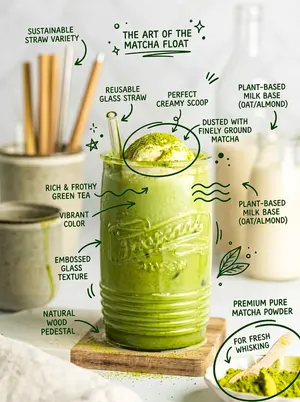
Hand-Drawn Doodles Overlay Prompt
Create a creative image of Hand Drawn Doodles Overlay Prompt. Style: photorealistic. Composition: balanced and well-framed. Lighting: natural with cinematic mood. Category: photography. Reference: hand-drawn-doodles-overlay-prompt-17814.

Travel Scrapbook Chibi Collage Creator
Use the GPT Image 2 model to generate image. Prompt: Transform the uploaded travel photo into a playful travel scrapbook chibi collage while preserving the original photo as the base image. Keep the original photo recognizable and structurally intact. Preserve the main person's facial features, expression, body shape, pose, outfit, lighting, and real background. Do not replace the person, change their identity, redraw their face, or alter the actual travel setting. The edit should feel like illustration and scrapbook elements have been layered on top of a real photo. Add 4 to 7 cute chibi-style mini versions of the person from the uploaded photo. Each mini character should be based on the same person, keeping consistent facial traits, hairstyle, outfit details, and overall personality. Use big-head chibi proportions, lively expressions, refined details, and a light cartoon-rendered look. Make every mini character do a different natural travel action. Choose varied candid moments such as taking photos, walking while looking around, reading a map, checking navigation, pulling luggage, drinking coffee, gazing at scenery, posing near a landmark, crouching to notice flowers or street details, filming with a phone, having hair blown by the wind, looking around while slightly lost, or jumping happily. The poses should feel spontaneous and life-like, as if captured during a real trip, not staged. Overlay hand-drawn doodles, handwritten notes, and sticker-like details to create a relaxed travel journal scrapbook style. Use mainly white and soft pink accents, with slightly uneven hand-drawn lines. Include elements such as arrows, stars, hearts, sparkles, tiny airplanes, location pins, dashed route lines, hand-drawn circles, tape pieces, stickers, and small decorative marks. Add 3 to 6 short handwritten English phrases related to travel mood and memories. Vary the phrases each time instead of using a fixed set. Examples of the tone include: "go somewhere new", "chase the horizon", "little moments matter", "memory unlocked", "lost but happy", "soft days", "just wandering", "no plans, just go", "take it slow", "follow the sun", "breathe and see", "quiet joy", and "this feels right". Place the handwritten phrases near the person, mini characters, or travel actions so the text interacts naturally with the image. Avoid neat or formal typography. The writing should feel casual, personal, and spontaneously added to a travel journal. The final image should feel light, healing, airy, cute, and relaxed, with a sense of freedom and travel nostalgia. Keep a balanced mix of real photo and subtle illustration enhancement. The viewer should first recognize it as a real travel photo, then notice the charming chibi characters and scrapbook details. Ask the user to upload a photo of themselves as the main subject reference. Use the uploaded person as the basis for a travel scrapbook chibi collage, focusing on scrapbook layout, chibi doodles, sticker elements, and a playful travel-journal style. The user may also describe the travel moments to include, such as taking photos, drinking coffee, reading a map, or shopping.

Doodle Aesthetic Social Media Photo Edit
Create a social-media image of Doodle Aesthetic Social Media Photo Edit. Style: photorealistic. Composition: balanced and well-framed. Lighting: natural with cinematic mood. Category: poster. Reference: doodle-aesthetic-social-media-photo-edit-23333.

Misordered Image Relay Grid
添付の画像をもとに、3×4 (グリッド)のグリッドで12種類 (枚数)のバージョンを配置してください。 この画像が、まるで12人の異なる人に順番に渡され、それぞれが前の人の作ったものだけを見ながら、「これはたぶんこういうものだろう」「こういう用途で使うものだろう」と勝手に勘違いし、別の形に作り直していったかのように表現してください。 最初のコマはオリジナルにかなり近い雰囲気から始めてください。そこからコマが進むにつれて、元画像の形、色、表情、ポーズ、構図、モチーフ、雰囲気が少しずつ誤解され、単純化され、別の用途に変換され、だんだん本来の意味や姿から離れていくようにしてください。 各コマは、前のコマだけを見た別の人が「たぶんこれはこういう依頼だったはず」と判断して作り直したようにしてください。人物やキャラクター、ペット、料理、風景、建物、プロフィール画像など、元画像の内容に応じて自然に変化させてください。 途中の変化は細かく固定しないでください。あるコマではイラスト化され、次のコマではマスコット化され、その次では商品化され、さらに看板、チラシ、ぬいぐるみ、食品パッケージ、観光グッズ、注意標識、ゲームキャラ、謎のおもちゃ、資料用アイコン、手作り工作物など、別の用途へ誤解されていっても構いません。変化の方向は、元画像と前のコマの見た目から自然に連想されるものにしてください。 コマが進むほど、「誰かがちゃんと作ろうとしたのは分かるけれど、何を作る依頼だったのか少しずつ間違えている」ようにしてください。形、比率、目、口、輪郭、色の配置、素材感、用途、装飾、構図が少しずつズレていき、後半ほど予想外でユーモラスな姿になっていくようにしてください。 重要なのは、単なる画質劣化やノイズではなく、人が前の成果物を見て、解釈を間違えながら、別の目的のものとして作り直した結果、どんどん崩壊していくように見せることです。 後半では、元画像の特徴を完全に消すのではなく、色、輪郭、表情、髪型、服、小物、ポーズ、構図、モチーフなどのうち、どれか1つか2つだけを不自然に残してください。その一方で、他の要素は大胆に省略、変形、誤解、別物化して構いません。 12コマ目は、元画像を知っている人だけがギリギリ元ネタを感じ取れる程度にし、初めて見る人には完全に別の謎の存在、謎の商品、謎キャラクター、謎の工作物、謎のアイコン、または謎のマスコットに見えるくらい大胆に崩してください。最後は「なんでこうなった!?」と思える、予想外で少し笑える着地にしてください。 各コマはそれぞれ異なる見た目にしてください。背景は白くシンプルにし、12種類の変化が見やすい3×4のグリッドとして整理してください。後半のコマでは、きれいに整えすぎないでください。むしろ、前の人の誤解を次の人がさらに別の方向へ誤解していくようにしてください。12コマ目は、元画像の特徴が1つだけ奇妙に残っているのに、それ以外はほぼ別物になっているくらい大胆に変化させてください。39:Tbdb,Based on the attached image, arrange 12 versions (quantity) in a 3x4 (grid) grid. Express this as if the image were passed sequentially to 12 different people, each looking only at what the previous person made and mistakenly assuming 'this must be what was requested' or 'this is meant for this purpose,' leading them to redesign it. Start the first frame with an atmosphere very close to the original. As the frames progress, have the shape, color, expression, pose, composition, motifs, and mood of the original image gradually be misunderstood, simplified, converted for different uses, and move away from its original meaning and appearance. Each frame should look like it was remade by a person who only saw the previous frame and judged 'this must have been the request.' Naturally change it according to the content of the original image, whether it's a person, character, pet, food, landscape, building, or profile image. Do not fix the intermediate changes too strictly. It's okay to misunderstand it as an illustration in one frame, a mascot in the next, a commercial product, a sign, a flyer, a stuffed toy, food packaging, tourist goods, a warning sign, a game character, a mysterious toy, a reference icon, or a handmade craft. The direction of change should be naturally associated with the appearance of the original and the previous frame. As the frames progress, make it look like 'you can tell someone was trying to make it properly, but they slightly misunderstood what the request was.' Let the shapes, proportions, eyes, mouths, outlines, color placement, textures, uses, decorations, and compositions shift bit by bit, leading to an unexpected and humorous appearance in the latter half. The key is not just image degradation or noise, but to make it look like it's collapsing because humans misinterpreted the previous result while rebuilding it for a different purpose. In the latter half, do not completely erase the characteristics of the original image, but unnaturally leave one or two elements like color, outline, expression, hairstyle, clothes, accessories, pose, composition, or motif. Meanwhile, other elements can be boldly omitted, transformed, misunderstood, or turned into something else. Make the 12th frame bold enough that only someone who knows the original image can barely sense the original source, while appearing as a completely different mysterious entity,
Explore more prompts
Browse more AI image and video prompts by category.
FAQ
- How is the button text handled if the original screenshot shows different wording?
- The ui_text_enforcement section overwrites the action_button_top_right with mandatory English text 'Follow' using sans-serif bold legible styling, regardless of the source image.
- What grounding technique makes the character appear seated on the UI?
- Realistic contact shadows are added under the legs and placed directly on the background surface while the rest of the screenshot layout stays pixel-rigid.
- Is the Promo Effect v2.0 Prompt for Profile Screenshot Composition - Nano Banana Pro AI Prompt for Social Media Post prompt free to use?
- Yes, this prompt is completely free on AI Pin Maker and you can copy it directly with no signup or payment required.
- How do I use the Promo Effect v2.0 Prompt for Profile Screenshot Composition - Nano Banana Pro AI Prompt for Social Media Post prompt to generate an image or video?
- Copy the prompt, tweak the subject or style to fit your idea, then paste it into AI Pin Maker and generate your image or video in one click.
- Can I change the Promo Effect v2.0 Prompt for Profile Screenshot Composition - Nano Banana Pro AI Prompt for Social Media Post prompt into my own version?
- Absolutely, just replace the subject, style, or parameters in AI Pin Maker to make the prompt entirely your own.