
Text to Image
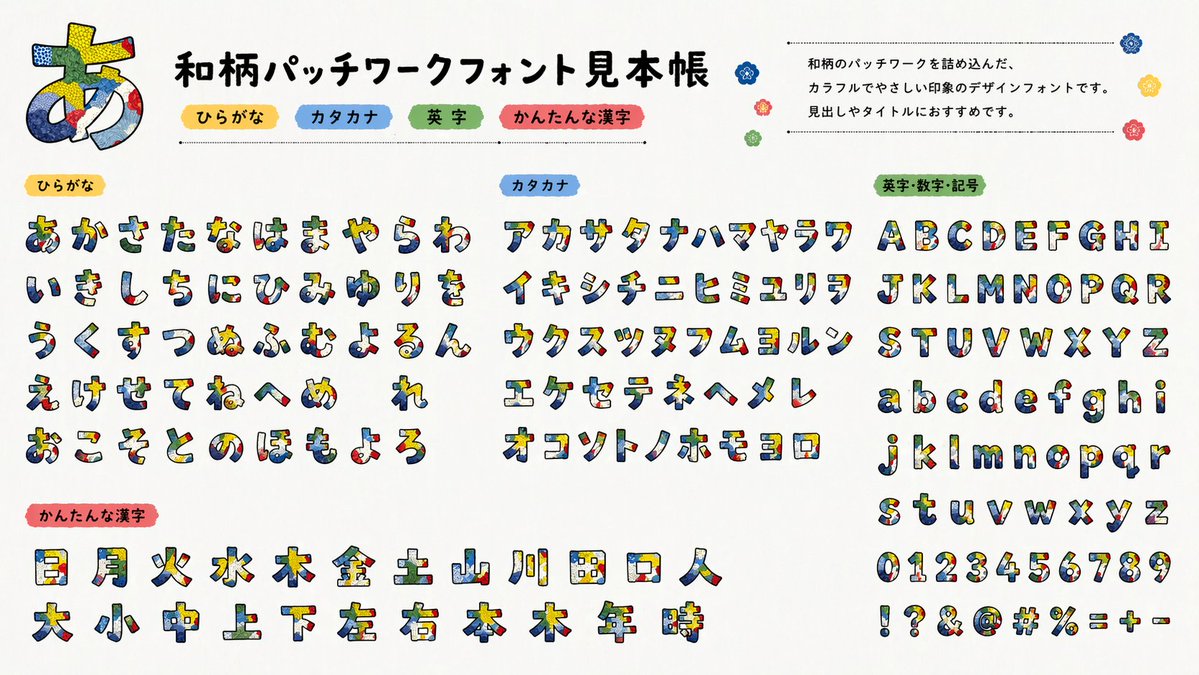
Multilingual font specimen sheet prompt — AI Image Prompt
A detailed prompt for generating font specimen catalogs containing Japanese, English, and Kanji characters using specific GPT-image-2 model versions.
Prompt
Create a creative image of Multilingual Font Specimen Sheet Prompt. Style: photorealistic. Composition: balanced and well-framed. Lighting: natural with cinematic mood. Category: photography. Reference: multilingual-font-specimen-sheet-prompt-14142.
Prompt breakdown
- Subject
- Multilingual font specimen sheet displaying varied language scripts on textured paper
- Style
- photorealistic
- Lighting
- natural with cinematic mood
- Composition
- balanced and well-framed
- Mood
- cinematic
Remix ideas
- swap in Hangul and Thai samples while keeping the same paper texture
- add faint coffee-stain marks to the sheet edges for an archival feel
- tilt the camera angle slightly to create gentle perspective distortion on the text blocks
Reference images
How to use this AI Image prompt template
 1
1Copy the prompt — grab this template’s prompt and negative prompt.  2
2Pick a model — choose a recommended AI model for the best match.  3
3Generate — open the studio with one click and create your result.
Related templates

Code Review English Infographic
{"type":"vertical Japanese educational infographic poster, fictional English learning material for programmers","style":"bright clean anime illustration, rounded blue borders, white background, teal and navy typography, pink accent marks, cute textbook layout, glossy vector icons, soft shadows, high readability, GPT-image-2 style","canvas":{"orientation":"portrait","aspect_ratio":"9:16","border":"thin rounded cyan outline with small sparkles, dots, speech bubbles and decorative emphasis lines"},"main_topic":{"headline":"{argument name=\"headline text\" default=\"コードレビューを依頼する\"}","subtitle":"品質向上やバグ予防のために使う表現","theme":"practical English phrases for asking someone to review code"},"main_phrase_section":{"position":"upper center","label":"メインフレーズ","english_phrase":"{argument name=\"main English phrase\" default=\"Can you review this code?\"}","japanese_translation":"このコードをレビューしてくれますか?","design":"large rounded speech-card with dashed divider line, big bold navy English text"},"related_phrases_section":{"position":"left middle","title":"関連フレーズ","count":4,"items":[{"icon":"blue open book","english":"Could you review this code for readability?","japanese":"読みやすさの観点でレビューしていただけますか?"},{"icon":"red bug","english":"Please check for potential bugs.","japanese":"潜在的なバグを確認してください。"},{"icon":"green speedometer","english":"Can you suggest a more efficient implementation?","japanese":"より効率的な実装を提案してくれますか?"},{"icon":"purple shield","english":"Could you check if this handles edge cases?","japanese":"エッジケースに対応できているか確認していただけますか?"}]},"character":{"description":"anime-style young woman programmer mascot seated at a desk, long vivid purple hair in a high side ponytail with loose bangs, face intentionally covered by a square blur/mosaic censor block, teal T-shirt reading AITuber, oversized pastel pink and blue jacket, typing on a gray laptop with a heart sticker, focused study mood","customization":{"name":"{argument name=\"character name\" default=\"Nike-chan\"}","hair_color":"{argument name=\"hair color\" default=\"deep purple\"}","shirt_text":"{argument name=\"shirt text\" default=\"AITuber\"}"}},"central_visuals":{"code_review_window":{"position":"center behind character","description":"dark code editor window showing a git diff with red removed line and green added line, small chat/comment icon in the top right"},"desk_objects":{"count":2,"items":["open gray laptop","white mug labeled AI with coffee"]}},"bottom_sections":{"chibi_character":{"position":"lower left","description":"small chibi version of the same purple-haired mascot sitting and pointing with a teacher pointer, face also covered by a square blur, tiny yellow letter A on hair accessory"},"review_points":{"position":"lower center","title":"レビュー観点の例","count":4,"items":[{"icon":"red bug","label":"バグ","checkmark":true},{"icon":"green speedometer","label":"効率性","checkmark":true},{"icon":"blue book","label":"読みやすさ","checkmark":true},{"icon":"purple shield","label":"セキュリティ / ベストプラクティス","checkmark":true}]},"vocabulary_memo":{"position":"lower right","title":"単語メモ","count":4,"items":[{"term":"readability","meaning":"読みやすさ"},{"term":"potential bugs","meaning":"起こりうるバグ"},{"term":"efficient","meaning":"効率的な"},{"term":"edge cases","meaning":"例外的なケース"}]},"tip_bar":{"position":"very bottom","label":"TIP","text":"レビューしてほしい観点を添えると、より実用的なフィードバックを得やすい。","icons":"lightbulb on the left and blue chat bubble on the right"}},"composition_notes":"Make every card rounded with cyan outlines; use crisp readable text; balance Japanese headline and English teaching phrases; include exactly 4 related phrase cards, exactly 4 review-point items, exactly 4 vocabulary entries, and exactly 2 desk objects. Maintain a cheerful learning-material look with sparkles and stickers."}

Minimalist Layout and Document Prompts
Create a creative image of Minimalist Layout And Document Prompts. Style: photorealistic. Composition: balanced and well-framed. Lighting: natural with cinematic mood. Category: photography. Reference: minimalist-layout-and-document-prompts-13704.

Clean flat slide design style guide for NotebookLM
Create a creative image of Clean Flat Slide Design Style Guide For Notebooklm. Style: photorealistic. Composition: balanced and well-framed. Lighting: natural with cinematic mood. Category: photography. Reference: clean-flat-slide-design-style-guide-for-notebooklm-768.

Modern MPLUS Link UI Redesign
Using REFERENCE_0 as the source UI, redesign the Teams-like internal/external collaboration system into a cleaner, more modern product mockup while preserving the MPLUS Link brand, the dark navy left sidebar navigation, and the overall set of app functions. Create a polished 2-column by 3-row presentation showing exactly 6 redesigned screens: 1) a welcome/login landing screen with a large hero card, Japanese headline 社外パートナー連携を、招待制の専用ワークスペースで一元化 (headline text), login tabs/buttons, and a realistic desktop-monitor hero image; 2) a project bridge chat screen with right-aligned chat cards, action chips, and a message composer; 3) a team list screen simplified into two clean team cards; 4) a materials/document list screen with upload controls, search/filter area, and file rows; 5) a shared collaboration room screen titled MPI 共同開発ルーム (room title) with a project overview card and compact member/status list; 6) a user management screen titled ユーザー管理 (admin title) with user rows and an empty detail panel. Make the new mockups much more spacious than the reference: fewer table rows, larger margins, softer dividers, pale blue-gray backgrounds, white rounded cards, subtle shadows, and small blue/green accent buttons. Keep the Japanese enterprise SaaS feel and dummy-data nature, but remove the dense micromanaged tables and replace them with simplified, presentable mock UI suitable for a design-improvement comparison. Use brand name MPLUS Link (brand name) in the sidebar, keep the sidebar consistent on every screen, and avoid adding unrelated features, watermarks, or decorative clutter.37:T6fb,Using REFERENCE_0 as the source UI, redesign the Teams-like internal/exter

Chinese AI Retirement Planning Infographic
{"type":"editorial Chinese infographic poster","topic":"AI and retirement planning boundaries","style":"clean academic magazine infographic, flat vector icons, soft textured off-white paper background, balanced Chinese editorial typography, minimal Japanese-inspired decorative motifs","canvas":{"orientation":"portrait","aspect_ratio":"3:4"},"palette":{"background":"warm ivory","primary_text":"black","secondary_text":"deep blue","accent_red":"rose pink","accent_green":"muted olive green","accent_yellow":"golden yellow","accent_blue":"navy blue","line_color":"soft gray-blue"},"headline":{"text":"{argument name=\"headline text\" default=\"AI 能帮你规划退休,但不能替你负责\"}","position":"top left","font":"bold Chinese serif or Song-style display","large":true},"subheadline":{"text":"MIT Sloan 对“AI + 退休规划”的边界判断","position":"below headline","color":"deep blue","font":"bold Chinese sans-serif"},"source_line":{"text":"来源:MIT Sloan / Andrew Lo","position":"below subheadline","color":"gray"},"layout":{"sections":[{"title":"高责任场景","position":"upper middle","count":2,"shape":"rounded rectangle with pink border and pale pink fill","icon_count":3,"labels":["AI = 辅助工具,不是最终决策者","适合帮助思考,不适合替你拍板"],"left_icon":"large pink warning triangle inside circle over wave pattern","item_icons":["person badge","exclamation mark"]},{"title":"强在帮你想清楚,弱在替你承担后果","position":"center","count":2,"shape":"large framed comparison panel","subsections":[{"title":"AI 更适合做:认知辅助","position":"left","count":4,"color":"green","labels":["解释复杂概念","比较不同方案","做情景推演","提醒行为偏差"],"icons":["book","balance scale","upward chart","exclamation in speech bubble"]},{"title":"AI 不能替代:责任判断","position":"right","count":4,"color":"pink-red","labels":["承担法律责任","精确税务与收益计算","处理复杂合规细节","托管敏感隐私风险"],"icons":["courthouse","calculator","clipboard","lock"]}],"center_icon":"blue circle with white balance scale"},{"title":"正确用法:把 AI 当分析伙伴,不当神谕","position":"lower middle","count":3,"shape":"rounded rectangle with yellow border and pale cream fill","labels":["先用 AI 做认知准备:理解概念、列变量、梳理方案","再让 AI 挑战你的假设:问它哪里可能错、缺了什么信息","关键决策交给自己,并由专业人士复核"],"left_illustration":"yellow rising sun over stylized landscape with bamboo leaves","step_markers":"three yellow numbered circles: 1, 2, 3"},{"title":"注:本文强调的是“辅助决策边界”,不是投资建议","position":"bottom","count":1,"shape":"rounded rectangle with blue-gray border","labels":["Source: MIT Sloan, Want to use AI to plan your retirement? Here’s how to proceed"],"left_icon":"blue fountain pen nib in circle","right_decoration":"gray-blue wave pattern"}],"decorations":{"count":5,"items":["top right cherry blossom branch with pink flowers and falling petals","top left pagoda silhouette","top left distant mountain silhouette","small cloud-line motifs near upper corners of comparison section","subtle wave patterns inside circular icons and lower right footer"]}},"composition":"ample margins, all text in Chinese except the English source line at bottom, strong hierarchy from headline to colored content boxes, symmetrical comparison layout in the middle, polished social-media-ready infographic","rendering":"sharp vector infographic, crisp text, subtle paper grain, no photorealism"}3e:Te44,{"type":"editorial Chinese infographic poster","topic":"AI and retirement planning boundaries","style":"clean academic magazine infographic, flat vector icons, soft textured off-white paper background, balanced Chinese editorial typography, minimal Japanese-inspired decorative motifs","canvas":{"orientation":"portrait","aspect_ratio":"3:4"},"palette":{"background":"warm ivory","primary_text":"black","secondary_text":"deep blue","accent_red":"rose pink","accent_green":"muted olive green",

Cloisonné Craft PPT Cover
Create a 16:9 widescreen PowerPoint cover slide in an elegant Chinese traditional craft presentation style, with an ivory rice-paper background, dark teal and gold ornamental border, and decorative Chinese corner brackets. The main headline on the left is large dark blue Chinese calligraphy text reading 掐丝珐琅 (headline text), with a smaller gold subtitle underneath reading 火与金线中的东方华彩 (subtitle text). Below it, place a centered rounded label plaque with teal text reading 传统工艺主题分享 (section label), and a small explanatory line near the lower left reading 认识一种以金属胎、细丝与珐琅釉色共同构成的华美工艺 (footer note). In the top-right corner, add a small ornate dark teal page indicator reading 01 / 10 (page indicator). On the right half, feature a highly detailed blue-and-gold cloisonné enamel vase on a dark wooden stand, decorated with lotus flowers, green lotus leaves, curling gold wire patterns, turquoise accents, and ornate gold handles. The tabletop foreground contains exactly 7 discrete craft objects: 1 coil of gold wire, 1 flat cloisonné floral medallion, 1 gold key-shaped ornament, 1 fine metalworking brush or stylus, and 4 small bowls of enamel powder in blue, green, turquoise, and white/gold. Add pale ink-wash mountains, a distant pavilion, soft lotus line art, and floating auspicious cloud motifs in the background. Use a refined museum-course aesthetic, realistic product rendering mixed with delicate Chinese illustration, harmonious cream, deep navy, turquoise, and metallic gold palette, crisp typography, balanced negative space, premium educational PPT title-slide composition.36:T715,Create a 16:9 widescreen PowerPoint cover slide in an elegant Chinese traditional craft
Explore more prompts
Browse more AI image and video prompts by category.
FAQ
- Which languages appear on the specimen sheet?
- The base prompt leaves languages open but photorealistic renders typically show Latin, Cyrillic, Arabic, and Devanagari side-by-side for quick cross-script comparison.
- How can I adapt this prompt for print-ready mockups?
- Insert specific font names after the sheet description and add a subtle drop-shadow layer to mimic offset printing on uncoated stock.
- Is the Multilingual font specimen sheet prompt prompt free to use?
- Yes, this prompt is completely free on AI Pin Maker and you can copy it directly with no signup or payment required.
- How do I use the Multilingual font specimen sheet prompt prompt to generate an image or video?
- Copy the prompt, tweak the subject or style to fit your idea, then paste it into AI Pin Maker and generate your image or video in one click.
- Can I change the Multilingual font specimen sheet prompt prompt into my own version?
- Absolutely, just replace the subject, style, or parameters in AI Pin Maker to make the prompt entirely your own.