
Text to Image
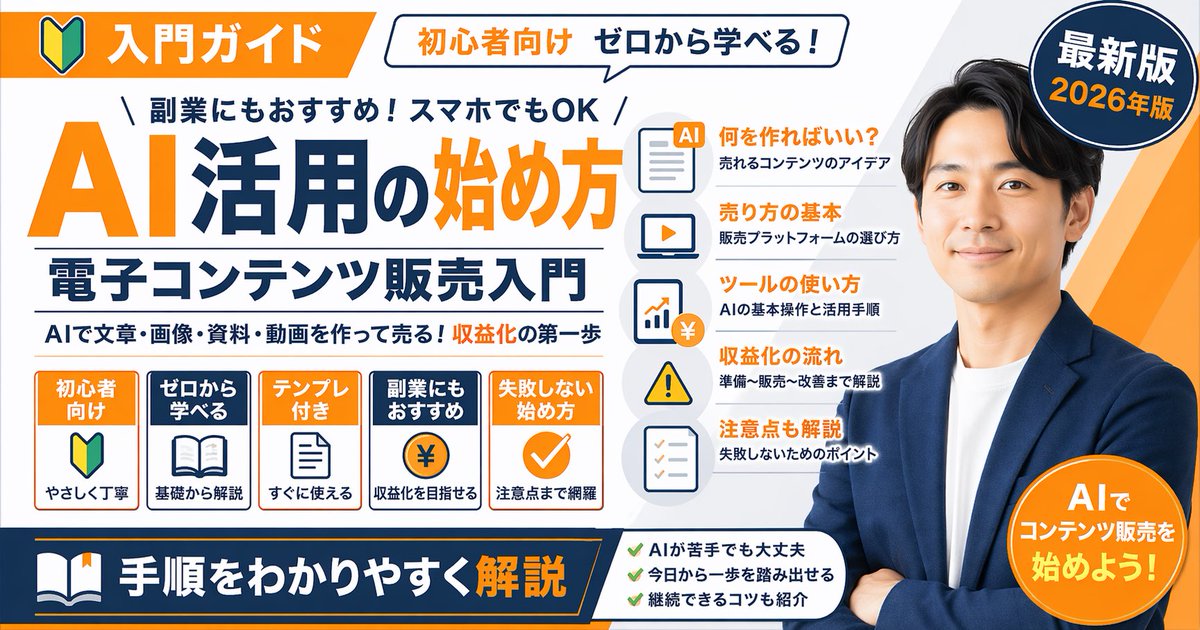
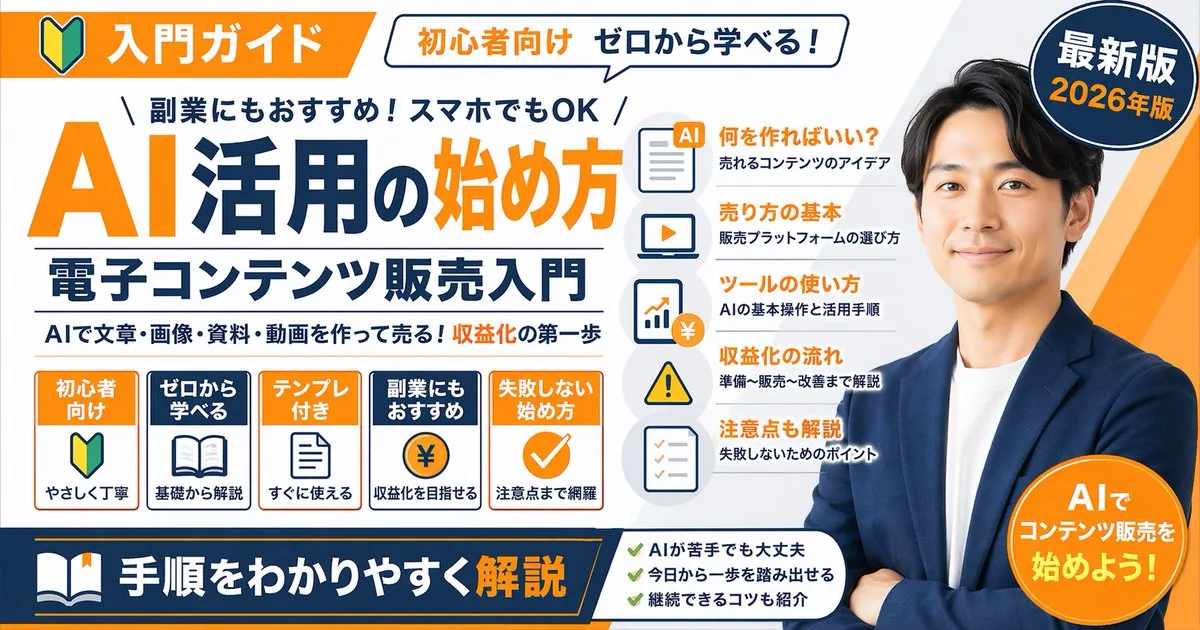
Japanese Educational Promo Banner — AI Image Prompt
Generates a highly detailed, text-heavy promotional banner or YouTube thumbnail featuring a spokesperson, main titles, and multiple feature lists.
Prompt
{
  "type": "promotional banner infographic",
  "style": "clean, professional, flat design, corporate educational graphic, white background with orange and dark blue accents",
  "subject": "{argument name=\"spokesperson\" default=\"smiling Asian man in a blue blazer and white t-shirt, arms crossed\"}",
  "layout": {
    "top_section": {
      "left_badge": "Orange banner with beginner mark icon and text '入門ガイド'",
      "speech_bubble": "White bubble with text '初心者向け ゼロから学べる!'",
      "right_badge": "Dark blue circle with text '最新版' and '{argument name=\"year edition\" default=\"2026年版\"}'"
    },
    "main_title_section": {
      "top_small_text": "\\ 副業にもおすすめ!スマホでもOK /",
      "large_title": "{argument name=\"main title\" default=\"AI活用の始め方\"}",
      "subtitle": "{argument name=\"subtitle\" default=\"電子コンテンツ販売入門\"}",
      "bottom_small_text": "AIで文章・画像・資料・動画を作って売る!収益化の第一歩"
    },
    "middle_sections": [
      {
        "position": "middle-left",
        "type": "feature boxes",
        "count": 5,
        "items": [
          "Orange box: '初心者向け', beginner mark icon, 'やさしく丁寧'",
          "Blue box: 'ゼロから学べる', open book icon, '基礎から解説'",
          "Orange box: 'テンプレ付き', document icon, 'すぐに使える'",
          "Blue box: '副業にもおすすめ', coin with ¥ icon, '収益化を目指せる'",
          "Orange box: '失敗しない始め方', checkmark icon, '注意点まで網羅'"
        ]
      },
      {
        "position": "middle-center",
        "type": "list items with icons",
        "count": 5,
        "items": [
          "Document icon: '何を作ればいい?' / '売れるコンテンツのアイデア'",
          "Laptop icon: '売り方の基本' / '販売プラットフォームの選び方'",
          "Chart icon: 'ツールの使い方' / 'AIの基本操作と活用手順'",
          "Warning icon: '収益化の流れ' / '準備〜販売〜改善まで解説'",
          "Checklist icon: '注意点も解説' / '失敗しないためのポイント'"
        ]
      }
    ],
    "bottom_section": {
      "left_banner": "Dark blue banner with book icon and text '{argument name=\"bottom banner text\" default=\"手順をわかりやすく解説\"}'",
      "center_checklist": {
        "count": 3,
        "items": [
          "AIが苦手でも大丈夫",
          "今日から一歩を踏み出せる",
          "継続できるコツも紹介"
        ]
      },
      "right_badge": "Orange circle with text 'AIでコンテンツ販売を始めよう!'"
    }
  }
}3a:Tacd,{
  "type": "promotional banner infographic",
  "style": "clean, professional, flat design, corporate educational graphic, white background with orange and dark blue accents",
  "subject": "{argument name=\"spokesperson\" default=\"smiling Asian man in a blue blazer and white t-shirt, arms crossed\"}",
  "layout": {
    "top_section": {
      "left_badge": "Orange banner with beginner mark icon and text '入門ガイド'",
      "speech_bubble": "White bubble with text '初心者向け ゼロから学べる!'",
"right_badge": "Dark blue circle with text '最新版' and '{argument name=\"year edition\" default=\"Prompt breakdown
- Subject
- smiling Asian man in a blue blazer and white t-shirt, arms crossed
- Style
- clean, professional, flat design, corporate educational graphic, white background with orange and dark blue accents
- Composition
- top section with left orange badge, speech bubble and right dark blue circle; main title with small texts and large 'AI活用の始め方'; middle-left five feature boxes and middle-center five icon list items; bottom dark blue banner, three-item checklist and orange circle badge
- Mood
- professional and encouraging for beginners
Remix ideas
- Change the year edition badge from 2026年版 to 2025年版 while keeping the dark blue circle
- Replace the main subtitle '電子コンテンツ販売入門' with 'AI動画作成入門' and update the bottom small text accordingly
- Alter the middle-left boxes to swap 'テンプレ付き' for a new item on mobile app recommendations
Reference images
How to use this AI Image prompt template
 1
1Copy the prompt — grab this template’s prompt and negative prompt.  2
2Pick a model — choose a recommended AI model for the best match.  3
3Generate — open the studio with one click and create your result.
Related templates

YouTube Live Stream Announcement Mockup
{"type": "YouTube Live Stream UI mockup", "theme": "dark mode", "layout": {"top_bar": {"components": ["hamburger menu", "YouTube logo", "search bar", "microphone icon", "create icon", "notifications icon", "profile avatar"]}, "video_player": {"status": "LIVE badge in top left", "left_side": "A {argument name=\"presenter description\" default=\"man in a green sweater\"} standing at a wooden podium with a spiral logo, gesturing with hands, laptop on podium.", "right_side_presentation": {"text_elements": ["OpenAI", "INTRODUCING", "{argument name=\"product name\" default=\"GPT-Image-2\"}", "{argument name=\"tagline\" default=\"More Realistic. More Useful. More Creative.\"}"], "image_gallery": {"count": 4, "panels": ["mountain lake with a boat", "close-up portrait of a woman with dappled lighting", "cute robot holding a lantern in a dark forest", "impressionist painting of a glowing city street at night"]}}, "bottom_controls": {"components": ["play/pause", "next", "volume", "LIVE text", "red progress bar", "CC", "settings gear", "miniplayer", "theater mode", "fullscreen"]}}, "video_info": {"title": "{argument name=\"video title\" default=\"OpenAI Live: Introducing GPT-Image-2\"}", "channel_section": {"name": "{argument name=\"channel name\" default=\"OpenAI\"}", "badge": "verified checkmark", "subscribers": "1.36M subscribers", "button": "Subscribe (white pill button)"}, "action_buttons": {"count": 5, "labels": ["Like (12K)", "Dislike (497)", "Share", "Save", "..."]}, "description_box": {"metadata": "95,237 watching now, Started streaming 7 minutes ago", "hashtags": "#OpenAI #GPTImage2 #AI", "body_text": "Join us for a special live event as we introduce GPT-Image-2, our latest and most advanced image generation model. See new capabilities, live demos, and hear from the team ...more"}}}}

Website Building Tutorial Thumbnail
A thumbnail for a tutorial on “How to Build a Website in 10 Minutes.” The image shows a computer screen with a beautiful, professional-looking website on it. A large clock icon showing “10 Min” is overlaid on the screen. The YouTuber is in the corner, pointing to the screen and smiling, looking confident and helpful. The text is clear and promises a quick, easy solution. –ar 16:9

Thumbnail text overlay based on attachment
Create a youtube-thumbnail image of Thumbnail Text Overlay Based On Attachment. Style: photorealistic. Composition: balanced and well-framed. Lighting: natural with cinematic mood. Category: poster. Reference: thumbnail-text-overlay-based-on-attachment-435.

YouTube Dark Mode Desktop UI Mockup
{ "type": "desktop web browser UI screenshot", "environment": "{argument name=\"os environment\" default=\"Windows 11 desktop\"}", "theme": "{argument name=\"ui theme\" default=\"dark mode\"}", "browser_window": { "tabs": ["YouTube", "New Tab"], "url_bar": "youtube.com", "profile_icon": "{argument name=\"profile initial\" default=\"M\"}" }, "app_interface": { "header": { "logo": "{argument name=\"website name\" default=\"YouTube\"} GB", "search_bar": "Search", "icons": ["mic", "create", "notifications", "profile"] }, "filter_bar": { "active_filter": "{argument name=\"active filter\" default=\"All\"}", "count": 11, "labels": ["All", "Gaming", "Music", "Live", "Podcasts", "Mixes", "Science", "Lo-fi", "Thrillers", "Recently uploaded", "Watched"] }, "sidebar": { "sections": [ { "title": "Main", "count": 3, "labels": ["Home", "Shorts", "Subscriptions"] }, { "title": "You", "count": 6, "labels": ["Your channel", "History", "Playlists", "Your videos", "Watch later", "Liked videos"] }, { "title": "Subscriptions", "count": 8, "labels": ["Linus Tech Tips", "MrBeast", "Kurzgesagt - In a Nutshell", "ColdFusion", "3Blue1Brown", "Khan Academy", "Veritasium", "Show more"] }, { "title": "Explore", "count": 7, "labels": ["Trending", "Music", "Films", "Live", "Gaming", "News", "Sport"] }, { "title": "More from YouTube", "count": 3, "labels": ["YouTube Premium", "YouTube Music", "YouTube Kids"] } ] }, "main_content": { "layout": "3 columns by 4 rows grid", "count": 12, "video_cards": [ { "title": "Why Build Your Own GPU is Almost Impossible", "channel": "Linus Tech Tips", "stats": "164K views • 1 day ago", "thumbnail": "CPU/GPU chip" }, { "title": "Survive 100 Days In Circle, Win $500,000", "channel": "MrBeast", "stats": "40M views • 5 days ago", "thumbnail": "MrBeast with crowd in blue tracksuits" }, { "title": "What If We Nuke an Asteroid?", "channel": "Kurzgesagt - In a Nutshell", "stats": "4.2M views • 6 hours ago", "thumbnail": "Missile hitting asteroid in space" }, { "title": "How Dubai Became a $10 Billion City", "channel": "ColdFusion", "stats": "1.6M views • 2 weeks ago", "thumbnail": "Man and Dubai skyline" }, { "title": "The Beautiful Math of Euler's Identity", "channel": "3Blue1Brown", "stats": "2.8M views • 3 months ago", "thumbnail": "Math equation and spiral graph" }, { "title": "The World in 2040 - Population, Climate & More", "channel": "Veritasium", "stats": "7.7M views • 2 weeks ago", "thumbnail": "Lush green forest aerial view" }, { "title": "I've Been Using Linux For 12 Years, This Is What Finally...", "channel": "DistroTube", "stats": "160K views • 3 days ago", "thumbnail": "Laptop and smartphone with Linux logo" }, { "title": "Black Holes Explained - From Birth to Death", "channel": "Khan Academy", "stats": "3.9M views • 3 months ago", "thumbnail": "Glowing black hole accretion disk" }, { "title": "The Problem With Diet Advice", "channel": "Andrew Huberman", "stats": "4.4M views • 6 days ago", "thumbnail": "Man with glasses speaking" }, { "title": "How to Learn Anything (Evidence-Based)", "channel": "Ali Abdaal", "stats": "2.7M views • 3 months ago", "thumbnail": "Vector illustration of man reading a book" }, { "title": "The Last of Us Part 2 is a Masterpiece", "channel": "Naughty Dog", "stats": "2.3M views • 3 years ago", "thumbnail": "Ellie from The Last of Us" }, { "title": "lofi hip hop radio - beats to relax/study to", "channel": "Lofi Girl", "stats": "LIVE", "thumbnail": "Lofi girl studying at desk" } ] } }, "taskbar": { "os": "Windows", "icons": ["Start", "Search", "Task View", "File Explorer", "Edge", "Spotify"], "system_tray": "08:34 03/04/2024" } }3a:Tf5c,{ "type": "d
Japanese AI Creative Tool Poster
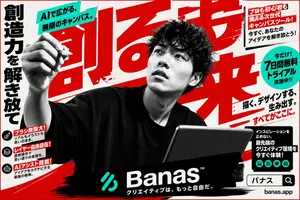
Goal: Create a bold Japanese advertising poster for a next-generation AI creative canvas tool called Banas (brand name), with an aggressive high-contrast magazine/landing-page aesthetic. Canvas: Horizontal 16:9 poster, off-white paper background with red ink splatters, black brush strokes, and a thin red border. Use a limited palette of black, white, vivid red, and turquoise. Main subject: Center foreground shows a black-and-white photographic young male creator with curly dark hair, wearing an oversized black T-shirt. His face is intentionally hidden by a centered rectangular gray blur/mosaic block. His left arm is raised toward the viewer holding a stylus or pen as if drawing in midair, and his right hand holds a large dark tablet angled upward in the lower right. The figure should be dramatic, cropped large, and partially overlap all typography. Layout and typography: Fill the background with enormous slanted red Japanese headline characters, partially cropped and layered behind the person, reading 創る力 (main headline). Along the far left edge place a tall vertical black Japanese slogan reading 創造力を解き放て (left slogan). At top left, place a turquoise diagonal banner with bold black text reading AIで広がる、無限のキャンバス。 (top banner text). Use heavy Japanese gothic fonts, oversized lettering, diagonal underlines, rough ink textures, and energetic poster composition. Text and callouts: Include exactly 6 promotional callout areas: 1 turquoise diagonal top-left banner; 1 white boxed callout in the upper right with red header text and black body copy; 1 turquoise circular badge on the right advertising a free trial; 1 bold right-side slogan block with red underline accents; 1 black rectangular feature block in the lower right with small turquoise icons; and 1 black bottom brand bar. The upper-right box should read in Japanese: 「プロも初心者も使える次世代キャンバスツール! 今すぐ、あなたのアイデアを解き放とう!」. The turquoise circle should read: 「今だけ!7日間無料トライアル実施中!!」. The right slogan should read: 「描く、デザインする、生み出す。すべてがここに。」. The lower-right black block should read: 「インスピレーションを止めない。最先端のクリエイティブ環境を今すぐ体験!」. Left feature stack: Create exactly 3 small feature rows on the lower left, each with a black circular icon, a red label strip, and small black description text. The 3 rows are: 1) brush icon, label 「ブラシ無限大!」, description 「リアルもイラストも思いのまま。」; 2) layered-squares icon, label 「レイヤー自由自在!」, description 「直感操作で思い通りの表現を。」; 3) robot icon, label 「AIアシスト搭載!」, description 「アイデアをカタチにする最強の相棒。」. Bottom branding: Add one wide black brush-stroke rectangle across the bottom center containing a turquoise abstract logo mark, the large white wordmark Banas (brand name) with a tiny ™, and the Japanese tagline 「クリエイティブは、もっと自由だ。」. At bottom right, add a search-bar style box containing 「バナス」 and a magnifying glass icon, with the URL 「banas.app」 below it. Icon counts: Include exactly 3 black circular feature icons on the lower left and exactly 5 small turquoise circular icons inside the lower-right black feature block, representing creative tools such as image, document, palette, collaboration, and gallery. Do not add extra icons. Style constraints: Make it look like a polished Japanese tech startup advertisement generated from text only, combining realistic monochrome photography, halftone grain, distressed print texture, bold red brush typography, and clean turquoise accent shapes. Keep all Japanese text crisp and legible except for the intentionally face-blurred subject.37:Tffe,Goal: Create a bold Japanese advertising poster for a next-generation AI creative canvas tool called Banas (brand name), with an aggressive high-contrast magazine/landing-page aesthetic. Canvas: Horizontal 16:9 poster, off-white paper background with red ink splatters, black brush strokes, and a thin red border. Use a limited palette of black, white, vivid red, and turquoise. Main subject: Center foreground shows a black-and-white photographic young male creator w

Minimalist Symmetrical Sports Poster
A clean minimalist sports poster featuring a legendary football player (player) viewed entirely from the back, standing confidently in the center of the frame. The player wears the Portugal national team home kit (kit) with a deep red jersey, green shorts, red socks, and modern football boots. The jersey displays "RONALDO" in gold lettering with the number 7 beneath it. The composition is perfectly symmetrical with the player occupying the lower-middle portion of the canvas. A smooth sky-blue gradient (background color) background fills the entire scene with large negative space above the subject, creating a premium wallpaper aesthetic. Behind the player, enormous bold white typography spelling "RONALDO" stretches horizontally across the lower background, partially hidden by the player's body. A dramatic long shadow extends diagonally across the ground, adding depth and cinematic atmosphere. The lighting is soft yet directional, creating subtle highlights on the jersey fabric and realistic folds. Ultra-clean composition, modern sports branding style, high contrast, crisp edges, hyper-detailed fabric texture, realistic proportions, studio-quality lighting, premium poster design, centered composition, vertical smartphone wallpaper, 8K quality.
Explore more prompts
Browse more AI image and video prompts by category.
FAQ
- What text appears in the top speech bubble?
- The white bubble reads '初心者向け ゼロから学べる!' next to the orange '入門ガイド' badge.
- Which icons appear in the middle-center list items?
- The five items use a document icon for content ideas, laptop for sales platforms, chart for AI tools, warning for monetization flow, and checklist for failure prevention points.
- Is the Japanese Educational Promo Banner prompt free to use?
- Yes, this prompt is completely free on AI Pin Maker and you can copy it directly with no signup or payment required.
- How do I use the Japanese Educational Promo Banner prompt to generate an image or video?
- Copy the prompt, tweak the subject or style to fit your idea, then paste it into AI Pin Maker and generate your image or video in one click.
- Can I change the Japanese Educational Promo Banner prompt into my own version?
- Absolutely, just replace the subject, style, or parameters in AI Pin Maker to make the prompt entirely your own.