
Text to Image
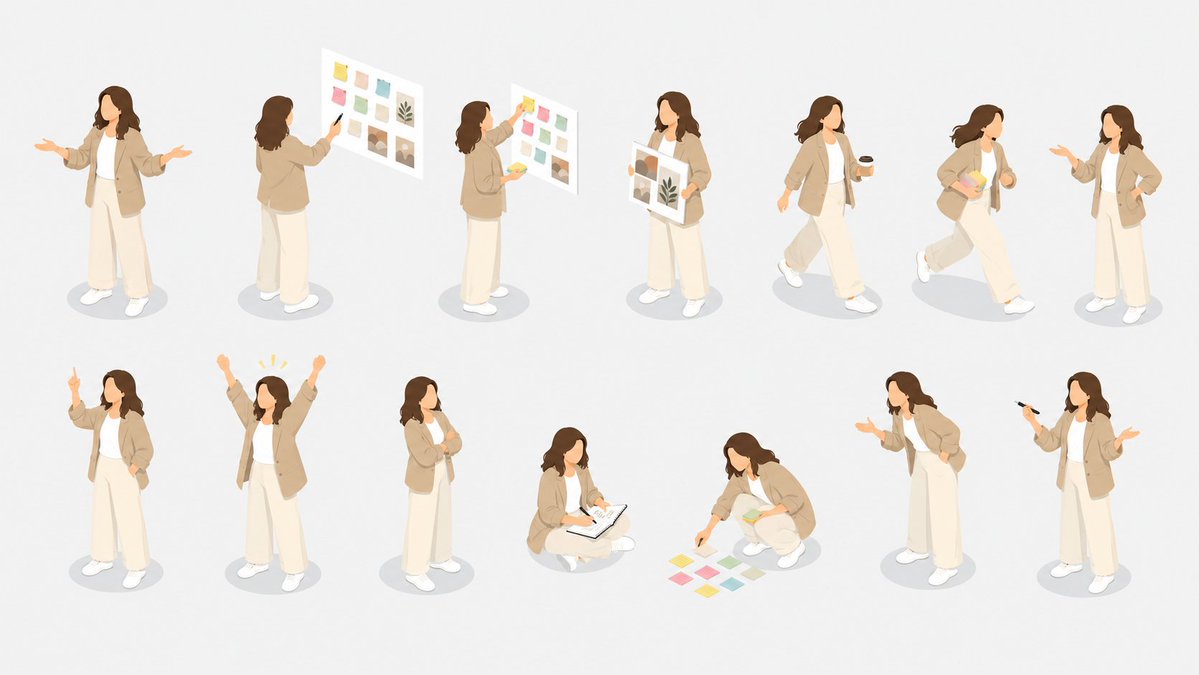
Isometric Presenter Pose Sheet — AI Image Prompt
Generates a clean isometric illustration set of one female business presenter in 14 different presentation and planning poses for slides, websites, or UI assets.
Prompt
Goal: Create an isometric character pose sheet showing the same faceless female presenter in many business presentation situations, suitable for a clean illustration library.

Canvas: Wide horizontal 16:9 canvas on a very light warm gray background, with generous spacing and soft oval gray shadows under each character. No borders, no title, no labels, no watermark.

Subject details: The repeated character is {argument name="character name" default="a young female business presenter"} with shoulder-length wavy {argument name="hair color" default="dark brown hair"}, no facial features, soft peach skin tone, wearing a beige oversized blazer, white inner top, loose cream wide-leg trousers, and white sneakers. Keep the same outfit and proportions across every pose. Use a soft modern isometric vector style, rounded shapes, muted pastel colors, minimal detail, clean edges, subtle depth, and a friendly corporate presentation mood.

Layout: Arrange exactly 14 separate full-body character poses in two loose rows of 7 across the canvas, each figure isolated and evenly spaced, all viewed from a consistent three-quarter isometric angle.

Visible poses, exactly 14:
1. Standing front-facing with both arms open as if explaining to an audience.
2. Standing with back turned, pointing at a floating presentation board filled with small pastel color swatches and image tiles.
3. Side view, placing colorful sticky notes onto a floating board.
4. Standing front view holding a large mood-board sheet with color blocks, image thumbnails, and a leaf motif.
5. Walking to the right while holding a black coffee cup.
6. Walking quickly to the right while carrying a stack of pastel papers or sticky notes.
7. Standing and gesturing conversationally with one hand while the other hand rests near the waist.
8. Standing with one index finger raised as if making an important point.
9. Standing with both arms raised in celebration, with small yellow emphasis marks above the head.
10. Standing in a thinking pose with one hand at the chin and the other arm folded.
11. Sitting cross-legged on the floor, writing or sketching in an open notebook or clipboard.
12. Crouching and arranging exactly 8 pastel sticky notes on the floor, with a small stack of notes in one hand.
13. Standing in a leaning presentation pose, one hand extended as if inviting discussion.
14. Standing with a black marker or pen raised in one hand and the other hand open in a presenting gesture.

Presentation props: Include only minimal presentation materials: floating white boards, pastel sticky notes, a notebook, coffee cup, pen, and paper sheets. Use {argument name="accent colors" default="soft yellow, pink, mint green, teal, beige, and muted brown"} for sticky notes and board graphics.

Constraints: Keep all characters faceless, do not add text, do not add extra people, do not change outfits between poses, keep the background clean and uncluttered, and maintain a cohesive isometric illustration set.Prompt breakdown
- Subject
- faceless female presenter with shoulder-length wavy dark brown hair, soft peach skin, beige oversized blazer, white inner top, loose cream wide-leg trousers and white sneakers
- Style
- soft modern isometric vector style with rounded shapes, muted pastel colors, minimal detail, clean edges and subtle depth
- Composition
- exactly 14 full-body figures in two loose rows of seven, each evenly spaced with generous margins on a wide horizontal canvas
- Mood
- friendly corporate presentation mood using soft yellow, pink, mint green, teal, beige and muted brown accents on sticky notes and boards
Remix ideas
- swap the blazer to soft gray while keeping the exact 14 poses and faceless head
- add a small floating tablet to the thinking pose instead of the hand-at-chin gesture
- change the background to a cooler off-white tone and adjust only the oval shadows to match
Reference images
How to use this AI Image prompt template
 1
1Copy the prompt — grab this template’s prompt and negative prompt.  2
2Pick a model — choose a recommended AI model for the best match.  3
3Generate — open the studio with one click and create your result.
Related templates
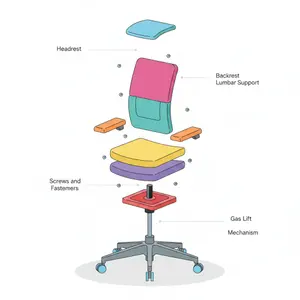
Minimalist Exploded View Industrial Design Diagram - Nano Banana Pro AI Prompt for Infographic / Edu Visual
{ "prompt": { "objective": "Create a colorful minimalist exploded view of a chair with clearly labeled parts", "style": "minimalist, modern industrial design, flat yet slightly 3D, clean lines, soft shadows", "composition": "chair centered in frame, all components separated vertically in an exploded view, evenly spaced, balanced layout", "subject": { "type": "chair", "chair_style": "modern ergonomic chair", "parts": [ "Headrest", "Backrest", "Lumbar Support", "Seat Cushion", "Seat Base", "Armrests", "Armrest Pads", "Gas Lift Cylinder", "Tilt Mechanism", "Five-Star Base", "Caster Wheels", "Screws and Fasteners" ], "labels": "clear part names placed beside each component, thin connector lines, clean sans-serif font" }, "colors": "bright yet soft colors for each part, pastel and vibrant mix, each component in a different color, white or very light background", "lighting": "soft studio lighting, gentle shadows under each floating part", "camera": { "angle": "slight isometric view for depth", "focus": "all parts sharp and readable" }, "extra": "educational product diagram look, no clutter, modern design presentation, Instagram-friendly composition" }, "size": "1024x1024", "format": "png", "style_transfer": false }
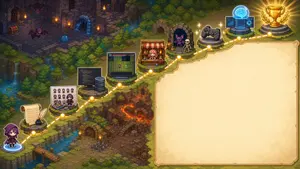
Pixel Art Game Development Roadmap
{"type":"wide pixel-art fantasy roadmap illustration with blank presentation panel","format":"16:9 horizontal banner","style":"high-detail isometric pixel art, cozy JRPG game map, warm torchlight, saturated fantasy colors, crisp sprites, soft glow effects, no readable text anywhere","main_scene":{"setting":"a winding cliffside adventure path through a forested dungeon landscape, combining medieval ruins, waterfalls, lava caverns, bridges, stone platforms, and magical lights","camera":"isometric top-down view, wide composition","left_character":"a small hooded purple-robed adventurer seen from behind, standing at the lower-left starting point on a glowing blue magic circle","path":"a dotted glowing golden route line travels from the lower-left corner upward and across the image to the upper-right, connecting circular gold waypoint nodes","waypoint_count":10,"waypoints":["starting character on blue portal at bottom-left","parchment scroll with feather quill and inkwell","pixel character sprite sheet and color palette board with a small artist character","programming workstation with code monitor and server tower","game prototype monitor showing a grid map and tiny sprites","shop stall with red-and-white awning and pink-haired merchant","monster encounter cave with purple bat and skeleton","game controller platform","AI brain hologram with laptop and interface screens","gold trophy on stone pedestal with laurel branches"]},"right_panel":{"position":"right half of the image","shape":"large blank parchment rectangle with irregular hand-drawn border and rounded corners","purpose":"empty space reserved for adding a title, explanation, or roadmap text later","fill":"warm cream parchment texture with subtle stains, no writing"},"background_details":{"upper_left":"dark ruined stone dungeon rooms with torches, treasure chest, arched doorways, purple bats, and a blue slime","middle_left":"dense evergreen forest, cliffs, small waterfalls, streams, and mossy stone ledges","lower_middle":"rocky dungeon entrance with wooden door, stairs, floor spikes, torches, and orange lava fissures","upper_right":"forest edge and final trophy area glowing with victory light"},"customization":{"theme":"{argument name=\"roadmap theme\" default=\"AI-assisted game development journey\"}","main character":"{argument name=\"main character\" default=\"small hooded purple adventurer\"}","blank panel use":"{argument name=\"blank panel use\" default=\"empty parchment area for later text\"}","art style":"{argument name=\"art style\" default=\"isometric pixel art JRPG map\"}","final reward":"{argument name=\"final reward\" default=\"gold trophy with laurel branches\"}"},"composition_notes":"Keep the left and upper portions visually busy with the 10 connected roadmap icons, while the entire right side remains a clean blank parchment panel. Use glowing yellow nodes and a dashed route to clearly imply progression from writing and art creation to coding, prototyping, publishing, testing, AI assistance, and final success."}
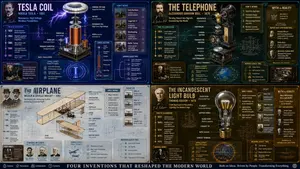
Exploded View Invention Infographic
2x2 grid, do this for tesla coil (invention) and 3 other famous inventions. 16:9 inventor_content = ( patent_drawing_recreation_in_isometric_exploded_view_of_[invention (invention placeholder)]_by_[inventor (inventor placeholder)] * 1.7 ) + ( historical_context_timeline_of_scientific_breakthroughs_leading_to_[invention] * 1.5 ) + ( failure_log_and_iteration_cards_showing_[inventor]_s_failed_prototypes_with_annotations * 1.6 ) + ( cross_section_and_mechanics_diagram_of_[invention]_with_material_callouts * 1.4 ) + ( economic_and_cultural_impact_ripple_map_of_[invention]_on_society * 1.3 ) + ( quirky_personal_habit_or_workshop_inserts_from_[inventor]_s_biography * 1.2 ) + ( modern_day_derivative_technologies_tree_from_[invention] * 1.1 ) + ( common_misconception_busting_panel_about_who_really_invented_[invention] * 1.0 ) - ( romanticized_lone_genius_cliché_without_team_context / 3.0 ) - ( boring_textbook_engraving_style_instead_of_dynamic_infographic / 2.9 ) - ( eurocentric_filter_if_invention_originated_elsewhere / 3.2 )3
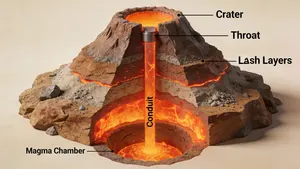
3D Cutaway Volcano Diagram
A 3D cutaway diagram of a volcano, showing its internal structure. The diagram should clearly label the magma chamber, conduit, throat, crater, and layers of ash and lava. The style should be a clean, technical illustration, with realistic textures for the rock and magma. This demonstrates the ability to generate accurate, science-based visuals for educational purposes, requiring strong spatial and scientific reasoning. –ar 16:9

16-Panel Yoga Instructional Storyboard
A 16-panel instructional storyboard grid featuring a calm, athletic young woman (subject) performing a sequence of yoga poses (activity) in the same spot. Clean minimal studio background with soft natural lighting, consistent full-body framing across all panels. The woman wears a fitted neutral-toned yoga outfit (leggings + sports top) (outfit), barefoot, hair tied back. Each panel shows a different pose in a smooth progression: Mountain Pose (Tadasana), Upward Stretch (Arms Overhead), Forward Fold (Uttanasana), Half Lift, Plank Pose, Chaturanga (Low Plank), Upward Facing Dog, Downward Dog, Low Lunge (Right Leg Forward), Warrior I, Warrior II, Reverse Warrior, Triangle Pose, Tree Pose (Balance), Seated Fold, Final Meditation Pose (Eyes Closed, Calm Expression). Style: modern instructional design, evenly spaced grid layout, each frame labeled with step number and pose name, subtle arrows indicating movement flow, soft shadows, neutral background, high detail, realistic proportions, elegant and calming aesthetic.

Software Workflow Infographic
{ "type": "infographic", "style": "clean, modern, professional, soft green and beige color palette, photorealistic character integration", "header": { "icon": "lightbulb", "title": "{argument name=\"main title\" default=\"ここまでの Seedance 2.0 の使い方まとめ\"}", "subtitle": "{argument name=\"subtitle\" default=\"実写MV・会話・芝居系を想定した実践メモ\"}" }, "presenter_character": "{argument name=\"presenter description\" default=\"photorealistic young Japanese woman with long dark brown hair wearing a beige sleeveless top\"}", "total_presenter_cutouts": 6, "layout": { "sections": [ { "number": 1, "title": "{argument name=\"section 1 title\" default=\"参照画像と背景づくり\"}", "elements": "3 bullet points, 1 horizontal 3-step flowchart with thumbnail images (cityscape, text box, video player)", "presenter_pose": "pointing left towards the flowchart, with a speech bubble" }, { "number": 2, "title": "{argument name=\"section 2 title\" default=\"プロンプトは長くてもかなり耐える\"}", "elements": "2 bullet points, 1 table with 3 rows featuring icons (lock, clock, prohibition sign)", "presenter_pose": "neutral expression, looking forward, with a speech bubble" }, { "number": 3, "title": "秒数に“隙間”を作らない", "elements": "2 bullet points, 1 horizontal timeline graphic with 3 segments", "presenter_pose": "pointing up, looking slightly left, with a speech bubble" }, { "number": 4, "title": "720p と 1080p の使い分け", "elements": "text description, 1 two-column comparison table (green column, orange column)", "presenter_pose": "looking forward, with a speech bubble" }, { "number": 5, "title": "今後の課題 / 次の動画への引き継ぎ", "elements": "4 bullet points", "presenter_pose": "looking slightly right, with a speech bubble" }, { "type": "summary_box", "title": "実践メモ 要点", "elements": "clipboard icon, 5 checklist items with green checkmarks", "presenter_pose": "large portrait from chest up, looking directly at viewer" } ] } }
Explore more prompts
Browse more AI image and video prompts by category.
FAQ
- Can I use individual poses from this sheet separately in my own slides?
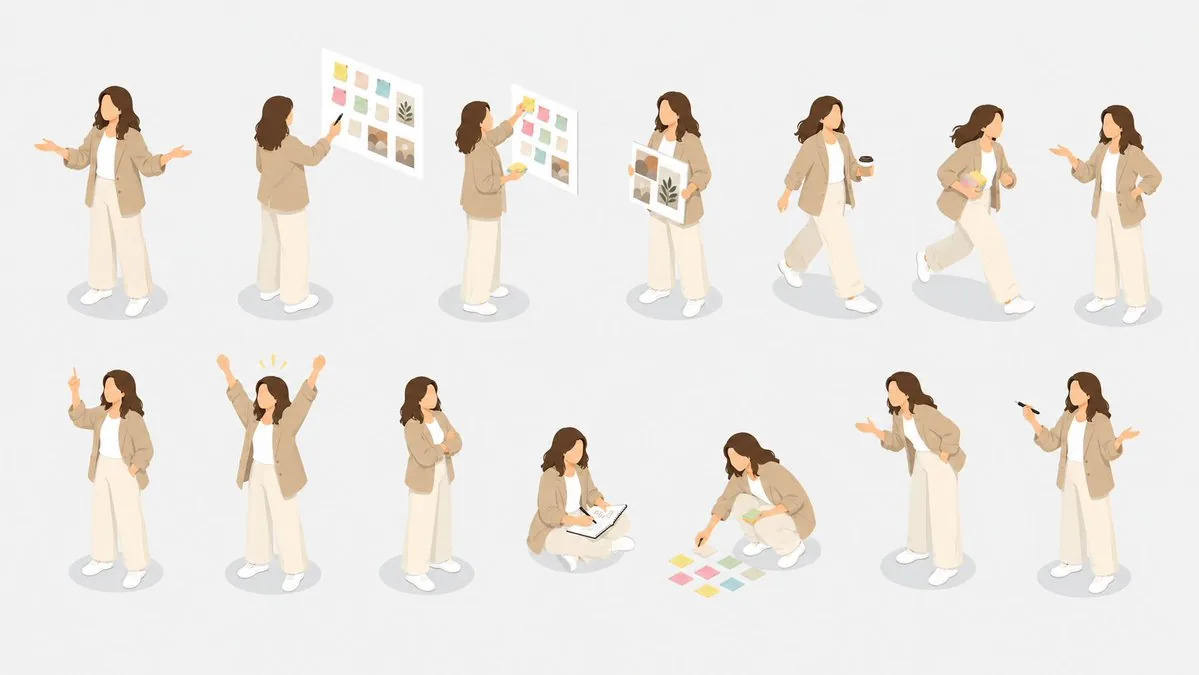
- Yes, each of the 14 figures is isolated with its own soft shadow, so you can crop any single pose like the one arranging eight sticky notes or the walking pose with the coffee cup without affecting the others.
- What happens if I want to change the hair color across the whole sheet?
- The prompt keeps the same shoulder-length wavy dark brown hair on every figure; simply update the color value once and regenerate to maintain perfect outfit and proportion consistency.
- Is the Isometric Presenter Pose Sheet prompt free to use?
- Yes, this prompt is completely free on AI Pin Maker and you can copy it directly with no signup or payment required.
- How do I use the Isometric Presenter Pose Sheet prompt to generate an image or video?
- Copy the prompt, tweak the subject or style to fit your idea, then paste it into AI Pin Maker and generate your image or video in one click.
- Can I change the Isometric Presenter Pose Sheet prompt into my own version?
- Absolutely, just replace the subject, style, or parameters in AI Pin Maker to make the prompt entirely your own.