
Text to Image
Cinematic City Explosion Chase — AI Image Prompt
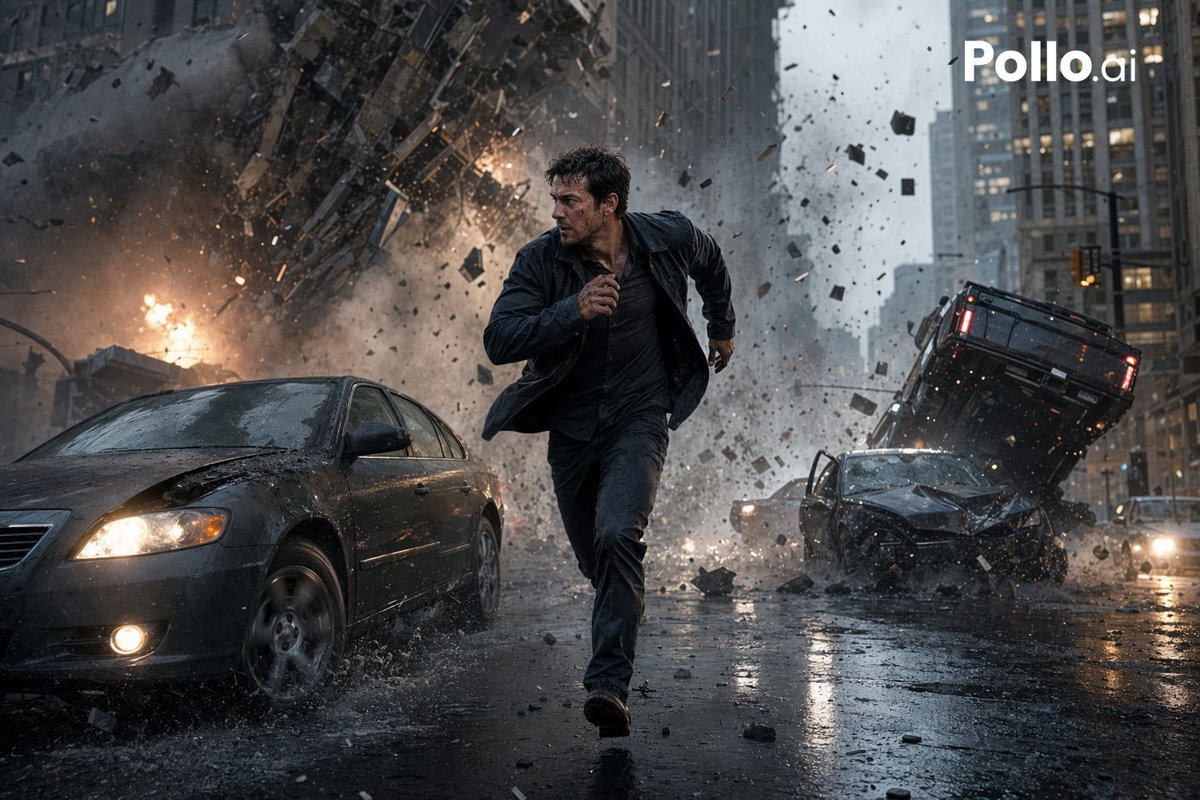
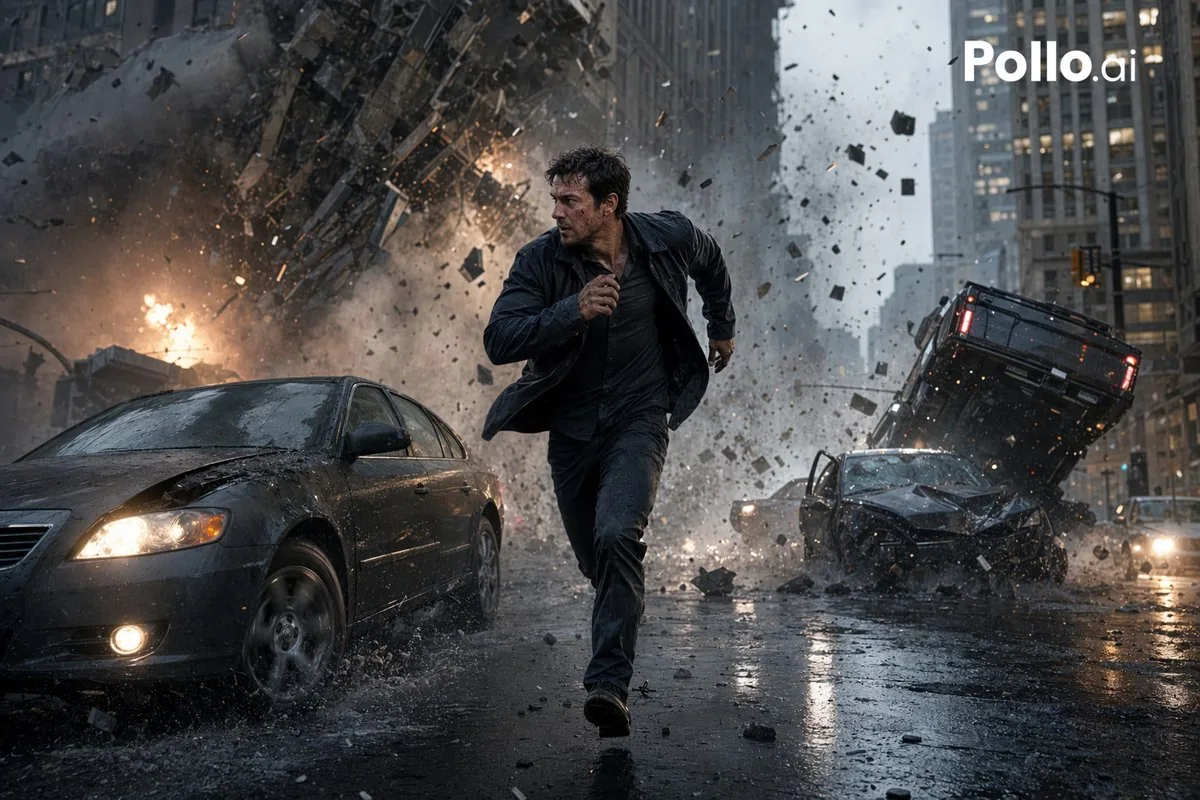
A photorealistic blockbuster-style image of a man running from a huge urban explosion, ideal for action movie posters, dramatic ads, or AI image model comparisons.
Prompt
A cinematic photorealistic action scene in a rainy downtown city street canyon, showing {argument name="main subject" default="a dark-haired man in his 30s"} sprinting directly toward the camera in the center foreground with a tense survival expression, wearing a soaked dark jacket, dark shirt, and dark pants, mid-stride with one arm pumping forward. Behind him, a massive urban explosion tears through the street and lower facade of a high-rise building, sending a huge cloud of smoke, fire, dust, shattered concrete, glass, and metal debris outward in all directions. The scene includes exactly 3 visible damaged vehicles: 1 dark sedan in the left foreground with headlights on and a crumpled hood splashing through rainwater, 1 wrecked dark car in the right midground with severe front-end damage, and 1 overturned or airborne black SUV tilted upward behind it on the right side. Wet asphalt reflects headlights, firelight, and gray skyscrapers. Dense debris fills the air, with chunks of rubble frozen in motion. Overcast stormy daylight, desaturated blue-gray color palette with orange fire accents, dramatic motion blur in flying debris but sharp focus on the running figure, low-angle wide-lens composition, blockbuster disaster-movie realism, ultra-detailed textures, high contrast, dynamic depth, volumetric smoke, rain spray, cinematic lighting. Add a white {argument name="watermark text" default="Pollo.ai"} logo in the top-right corner.Prompt breakdown
- Subject
- Dark-haired man in 30s sprinting toward camera in soaked dark jacket, shirt and pants with tense expression, chased by massive explosion hurling smoke, fire, concrete, glass and metal debris plus exactly three damaged vehicles: left-foreground dark sedan with headlights, right-midground wrecked dark car, and tilted airborne black SUV
- Style
- Cinematic photorealistic blockbuster disaster-movie realism with ultra-detailed textures, high contrast and dynamic depth
- Lighting
- Overcast stormy daylight using desaturated blue-gray palette with orange fire accents, volumetric smoke, rain spray and wet asphalt reflections of headlights and flames
- Composition
- Low-angle wide-lens framing with sharp focus on central running figure, motion blur on flying debris chunks, dense airborne rubble and layered vehicle placement for depth
- Mood
- Tense survival urgency amid chaotic urban destruction and dramatic forward motion
Remix ideas
- Change the man's dark jacket to a torn white shirt to make him pop against the blue-gray smoke and fire
- Move the airborne black SUV slightly left so it overlaps the explosion cloud for tighter framing
- Add heavier rain streaks across the lens while keeping the Pollo.ai watermark crisp in the top-right corner
Reference images
How to use this AI Image prompt template
 1
1Copy the prompt — grab this template’s prompt and negative prompt.  2
2Pick a model — choose a recommended AI model for the best match.  3
3Generate — open the studio with one click and create your result.
Related templates

iPhone Travel Photo at Mt Fuji
Use the attached face reference strictly for identity only. Preserve the exact same facial structure, eye shape, nose shape, lips, jawline, skin texture, skin tone, hairstyle and natural hair color. Do not beautify, stylize or change identity. ultra-realistic casual iPhone (camera) travel photo at a famous Japanese viewpoint overlooking Mount Fuji and a traditional red pagoda temple (location), authentic tourist travel atmosphere, clear blue sky with soft clouds, realistic late afternoon natural lighting with slightly warm tones. man standing casually on a wooden observation deck with both hands in pockets, body facing slightly sideways while looking away from camera naturally, relaxed candid posture instead of fashion pose. Wearing oversized navy TOKYO sweater with cream lettering, loose blue jeans, tan boots and slim black sunglasses (outfit). Natural clothing folds and realistic body proportions. traditional multi-level red pagoda visible on the right side of frame, Mount Fuji clearly visible in the background on the left side, realistic autumn trees and Japanese cityscape below, authentic depth and perspective like a real tourist photo captured during travel. photo should feel like a random friend quickly took the picture on iPhone during sightseeing, authentic handheld smartphone framing, slightly imperfect composition, natural perspective, subtle iPhone HDR, realistic shadows and exposure balance, soft realistic environmental detail. Ultra-realistic moments captured like genuine iPhone travel photos: natural light, authentic environments, candid human posture, realistic composition and scale, documentary-style vacation photography feeling, no cinematic grading, no studio lighting, no AI perfection, no CGI look, no glossy skin, no influencer photoshoot energy. Real casual tourist snapshot feeling.

Apple Park Keynote Photo Prompt
Create a creative image of Apple Park Keynote Photo Prompt. Style: photorealistic. Composition: balanced and well-framed. Lighting: natural with cinematic mood. Category: photography. Reference: apple-park-keynote-photo-prompt-13710.

Censored Sand Businessman Statue
Create a vertical photorealistic urban scene of a colossal hyper-realistic sand sculpture of a smiling businessman wearing a formal suit, dress shirt, and blue striped tie, placed in the middle of a busy modern city street between tall glass skyscrapers. The statue should fill most of the frame from chest to head, with detailed carved sand hair, ears, collar, lapels, tie texture, and realistic granular sand shading. Cover the entire face area with a large plain rectangular censor block in medium warm brown (censor block color), centered over the face from forehead to chin, obscuring all facial features while leaving hair, ears, neck, shirt, and suit visible. Include exactly 4 construction workers wearing orange safety vests, jeans, and hard hats: one worker on the left scaffold carving the left shoulder with a hand tool, one worker standing on a small platform at the right side near the head holding a tool, one worker on the right scaffold working near the suit lapel while bending forward, and one worker on the ground in front of the statue shoveling or smoothing sand. Add exactly 2 scaffold platforms, one on each side of the statue, with metal rails and wooden planks. Add exactly 1 yellow excavator at the lower left foreground with its bucket resting in sand, plus piles of sand, sandbags, buckets, and a shovel in the lower foreground. The background should show a busy city avenue with cars, crosswalks, traffic lights, pedestrians, and tall reflective office towers on both sides, under bright daytime sky with a few clouds. Use realistic perspective, sharp details, natural daylight, cinematic depth, and a documentary construction-site feeling. No text, no logos, no watermark.

Architect Live Stream UI Mockup
{ "type": "live stream interface mockup", "scene": { "subject": "{argument name=\"subject description\" default=\"young Asian male architect wearing glasses and a brown canvas apron\"}", "action": "focused on building a detailed white architectural scale model of a modern house using tweezers", "setting": "dimly lit design studio, green cutting mat, desk lamp, architectural blueprints on the wall in the background" }, "ui_elements": { "top_left": { "profile": "avatar, username '{argument name=\"username\" default=\"建筑师阿凯\"}', stats '2.3万本场点赞', pink '关注' button", "ranking": "yellow flame icon '小时榜第6名'" }, "top_right": { "viewers": "4 user avatars, count '2336', 'X' close button", "ranking_link": "pink dot '更多直播 >', '抖音直播榜 专业设计师榜' with bar chart icon" }, "mid_left_overlay": { "title": "正在做:", "subtitle": "{argument name=\"current task\" default=\"山地住宅概念模型\"}", "bullet_points_count": 4, "bullet_points": [ "· 场地分析", "· 体块推敲", "· 材料搭建", "· 细节刻画" ] }, "bottom_left_chat": { "message_count": 6, "messages": [ "Badge 32 粉丝团 建筑小白: {argument name=\"chat message 1\" default=\"这个模型比例是多大呀?\"}", "Badge 7 清风徐来: 太厉害了,细节好棒!", "Badge 11 回笙: 用的什么材料呀?", "主播 {argument name=\"username\" default=\"建筑师阿凯\"}: {argument name=\"host reply\" default=\"主要是卡纸、泡沫板、和balsa木,等会会展示👍\"}", "Badge 26 设计师文文: 这个设计好治愈🌿", "Badge 5 一只奶盖: 学到了,感谢分享!" ] }, "bottom_right_interactions": "floating colorful icons including hearts, thumbs up, and smiley faces", "bottom_bar": "input field '说点什么...', smiley icon, yellow shopping cart icon, pink heart icon, pink gift box icon, '...' icon" } }

Busy Construction Manager Scene
Create a cinematic image of Busy Construction Manager Scene. Style: photorealistic. Composition: balanced and well-framed. Lighting: natural with cinematic mood. Category: cinematic-video. Reference: busy-construction-manager-scene-4420.
Desert Landscape Heroic Collage
Create a creative image of Desert Landscape Heroic Collage. Style: photorealistic. Composition: balanced and well-framed. Lighting: natural with cinematic mood. Category: photography. Reference: desert-landscape-heroic-collage-22683.
Explore more prompts
Browse more AI image and video prompts by category.
FAQ
- Why does the prompt specify exactly three damaged vehicles with precise positions?
- It places one dark sedan splashing in the left foreground, one wrecked dark car in the right midground, and one overturned black SUV tilted upward behind it to create balanced layers of destruction without visual clutter.
- How is the watermark integrated into the cinematic scene?
- A white Pollo.ai logo is added in the top-right corner as a final overlay that sits cleanly over the stormy sky and smoke without obscuring the action.
- Is the Cinematic City Explosion Chase prompt free to use?
- Yes, this prompt is completely free on AI Pin Maker and you can copy it directly with no signup or payment required.
- How do I use the Cinematic City Explosion Chase prompt to generate an image or video?
- Copy the prompt, tweak the subject or style to fit your idea, then paste it into AI Pin Maker and generate your image or video in one click.
- Can I change the Cinematic City Explosion Chase prompt into my own version?
- Absolutely, just replace the subject, style, or parameters in AI Pin Maker to make the prompt entirely your own.