
이미지 투 이미지
퍼러비즈 초상화 — AI 이미지 프롬프트
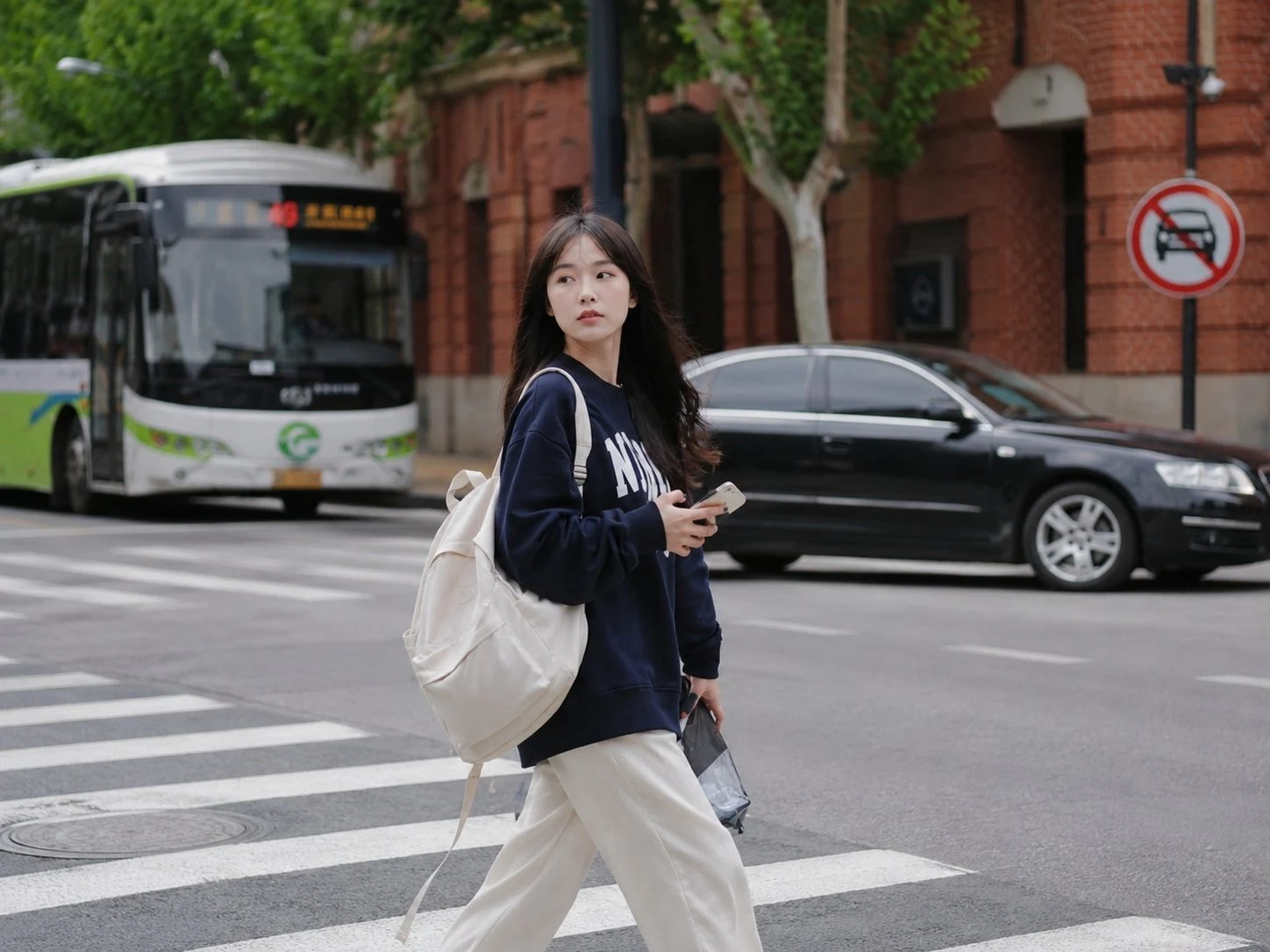
실루엣과 색감을 유지한 채 인물 사진을 따뜻한 퍼러비즈(휴즈비즈) 스타일로 변환합니다. X의
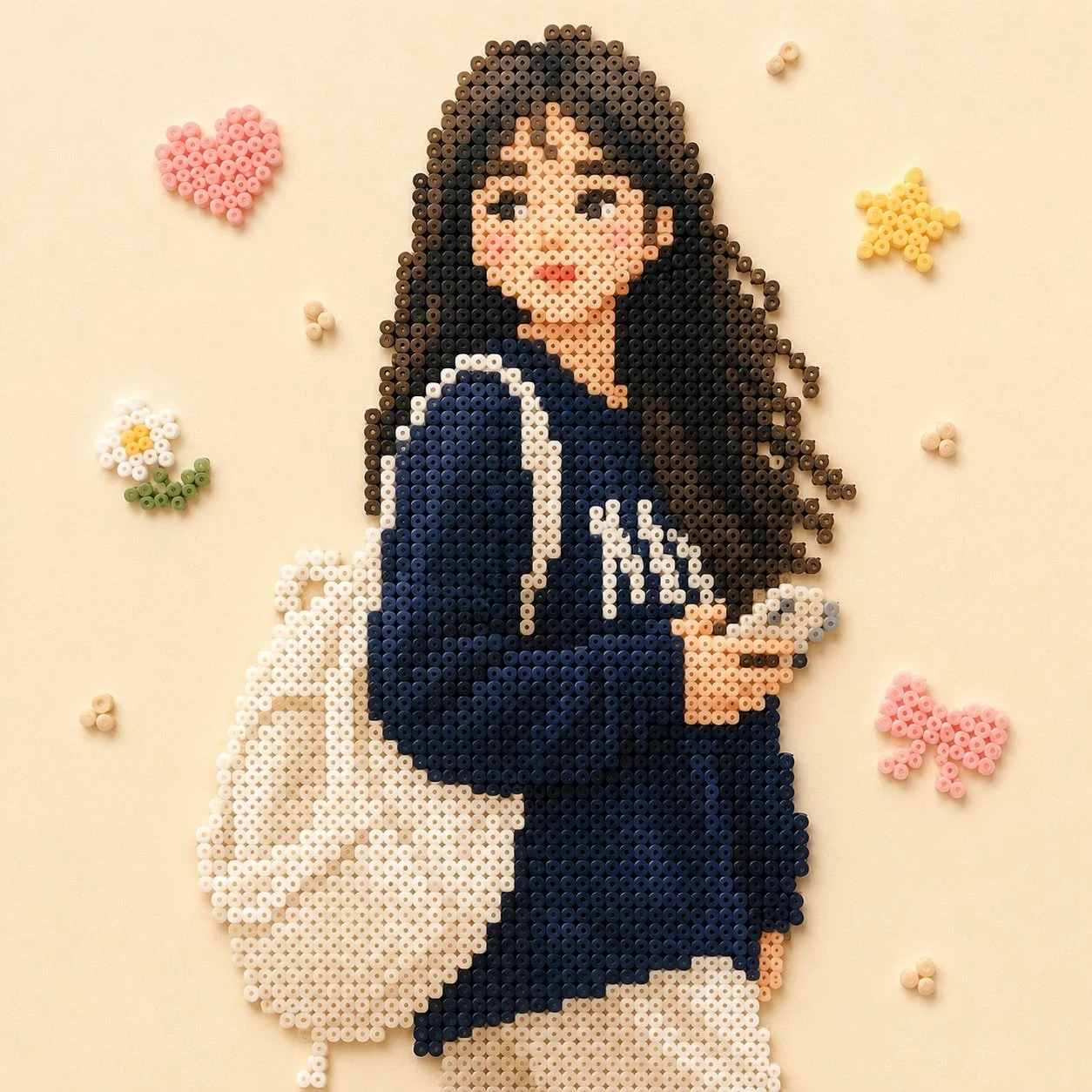
프롬프트
以拼豆风格绘制出图片中的主体人物,颜色接近画面中效果,背景换成比较简单的装饰,整体画面温馨
참고 이미지
이 AI 이미지 프롬프트 템플릿 사용 방법
 1
1프롬프트 복사 — 템플릿의 프롬프트와 네거티브 프롬프트를 가져오세요.  2
2모델 선택 — 가장 잘 맞는 추천 AI 모델을 고르세요.  3
3생성 — 클릭 한 번으로 스튜디오를 열어 결과를 만드세요.
관련 템플릿

Retro PC-88 8-Bit Anime Portrait
Create a portrait image of Retro Pc 88 8 Bit Anime Portrait. Style: photorealistic. Composition: balanced and well-framed. Lighting: natural with cinematic mood. Category: portrait. Reference: retro-pc-88-8-bit-anime-portrait-24126.

Intense Artistic Glitch Transformation
Create a cinematic image of Intense Artistic Glitch Transformation. Style: photorealistic. Composition: balanced and well-framed. Lighting: natural with cinematic mood. Category: cinematic-video. Reference: intense-artistic-glitch-transformation-20830.
Perler Bead Style Character Illustration
Create a anime image of Perler Bead Style Character Illustration. Style: photorealistic. Composition: balanced and well-framed. Lighting: natural with cinematic mood. Category: anime. Reference: perler-bead-style-character-illustration-20022.

Clumsy MS Paint Redraw
Create a creative image of Clumsy Ms Paint Redraw. Style: photorealistic. Composition: balanced and well-framed. Lighting: natural with cinematic mood. Category: photography. Reference: clumsy-ms-paint-redraw-18777.

Vintage Rubber Hose Cartoon Transformation
Transform the person in the photo into a vintage 1930s–1940s cartoon character (style) inspired by classic “rubber hose animation” styles such as Betty Boop, Cuphead, Steamboat Willie (references), and old Fleischer Studios cartoons. IMPORTANT: Clearly preserve the identity of the person in the photo (recognizable hair, beard, glasses, face, and facial expression). Exaggerated, elastic cartoon-style body. Large black vintage pie-cut eyes. Big expressive smile. Classic white cartoon gloves. Oversized 1930s-style cartoon shoes. Thin rubber hose-style arms and legs. Thick black outlines and authentic vintage animation look. Visual Style: Black and white or vintage sepia tones. Aged old-film texture. Small grain, scratches, and imperfections like old film reels. Simple cel-animation style shading. Caricatured but natural proportions. Background inspired by the original environment of the photo. Art Style: 1930s / 1940s cartoon animation. Rubber hose cartoon aesthetic. Vintage animation poster style. Fleischer Studios aesthetic. Cuphead-inspired vintage cartoon style. Ink outlines and exaggerated expressions. Quality: Ultra-detailed vintage cartoon. Cinematic composition. High facial likeness detail. Soft vintage lighting. Authentic retro animation feeling. Full-body character.3d:T56

Ghibli and Anime Style Photo Transformation
Create a anime image of Ghibli And Anime Style Photo Transformation. Style: photorealistic. Composition: balanced and well-framed. Lighting: natural with cinematic mood. Category: anime. Reference: ghibli-and-anime-style-photo-transformation-20040.
더 많은 프롬프트 탐색
카테고리별 AI 이미지·영상 프롬프트를 더 찾아보세요.
자주 묻는 질문
- 퍼러비즈 초상화 프롬프트는 무료로 쓸 수 있나요?
- 네, 이 프롬프트는 AI Pin Maker에서 완전히 무료이며 가입이나 결제 없이 바로 복사해 쓸 수 있습니다.
- 퍼러비즈 초상화 프롬프트로 이미지나 영상을 어떻게 생성하나요?
- 프롬프트를 복사해 주제나 스타일을 원하는 대로 바꾼 뒤 AI Pin Maker에 붙여넣으면 한 번의 클릭으로 이미지나 영상을 생성할 수 있습니다.
- 퍼러비즈 초상화 를 제 버전으로 바꿀 수 있나요?
- 물론입니다. AI Pin Maker에서 주제나 스타일, 파라미터만 바꾸면 완전히 나만의 프롬프트로 만들 수 있습니다.
- 퍼러비즈 초상화 프롬프트에는 어떤 AI 모델을 쓰는 것이 좋나요?
- 먼저 이 페이지에 표시된 추천 모델을 사용하고, 스타일이나 속도, 디테일을 바꾸고 싶다면 비슷한 이미지 또는 영상 모델도 함께 시도해 보세요.
- 퍼러비즈 초상화 프롬프트로 생성하기 전에 무엇을 수정해야 하나요?
- 주제, 장면, 화면 비율, 레퍼런스 이미지, 그리고 브랜드나 창작 방향에 맞춰야 하는 스타일 표현을 먼저 조정하세요.