
SEEDANCE 2.0 HENSHIN
Seedance 2.0 Henshin Prompts: 3 Tested Transformations
By the AI Pin Maker Editorial Team · Published 2026-07-06
Summarize With AI
The henshin trend is the most copied Seedance 2.0 format right now: you upload one photo of yourself, and the model turns you into a knight, an anime protagonist, or whatever else your feed rewards — in one continuous transformation shot. Trend explainers from Picsart and film-industry write-ups at No Film School both point at the same wave; what they don't give you is the exact prompts.
Three transformation prompts, tested end to end. Below are the three seedance 2.0 henshin prompts in full — copy them exactly as they are, see the real clips they produced, and use the fill-in-the-blank template to make your own version.
What you need: one good photo
You need one photo: front-facing, even light, head and shoulders in frame. That framing is what keeps the transformation locked to your face instead of drifting. The example below uses a fictional AI-generated portrait as the source — swap in your own photo and you get the same result:
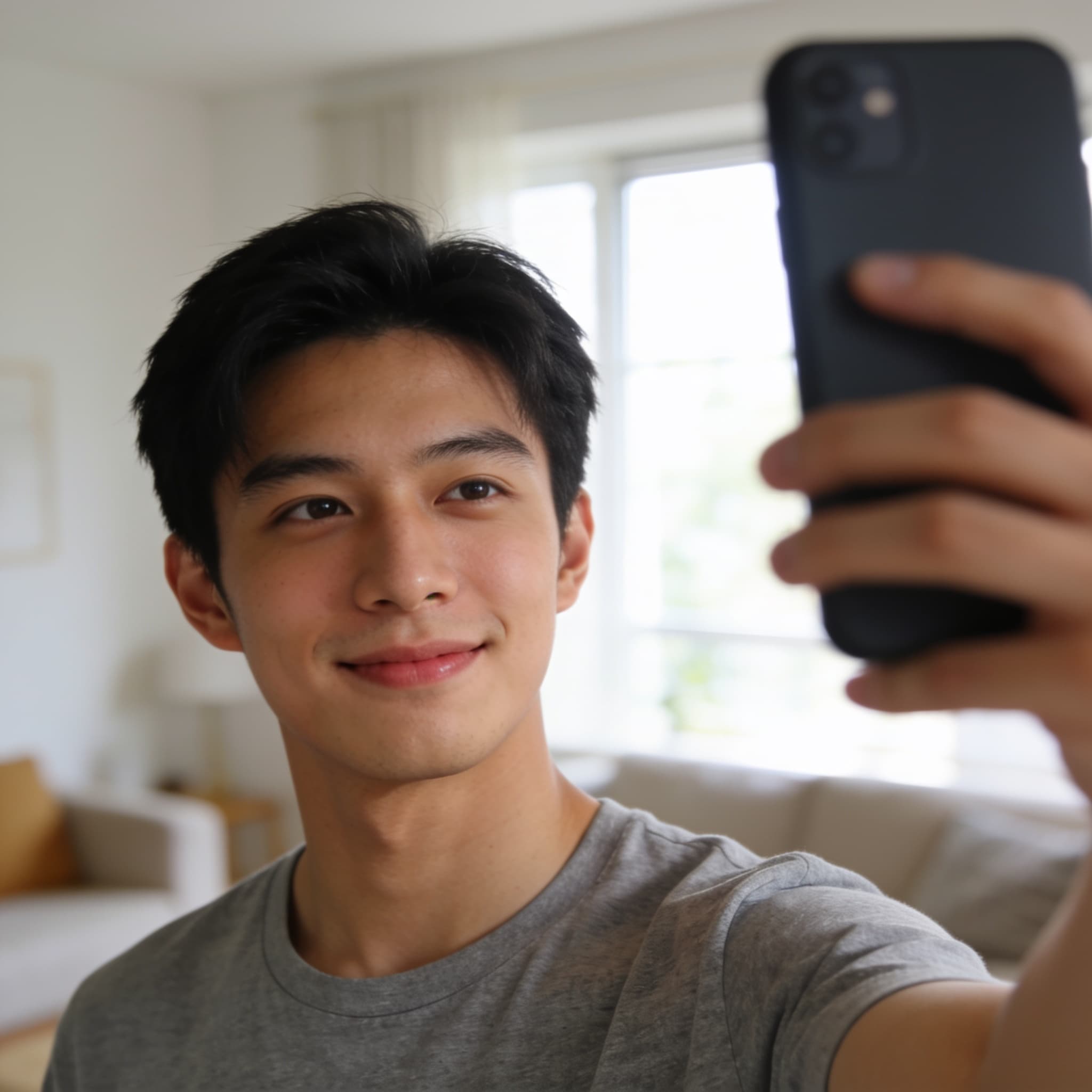
Each prompt on this page runs on the seedance-2.0-fast tier and takes about 2–3 minutes from submit to finished clip. Before you paste one, decide which switches you want on: 5-second length, 720p, vertical 9:16 (the native aspect for TikTok and Reels), and audio if you want the sound baked into the same generation instead of added in editing.
That speed matters: the henshin format lives or dies on iteration, and a two-minute loop means you can afford to fix what the first pass gets wrong instead of settling for it.
Prompt 1: Knight armor transformation
The classic henshin: energy sweep, armor forming piece by piece, heroic finish. Copy it whole, then swap the details:
@Image1 is the person. Keep his face identical throughout. He stands up,
raises his right fist to chest height, and a ring of golden light sweeps
upward from his feet: his grey t-shirt transforms piece by piece into
ornate silver knight armor with glowing blue engravings, hair lifting in
the energy wind. Camera: one continuous push-in from medium shot to
close-up as the transformation completes. Finish on a heroic stance,
armor glinting. Anime-inspired lighting flares, epic orchestral hit at
the transformation beat.The first frame should look like this: same face, same clothes, same room as the source photo, with the subject standing naturally — no uncanny re-pose, no wardrobe drift before the transformation even starts. If your first frame already shows drift in hairstyle or room, fix the source photo before you touch the prompt.
Three things in this prompt do the heavy lifting. "Keep his face identical throughout" is the identity anchor — leave it out and the model treats your face as a suggestion. "Piece by piece" forces a visible transformation arc instead of a hard cut. And naming the camera move ("one continuous push-in") stops the model from inventing three random angles in five seconds.
Prompt 2: Anime style flip
The style flip is harder than the armor swap because you're asking the model to change the entire rendering style mid-shot while keeping the person recognizable:
@Image1 is the person; keep his facial identity recognizable while the
art style shifts. The living room freezes, colors drain to pencil-sketch
lines, then a wave of cel-shaded anime color floods back over him: he
becomes a 2D anime protagonist with sharp ink outlines, dramatic spiky
hair highlights, and a school-uniform jacket flaring in the wind.
Camera: quick orbit with speed lines during the style flip, end on a
classic anime hero pose with a slow wink. Upbeat J-rock sting synced to
the flip.In our run the model committed fully: clean ink outlines, cel shading, even the manga speed lines around the orbit — details we asked for and actually got. The trick is the two-stage bridge ("colors drain to pencil-sketch lines, then a wave of cel-shaded color floods back"). Prompting the style change as a process gives the model a path; prompting it as a before/after usually gets you a jarring jump cut.
Prompt 3: Sorcerer reveal
The moody one:
@Image1 is the person. Keep his face identical. He extends one hand
toward the camera; floating runes ignite around his arm, and dark violet
mist wraps him from the shoulders down, reforming his clothes into a
hooded sorcerer robe with ember-lit trim. His eyes catch a brief violet
glow. Camera: low-angle slow dolly-in, particles drifting past the lens,
thunder rumbling under a deep choir swell. End with him lowering the
hood, calm and confident.Notice one behavior: the reference locks the person, not the scene — we never asked to leave the living room, and the model rebuilt the environment into a torch-lit stone hall on its own. If you want to keep your own room, say so explicitly in the prompt.
What the reference actually locks
Across all five runs, one pattern held: the reference image locks the subject, not the scene. Ask for a mood the source photo can't support — a sorcerer, thunder, drifting particles — and Seedance 2.0 will quietly rebuild the entire environment around your locked subject. If you want the transformation to happen in your own room, you have to say so explicitly ("the living room stays unchanged behind him"). If you don't care, let the model relocate you; it usually picks something more dramatic than your sofa.
Reference locking works on objects too: this fox enamel pin from our own studio.
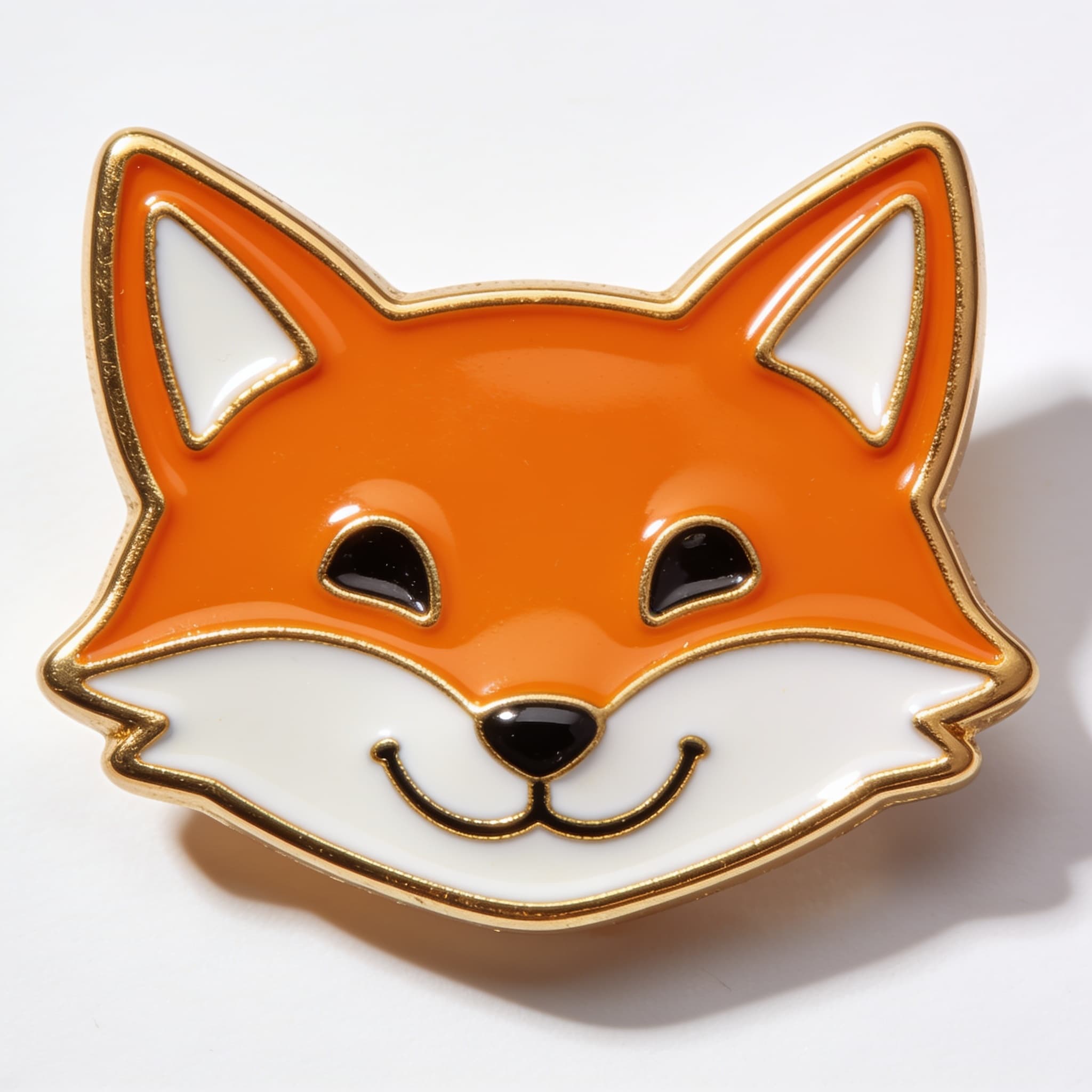
Even with a deliberately lazy prompt ("a cool cinematic video of an enamel pin, trending, 4k"), the pin's design survived: gold outlines, enamel colors, proportions all intact. The lazy prompt cost us narrative — we got a generic macro orbit instead of a story — but not the product. The reference lock is strong enough to carry sloppy prompting; what sloppy prompting loses is direction, which is precisely what the three prompts above supply.
Generated clips can carry unexpected brand elements on their own — the model once added a recognizable laptop logo to a scene unprompted. Worth a scan before you post, especially for anything commercial.
The henshin prompt template
All three prompts are one skeleton with four slots. Fill the brackets and you have your own version:
@Image1 is the person. Keep [his/her] face identical throughout.
[TRIGGER ACTION — stand up / raise a fist / extend a hand toward camera].
[TRANSFORMATION PROCESS — what sweeps over them, what the clothes become,
one visible stage at a time].
Camera: [ONE named move — continuous push-in / quick orbit / low-angle
dolly-in].
End on [FINAL POSE — heroic stance / hero pose with a wink / lowering
the hood].
[SOUND — orchestral hit / J-rock sting / thunder under a choir swell]
synced to the transformation beat.
Keep one camera move, one transformation process, and one final pose per five-second clip. Every henshin clip that fails does so by cramming three ideas into a window that fits one.
Use assets you own: a 2-minute pre-publish check
Everything on this page runs through the same pipeline that powers the Seedance 2.0 studio on AI Pin Maker. The studio opens on the Fast tier — the free entry point — with the reference upload, aspect ratio, and audio toggle exposed as controls. Upload a photo the way described in the setup section above (front-facing, even light, head and shoulders), paste a prompt, and your first draft is two minutes out. If you'd rather start from a still you already have, the image to video tool takes a single frame as the starting point.
One design choice is worth explaining, because it doubles as the cleanest way to run this test yourself: the selfie we used for every generation on this page is a fictional AI-generated portrait, not a photo of a real person. Reference lock is precise — whichever face you upload is the face that shows up in the output, at the same fidelity we measured across all five runs — so the simplest way to keep every result zero-risk is to only feed the model a photo of yourself or a fictional character you own the rights to. Do that, and the rest of the workflow — role assignment, the transformation prompts above, the audio toggle — just works without a second thought.
Before you publish anything commercial, give the clip the same 30-second scan we described above: the reference-lock section on this page caught the model adding an unrequested brand logo on its own, and that habit catches it every time.
Past your own reference material, the model's guardrails follow ByteDance's platform terms — those decide what the tool will and will not generate no matter what you upload, so check the current terms before you build anything beyond a personal clip.
If a run does drift, the debugging order is: source photo first (resolution and lighting), identity anchor second (the "keep the face identical" line), scope third (one transformation, one camera move, one pose). Three steps — photo, anchor line, scope — is all it takes.
FAQ
What photo works best as the henshin source?
Front-facing, even light, head and shoulders filling most of the frame — like the test selfie above. Harsh side shadows and tiny faces in group shots are the two most common causes of identity drift.
Do I need to write "keep the face identical" every time?
Yes — it is the single highest-impact line. Without it, the model treats the reference as a style suggestion rather than a lock.
How long does one henshin clip take to generate?
Expect 118 to 150 seconds on the Fast tier for a 5-second, 720p, 9:16 clip with audio.
Why did my background change when I didn't ask for it?
Because the reference locks the subject, not the scene. If the mood you describe doesn't fit your room, the model rebuilds the environment. Pin the background explicitly if you want it kept.
Can I do the transformation in landscape instead of vertical?
Yes — set 16:9 instead of 9:16. Vertical is the default here because the henshin trend lives on TikTok and Reels, where 9:16 is native.
Does audio come with the clip?
On by default in our pipeline: the orchestral hit and thunder in the prompts above were generated, not added in editing. Turn audio off if you plan to use a trending platform sound instead.
Can I use a photo of a celebrity or an anime character I don't own?
Use your own face, or a character you own the rights to. Reference lock works on any face you upload with the same precision — so whose face appears in the clip is entirely your call to make.
Your turn
One selfie, one prompt from this page, two minutes: that's the whole cost of your first henshin clip. Start with the knight — it's the most forgiving — swap the four template slots once you've seen your face hold, and post the vertical cut. Open the Seedance 2.0 studio and run it now; the trend won't wait, and your transformation is three copy-pastes away.
Need more ready-to-copy ideas? Browse the Seedance 2.0 prompt gallery and launch your next video from AI Pin Maker.