
Text to Image
Japanese Vacuum Design Sketch Board — AI Image Prompt
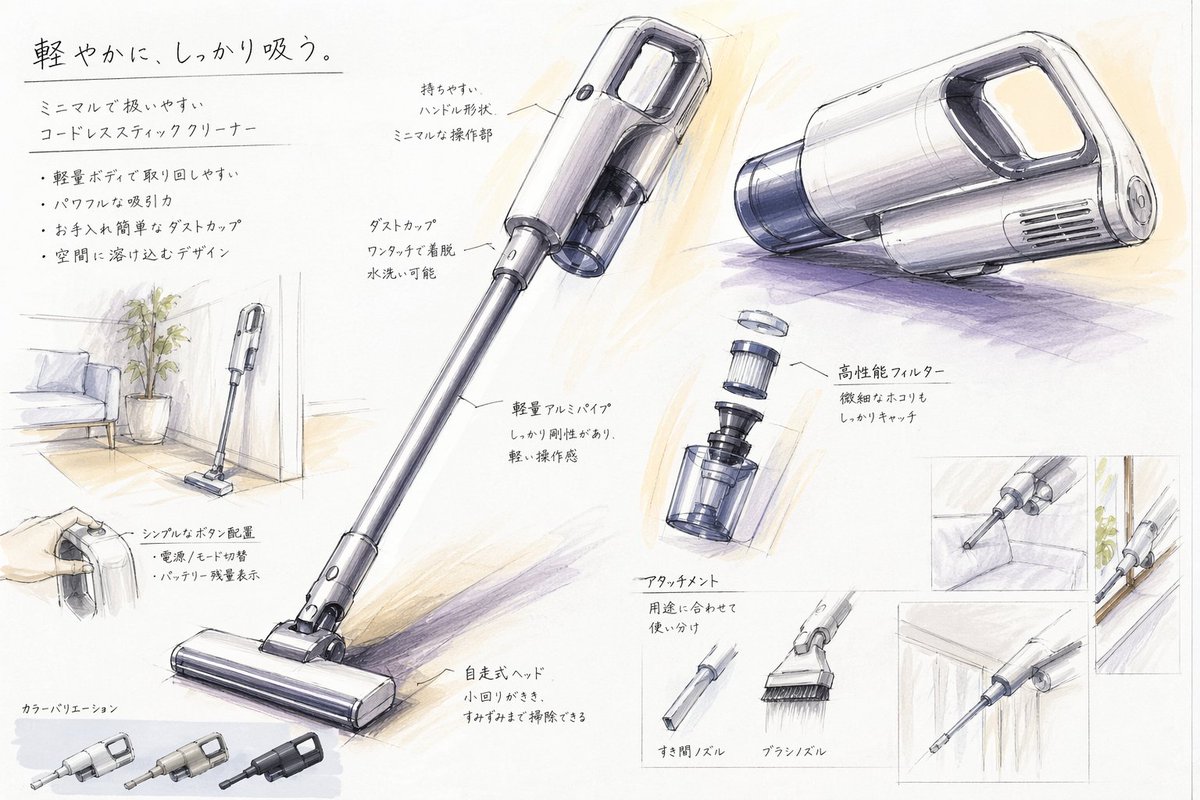
A hand-rendered industrial design presentation sheet for a minimalist cordless stick vacuum, useful for generating concept boards, portfolio pages, or product proposal visuals. - AIPinMaker
Prompt
{"type":"industrial design presentation board","style":"hand-rendered product concept sketch, marker and colored pencil rendering on white paper, clean Japanese product design school presentation aesthetic, light gray linework with soft purple and warm beige shading","subject":{"product":"minimal cordless stick vacuum cleaner","headline":"{argument name=\"headline text\" default=\"軽やかに、しっかり吸う。\"}","subheadline":"ミニマルで扱いやすい コードレススティッククリーナー","features":["軽量ボディで取り回しやすい","パワフルな吸引力","お手入れ簡単なダストカップ","空間に溶け込むデザイン"],"color":"{argument name=\"product color\" default=\"pearl white and smoky transparent gray\"}","materials":"matte plastic body, translucent dust cup, metallic aluminum pipe"},"layout":{"orientation":"landscape presentation sheet","sections":[{"title":"hero product views","position":"center and upper right","count":3,"labels":["full stick vacuum in three-quarter view","main body perspective view from upper center","main body side perspective view from upper right"]},{"title":"feature callouts","position":"around the hero views","count":7,"labels":["持ちやすい ハンドル形状 ミニマルな操作部","ダストカップ ワンタッチで着脱 水洗い可能","軽量アルミパイプ しっかり剛性もあり、軽い操作感","高性能フィルター 微細なほこりもしっかりキャッチ","シンプルなボタン配置 電源 / モード切替 バッテリー残量表示","自走式ヘッド 小回りがきき、すみずみまで掃除できる","アタッチメント 用途に合わせて使い分け"]},{"title":"usage and context sketches","position":"left side and right side insets","count":5,"labels":["vacuum standing in a living room corner beside a potted plant and sofa","hand holding the handle close-up","crevice nozzle cleaning sofa gap","vacuum body stored along a wall or narrow space","crevice nozzle cleaning under cabinet or edge"]},{"title":"attachment accessories","position":"lower center-right","count":2,"labels":["すき間ノズル","ブラシノズル"]},{"title":"exploded component view","position":"mid-right","count":1,"labels":["filter and dust cup separated vertically"]},{"title":"color variations","position":"bottom left","count":3,"labels":["light silver","warm gray","matte black"]}],"text_language":"Japanese","composition":"large central full-length vacuum diagonally across the page, supporting perspective renderings and small inset usability sketches, generous white margins, handwritten annotations with leader lines"},"rendering":{"line_quality":"loose but precise industrial sketch lines","shading":"soft marker gradients and pencil cross-shading","paper":"slightly textured white sketchbook paper","mood":"premium, approachable, student concept board meets professional product proposal"}}3c:Tb89,{"type":"industrial design presentation board","style":"hand-rendered product concept sketch, marker and colored pencil rendering on white paper, clean Japanese product design school presentation aesthetic, light gray linework with soft purple and warm beige shading","subject":{"product":"minimal cordless stick vacuum cleaner","headline":"{argument name=\"headline text\" default=\"軽やかに、しっかり吸う。\"}","subheadline":"ミニマルで扱いやすい コードレススティッククリーナー","features":["軽量ボディで取り回しやすい","パワフルな吸引力","Prompt breakdown
- Subject
- minimal cordless stick vacuum cleaner with pearl white and smoky transparent gray coloring, matte plastic body, translucent dust cup, metallic aluminum pipe, plus Japanese headline 軽やかに、しっかり吸う。 and subheadline ミニマルで扱いやすい コードレススティッククリーナー
- Style
- hand-rendered product concept sketch using marker and colored pencil on white paper, featuring light gray linework and soft purple and warm beige shading in a clean Japanese design school aesthetic
- Composition
- landscape presentation sheet with large central full-length vacuum positioned diagonally, three hero views, seven feature callouts with leader lines, five usage sketches in insets, two attachment accessories, one exploded component view, three color variations, and generous white margins
- Mood
- premium yet approachable, blending student concept board with professional product proposal
Remix ideas
- change product color to matte black and update the three bottom swatches accordingly
- replace one usage sketch with a narrow Japanese genkan entryway storage scene
- add a fourth hero view showing the vacuum mid-disassembly for filter access
Reference images
How to use this AI Image prompt template
 1
1Copy the prompt — grab this template’s prompt and negative prompt.  2
2Pick a model — choose a recommended AI model for the best match.  3
3Generate — open the studio with one click and create your result.
Related templates
Fitness SaaS Landing Page UI
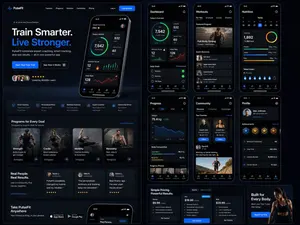
Design a modern, high-end fitness app (app type) landing page and product UI for a brand called PulseFit (brand name). Create a clean web design mockup that looks like a real SaaS fitness platform and mobile companion app. The design should feel premium, motivating, and easy to use, with a polished UI/UX style similar to top-tier health and wellness apps. Include: - A hero section with bold headline, short subheadline, strong call-to-action button, and app preview - Dashboard UI showing daily activity, calories burned, workout streak, heart rate, step count, and progress rings - Workout program cards for strength, cardio, mobility, and recovery - Nutrition tracking section with macro breakdown and water intake - Progress charts and analytics widgets - Trainer/community section with profile cards and testimonials - Pricing section and download/app store callout - Mobile app screens shown alongside the web design for a cohesive product ecosystem Style direction: - Sleek, minimal, modern interface - Premium fitness brand aesthetic - Smooth spacing, strong hierarchy, rounded cards, soft shadows - Dark mode UI with energetic accent colors like electric blue, neon green, or vibrant orange - Crisp typography, realistic charts, polished buttons, beautiful onboarding feel - Highly detailed, dribbble-worthy, startup-quality product design - Realistic UX case study presentation, not a cartoon or illustration Composition: - Full website homepage mockup - Multiple UI sections visible in one polished presentation - Slight perspective or straight-on product showcase - Clean background with subtle gradients and professional lighting - Ultra-detailed, sharp text rendering, visually balanced layout Output: A stunning, realistic UI/UX design concept for a fitness app website and dashboard that looks ready for development. Make it look like a real Figma product design presentation for a premium startup.

Pastel Running App UI with Sloth Mascot
{"type":"mobile fitness app UI mockup","style":"clean modern pastel app design, soft beige and warm white surfaces, muted sage green accents, rounded cards and buttons, subtle shadows, thin minimalist line icons, friendly playful branding with a sloth mascot, dribbble-style presentation on a dark brown dotted background","theme":"running tracker app","layout":{"device_count":3,"arrangement":"three tall smartphone screens side by side, evenly spaced, front view","background":"very dark brown with a faint evenly spaced dot grid","screens":[{"position":"left","screen_type":"home dashboard","header":{"greeting":"Good morning, Runner! 👋","left_icon":"none","right_icon":"notification bell"},"hero_card":{"headline":"Ready for a great day?","subcard_text_line_1":"Every step forward is a win.","subcard_text_line_2":"Let's make it count. 🌱","illustration":"cute sloth wearing a cream headband and mint-green workout outfit, standing and waving inside the card on the right"},"sections":[{"title":"This Week","position":"upper middle","count":3,"labels":["Runs","Distance","Time"],"values":["3","12.6 km","1h 45m"],"presentation":"single rounded stats card with three equal columns and pale green circular icons"},{"title":"NEXT GOAL","position":"middle lower","count":1,"labels":["20 km this month"],"values":["63%"],"presentation":"rounded progress card with green progress bar and small waving sloth illustration on the right"},{"title":"Recent Activity","position":"lower","count":1,"labels":["Recent Activity"],"presentation":"top edge of another rounded card visible, cropped by the bottom navigation"}],"bottom_nav":{"count":4,"labels":["Home","Run","Progress","Profile"],"active":"Home"}},{"position":"center","screen_type":"run summary","header":{"left_icon":"back chevron","center_text":"Great job!","subtext":"You did it. Time to celebrate. 🎉","right_icon":"share"},"hero_illustration":"cute sloth wearing a headband, mint athletic outfit, and a gold medal, both arms raised in celebration","stats_row":{"count":3,"labels":["DISTANCE","TIME","PACE"],"values":["5.00km","32:15","6:27"],"presentation":"three rounded statistic pills"},"achievement_card":{"count":1,"title":"New Personal Best! 🌟","subtitle":"You shaved 1:12 off your previous 5K.","icon":"small gold medal badge"},"table_section":{"title":"Splits","count":2,"columns":["KM","PACE","TIME"],"rows":[["1","6:35","6:35"],["2","6:23","12:58"]],"presentation":"rounded white table card with light dividers"}},{"position":"right","screen_type":"run goal setup","header":{"left_icon":"close x","center_text":"Time to run!","subtext":"You've got this. We'll take it slow. 🦥","right_icon":"settings gear"},"goal_visual":{"type":"circular progress selector","top_label":"CHOOSE A GOAL","main_value":"5.00","unit":"kilometers","ring":"thick partial sage-green arc on a pale beige circle","illustration":"small sloth stretching on the upper-right edge of the circle"},"goal_options":{"count":4,"labels":["2 km","5 km","10 km","Half"],"active":"5 km"},"primary_cta":{"label":"Start Run","style":"large rounded sage-green button"},"secondary_action":{"label":"Just Track","icon":"location pin"},"bottom_nav":{"count":4,"labels":["Home","Run","Progress","Profile"],"active":"Run"}}]}}
Dark AI Coding Dashboard UI
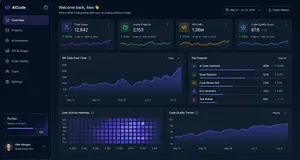
{ "type": "dark SaaS analytics dashboard UI", "product": { "brand": "{argument name=\"brand name\" default=\"AICode\"}", "theme": "dark navy blue glassmorphism interface with subtle gradients, soft glow, rounded cards, thin borders, modern developer-tool aesthetic" }, "canvas": { "aspect_ratio": "16:9", "background": "deep midnight blue with faint vignette and soft radial lighting" }, "layout": { "structure": "left sidebar plus main content area", "sections": [ { "title": "Sidebar", "position": "left", "count": 8, "labels": ["AICode", "Overview", "Projects", "AI Assistants", "API & Usage", "Code Quality", "Team", "Settings"], "details": "logo at top, Overview selected with purple highlight, lower subscription card showing Pro Plan, renews in 12 days, horizontal progress bar at 75%, user profile at bottom with avatar, {argument name=\"user name\" default=\"Alex Morgan\"}, and email alex@morgan.dev" }, { "title": "Header", "position": "top main area", "count": 4, "labels": ["Welcome back, Alex 👋", "Here's what's happening with your AI coding platform today.", "May 12 – Jun 12, 2024", "Export Report"], "details": "large greeting on left, date range picker and export button on right" }, { "title": "Metric cards", "position": "top row under header", "count": 4, "labels": ["Total Users", "Active Projects", "API Calls", "Code Quality Score"], "values": ["12,842", "2,153", "1.28M", "876"], "details": "each card has a small colored icon, large main value, comparison text vs Apr 12 – May 12, 2024, positive change percentages 14.6%, 8.3%, 23.7%, 5.9%, and a miniature line chart at the bottom; colors are purple, green, amber, and blue" }, { "title": "Main analytics panels", "position": "middle and bottom rows", "count": 4, "labels": ["API Calls Over Time", "Top Projects", "User Activity Heatmap", "Code Quality Trends"], "details": "API Calls Over Time is a wide area chart with Daily dropdown and rising purple line ending near 250K; Top Projects is a ranked list of 5 items with progress bars and percentage changes; User Activity Heatmap is a 7-row weekly heatmap with hour labels from 12 AM to 9 PM; Code Quality Trends is a line chart with Weekly dropdown and smooth upward purple trend from about 70 to low 90s" }, { "title": "Top Projects list", "position": "middle right panel", "count": 5, "labels": ["AI Code Assistant", "Smart Refactor", "Code Review Bot", "Doc Generator", "Test Builder"], "values": ["485K", "321K", "214K", "132K", "98K"], "details": "green positive deltas for first four items 12.4%, 8.7%, 3.1%, 6.8%, and red negative delta -1.2% for Test Builder; each row has a colored square icon and thin horizontal progress bar" } ] }, "style": { "visual_language": "premium fintech and AI product design mockup", "rendering": "crisp high-fidelity UI mockup, subtle shadows, neon edge lighting, polished charts, clean sans-serif typography", "primary_accent": "{argument name=\"accent color\" default=\"electric purple\"}", "secondary_accents": ["emerald green", "amber yellow", "cyan blue"], "density": "information-rich but spacious, balanced grid, highly legible" } }

4-Panel SaaS Ad Banner Variations
{ "type": "4-panel ad banner variation grid", "product": { "name": "{argument name=\"product name\" default=\"HP BOOSTER\"}", "subtitle": "AI搭載ノーコード・サイトビルダー", "logo": "blue and green angle brackets with a diamond" }, "common_elements": { "device_mockups": "laptop and smartphone (desktop monitor in bottom-left panel) displaying a website with a city skyline, text '未来を、あなたのビジネスに。', and a blue '今すぐ始める' button" }, "layout": { "grid": "2x2", "panels": [ { "position": "top-left", "theme": "dark blue gradient with tech lines", "headline": "{argument name=\"main headline 1\" default=\"最短10分で、プロ品質のホームページを。\"}", "sub_headline": "AIがデザイン・構成・文章まで自動生成", "badge": "gold laurel wreath with text '導入企業続々増加中!'", "icon_count": 5, "icon_labels": ["AIが自動で作成・最適化", "ノーコードで自由に編集", "デザイン自由プロ品質", "SEO対策もおまかせ", "スマホ対応高速表示"], "bottom_bar": "teal background, yellow button '今すぐ無料で始める ▶'" }, { "position": "top-right", "theme": "white and light gray", "headline": "{argument name=\"main headline 2\" default=\"AIで、誰でも、カンタンに。\"}", "pre_headline": "ホームページ制作の常識を、もっとシンプルに。", "badge": "teal circle with text '専門知識・制作スキル不要!'", "icon_count": 4, "icon_labels": ["AIが自動で作成・最適化", "ノーコードで自由に編集", "スマホ対応・高速表示", "SEO対策もおまかせ"], "bottom_bar": "teal background, yellow button '無料でスタートする ▶'" }, { "position": "bottom-left", "theme": "bright yellow with comic-book action lines", "headline": "{argument name=\"main headline 3\" default=\"自分でカンタン!最短10分でホームページ完成!\"}", "pre_headline": "もう、制作会社に頼まない!", "badge": "pink circle with text 'AIがすべて自動で作成!'", "icon_count": 6, "icon_labels": ["AI自動生成", "ノーコード", "デザイン自由", "SEO対策", "スマホ対応", "高速表示"], "call_to_action": "pink pill button '無料ではじめる!▶'" }, { "position": "bottom-right", "theme": "dark gray and black", "headline": "{argument name=\"main headline 4\" default=\"成果につながるホームページを。\"}", "pre_headline": "本気で集客したいなら、", "badge": "gold laurel wreath with text '導入企業続々増加中!'", "icon_count": 4, "icon_labels": ["AIが設計から文章まで自動生成", "ノーコードで自由にカスタマイズ", "SEO・スピード・セキュリティ対応", "集客・売上UPを徹底サポート"], "bottom_bar": "gold background, dark blue button '今すぐ無料で始める ▶'" } ] } }
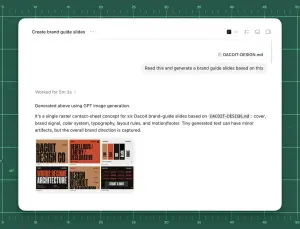
AI Brand Guide Generation UI
Goal: Create a polished screenshot-style UI mockup showing an AI chat or agent workspace successfully generating brand guide slides from a markdown file. Canvas: 4:3 landscape composition, approximately 1024×768. Background is a dark green cutting-mat grid with ruler markings around the top and left edges, thin mint grid lines, measurement numbers from 5 to 50, small tick marks, and a few faint diagonal guide lines. Center a large rounded white app window with a soft shadow, leaving the green grid visible as a border. App window layout: The white panel has rounded corners and a minimal toolbar. At top left, show the title text “Create brand guide slides” followed by a three-dot menu. At top right, include exactly 4 small toolbar icons: a dark square icon with a dropdown chevron, a list/settings icon, a small rectangle icon, and a split-panel icon. A thin horizontal divider runs under the toolbar. Near the upper right of the chat area, show a rounded attachment chip labeled “DACOIT-DESIGN.md”, then below it a light gray user message bubble reading “Read this and generate a brand guide slides based on this”. Add a subtle vertical scrollbar on the far right inside the window. Main response content: In the left-middle area, show a muted status line “Worked for 5m 3s (processing time) ›”. Below a divider, show the response text: “Generated above using GPT image generation.” Then a paragraph: “It’s a single raster contact-sheet concept for six Dacoit brand-guide slides based on `DACOIT-DESIGN.md`: cover, brand signal, color system, typography, layout rules, and motion/footer. Tiny generated text can have minor artifacts, but the overall brand direction is captured.” Use clean modern sans-serif UI typography, black and gray text, generous spacing. Embedded generated image thumbnail: Under the paragraph, place one rounded-corner thumbnail preview of a six-slide brand-guide contact sheet. It must contain exactly 6 mini slide panels in a 3×2 grid. The style of the mini slides is gritty editorial branding with tan, burnt orange, black, cream, and red. Count and depict the six visible slide topics: 1) cover slide with huge text “DACOIT DESIGN CO”, 2) brand signal slide with “REBELLIOUS / EARTHY / DECLARATIVE”, 3) color system slide with vertical swatches labeled roughly TAN, RED, INK, BLACK, SMOKE, 4) typography slide with large words “WORDS BECOME ARCHITECTURE”, 5) layout rules slide with “DESIGN WITHOUT APOLOGY”, 6) motion/footer slide with dark background and “START A RIOT”. The tiny text may be imperfect but the large labels should be recognizable. Visual style: High-fidelity product screenshot, crisp white interface, subtle shadows, realistic browser/app chrome, minimal monochrome icons, sharp readable text, clean spacing. The background should feel like a design workspace or drafting mat. Customizable source/brand details: Use Create brand guide slides (project title) as the window title if changed. Use DACOIT-DESIGN.md (file name) for the attachment chip and paragraph reference. Use Dacoit (brand name) for the brand guide subject. Use Read this and generate a brand guide slides based on this (user request) as the message bubble text. Constraints: Do not add people, hands, browser address bars, extra popups, watermarks, or unrelated UI. Keep exactly one app window, one attachment chip, one user message bubble, one status line, one response paragraph block, and one embedded thumbnail containing exactly six mini slides.37:Te4e,Goal: Create a polished screenshot-style U

JSON Prompt for Architectural Product Design Catalog Layout - Nano Banana Pro AI Prompt for E-commerce Main Image
{ "reference_images": { "product_image": "UPLOADED_IMAGE", "usage_rule": "Use the uploaded image as the exact visual reference for the product’s form, proportions, materials, and overall identity. Do not redesign or reinterpret the product." }, "layout": { "canvas": { "orientation": "vertical", "aspect_ratio": "3:4", "background": "warm neutral paper-like surface" }, "structure": { "top_section": "lifestyle_hero", "bottom_section": "technical_specification" } }, "top_section": { "type": "lifestyle_product_image", "composition": { "placement": "top_center", "scale": "dominant", "margin": "generous whitespace around product" }, "environment": { "setting": "minimal architectural interior", "lighting": { "type": "natural sunlight", "direction": "angled side light", "quality": "soft but high-contrast shadows" }, "floor": "subtle concrete or stone surface", "background": "textured plaster wall" }, "rendering": { "style": "editorial lifestyle photography", "detail": "high realism", "color_grading": "warm, muted, premium" } }, "bottom_section": { "type": "technical_specification_panel", "layout": { "grid": "modular", "alignment": "clean, architectural" }, "technical_drawings": { "placement": "bottom_left_and_center", "style": "architectural line drawings", "views": [ "front view", "side view", "three-quarter cutaway or profile view" ], "projection": "orthographic", "line_style": { "color": "muted red (drawing line color) or sepia", "weight": "fine technical lines" }, "annotations": { "type": "measurement and construction callouts", "language": "neutral technical labels", "density": "minimal, editorial" } }, "materials_panel": { "placement": "bottom_right", "content": { "type": "material_swatches", "count": "3-4 (swatch count) depending on product", "format": "square or rectangular samples" }, "textures": { "source": "derived from the product materials", "examples": [ "fabric", "leather", "metal", "wood", "plastic" ] }, "labels": { "style": "small editorial captions", "tone": "technical but refined" } } }, "typography": { "style": "minimal editorial", "usage": "subtle captions, no large headlines", "color": "soft black or dark brown" }, "overall_style": { "mood": "design catalog / product design journal", "aesthetic": "architectural, premium, calm", "avoid": [ "clutter", "bold colors", "heavy branding", "overly decorative graphics" ] }, "constraints": { "do_not": [ "change product design", "invent new materials", "add logos unless present in reference", "use perspective distortion in drawings" ] }41
Explore more prompts
Browse more AI image and video prompts by category.
FAQ
- What does the main Japanese headline translate to in English?
- The headline 軽やかに、しっかり吸う。 means 'Lightly, yet sucks powerfully,' highlighting both portability and strong performance.
- Which specific attachments appear in the lower center-right section?
- The board shows the すき間ノズル crevice nozzle and ブラシノズル brush nozzle as separate accessory sketches.