
Text to Image
JSON Prompt for Architectural Product Design Catalog Layout - Nano Banana Pro AI Prompt for E-commerce Main Image — AI Image Prompt
A detailed JSON prompt for Nano Banana Pro designed to create a vertical product design catalog page. It specifies a two-section layout: a top lifestyle hero shot of an uploaded product in a minimal architectural interior, and a bottom technical specification panel featuring orthographic line drawings and material swatches, aiming for a premium, calm, and editorial aesthetic. - AIPinMaker
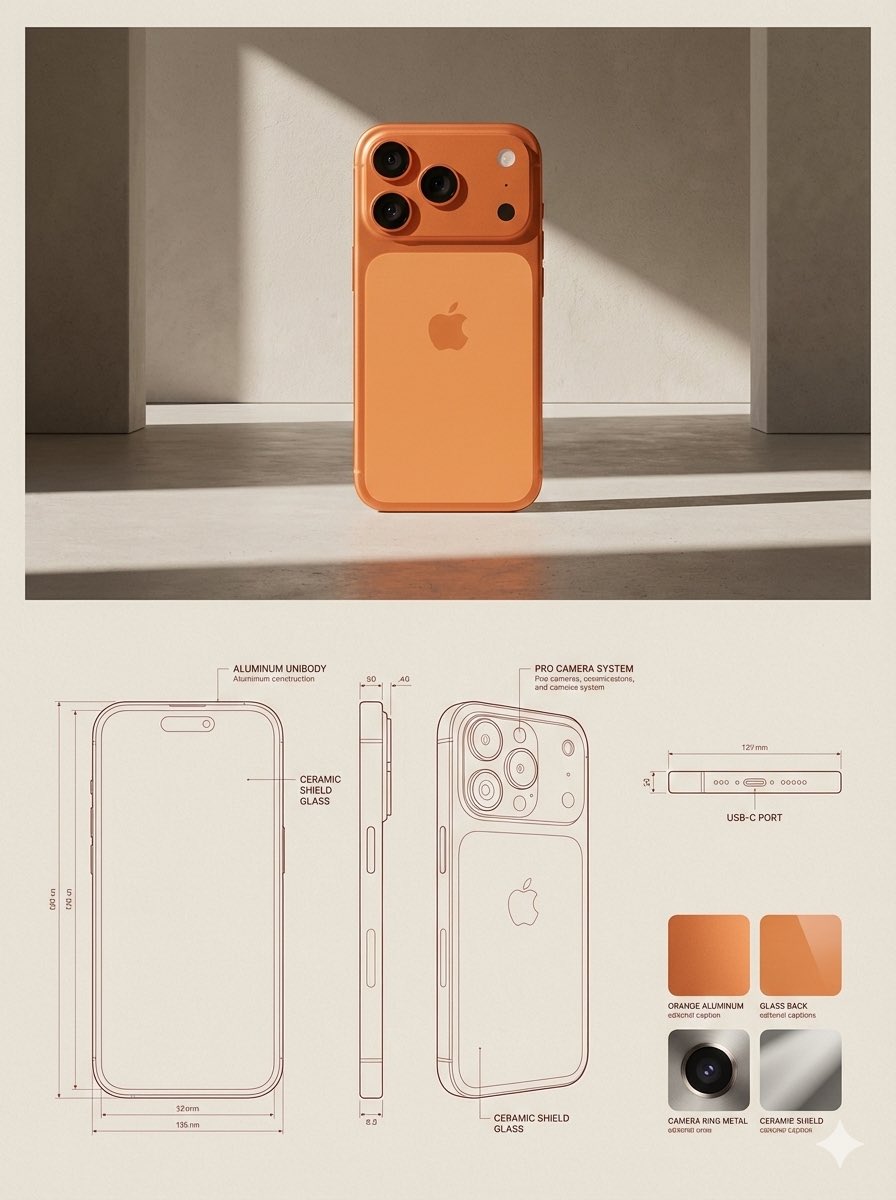
Prompt
{
 "reference_images": {
 "product_image": "UPLOADED_IMAGE",
 "usage_rule": "Use the uploaded image as the exact visual reference for the product’s form, proportions, materials, and overall identity. Do not redesign or reinterpret the product."
 },

 "layout": {
 "canvas": {
 "orientation": "vertical",
 "aspect_ratio": "3:4",
 "background": "warm neutral paper-like surface"
 },
 "structure": {
 "top_section": "lifestyle_hero",
 "bottom_section": "technical_specification"
 }
 },

 "top_section": {
 "type": "lifestyle_product_image",
 "composition": {
 "placement": "top_center",
 "scale": "dominant",
 "margin": "generous whitespace around product"
 },
 "environment": {
 "setting": "minimal architectural interior",
 "lighting": {
 "type": "natural sunlight",
 "direction": "angled side light",
 "quality": "soft but high-contrast shadows"
 },
 "floor": "subtle concrete or stone surface",
 "background": "textured plaster wall"
 },
 "rendering": {
 "style": "editorial lifestyle photography",
 "detail": "high realism",
 "color_grading": "warm, muted, premium"
 }
 },

 "bottom_section": {
 "type": "technical_specification_panel",
 "layout": {
 "grid": "modular",
 "alignment": "clean, architectural"
 },

 "technical_drawings": {
 "placement": "bottom_left_and_center",
 "style": "architectural line drawings",
 "views": [
 "front view",
 "side view",
 "three-quarter cutaway or profile view"
 ],
 "projection": "orthographic",
 "line_style": {
 "color": "{argument name="drawing line color" default="muted red"} or sepia",
 "weight": "fine technical lines"
 },
 "annotations": {
 "type": "measurement and construction callouts",
 "language": "neutral technical labels",
 "density": "minimal, editorial"
 }
 },

 "materials_panel": {
 "placement": "bottom_right",
 "content": {
 "type": "material_swatches",
 "count": "{argument name="swatch count" default="3-4"} depending on product",
 "format": "square or rectangular samples"
 },
 "textures": {
 "source": "derived from the product materials",
 "examples": [
 "fabric",
 "leather",
 "metal",
 "wood",
 "plastic"
 ]
 },
 "labels": {
 "style": "small editorial captions",
 "tone": "technical but refined"
 }
 }
 },

 "typography": {
 "style": "minimal editorial",
 "usage": "subtle captions, no large headlines",
 "color": "soft black or dark brown"
 },

 "overall_style": {
 "mood": "design catalog / product design journal",
 "aesthetic": "architectural, premium, calm",
 "avoid": [
 "clutter",
 "bold colors",
 "heavy branding",
 "overly decorative graphics"
 ]
 },

 "constraints": {
 "do_not": [
 "change product design",
 "invent new materials",
 "add logos unless present in reference",
 "use perspective distortion in drawings"
 ]
}41Prompt breakdown
- Subject
- uploaded product shown in split lifestyle and technical catalog layout
- Style
- editorial lifestyle photography combined with architectural line drawings and material swatches
- Lighting
- natural sunlight angled from the side producing soft high-contrast shadows
- Composition
- vertical 3:4 canvas with dominant top-center product placement and modular bottom specification grid
- Mood
- premium calm design catalog aesthetic on warm neutral paper-like background
Remix ideas
- switch drawing line color argument to sepia for a warmer blueprint tone
- increase materials panel to four swatches including leather and wood textures from the reference
- tighten top margins to reduce whitespace while keeping the product dominant
Reference images
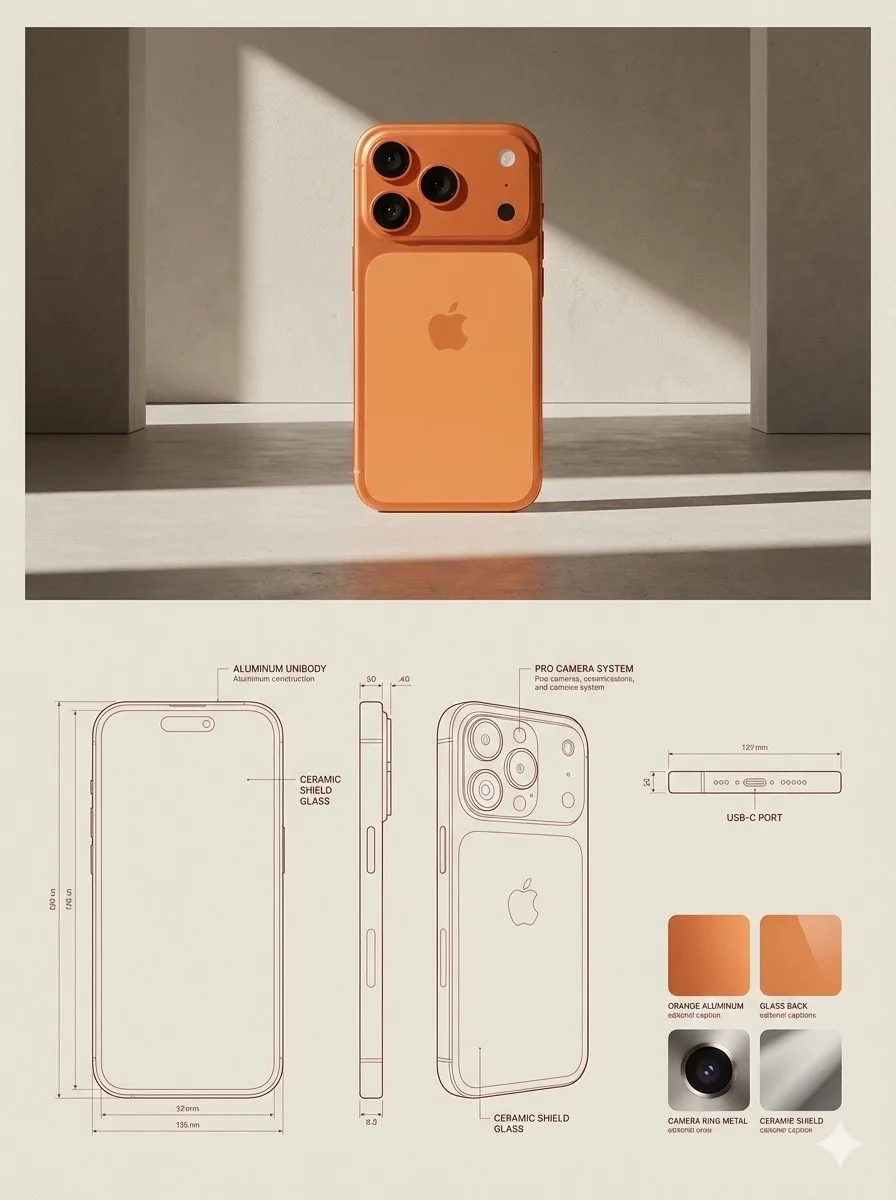
How to use this AI Image prompt template
 1
1Copy the prompt — grab this template’s prompt and negative prompt.  2
2Pick a model — choose a recommended AI model for the best match.  3
3Generate — open the studio with one click and create your result.
Related templates

Japanese Vacuum Design Sketch Board
{"type":"industrial design presentation board","style":"hand-rendered product concept sketch, marker and colored pencil rendering on white paper, clean Japanese product design school presentation aesthetic, light gray linework with soft purple and warm beige shading","subject":{"product":"minimal cordless stick vacuum cleaner","headline":"{argument name=\"headline text\" default=\"軽やかに、しっかり吸う。\"}","subheadline":"ミニマルで扱いやすい コードレススティッククリーナー","features":["軽量ボディで取り回しやすい","パワフルな吸引力","お手入れ簡単なダストカップ","空間に溶け込むデザイン"],"color":"{argument name=\"product color\" default=\"pearl white and smoky transparent gray\"}","materials":"matte plastic body, translucent dust cup, metallic aluminum pipe"},"layout":{"orientation":"landscape presentation sheet","sections":[{"title":"hero product views","position":"center and upper right","count":3,"labels":["full stick vacuum in three-quarter view","main body perspective view from upper center","main body side perspective view from upper right"]},{"title":"feature callouts","position":"around the hero views","count":7,"labels":["持ちやすい ハンドル形状 ミニマルな操作部","ダストカップ ワンタッチで着脱 水洗い可能","軽量アルミパイプ しっかり剛性もあり、軽い操作感","高性能フィルター 微細なほこりもしっかりキャッチ","シンプルなボタン配置 電源 / モード切替 バッテリー残量表示","自走式ヘッド 小回りがきき、すみずみまで掃除できる","アタッチメント 用途に合わせて使い分け"]},{"title":"usage and context sketches","position":"left side and right side insets","count":5,"labels":["vacuum standing in a living room corner beside a potted plant and sofa","hand holding the handle close-up","crevice nozzle cleaning sofa gap","vacuum body stored along a wall or narrow space","crevice nozzle cleaning under cabinet or edge"]},{"title":"attachment accessories","position":"lower center-right","count":2,"labels":["すき間ノズル","ブラシノズル"]},{"title":"exploded component view","position":"mid-right","count":1,"labels":["filter and dust cup separated vertically"]},{"title":"color variations","position":"bottom left","count":3,"labels":["light silver","warm gray","matte black"]}],"text_language":"Japanese","composition":"large central full-length vacuum diagonally across the page, supporting perspective renderings and small inset usability sketches, generous white margins, handwritten annotations with leader lines"},"rendering":{"line_quality":"loose but precise industrial sketch lines","shading":"soft marker gradients and pencil cross-shading","paper":"slightly textured white sketchbook paper","mood":"premium, approachable, student concept board meets professional product proposal"}}3c:Tb89,{"type":"industrial design presentation board","style":"hand-rendered product concept sketch, marker and colored pencil rendering on white paper, clean Japanese product design school presentation aesthetic, light gray linework with soft purple and warm beige shading","subject":{"product":"minimal cordless stick vacuum cleaner","headline":"{argument name=\"headline text\" default=\"軽やかに、しっかり吸う。\"}","subheadline":"ミニマルで扱いやすい コードレススティッククリーナー","features":["軽量ボディで取り回しやすい","パワフルな吸引力","
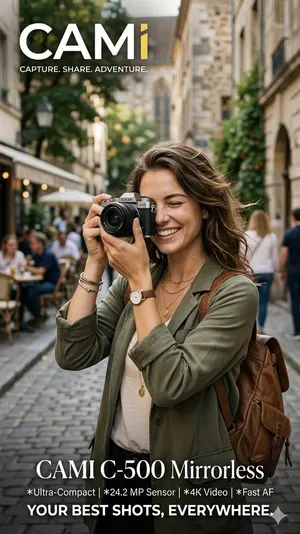
Travel Photographer Camera Advertisement
Create a creative image of Travel Photographer Camera Advertisement. Style: photorealistic. Composition: balanced and well-framed. Lighting: natural with cinematic mood. Category: photography. Reference: travel-photographer-camera-advertisement-18758.

Meta Quest 3 Exploded View Poster
Create a clean premium Japanese tech infographic poster for Meta Quest 3 (product name), centered on a vertically stacked exploded view of a white mixed-reality headset floating in space against a soft lavender-to-blue gradient background. At the top, place the Meta logo in blue followed by a large bold black sans-serif headline reading Meta Quest 3 (headline text), with a smaller Japanese tagline beneath: 「まったく新しい現実を、まったく新しい構造から。」. The central subject is a highly polished 3D product render shown as an engineering breakdown with exactly 9 numbered layers, each layer separated evenly from top to bottom and labeled with blue circular number markers on the left side from 1 to 9. The 9 visible layers are: 1) the white outer faceplate shell with three front sensor/camera openings, 2) a row of exactly 3 black tracking camera modules, 3) the main logic board with chips and a clearly visible Snapdragon XR2 Gen 2 processor graphic at the center, 4) a pair of large pancake lens assemblies with vivid purple-blue glass reflections, 5) the black internal frame chassis with openings for optics, 6) the battery/electronics bar with glowing blue accents, 7) two white articulated side strap arms, 8) a white fabric head strap loop, 9) a black soft facial interface cushion at the bottom. Add rounded rectangular annotation boxes with thin white borders and subtle transparency on both sides, each connected by fine white leader lines to the corresponding layer. There are exactly 7 feature callout boxes total: 3 on the left and 4 on the right. Left side boxes, from top to bottom, read: 「Snapdragon XR2 Gen 2」 with a chip icon and smaller Japanese body text, 「調整可能なIPD機構」 with an optics adjustment icon and smaller Japanese body text, 「精密設計されたヘッドストラップ」 with a headset strap icon and smaller Japanese body text. Right side boxes, from top to bottom, read: 「フェイスプレート」 with a simple faceplate icon and smaller Japanese body text, 「トラッキングカメラ」 with a camera icon and smaller Japanese body text, 「パンケーキレンズ」 with a dual-lens icon and smaller Japanese body text, 「高性能バッテリー」 with a battery icon and smaller Japanese body text, plus a lower-right box reading 「柔らかなフェイスインターフェース」 with a soft cushion icon and smaller Japanese body text; keep the overall visual balance elegant and symmetric. At the bottom, add a wide white rounded banner spanning most of the width. On its left side place a large bold Japanese statement in blue: 「体験は、構造から進化する。」 and below it smaller Japanese explanatory copy in black. On the right side of the banner place the blue Meta logo and the wordmark “Meta”. Use a sleek Apple-like product marketing style, ultra-sharp 3D rendering, soft studio lighting, subtle glow, precise shadows, glossy plastics, realistic materials, minimal clutter, and a high-end corporate presentation aesthetic.3b:Tc2b,Create a clean premium Japanese tech infographic poster for Meta Quest 3 (product name), centered on a vertically stacked exploded view of a white mixed-reality headset floating in space against a soft lavender-to-blue gradi

Professional Physical Product Design Board
{ "prompt": { "title": "High-End Physical Product Design Board", "trigger": "Upload a simple sketch or outline of a product. Use it to build a full, professional product design poster—the kind that wins over investors and gets featured on top design websites.", "prime_directive": { "rule": "Every shape, material, screen, and accessory must come directly from the lines and style of the uploaded sketch.", "enforcement": "Do not use standard templates. Look closely at the shape. Build a complete physical and digital world from its basic design." }, "format": { "orientation": "Horizontal", "aspect_ratio": "16:9", "layout": "Clean technical grid", "composition": "Neat, spacious, and purposeful—balancing big, beautiful images with clear technical details" }, "sections": { "01_product_header": { "label": "The Main Shot", "elements": [ "Product name (product name) in strong, clean text", "Short product goal—5 words max, sharp and clear", "Three main feeling words (e.g., Smooth / Tough / Smart (style keywords))" ] }, "02_materials_system": { "label": "Colors, Materials, and Finishes", "palettes": { "primary_body": "Main materials (e.g., dark metal, smooth plastic (primary materials))", "secondary_parts": "Materials for buttons, ports, or edges", "touch_areas": "Materials you feel (e.g., soft rubber, textured fabric)" }, "per_material_display": [ "Close-up picture of the material", "Material name", "Finish type (matte, shiny, or rough)" ] }, "03_exploded_view": { "label": "Inside the Product", "components": [ "Outer shell floating above the inside parts", "Visible battery, main circuit board, or switches", "Connecting wires and cooling parts" ], "requirement": "Must look like it can actually be built in real life, with clear guide lines." }, "04_digital_screen": { "label": "The App or Screen", "define": [ "The main device screen or a mobile app that controls it", "The screen design must match the physical product's shape" ], "visual_tiles": { "count": "2–3 key screens", "style": "Dark mode with high contrast and simple buttons" } }, "05_unboxing_experience": { "label": "The Packaging", "rule": "The box must look premium, sturdy, and environmentally friendly.", "mockups": [ { "type": "Outer Box", "detail": "Clean logo pressed into thick, high-quality cardboard" }, { "type": "Inside Tray", "detail": "Perfectly cut spaces to hold the product and wires safely" } ] }, "06_real_world_use": { "label": "Human Interaction", "scenarios": [ "Product sitting naturally on a desk or outdoors", "A person's hand pressing the main button or holding the handle", "Realistic lighting and shadows that match the background" ], "requirement": "Must look like a real photograph to show the actual size of the item." }, "07_text_and_specs": { "label": "Technical Details", "tiers": { "model_number": "Clear, typewriter-style text for small numbers" } } } }
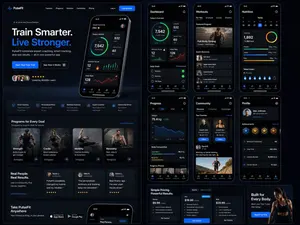
Fitness SaaS Landing Page UI
Design a modern, high-end fitness app (app type) landing page and product UI for a brand called PulseFit (brand name). Create a clean web design mockup that looks like a real SaaS fitness platform and mobile companion app. The design should feel premium, motivating, and easy to use, with a polished UI/UX style similar to top-tier health and wellness apps. Include: - A hero section with bold headline, short subheadline, strong call-to-action button, and app preview - Dashboard UI showing daily activity, calories burned, workout streak, heart rate, step count, and progress rings - Workout program cards for strength, cardio, mobility, and recovery - Nutrition tracking section with macro breakdown and water intake - Progress charts and analytics widgets - Trainer/community section with profile cards and testimonials - Pricing section and download/app store callout - Mobile app screens shown alongside the web design for a cohesive product ecosystem Style direction: - Sleek, minimal, modern interface - Premium fitness brand aesthetic - Smooth spacing, strong hierarchy, rounded cards, soft shadows - Dark mode UI with energetic accent colors like electric blue, neon green, or vibrant orange - Crisp typography, realistic charts, polished buttons, beautiful onboarding feel - Highly detailed, dribbble-worthy, startup-quality product design - Realistic UX case study presentation, not a cartoon or illustration Composition: - Full website homepage mockup - Multiple UI sections visible in one polished presentation - Slight perspective or straight-on product showcase - Clean background with subtle gradients and professional lighting - Ultra-detailed, sharp text rendering, visually balanced layout Output: A stunning, realistic UI/UX design concept for a fitness app website and dashboard that looks ready for development. Make it look like a real Figma product design presentation for a premium startup.

Cartoon Sneaker Advertising Campaign
Create a creative image of Cartoon Sneaker Advertising Campaign. Style: photorealistic. Composition: balanced and well-framed. Lighting: natural with cinematic mood. Category: photography. Reference: cartoon-sneaker-advertising-campaign-19420.
Explore more prompts
Browse more AI image and video prompts by category.
FAQ
- How does the prompt keep the product faithful to the upload?
- It mandates using the uploaded image for exact form, proportions, materials, and identity while forbidding redesign, new materials, or added logos.
- Why include both lifestyle and orthographic views in one image?
- The top section delivers the emotional e-commerce hero shot while the bottom delivers precise front, side, and cutaway technical drawings plus material samples for a complete catalog page.