
Text to Image
Professional Physical Product Design Board — AI Image Prompt
A highly structured technical prompt for creating a professional product design poster, featuring exploded views, materials, and digital screen layouts. - AIPinMaker
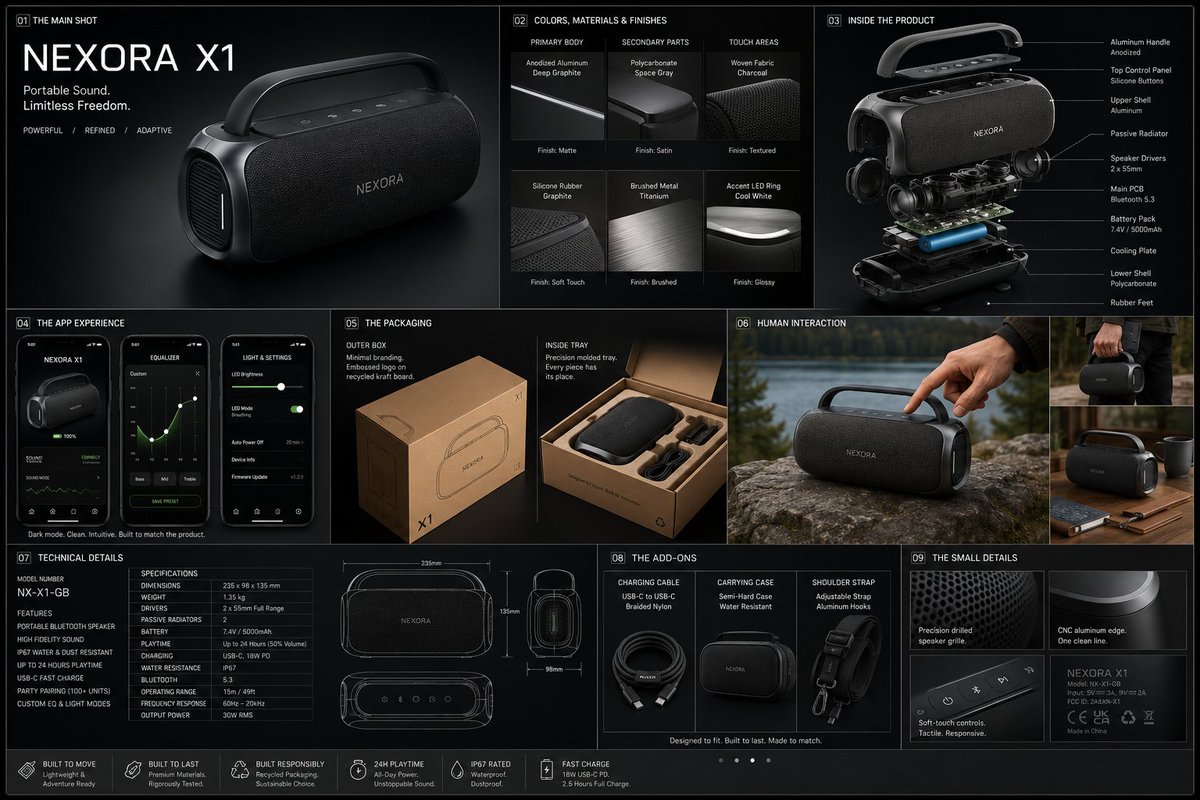
Prompt
{
 "prompt": {
"title": "High-End Physical Product Design Board",     "trigger": "Upload a simple sketch or outline of a product. Use it to build a full, professional product design poster—the kind that wins over investors and gets featured on top design websites.",          "prime_directive": {
"rule": "Every shape, material, screen, and accessory must come directly from the lines and style of the uploaded sketch.",
"enforcement": "Do not use standard templates. Look closely at the shape. Build a complete physical and digital world from its basic design."
 },

"format": {
"orientation": "Horizontal",
"aspect_ratio": "16:9",
"layout": "Clean technical grid",
"composition": "Neat, spacious, and purposeful—balancing big, beautiful images with clear technical details"
},
"sections": {
"01_product_header": {
"label": "The Main Shot",
"elements": [
"{argument name="product name" default="Product name"} in strong, clean text",
"Short product goal—5 words max, sharp and clear",
"Three main feeling words (e.g., {argument name="style keywords" default="Smooth / Tough / Smart"})"
]
},
"02_materials_system": {
"label": "Colors, Materials, and Finishes",
"palettes": {
"primary_body": "Main materials (e.g., {argument name="primary materials" default="dark metal, smooth plastic"})",
"secondary_parts": "Materials for buttons, ports, or edges",
"touch_areas": "Materials you feel (e.g., soft rubber, textured fabric)"
},
"per_material_display": [
"Close-up picture of the material",
"Material name",
"Finish type (matte, shiny, or rough)"
]
},

"03_exploded_view": {
"label": "Inside the Product",
"components": [
"Outer shell floating above the inside parts",
"Visible battery, main circuit board, or switches",
"Connecting wires and cooling parts"
],
"requirement": "Must look like it can actually be built in real life, with clear guide lines."
},
"04_digital_screen": {
"label": "The App or Screen",
"define": [
"The main device screen or a mobile app that controls it",
"The screen design must match the physical product's shape"
],
"visual_tiles": {
"count": "2–3 key screens",
"style": "Dark mode with high contrast and simple buttons"
}
},
"05_unboxing_experience": {
"label": "The Packaging",
"rule": "The box must look premium, sturdy, and environmentally friendly.",
"mockups": [
{
"type": "Outer Box",
"detail": "Clean logo pressed into thick, high-quality cardboard"
},
{
"type": "Inside Tray",
"detail": "Perfectly cut spaces to hold the product and wires safely"
}
]
},
"06_real_world_use": {
"label": "Human Interaction",
"scenarios": [
"Product sitting naturally on a desk or outdoors",
"A person's hand pressing the main button or holding the handle",
"Realistic lighting and shadows that match the background"
],
"requirement": "Must look like a real photograph to show the actual size of the item."
},
"07_text_and_specs": {
"label": "Technical Details",
"tiers": {
"model_number": "Clear, typewriter-style text for small numbers"
}
}
}
}Prompt breakdown
- Subject
- High-End Physical Product Design Board built directly from uploaded sketch lines
- Style
- Professional technical poster with sections for materials, exploded views, packaging, and specs
- Composition
- Neat, spacious clean technical grid in 16:9 horizontal orientation
- Mood
- Purposeful and investor-ready with realistic photographic elements
Remix ideas
- Swap the touch areas material from soft rubber to textured fabric while keeping the sketch's button shapes intact
- Include an additional visual tile in the digital screen section that shows a notification overlay matching the product's outline
- Change the unboxing tray detail to feature recycled paper pulp for a stronger environmental angle
Reference images
How to use this AI Image prompt template
 1
1Copy the prompt — grab this template’s prompt and negative prompt.  2
2Pick a model — choose a recommended AI model for the best match.  3
3Generate — open the studio with one click and create your result.
Related templates
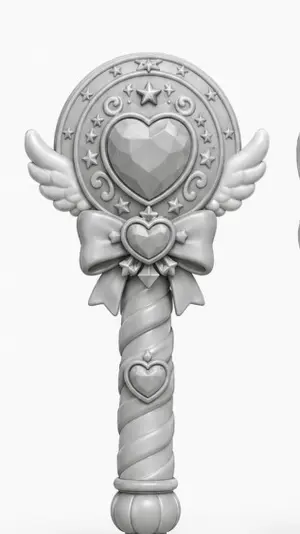
Monochrome Magical Heart Wand
A centered studio render of a magical girl wand or scepter designed like a toy collectible, shown front-facing against a plain light gray background. The wand is monochrome matte white to light gray clay-render style with soft even lighting and gentle shadows, emphasizing sculpted form rather than color. The top has a large circular medallion with a faceted heart-shaped gem in the center, surrounded by an ornate ring featuring exactly 1 large five-pointed star at the top center, 8 small five-pointed stars around the ring, and 4 curling decorative swirl motifs. Small symmetrical angel wings extend left and right from the lower sides of the circular head. Beneath the medallion is a large bow with a small heart-shaped jewel at its center and two ribbon tails hanging down. The handle is long and cylindrical with a spiral twist pattern, with exactly 1 additional heart emblem mounted near the upper part of the grip, and it ends in a rounded bulb-like pommel with vertical grooves. The overall silhouette is cute, symmetrical, elegant, fantasy-inspired, and suitable for a clean product concept render or 3D model showcase.

Meta Quest 3 Exploded View Poster
Create a clean premium Japanese tech infographic poster for Meta Quest 3 (product name), centered on a vertically stacked exploded view of a white mixed-reality headset floating in space against a soft lavender-to-blue gradient background. At the top, place the Meta logo in blue followed by a large bold black sans-serif headline reading Meta Quest 3 (headline text), with a smaller Japanese tagline beneath: 「まったく新しい現実を、まったく新しい構造から。」. The central subject is a highly polished 3D product render shown as an engineering breakdown with exactly 9 numbered layers, each layer separated evenly from top to bottom and labeled with blue circular number markers on the left side from 1 to 9. The 9 visible layers are: 1) the white outer faceplate shell with three front sensor/camera openings, 2) a row of exactly 3 black tracking camera modules, 3) the main logic board with chips and a clearly visible Snapdragon XR2 Gen 2 processor graphic at the center, 4) a pair of large pancake lens assemblies with vivid purple-blue glass reflections, 5) the black internal frame chassis with openings for optics, 6) the battery/electronics bar with glowing blue accents, 7) two white articulated side strap arms, 8) a white fabric head strap loop, 9) a black soft facial interface cushion at the bottom. Add rounded rectangular annotation boxes with thin white borders and subtle transparency on both sides, each connected by fine white leader lines to the corresponding layer. There are exactly 7 feature callout boxes total: 3 on the left and 4 on the right. Left side boxes, from top to bottom, read: 「Snapdragon XR2 Gen 2」 with a chip icon and smaller Japanese body text, 「調整可能なIPD機構」 with an optics adjustment icon and smaller Japanese body text, 「精密設計されたヘッドストラップ」 with a headset strap icon and smaller Japanese body text. Right side boxes, from top to bottom, read: 「フェイスプレート」 with a simple faceplate icon and smaller Japanese body text, 「トラッキングカメラ」 with a camera icon and smaller Japanese body text, 「パンケーキレンズ」 with a dual-lens icon and smaller Japanese body text, 「高性能バッテリー」 with a battery icon and smaller Japanese body text, plus a lower-right box reading 「柔らかなフェイスインターフェース」 with a soft cushion icon and smaller Japanese body text; keep the overall visual balance elegant and symmetric. At the bottom, add a wide white rounded banner spanning most of the width. On its left side place a large bold Japanese statement in blue: 「体験は、構造から進化する。」 and below it smaller Japanese explanatory copy in black. On the right side of the banner place the blue Meta logo and the wordmark “Meta”. Use a sleek Apple-like product marketing style, ultra-sharp 3D rendering, soft studio lighting, subtle glow, precise shadows, glossy plastics, realistic materials, minimal clutter, and a high-end corporate presentation aesthetic.3b:Tc2b,Create a clean premium Japanese tech infographic poster for Meta Quest 3 (product name), centered on a vertically stacked exploded view of a white mixed-reality headset floating in space against a soft lavender-to-blue gradi
Nano Banana Pro Decision Making Prompt
Create a creative image of Nano Banana Pro Decision Making Prompt. Style: photorealistic. Composition: balanced and well-framed. Lighting: natural with cinematic mood. Category: photography. Reference: nano-banana-pro-decision-making-prompt-1175.

Exploded View Smartphone Infographic Prompt
Create a infographic image of Exploded View Smartphone Infographic Prompt. Style: photorealistic. Composition: balanced and well-framed. Lighting: natural with cinematic mood. Category: illustration. Reference: exploded-view-smartphone-infographic-prompt-6101.

Google Search Results Mockup
{ "type": "web browser screenshot", "interface": "Google search results page", "header": { "logo": "Google", "search_bar": { "query": "{argument name=\"search query\" default=\"openai gpt-image 2 image generator\"}", "icons": ["clear", "microphone", "camera", "search"] }, "right_actions": ["settings gear", "apps grid", "blue Sign in button"] }, "navigation_tabs": ["All", "Images", "News", "Videos", "Shopping", "Short videos", "Forums", "Web", "More", "Tools"], "results_stats": "About 18,200,000 results (0.32 seconds)", "search_results": { "count": 3, "items": [ { "source": "OpenAI", "url": "https://openai.com > index > gpt-image-2", "title": "{argument name=\"result 1 title\" default=\"GPT-Image-2 | OpenAI\"}", "snippet": "{argument name=\"date\" default=\"Apr 1, 2025\"} — GPT-Image-2 is our new image generation model that delivers state-of-the-art image quality, finer details, better text rendering, and more precise instruction following.", "sitelinks": ["Research", "Safety", "Try in ChatGPT"] }, { "source": "OpenAI Platform", "url": "https://platform.openai.com > docs > gpt-image-2", "title": "GPT-Image-2 - OpenAI API", "snippet": "Learn about GPT-Image-2, OpenAI's most advanced image generation model, available via the Images API. Create high-quality images with improved realism, text rendering, and instruction ...", "sitelinks": ["Quickstart", "Edit images", "Example code"] }, { "source": "The Verge", "url": "https://www.theverge.com > openai-gpt-image-2-launch", "title": "OpenAI's GPT-Image-2 brings major improvements to AI ...", "snippet": "Apr 1, 2025 — OpenAI has officially launched GPT-Image-2, its next-generation image generator that offers better photorealism, improved text rendering, and more accurate adherence to user ..." } ] }, "people_also_ask": { "title": "People also ask", "count": 4, "questions": [ "What is GPT-Image-2?", "How is GPT-Image-2 different from previous models?", "Can I try GPT-Image-2 in ChatGPT?", "Is GPT-Image-2 available through the API?" ] } }

Technology Exploded View
Create a creative image of Technology Exploded View. Style: photorealistic. Composition: balanced and well-framed. Lighting: natural with cinematic mood. Category: photography. Reference: technology-exploded-view-17011.
Explore more prompts
Browse more AI image and video prompts by category.
FAQ
- Why must the app screens match the physical product's shape?
- The prompt requires screen designs to align with the device's outline so the digital interface feels like a natural extension of the hardware.
- How is realism achieved in the human interaction section?
- By depicting the product on a desk or outdoors with accurate shadows, a hand pressing buttons, and photographic quality to convey real scale.