
テキストから画像
Pixel Game Asset Atlas Template — AI 画像プロンプト
A comprehensive professional template for generating high-density 16-bit pixel art asset sheets for game development, including characters, animations, and environments. - AIPinMaker
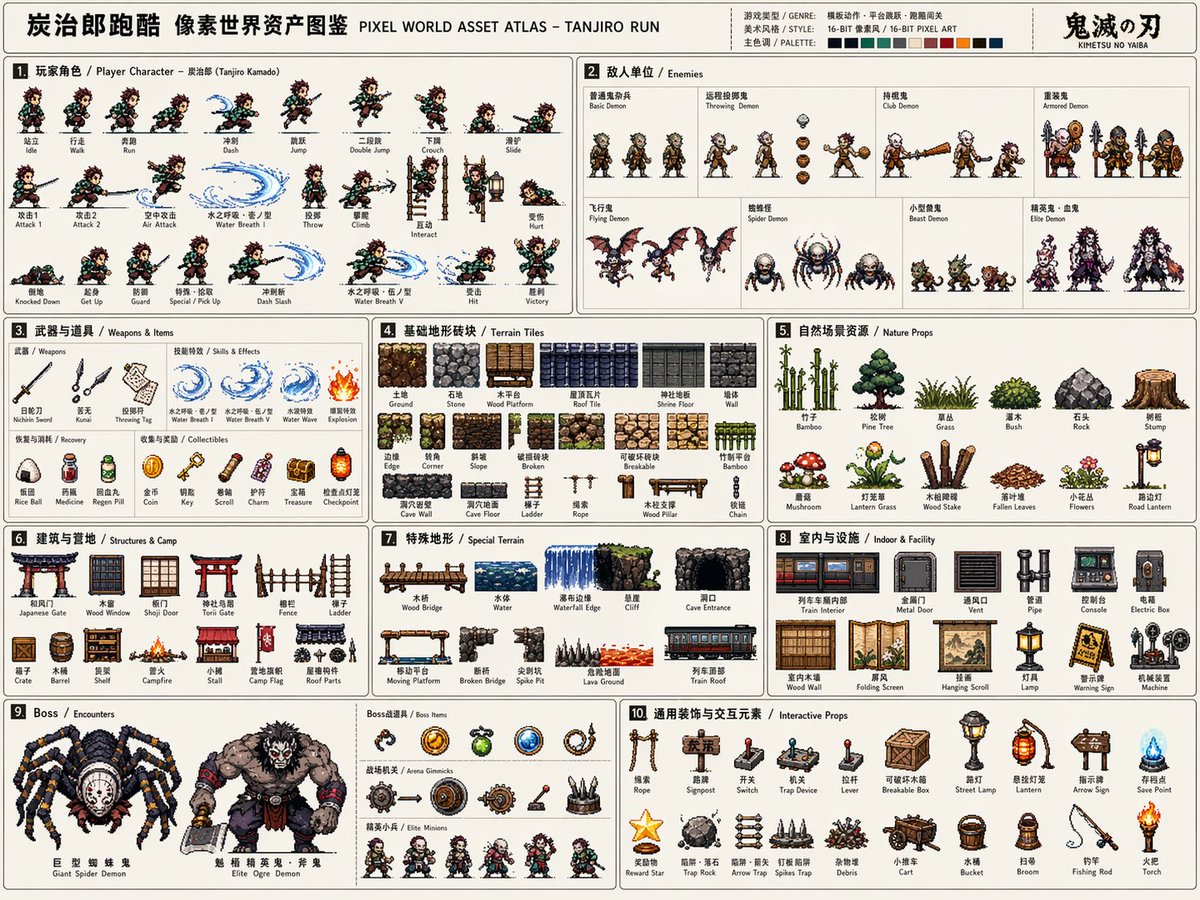
プロンプト
请根据【游戏主题:{argument name="游戏主题" default="鬼灭之刃/炭治郎"}】创作一张高完成度、高信息密度、适合系列化发布的「像素世界资产图鉴 / Pixel World Asset Atlas」。

这不是普通像素插画,也不是单张游戏场景图,而是一张面向游戏开发、美术设定、关卡设计和视觉提案的“2D像素游戏资产总览图”。画面需要像一张完整的游戏素材说明板,把一个【游戏类型:{argument name="游戏类型" default="横版动作"}】所需的核心角色、敌人、道具、地形、场景、机关、Boss和装饰元素系统化整理在同一张图中,形成清晰、专业、可复用的游戏资产图鉴。

【基础设定】
主题世界观:【游戏主题】
游戏类型:【游戏类型】
时代背景:【时代背景】
主角身份:【主角身份】
敌人类型:【敌人类型】
主要场景:【主要场景环境】
整体风格:【风格方向,例如{argument name="风格" default="16-bit复古街机像素风"}】
主色调:【主色调】
辅助色:【辅助色】
点缀色:【点缀色】
画幅比例:【画幅比例,横版4:3】
如没有填写,自动按照游戏主题最优方案进行匹配。

【整体画面要求】
画面采用横版大画布,浅色或低干扰背景,整体像一张游戏开发资产表、像素设定集展开页、说明书式资源目录。所有元素都应为统一像素密度的2D pixel art sprite,具有清晰黑色或深色描边、有限色阶、复古游戏质感。不要生成真实摄影风、3D渲染风、厚涂插画风或电影海报风。重点是“系统完整、分类清晰、资源丰富、可开发感强”。

【版式结构】
整张图采用模块化网格排版,用细线分割不同资源区域。每个区域需要有编号标题和简短分类标签,整体阅读路径为从左到右、从上到下。版式应具有说明书、游戏开发文档、素材图鉴、设定板的秩序感。信息密度要高,但不能混乱;每个模块内部的元素应等距排列,保持清晰可读。

【必须包含的模块】
1. 玩家角色模块:展示完整动作帧,包括站立、行走/奔跑、跳跃等。动作帧应横向排列,像游戏sprite sheet。
2. 敌人单位模块:设计多种敌人,包括普通、远程、重装、精英单位等。
3. 武器与道具模块:展示近战、远程、投掷物、特效、拾取物等。
4. 基础地形砖块模块:展示地面、墙体、平台、转角、不同材质地块。
5. 自然/外部场景资源模块:展示树木、草丛、石头、障碍物。
6. 建筑/基地/营地资源模块:展示门、窗、墙、梯子、营地设施。
7. 特殊地形模块:展示桥梁、水体、悬崖、洞口。
8. 室内/地下/设施资源模块:展示管道、控制台、金属门、设备。
9. Boss / 遭遇战资源模块:展示大型Boss、特殊载具、巨型机关。
10. 通用装饰与交互元素模块:展示梯子、绳索、指示牌、开关、机关。

【视觉细节要求】
所有资源需要保持统一的像素尺寸逻辑和世界观一致性。比例关系明确。动作帧需体现连续性;地形砖块可拼接;道具和机关有功能识别度;Boss元素需有压迫感。37:Tde0,Please create a high-completion, high-information-density "Pixel World Asset Atlas" suitable for serialized release based on [Game Theme: {argument name="game theme" default="Demon Slayer/Tanjiro"}].

This is not a regular pixel illustration or a single game scene, but a "2D pixel game asset overview map" for game development, art setting, level design, and visual proposals. The visual should look like a complete game material board, systematically organizing core characters, enemies, items, terrain, scenes, mechanisms, Bosses, and decorative elements required for a [Game Type: {argument name="game type" default="Side-scrolling action"}] into a single clear, professional, and reusable game asset atlas.

[Basic Settings]
Theme Worldview: [Game Theme]
Game Type: [Game Type]
Era Background: [Era Background]
Protagonist Identity: [Protagonist Identity]
Enemy Types: [Enemy Types]
Main Scenes: [Main Scene Environment]
Overall Style: [Style Direction, e.g., {argument name="style" default="16-bit retro arcade pixel style"}]
Main Color: [Main Color]
Secondary Color: [Secondary Color]
Accent Color: [Accent Color]
Aspect Ratio: [Aspect Ratio, Landscape 4:3]
If not filled, automatically match according to the optimal plan for the game theme.

[Overall Visual Requirements]
The visual uses a large landscape canvas with a light or low-interference background, looking like a game development asset sheet or an instruction-style resource catalog. All elements should be 2D pixel art sprites with uniform pixel density, clear black/dark outlines, limited color scales, and retro game textures. Do not generate realistic photography, 3D rendering, painterly illustration, or movie poster styles. Focus on being "systematically complete, clearly categorized, resource-rich, and high in developability."

[Layout Structure]
The map uses a modular grid layout with fine lines dividing different resource areas. Each area needs a numbered title and short category labels, with a reading path from left to right, top to bottom. The layout参照画像
このAI画像プロンプトテンプレートの使い方
 1
1プロンプトをコピー — テンプレートのプロンプトとネガティブプロンプトを取得。  2
2モデルを選ぶ — 最適な推奨AIモデルを選択。  3
3生成 — ワンクリックでスタジオを開いて作成。
関連テンプレート

Pixel Mosaic Jungle Parrot
A pixel-art style mosaic illustration of a tropical parrot perched on a short brown branch in the middle of dense jungle foliage, created as if assembled from a tight uniform square grid of tiny colored tiles with thin dark outlines around every square. The single bird is shown in side profile facing right, with a large curved black beak, a pale cream face, a bright red-orange forehead and throat, a vivid yellow neck, a bright green body, and long wings and tail feathers in saturated blue and cyan. The parrot is centered vertically and slightly left of center, standing upright on the branch, with the tail extending downward. Surround the bird with lush layered leaves in many shades of green, from deep forest green to lime, filling the entire frame with no sky visible. Use strong contrast, crisp black contouring, and a glowing light green area behind the parrot to separate it from the darker foliage. The overall image should look like retro pixel art or stained-glass mosaic, highly detailed, colorful, square format, and edge-to-edge tiled texture.

Faux Pixel Raven in Wheat Field
A stylized faux-pixel-art landscape illustration of a single black raven (bird species) standing in profile in a golden wheat field, facing right. The image should look like retro pixel art at first glance when viewed zoomed out, but not be perfectly grid-aligned or true sprite-based pixel art; instead it should feel like painterly image-generation imitating pixel art, with soft inconsistencies in the block shapes and edges. Place the bird large in the foreground, slightly left of center, with glossy near-black feathers shaded in deep navy and indigo, a dark beak, and one small amber-brown eye visible. Surround it with tall yellow-gold grasses and exactly 9 visible small purple wildflower blossoms scattered in the foreground. In the midground, show a broad rural plain with patchy fields and a dark green tree line including a few tall narrow conifers on the right. In the distance, add a low mountain range in muted blue-violet tones. Above, create a bright soft blue (sky color) sky filled with large chunky cumulus clouds and a few smaller cloud bands, all rendered in limited-color dithered blocks. Use a warm late-afternoon palette with gold, blue, lavender, and dark charcoal, strong atmospheric depth, and a calm pastoral mood. Full-frame composition, landscape orientation, thin black border around the entire image, crisp blocky edges, retro game background aesthetic, highly detailed but simple, no text, no UI, no extra animals.

Blurry Retro Pixel Parrot Jungle
A retro pixel-art style illustration of a tropical parrot perched on a short brown branch in the center of a dense jungle. The bird is shown in side profile facing right, with a bright green body, a vivid blue wing and long blue tail feathers, a yellow chest, an orange-red head and neck, a white facial patch around the eye, and a large curved black beak. The parrot is the single main subject, centered and enlarged, outlined with dark pixel edges. Surround it with thick rainforest foliage filling the entire frame: layered green leaves, twisting vines, and partial tree trunks on both sides, with 2 visible trunks and many overlapping leaf clusters. Add a soft glowing light halo behind the parrot to separate it from the darker forest background. Use a square composition, saturated colors, classic 16-bit game sprite aesthetics, chunky visible pixels, low-resolution grid-based rendering, and intentionally soft, blurry pixel edges rather than crisp modern pixel art. The mood is lush, vibrant, and nostalgic, like a tropical scene from an old video game.

Pixel Art Dragon Castle
A detailed retro fantasy pixel art scene of a massive medieval stone castle perched on a steep rocky hill, viewed from a slight low angle, with a winding dirt path leading up to the gate. The castle has many cylindrical towers and connecting walls, exactly 9 visible towers with red-orange conical roofs, several small red flags fluttering from the tallest spires, and weathered gray stone masonry. A huge red dragon is coiled around the tallest central tower, with its long body wrapped around the stone, claws gripping the battlements, horned head leaning forward near the top, and one large batlike wing spread open on the right side. Surround the hill with dense dark-green pine trees and rocky outcrops, with distant blue mountains on the horizon. Place the castle against a bright daytime sky in saturated blue with large fluffy white cumulus clouds. Render in classic 16-bit inspired pixel art with crisp sprite-like shapes, visible pixel texture, rich contrast, adventurous fantasy game cover composition, centered subject, and a square frame.

16-Bit RPG Battle Screen
Using the provided reference image as the character source, transform the character into a 16-bit command RPG battle screen in pixel-art style. Keep the original character’s outfit, long blond hair, general silhouette, and faceless/blurred face treatment, but redraw her as a playable battle sprite standing on the left side in a ready-to-fight pose. Goal: Create a retro Japanese fantasy RPG combat scene, like a Super Famicom / 16-bit era command battle screen. Scene additions: Add an ancient ruined stone arena background with broken arches, columns, moss, vines, scattered machinery, and atmospheric depth. Place exactly 2 enemy monsters on the right side: 1 tall plant/serpent-like mechanical monster with glowing blue orbs, and 1 smaller spider-like mechanical creature with cyan energy rings. UI layout: Add exactly 3 dark navy RPG interface boxes with thin white borders: 1 command menu in the upper left, 1 character status box near the lower center-left, and 1 dialogue box across the bottom. Text: The command menu must contain exactly 4 Japanese options in vertical order: 「たたかう」, 「まほう」, 「アイテム」, 「にげる」, with a triangular cursor pointing to the first option. The status box should show フミ姐ぇ (character name), LV 35, HP 320/320, and MP 150/150. The bottom dialogue box should show さっさと片付けるわよ (battle line). Style constraints: Use crisp 16-bit pixel art, limited color palette, visible pixel edges, side-view RPG composition, no modern UI, no photorealism, no extra characters, no extra menu items, no watermark.37:T675,Using the provided reference image as the character source, transf

Voxel Survival Game Boss Fight UI
{ "type": "voxel video game screenshot", "style": "crossover between Minecraft and Terraria", "environment": "nighttime blocky landscape, purple-tinted corruption biome, water pools, trees", "first_person_view": "holding a large blocky sword on the right side of the screen", "entities": { "boss": "giant floating eyeball with red veins shooting a purple laser", "player_avatar": "character in dark armor holding a green sword, viewed from behind", "mobs": [ "1 giant crowned blue slime", "1 small blue slime", "2 zombies", "2 skeletons", "2 purple bats", "1 pink flamingo" ] }, "user_interface": { "boss_bar": "top center, purple bar, text '{argument name=\"boss name\" default=\"Eye of Cthulhu\"}'", "coordinates": "top left, text 'X: 340 Y: 64 Z: -190 Biome: {argument name=\"biome name\" default=\"Corruption\"}'", "notification": "top right, white box, text '{argument name=\"notification text\" default=\"New Recipes Unlocked! Check your recipe book\"}'", "chat": "bottom left, text 'Steve has made the advancement [{argument name=\"advancement name\" default=\"Eye of Cthulhu\"}]'", "status_bars": "bottom center, 10 red hearts, 10 hunger icons, green XP bar showing level 15", "hotbar": "bottom center, 9 slots containing: purple sword, pickaxe, axe, green tool, gun, 30 red potions, 64 brown blocks, 8 golden apples, 2 blue stars" } }
他のプロンプトを探す
カテゴリ別にAI画像・動画プロンプトをもっと見る。