
文生图
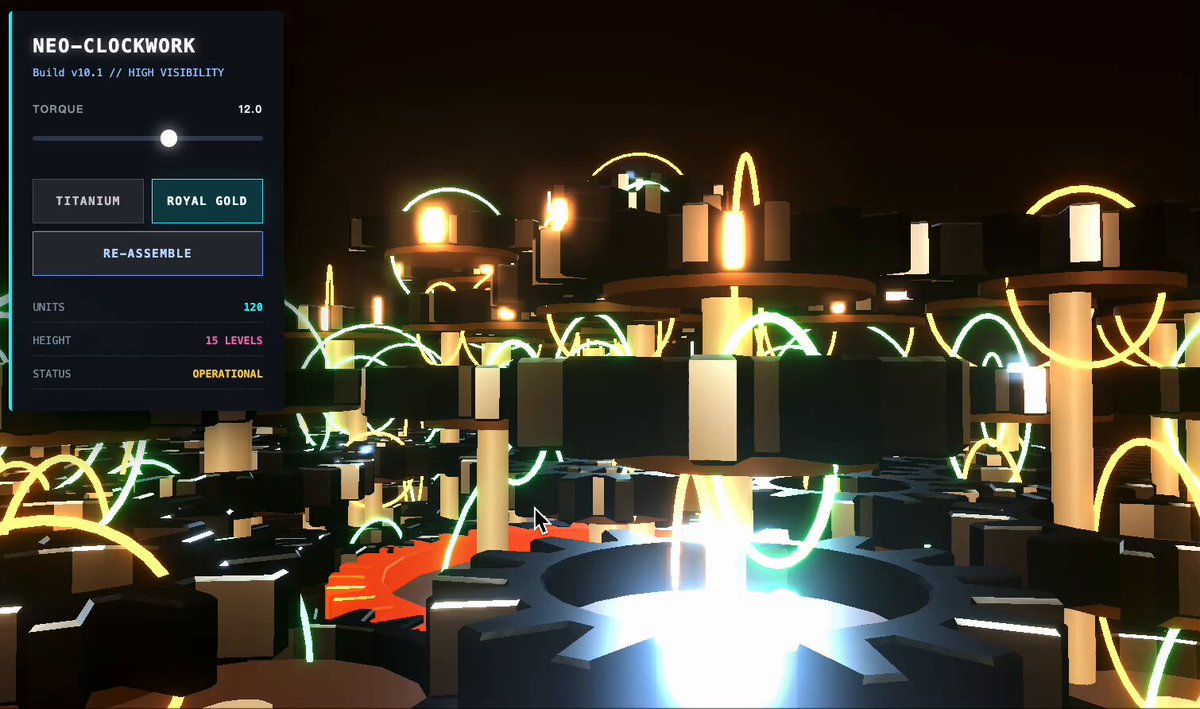
Multi-level gear linkage system animation — AI 图像提示词
A concise Gemini prompt to generate an animated multi-level gear linkage system where turning the main gear drives all others proportionally, suitable as an SVG or canvas demo. - AIPinMaker
提示词
多级齿轮组联动系统,主齿轮旋转→所有齿轮自动按比例联动。
如何使用这个 AI 图像提示词模板
 1
1复制提示词 —— 取走该模板的提示词与反向提示词。  2
2选择模型 —— 选一个推荐的 AI 模型以获得最佳匹配。  3
3生成 —— 一键打开工作台并生成你的作品。
相关模板

Camera Exploded View Infographic
{ "type": "technical infographic and exploded view diagram", "header": { "title": "{argument name=\"main title\" default=\"佳能 EOS R5 成像系统剖面 CANON EOS R5 IMAGING ATLAS\"}", "subtitles": [ "一张照片是如何被制造出来的 HOW AN IMAGE IS ACTUALLY FORMED", "从光,到数据 | FROM PHOTONS TO FILES", "相机不是壳体,而是一条运算链 A camera is not a shell, but a computational chain" ], "top_left_box": { "title": "EOS R5 核心规格 KEY SPECIFICATIONS", "bullet_points_count": 6 }, "top_right_images": { "count": 2, "description": "front and back views of the camera body" } }, "centerpiece": { "description": "highly detailed 3D exploded view of the {argument name=\"camera model\" default=\"Canon EOS R5\"} camera, showing internal components separated vertically", "components_visible": [ "lens mount", "lens elements with glowing blue light rays", "image sensor", "motherboard with glowing {argument name=\"processor name\" default=\"DIGIC X\"} chip", "battery pack", "dual card slots", "electronic viewfinder (EVF)" ] }, "layout": { "numbered_sections": [ { "number": 1, "title": "光学入口 OPTICAL ENTRY", "elements": ["lens cross-section with light rays", "2 line graphs"] }, { "number": 2, "title": "光圈、快门与曝光控制 APERTURE, SHUTTER, EXPOSURE", "elements": ["3 aperture blade diagrams", "4 shutter speed example photos", "depth of field diagram", "exposure triangle diagram"] }, { "number": 3, "title": "对焦系统与成像平面 FOCUS ACQUISITION + IMAGE PLANE", "elements": ["lens alignment diagram", "AF coverage photo of a runner"] }, { "number": 4, "title": "传感器与像素结构 SENSOR + PIXEL ARCHITECTURE", "elements": ["3D pixel array diagram", "single pixel cross-section diagram", "sensor spec table", "quantum efficiency graph"] }, { "number": 5, "title": "防抖系统与机械稳定 IBIS + MECHANICAL STABILIZATION", "elements": ["sensor shift mechanism diagram with yaw/pitch/roll axes", "2 stabilization effect comparison photos"] }, { "number": 6, "title": "模拟信号、模数转换与读出 ANALOG READOUT + A/D CONVERSION", "elements": ["signal flowchart", "3 readout timing graphs", "signal-to-noise ratio graph", "rolling shutter example photo of a car"] }, { "number": 7, "title": "DIGIC X 图像处理链 DIGIC X IMAGE PROCESSING PIPELINE", "elements": ["processing flowchart with central chip", "dynamic range graph", "tone curve graph", "histogram"] }, { "number": 8, "title": "文件生成、显示与存储 FILE OUTPUT, PREVIEW, STORAGE", "elements": ["file output flowchart", "2 storage card icons", "file workflow diagram"] } ], "bottom_comparisons": { "count": 5, "labels": [ "传感器尺寸对比 SENSOR SIZE COMPARISON", "镜头焦距与视角 FOCAL LENGTH & ANGLE OF VIEW", "ISO 与噪点关系 ISO & NOISE RELATIONSHIP", "光圈与景深关系 APERTURE & DEPTH OF FIELD", "RAW vs JPEG" ] }, "footer": "{argument name=\"footer quote\" default=\"光被捕获,数据被解读,影像被记录,记忆被永恒。 Light is captured. Data is interpreted. Image is recorded. Memory is eternal.\"}" }, "style": "clean, technical, highly detailed, photorealistic components, blueprint-style annotations, light gray background, precise typography" }3a:Teaf,{ "type": "technical infographic and exploded view diagram", "header": { "title": "{argument name=\"main title\" default=\"佳能 EOS R5 成像系统剖面 CANON EOS R5 IMAGING ATLAS\"}", "subtitles": [ "一张照片是如何被制造出来的 HOW AN IMAGE IS ACTUALLY FORMED", "从光,到数据 | FROM PHOTONS TO FILES", "相机不是壳体,而是一条运算
Technical Isometric Teardown Infographic
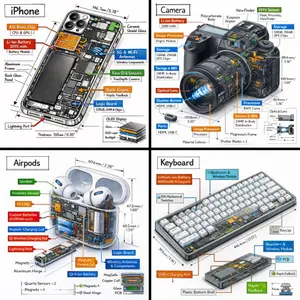
Generate a technical infographic of OBJECT (object) rendered from a 45-degree isometric 3D viewpoint (viewpoint), with the object slightly tilted to expose depth and three-dimensional structure. Blend a photorealistic render of the object with hand-drawn black ink technical annotations on a clean pure-white background. Include: - Color-coded callout boxes labeling each key component - Transparent / cutaway sections that reveal internal parts - Precise measurements, dimensions, and scale markers - Material descriptions and quantity counts - Color-coded directional arrows for function and flow: RED for power/battery, BLUE for data/connectivity, ORANGE for thermal/processor, GREEN for sensors/haptics - Simple schematics or cross-section diagrams where useful Place the "OBJECT (object)" title inside a hand-sketched technical frame in the top-left corner. Style: black architectural-pen linework, sketchy yet precise; the object remains fully visible; vibe of a professional engineering teardown or museum exhibit. Clean layout with balanced negative space. Perspective: 45-degree isometric tilt that dramatically reveals depth, dimension, and internal architecture, like a product engineering manual. Color usage: roughly 10-15% accent density, black dominant, white background. Output: 1080x1080, ultra-crisp, optimized for social feeds.
Exploded View Invention Infographic
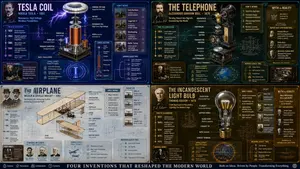
2x2 grid, do this for tesla coil (invention) and 3 other famous inventions. 16:9 inventor_content = ( patent_drawing_recreation_in_isometric_exploded_view_of_[invention (invention placeholder)]_by_[inventor (inventor placeholder)] * 1.7 ) + ( historical_context_timeline_of_scientific_breakthroughs_leading_to_[invention] * 1.5 ) + ( failure_log_and_iteration_cards_showing_[inventor]_s_failed_prototypes_with_annotations * 1.6 ) + ( cross_section_and_mechanics_diagram_of_[invention]_with_material_callouts * 1.4 ) + ( economic_and_cultural_impact_ripple_map_of_[invention]_on_society * 1.3 ) + ( quirky_personal_habit_or_workshop_inserts_from_[inventor]_s_biography * 1.2 ) + ( modern_day_derivative_technologies_tree_from_[invention] * 1.1 ) + ( common_misconception_busting_panel_about_who_really_invented_[invention] * 1.0 ) - ( romanticized_lone_genius_cliché_without_team_context / 3.0 ) - ( boring_textbook_engraving_style_instead_of_dynamic_infographic / 2.9 ) - ( eurocentric_filter_if_invention_originated_elsewhere / 3.2 )3
3D Cutaway Volcano Diagram
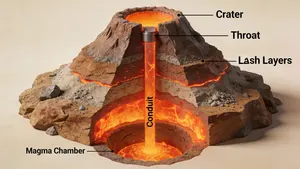
A 3D cutaway diagram of a volcano, showing its internal structure. The diagram should clearly label the magma chamber, conduit, throat, crater, and layers of ash and lava. The style should be a clean, technical illustration, with realistic textures for the rock and magma. This demonstrates the ability to generate accurate, science-based visuals for educational purposes, requiring strong spatial and scientific reasoning. –ar 16:9

Four-Panel Bank World Storyboard
Goal: Create a polished 2x2 storyboard-style image sheet for a short video scene about the despair of a zero bank balance (scene theme), set in a modern blue-themed bank world. Canvas: Square 1:1 composition, four equal panels separated by clean white gutters, bright cinematic 3D-rendered realism with slightly idealized commercial lighting, high detail, sharp focus, saturated blue bank branding, no captions or speech bubbles. Layout: Use exactly 4 panels in a grid. 1. Top-left panel: Interior ATM area with exactly 3 visible ATM machines in a row, each built into gray wall bays with bold blue vertical dividers. The nearest ATM screen prominently shows a large red “0” on a pale cyan screen, implying an empty balance. Include tiled floor, ceiling lights, and a small potted plant in the background. 2. Top-right panel: Bank service counter with exactly 1 female bank clerk seated behind a beige stone counter. She wears a navy suit, white shirt, blue striped scarf or tie, and a small gold nameplate. Her face is intentionally featureless/softly blurred for anonymity. Include exactly 1 computer monitor, 1 keyboard, 1 blue document tray, and 1 potted plant on or near the counter. Behind her are glass office partitions, blue chairs, certificates on the wall, and warm office lighting. 3. Bottom-left panel: Exterior of a contemporary city bank branch on a sunny street corner. Show a blue horizontal sign band above glass doors, gray stone facade, street crosswalk markings, sidewalk bollards, leafy trees, and black street lamps. The entrance should feel clean, corporate, and Japanese urban but without readable signage. 4. Bottom-right panel: Fantasy bank vault interior with an oversized round open vault door in bronze and steel. Inside the vault are stacks of cash and gold, warm golden lighting, shelves, and treasure props. Include exactly 3 small cute animal mascots standing near the vault entrance, wearing colorful tiny outfits, plus visible piles of bundled banknotes, coins, a chest, and a money bag. Visual style: High-end 3D illustration, cinematic render, bank commercial aesthetic mixed with whimsical storybook detail in the vault panel, realistic materials, glossy glass, polished stone, metallic vault surfaces, warm highlights, deep blue brand accents. Subject details: The bank’s dominant brand color is royal blue (brand color). The ATM screen should display 0 (balance number) in red. The bank clerk outfit should be navy suit with blue striped scarf (clerk outfit). The vault should contain bundled cash, coins, treasure chest, and money bag (vault contents). Constraints: No extra panels, no visible watermarks, no logos, no readable text except the red balance number on the ATM screen, keep the four-panel sheet coherent as one bank-themed storyboard, maintain clean white borders between panels.37:Tb9
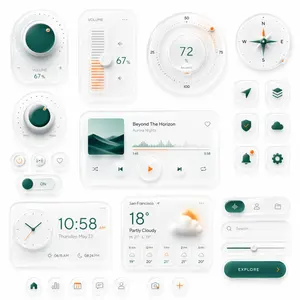
Neumorphic Smart UI Kit
Create a premium neumorphic smart-home and media control UI kit on a clean light gray background, arranged as a balanced dashboard-style composition of floating rounded cards and circular controls with soft extruded shadows, subtle inner highlights, frosted white surfaces, and elegant teal-and-orange accents. The overall style is minimalist, futuristic, tactile, and highly polished, like a high-end mobile interface concept. Include exactly 18 discrete UI modules and icons: 1 large circular volume knob card in the upper left with a glossy deep teal center, dotted perimeter, plus and minus symbols, and the text “VOLUME 67%”; 1 vertical volume slider card with the label “VOLUME”, a white knob, orange level bars, small speaker icons, and “67%”; 1 large circular balance dial at the top center-right with numeric markings 25, 50, 75, 100, the central value “72%”, the label “BALANCE”, and a small orange indicator dot; 1 circular compass widget in the upper right with N, E, S, W labels, a metallic teal compass needle, and a small orange accent dot on the rim; 1 smaller circular min-max knob on the left middle with a teal center, textured white dial edge, orange indicator dot, and “MIN” and “MAX” labels; 3 small circular utility buttons beneath it in one row, showing a power symbol, a connectivity or wireless symbol, and a heart outline; 1 horizontal toggle switch below those buttons with a teal knob and the text “ON”; 1 large media player card in the center with a square album cover showing abstract layered teal dunes or waves, the track title “Beyond The Horizon”, the artist name “Aurora Nights”, a heart icon in the top right, a waveform progress display, timestamps “1:45” and “3:58”, and 4 playback controls along the bottom row: shuffle, previous, central orange play button, next, and repeat; 6 rounded-square app icons in two columns on the right side, arranged in 3 rows, showing exactly these symbols: paper plane arrow, stacked layers, shield with check mark, cloud, bell with a small orange notification dot, and gear; 1 rectangular clock card at the bottom left with a circular analog clock face, large digital time “10:58 AM”, the date line “Thursday, May 23”, and sunrise/sunset times “06:15 AM” and “08:24 PM”; 1 weather card at the bottom center with the location “San Francisco”, current temperature “18°”, condition “Partly Cloudy”, high/low “H: 21° L: 13°”, a large sun-behind-cloud illustration, and a 5-column hourly forecast labeled “11 AM”, “12 PM”, “1 PM”, “2 PM”, “3 PM”; 1 pill-shaped tab selector at the lower right with 3 tabs, where the left tab is active in teal with an audio waveform icon, and the other 2 tabs show a user icon and a folder icon; 1 search bar directly beneath it with a magnifying glass and placeholder text “Search...” ; 1 horizontal slider below the search bar with a teal progress line and a white knob; 1 large rounded CTA button at the bottom right reading “EXPLORE (button text)” with a right-facing orange arrow; and 5 circular bottom navigation icons centered along the bottom edge, showing home, bar chart, calendar with “23”, chat bubble, and user profile, plus 2 floating action buttons beside them: a camera icon and an orange plus sign. Use a restrained palette with white and very light gray surfaces, deep teal-green gradients for active states, and warm orange for highlights and notifications. Emphasize depth through soft ambient shadows, subtle bevels, glossy reflections, and realistic material rendering. Keep the layout spacious, symmetric but not rigid, and suitable for a luxury mobile app concept presentation.37:Tea0,Create a premium neumorphic smart-home and media control UI kit on a clean light gray background, arranged
探索更多提示词
按分类浏览更多 AI 图像和视频提示词。