
文生图
Complex Text and Diagrams Prompt (Screenshot) — AI 图像提示词
A prompt designed to test the model's capability in rendering complex text and diagrams accurately, often a challenge for image generation models. The prompt text is visible in the accompanying screenshot. - AIPinMaker
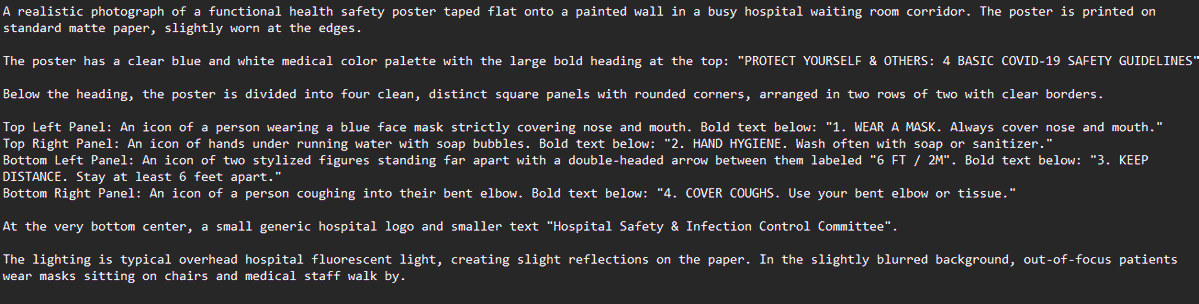
提示词
Create a creative image of Complex Text And Diagrams Prompt Screenshot. Style: photorealistic. Composition: balanced and well-framed. Lighting: natural with cinematic mood. Category: photography. Reference: complex-text-and-diagrams-prompt-screenshot-1822.
如何使用这个 AI 图像提示词模板
 1
1复制提示词 —— 取走该模板的提示词与反向提示词。  2
2选择模型 —— 选一个推荐的 AI 模型以获得最佳匹配。  3
3生成 —— 一键打开工作台并生成你的作品。
相关模板

Fitness Magazine Page Motion Sheet
Create a creative image of Fitness Magazine Page Motion Sheet. Style: photorealistic. Composition: balanced and well-framed. Lighting: natural with cinematic mood. Category: photography. Reference: fitness-magazine-page-motion-sheet-18085.
Film Style Instructional Diagram
Create a creative image of Film Style Instructional Diagram. Style: photorealistic. Composition: balanced and well-framed. Lighting: natural with cinematic mood. Category: photography. Reference: film-style-instructional-diagram-14715.

Local Web App Annotation Demo
Using REFERENCE_0 as the context, create a follow-up screenshot that shows the selected “Build Web Apps” tool in action as a local web app preview. Replace the plugin list view with a browser-like localhost workspace at 127.0.0.1:4392 (local address), clean white UI, soft shadows, and rounded panels. Main change: show an app-building/annotation interface rather than the original plugin directory. Add a top bar with the local address on the left and exactly 3 small window/control icons on the right. Add a blue annotation status pill on the upper right with the text 正在注释 (annotation status) and a vertical three-dot menu beside it. Content area: create a gallery-style UI with Chinese poster/card designs inside rounded white panels. Include a left toolbar row with a Search button and a blue comment/annotation button carrying a badge labeled “1”. Show at least two visible poster/card thumbnails, using dark brown traditional Chinese visual styling, while leaving some checkerboard transparent-placeholder areas in the right panel. Overlay: place a large floating rounded annotation input bubble centered near the top-middle of the content. It should look like an inline AI comment editor, with a sliders/settings icon on the left, Chinese instruction text 这个按钮的视觉和整体设计不符合,调整一下。 (comment text), a “取消” cancel button, a small microphone icon, and a black circular confirm button with a white checkmark. Bottom of the right preview panel: add exactly 3 action buttons labeled “Open”, “Folder”, and “Path”, each with a simple line icon. Keep the screenshot realistic, like a product demo of using Build Web Apps plus built-in HTML annotation to request UI refinements.38:T728,Using REFERENCE_0 as the context, create a follow-up screenshot that s

Convert Image to Editable PowerPoint Slide Prompt
Create a creative image of Convert Image To Editable Powerpoint Slide Prompt. Style: photorealistic. Composition: balanced and well-framed. Lighting: natural with cinematic mood. Category: photography. Reference: convert-image-to-editable-powerpoint-slide-prompt-2163.

YAML prompt conversion for images and diagrams
Create a creative image of Yaml Prompt Conversion For Images And Diagrams. Style: photorealistic. Composition: balanced and well-framed. Lighting: natural with cinematic mood. Category: photography. Reference: yaml-prompt-conversion-for-images-and-diagrams-706.

Academic Economics Chart Simulation
Create a creative image of Academic Economics Chart Simulation. Style: photorealistic. Composition: balanced and well-framed. Lighting: natural with cinematic mood. Category: photography. Reference: academic-economics-chart-simulation-14396.
探索更多提示词
按分类浏览更多 AI 图像和视频提示词。