
Text to Image
Merl iOS Personalization Screenshot — AI Image Prompt
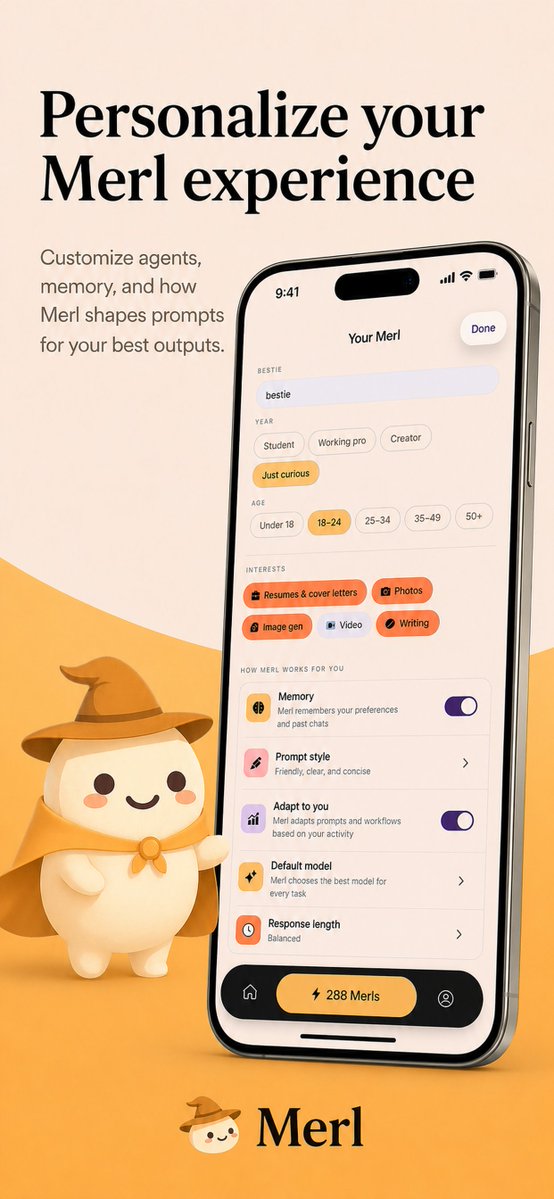
A polished vertical iOS App Store-style marketing image showing a branded AI app customization screen with a mascot, designed for product promotion and storefront screenshots. - AIPinMaker
Prompt
{"type":"app store promotional screenshot","platform":"iOS","style":"clean premium branding, soft 3D mascot illustration, warm minimalist product marketing","brand":{"name":"{argument name=\"app name\" default=\"Merl\"}","primary colors":["warm cream","golden yellow","black","soft orange","lavender accent"]},"canvas":{"aspect_ratio":"9:16 vertical","background":"light beige upper field with a large curved golden-yellow wave rising from the bottom"},"layout":{"sections":[{"title":"hero headline","position":"top-left","count":2,"labels":["Personalize your","Merl experience"]},{"title":"supporting copy","position":"upper-left below headline","count":4,"labels":["Customize agents,","memory, and how","Merl shapes prompts","for your best outputs."]},{"title":"phone mockup","position":"center-right","count":1,"labels":["iPhone displaying the app customization screen"]},{"title":"mascot","position":"bottom-left of phone","count":1,"labels":["small white mascot wearing wizard hat and cape, one arm pointing toward the phone"]},{"title":"brand signature","position":"bottom-center","count":2,"labels":["mascot face icon","Merl"]}]},"device":{"model":"modern iPhone Pro style with dynamic island","angle":"slight rightward perspective tilt","finish":"glossy black metal frame","screen":{"header":{"time":"9:41","center title":"Your Merl","right action":"Done"},"content_sections":[{"title":"BESTIE","count":1,"labels":["bestie"]},{"title":"YEAR","count":4,"labels":["Student","Working pro","Creator","Just curious"]},{"title":"AGE","count":5,"labels":["Under 18","18–24","25–34","35–49","50+"]},{"title":"INTERESTS","count":5,"labels":["Resumes & cover letters","Photos","Image gen","Video","Writing"]},{"title":"HOW MERL WORKS FOR YOU","count":5,"labels":["Memory","Prompt style","Adapt to you","Default model","Response length"]},{"title":"bottom navigation","count":3,"labels":["home icon","center pill button: 288 Merls","profile icon"]}],"selected states":["Just curious","18–24","Resumes & cover letters","Photos","Image gen","Writing"],"toggles":{"count":2,"labels":["Memory on","Adapt to you on"]},"descriptive_rows":["Memory — Merl remembers your preferences and past chats","Prompt style — Friendly, clear, and concise","Adapt to you — Merl adapts prompts and workflows based on your activity","Default model — Merl chooses the best model for every task","Response length — Balanced"]}},"mascot":{"design":"rounded chibi-like white character with dot eyes, small smile, peach blush cheeks","outfit_count":3,"outfit_pieces":["brown wizard hat","golden cape","round neck clasp or bow"],"pose":"standing beside the phone, slightly waving or presenting it"},"typography":{"headline":"large elegant high-contrast serif in black","body":"small clean sans-serif in muted dark gray","logo":"serif wordmark matching the headline"},"lighting":"soft studio lighting with gentle shadows, polished app-advertisement finish","quality":"high-resolution, highly legible UI, consistent brand identity, premium iOS App Store screenshot aesthetic"}3c:Tbf5,{"type":"aPrompt breakdown
- Subject
- iOS promotional screenshot for Merl app with iPhone mockup and wizard mascot
- Style
- clean premium branding, soft 3D mascot illustration, warm minimalist product marketing
- Lighting
- soft studio lighting with gentle shadows, polished app-advertisement finish
- Composition
- 9:16 vertical layout with top-left headline, center-right phone, bottom-left mascot, bottom-center brand signature
- Mood
- warm inviting minimalist product showcase
Remix ideas
- Change the golden-yellow wave to soft orange while keeping the light beige field
- Swap the selected interests to include Video instead of Writing on the phone UI
- Alter the mascot's pose so both arms present the phone instead of one pointing
Reference images
How to use this AI Image prompt template
 1
1Copy the prompt — grab this template’s prompt and negative prompt.  2
2Pick a model — choose a recommended AI model for the best match.  3
3Generate — open the studio with one click and create your result.
Related templates
Japanese Mecha Girl Figure Ad Poster
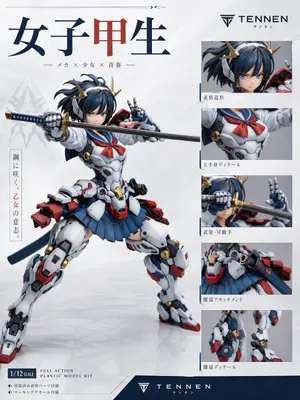
Create a premium Japanese plastic model kit product-poster layout on a clean white studio background with subtle gray gradients and a glossy floor reflection. The main subject is a highly detailed anime mecha schoolgirl figure posed dynamically in the center-left, in a wide combat stance, holding a katana horizontally across the frame with one robotic hand gripping the hilt and the other making a peace sign near her face. The character has a blurred face area, short dark navy-blue hair in a tousled bob with small side strands, and gold horn-like mechanical hair ornaments. Her outfit is a fusion of a Japanese high school sailor uniform and hard-surface sci-fi armor: white armored torso with mechanical panel lines, a red sailor neckerchief, a pleated navy skirt, bulky white armored thighs and shins, red and blue accent parts, gold circular joint details, a dark blue waist ribbon or back cloth, and red mechanical backpack-like attachments at the hips and lower back. The katana has a dark blade and a blue-and-gold wrapped handle. Render the figure like a professionally photographed collectible model or action plastic kit, with sharp material definition, realistic molded plastic surfaces, slight satin sheen, and commercial product-shot lighting. Design the page as a figure advertisement/spec sheet with exactly 1 large hero image and 5 smaller detail panels stacked vertically on the right. The 5 right-side panels must show: 1) close-up of the head and hair ornaments, 2) upper-body torso detail with sailor scarf and chest armor, 3) weapon and articulated hand close-up with the sword near the face, 4) waist attachment and skirt/hip armor detail, 5) leg detail close-up showing joints and armor construction. Include thin blue divider accents around the right-side panel area. At the top left, place a large Japanese title in bold serif-like characters reading "女子甲生", with the middle character in dark red and the others in dark navy. Beneath it, add a smaller Japanese subtitle line: "— メカ × 少女 × 青春 —". On the upper right, place a sleek logo and brand name reading "TENNEN (brand name)" with small Japanese text beneath it. Add a vertical Japanese slogan block on the left side of the hero figure reading "鋼に咲く、乙女の意志。" with the middle phrase in red. Add Japanese captions beneath each of the 5 right-side detail panels: "表情造形", "上半身ディテール", "武装・可動手", "腰部アタッチメント", "脚部ディテール". In the lower left, include a boxed scale label reading "1/12 SCALE (scale label)" and nearby English product text reading "FULL ACTION PLASTIC MODEL KIT". Add two small bullet lines in Japanese beneath that: "◆ 塗装済み髪パーツ付属" and "◆ マーキングデカール付属". Across the bottom, add a dark navy footer band with the brand logo and "TENNEN (footer brand)" centered, plus small Japanese text below. Use a polished modern hobby-brand aesthetic, Japanese mecha-girl collectible packaging design, minimal white negative space, crisp typography, balanced editorial layout, and realistic studio-photo rendering of a non-existent original figure. Color palette: white, navy blue, dark blue, red, gray, black, and metallic gold. Aspect ratio 3:4.39:Td20,Create a premium Japanese plastic model kit product-poster layout on a clean white studio background with subtle gray gradients and a glossy floor reflect
Productivity App UI Mockup
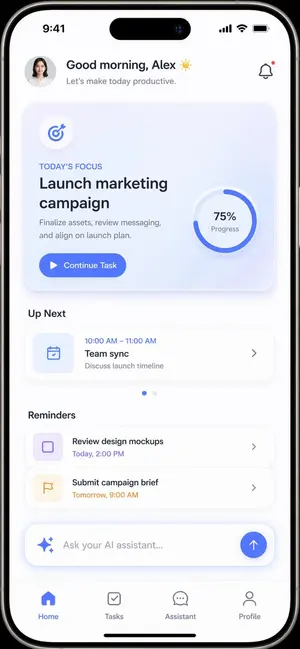
{ "type": "mobile app UI mockup", "device": "modern smartphone with dynamic island", "theme": "light mode, minimalist, {argument name=\"primary color\" default=\"soft blue\"} accents, soft drop shadows", "layout": { "header": { "profile": "small circular photo of a woman", "greeting": "Good morning, {argument name=\"user name\" default=\"Alex\"} ☀️", "subtitle": "Let's make today productive.", "icon": "notification bell with red dot" }, "hero_card": { "title": "TODAY'S FOCUS", "headline": "{argument name=\"focus task\" default=\"Launch marketing campaign\"}", "description": "Finalize assets, review messaging, and align on launch plan.", "button": "Continue Task", "graphic": "circular progress ring showing 75% Progress" }, "sections": [ { "title": "Up Next", "count": 1, "items": ["Team sync (10:00 AM - 11:00 AM)"] }, { "title": "Reminders", "count": 2, "items": ["Review design mockups", "Submit campaign brief"] } ], "bottom_elements": { "ai_input": "pill-shaped text field with sparkle icon and placeholder '{argument name=\"ai placeholder\" default=\"Ask your AI assistant...\"}'", "navigation_bar": { "count": 4, "tabs": ["Home", "Tasks", "Assistant", "Profile"] } } } }

Livestream E-commerce Interface Mockup
{ "type": "mobile livestream e-commerce interface mockup", "subject": { "person": "Elon Musk", "clothing": "black t-shirt with SPACEX logo", "pose": "gesturing towards camera with both hands, explaining enthusiastically", "watermark": "@Proof AI" }, "background": { "setting": "large display screen", "image": "Mars landscape with Starship rocket and dome habitats", "text": [ "SPACEX", "{argument name=\"background title\" default=\"移民火星计划\"}" ] }, "ui_layout": { "header": { "broadcaster_info": { "name": "{argument name=\"broadcaster name\" default=\"ElonMusk\"}", "stats": "75.8万本场点赞", "follow_button": "关注" }, "viewer_stats": { "avatars_count": 3, "text": "10万+", "close_button": "X" }, "tags": [ "带货总榜第1名", "更多直播 >" ] }, "product_card": { "position": "mid-right", "status": "讲解中", "image": "Mars dome habitats", "title": "{argument name=\"product title\" default=\"火星移民基础套餐\"}", "price": "{argument name=\"product price\" default=\"¥99.00\"}", "action_button": "抢" }, "chat_overlay": { "position": "bottom-left", "join_alert": "星辰大海 加入了直播间", "messages_count": 7, "messages": [ "{argument name=\"top chat message\" default=\"梦想家: 支持马斯克!!🚀\"}", "火星弟弟: 多少钱一位?", "科技迷: 太酷了!想去火星!", "未来已来: 如何报名?", "小火箭: 🌹🌹🌹", "宇宙无敌: 讲解一下细节", "东方不败: 老马牛逼!👍👍👍" ] }, "bottom_action_bar": { "input_placeholder": "说点什么...", "icons_count": 4, "icons": ["shopping cart", "gift box", "heart planet", "plus sign"] }, "floating_reactions": { "position": "bottom-right", "elements": "stack of floating hearts, thumbs up, and laughing emojis" } } }3c:T846,{ "type": "mobile livestream e-commerce interface mockup", "subject": { "person": "Elon Musk", "clothing": "black t-shirt with SPACEX logo", "pose": "gesturing towards camera with both hands, explaining enthusiastically",

E-commerce Livestream UI Mockup
{ "type": "mobile livestream screenshot", "subject": { "person": "Sam Altman", "action": "looking directly at the camera, gesturing with right hand extended forward", "clothing": "dark green sweater" }, "background": "room with a shelf containing 3 wine bottles, a sign saying 'AGI', and an OpenAI logo on the wall", "layout": { "top_bar": { "time": "20:34", "battery": "77+" }, "streamer_info": { "name": "{argument name=\"streamer name\" default=\"OpenAI\"}", "likes": "48.3万本场点赞", "button": "关注" }, "viewer_stats": { "viewers": "10万+", "avatars_count": 3 }, "banners": { "count": 4, "labels": ["OpenAI官方旗舰店榜第1名", "更多直播", "00:12", "520好礼季"] }, "host_label": { "name": "{argument name=\"host name\" default=\"山姆奥特曼 Sam Altman\"}", "status": "直播中", "subtitle": "{argument name=\"host quote\" default=\"大家好,我是山姆奥特曼,GPT滞销,帮帮我们!\"}" }, "chat_box": { "message_count": 6, "messages": [ "1号小迷妹: 来了来了", "博士在深圳: 支持奥特曼!支持 OpenAI!", "AI爱好者: GPTplus买起来!", "小太阳: 先拍一单试试", "OpenAI小助理: 点击下方小黄车,了解更多产品信息~", "淡定哥: 已拍,支持!" ] }, "product_card": { "title": "{argument name=\"product name\" default=\"OpenAI ChatGPT Plus 订阅服务 (一个月)\"}", "features": "正品保障 7天无理由 过期自动退 随时可退", "price": "{argument name=\"product price\" default=\"¥199\"}", "button": "抢" }, "bottom_bar": { "input_placeholder": "说点什么...", "icons_count": 4 } } }
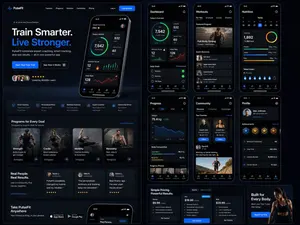
Fitness SaaS Landing Page UI
Design a modern, high-end fitness app (app type) landing page and product UI for a brand called PulseFit (brand name). Create a clean web design mockup that looks like a real SaaS fitness platform and mobile companion app. The design should feel premium, motivating, and easy to use, with a polished UI/UX style similar to top-tier health and wellness apps. Include: - A hero section with bold headline, short subheadline, strong call-to-action button, and app preview - Dashboard UI showing daily activity, calories burned, workout streak, heart rate, step count, and progress rings - Workout program cards for strength, cardio, mobility, and recovery - Nutrition tracking section with macro breakdown and water intake - Progress charts and analytics widgets - Trainer/community section with profile cards and testimonials - Pricing section and download/app store callout - Mobile app screens shown alongside the web design for a cohesive product ecosystem Style direction: - Sleek, minimal, modern interface - Premium fitness brand aesthetic - Smooth spacing, strong hierarchy, rounded cards, soft shadows - Dark mode UI with energetic accent colors like electric blue, neon green, or vibrant orange - Crisp typography, realistic charts, polished buttons, beautiful onboarding feel - Highly detailed, dribbble-worthy, startup-quality product design - Realistic UX case study presentation, not a cartoon or illustration Composition: - Full website homepage mockup - Multiple UI sections visible in one polished presentation - Slight perspective or straight-on product showcase - Clean background with subtle gradients and professional lighting - Ultra-detailed, sharp text rendering, visually balanced layout Output: A stunning, realistic UI/UX design concept for a fitness app website and dashboard that looks ready for development. Make it look like a real Figma product design presentation for a premium startup.

Cartoon Sneaker Advertising Campaign
Create a creative image of Cartoon Sneaker Advertising Campaign. Style: photorealistic. Composition: balanced and well-framed. Lighting: natural with cinematic mood. Category: photography. Reference: cartoon-sneaker-advertising-campaign-19420.
Explore more prompts
Browse more AI image and video prompts by category.
FAQ
- Why does the mascot wear a wizard hat and cape?
- The brown wizard hat, golden cape, and round neck clasp on the white chibi character visually represent Merl's magical prompt-shaping and memory features.
- What exact options appear selected inside the phone mockup?
- The screen highlights Just curious under BESTIE, 18–24 under AGE, Resumes & cover letters, Photos, Image gen, and Writing under INTERESTS, plus Memory and Adapt to you toggles turned on.