
Text to Image
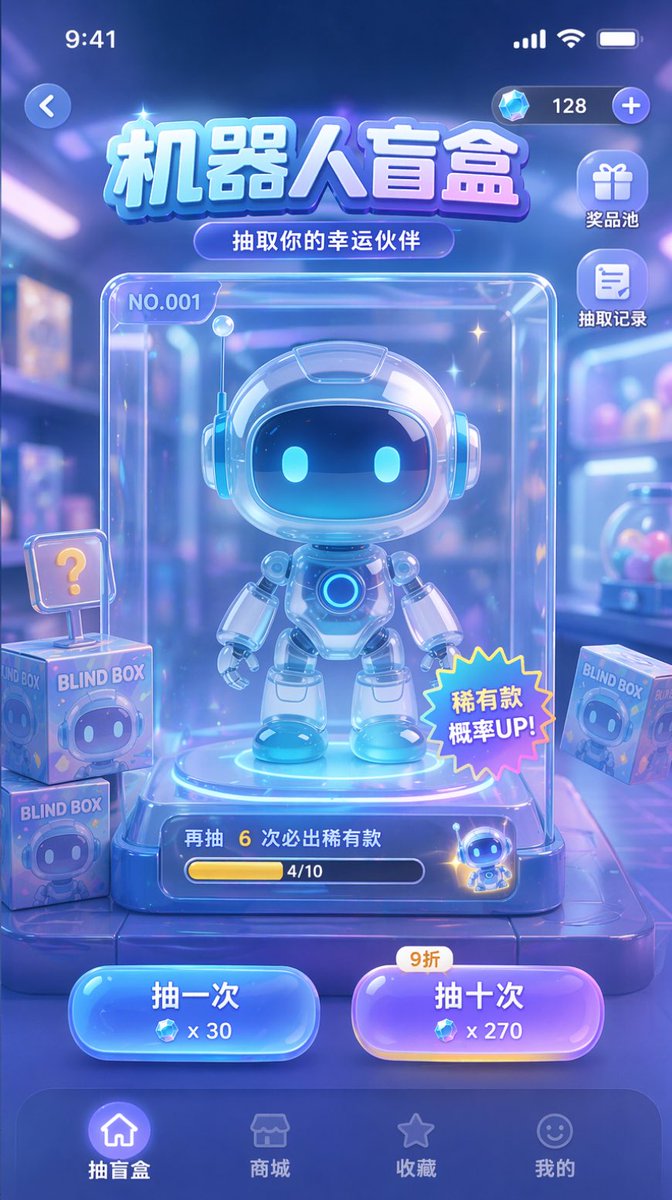
Gacha Game UI Mockup — AI Image Prompt
Generates a mobile app UI mockup for a blind box or gacha game featuring a central character display, action buttons, and navigation elements. - AIPinMaker
Prompt
{
  "type": "mobile game UI mockup",
  "theme": "sci-fi, cute, glassmorphism, neon blue and purple color palette",
  "header": {
    "status_bar": "standard iOS status bar at top",
    "top_controls": "back button on left, currency display with diamond icon and '128' on right",
    "title": "{argument name=\"main title\" default=\"机器人盲盒\"}",
    "subtitle": "{argument name=\"subtitle\" default=\"抽取你的幸运伙伴\"}"
  },
  "layout": {
    "side_menu": {
      "position": "top right below currency",
      "count": 2,
      "items": [
        {"icon": "gift", "label": "奖品池"},
        {"icon": "document", "label": "抽取记录"}
      ]
    },
    "centerpiece": {
      "description": "clear glass display case containing the main prize",
      "subject": "{argument name=\"robot character description\" default=\"cute chibi-style robot with glowing blue eyes and white glossy armor\"}",
      "case_details": [
        "label 'NO.001' in top left",
        "starburst sticker '稀有款 概率UP!' on bottom right",
        "progress bar at bottom with text '再抽 6 次必出稀有款' and '4/10'"
      ]
    },
    "background_elements": {
      "description": "blurred toy store background",
      "floating_items": {
        "count": 3,
        "description": "square boxes labeled 'BLIND BOX' with robot faces, one with a '?' sign"
      }
    },
    "action_buttons": {
      "position": "bottom center above nav bar",
      "count": 2,
      "buttons": [
        {"color": "blue", "text": "{argument name=\"left button text\" default=\"抽一次\"}", "cost": "x 30"},
        {"color": "purple", "text": "{argument name=\"right button text\" default=\"抽十次\"}", "cost": "x 270", "tag": "9折"}
      ]
    },
    "bottom_navigation": {
      "count": 4,
      "items": [
        {"icon": "home", "label": "抽盲盒", "state": "active"},
        {"icon": "store", "label": "商城"},
        {"icon": "star", "label": "收藏"},
        {"icon": "smiley", "label": "我的"}
      ]
    }
  }
}Prompt breakdown
- Subject
- cute chibi-style robot with glowing blue eyes and white glossy armor inside a clear glass display case labeled NO.001 with starburst sticker and pity progress bar
- Style
- sci-fi cute glassmorphism using neon blue and purple palette on a mobile game interface
- Composition
- standard iOS status bar, top currency bar, two-item side menu for prize pool and history, centerpiece case, three floating blind boxes, bottom draw buttons, and four-tab navigation with active home label
- Mood
- playful premium collectible vibe
Remix ideas
- swap the robot armor to glossy pink and change the case label to NO.007
- replace floating blind boxes with holographic crates while keeping the ? box
- alter the right button tag from 9折 to a limited-time banner icon
Reference images
How to use this AI Image prompt template
 1
1Copy the prompt — grab this template’s prompt and negative prompt.  2
2Pick a model — choose a recommended AI model for the best match.  3
3Generate — open the studio with one click and create your result.
Related templates
Crystal Golem Card Comparison UI
Goal: Create a dark comparison screenshot showing two fantasy trading-card designs side by side, as if from an image generation benchmark UI. Canvas: Landscape 16:9 composition, black/dark charcoal background with thin neon-green outlines. Two tall vertical panels fill the frame, left and right, separated by a narrow gap. Each panel contains one collectible monster card preview above a small status/control area. Layout: Use exactly 2 main panels. The left panel is labeled at the bottom in cyan pixel text “VENICE-NANO-BANANA-2”; the right panel is labeled “VENICE-GPT-IMAGE-2”. Each panel has a tiny green “OK” indicator in its top-right corner. Under each label, show a small metadata row with time, “FREE”, and “1500x2100”. At the very bottom of each panel, include a row of small UI buttons/icons: thumbs up, thumbs down, red flag, “SHARE”, “STUDIO”, “HD” with an up-arrow, a refresh icon, and “SAVE”. Subject: Both cards depict the same Pokémon-inspired character, Crystal Golem (character name), a massive humanoid golem made of jagged gray stone and glowing purple amethyst crystals, with violet energy cracks, crystal spikes, clenched fists, and floating crystal shards. The card type uses a purple psychic/eye symbol. Make the cards look like polished fantasy trading cards, but not an exact copy of any real copyrighted card template. Left card details: A Stage 1 card with a silver-gray border and slightly older illustrated-card look. Header text reads “STAGE 1”, Crystal Golem (card title), and “HP 160 HP”. Include a small circular evolution portrait at top left. The artwork shows the golem from the waist up inside an underground crystal cavern with teal mushrooms and glowing green cave lights, one fist raised toward the viewer, many purple crystal shards floating around. Use clean anime/comic line art, pale lavender highlights, and a holographic sheen. Attack area contains exactly 1 attack: “Amethyst Crush” with damage “130+”. Attack text: “Discard an Energy attached to this Golem. If you do, this attack does 70 more damage.” Bottom stats show weakness “×2”, resistance “-20”, and retreat with three star/colorless symbols. Include tiny illustrator/collector text and a short flavor line near the bottom. Right card details: A Stage 2 card with a darker, more cinematic high-detail look and a black/purple border. Header text reads “STAGE 2”, Crystal Golem (card title), and “HP 180”. Include a small evolution box at upper left reading “Evolves from Quartz Guardian”. The artwork fills more of the card and shows the golem lunging forward through an explosive cavern of purple crystals, with one huge open hand reaching toward the viewer, intense glowing violet eyes, black rock texture, luminous amethyst veins, and many floating crystal shards. Attack area contains exactly 1 attack: “Amethyst Crush” with damage “130”. Attack text: “This attack does 20 more damage for each Energy attached to this Pokémon.” Bottom stats show weakness “×2”, resistance “-30”, and retreat with four star/colorless symbols. Add tiny illustrator/collector text and a flavor quote: “Born from the heart of ancient caverns, it wields the power of earth and crystal in perfect harmony.” Visual style: High-contrast digital art, glossy trading-card foil effects, purple crystal magic, dark cave backgrounds, sharp details, cyan pixel UI labels, neon green UI outlines. The left card should appear cleaner and more cartoon/anime, while the right card should appear more dramatic, dense, and rendered. Constraints: Include exactly 2 card panels and exactly 1 trading card in each panel. Include exactly 1 attack on each card. Preserve all visible English labels named above. Do not add extra cards, characters, logos, watermarks, or real brand names.38:Tf6a,Goal: Create a dark comparison screenshot showing two fantasy trading-card designs side by side,

Futuristic animated landing page for AI game
I want to design the landing page for a new AI game (product_type). We want it to be futuristic and all that, and use animations as much as possible.

World Model Meme Grid
Create a square 1:1 comic-style meme infographic titled What is a World Model? (headline text) in huge bold black lettering centered at the top on a white background. Below the title, draw a clean black-outlined 3-column by 3-row grid with an extra left label column, like a humorous taxonomy chart. Column headers across the top are exactly three: “Predicts”, “Simulates”, and “Breaks Your Brain”. Row labels down the left are exactly three: “Robots”, “Foundation Models”, and “Movie Night”. Use thick black grid lines, white cell backgrounds, and colorful hand-drawn cartoon illustrations with crisp outlines, resembling playful science/AI memes. Cell 1, Robots × Predicts: title “DreamerV3”. Show a cute small robot sleeping on a blue pillow/blanket, with “Zzz” nearby and a thought bubble containing three small sequential robot/world prediction panels ending with a red flag. Cell 2, Robots × Simulates: title “Tiny Sandbox”. Show a glass snow-globe terrarium on a wooden base with a tiny robot standing on grass beside a tree, clouds, birds, and a sun inside the dome. Cell 3, Robots × Breaks Your Brain: title “Reward Goblin”. Show a small robot startled by a frantic green goblin chasing floating gold star rewards along a dotted path, with a red exclamation mark near the robot. Cell 4, Foundation Models × Predicts: title “Autocomplete Earth”. Show a retro computer-like AI with a green smiling screen and robot arms hovering over a globe, with a thought bubble containing a weather icon, a newspaper labeled “NEWS”, and a smiling emoji. Cell 5, Foundation Models × Simulates: title “Weather Wizard”. Show an old wizard in a blue robe and pointed hat casting spells over a world map or globe-like table, surrounded by weather icons: storm cloud with lightning, grey cloud, rain cloud, tornado, and bright sun, plus a small server rack at the side. Cell 6, Foundation Models × Breaks Your Brain: title “Everything Machine”. Show a giant black top-hat-shaped machine labeled FM (machine label) with a flexible hose/tube, generating many outputs: a cloud, purple DNA strand, red car, small robot, and a document page. Cell 7, Movie Night × Predicts: title “The Truman Show”. Show a man standing inside a transparent dome on a circular stage with a suburban house, fence, grass, clouds, and city skyline inside, surrounded by multiple studio cameras and spotlights outside the dome. Cell 8, Movie Night × Simulates: title “The Matrix”. Show a person seated in a futuristic chair wearing a black outfit, plugged into cables, against falling green code, flanked by one red pill and one blue pill. Keep the face simplified or obscured. Cell 9, Movie Night × Breaks Your Brain: title “SimCity God Mode”. Show a giant hand descending from a cloud and placing or pinching a building above a miniature city with roads, houses, factories, smoke, small people looking up with “?!” speech bubbles, and a bright sky. Constraints: include exactly 9 illustrated content cells, exactly 3 column headers, exactly 3 row labels, and exactly the cell titles listed above. Keep all typography bold, legible, black, and meme-like. Use a polished cartoon infographic style, not photorealistic. No watermark, no extra logos, no additional panels.36:Td2d,Create a square 1:1 comic-style meme infographic titled {argument name="h

Retro Robot Powering Illo with Codex
Create a playful retro black-and-white technical cartoon illustration on a warm off-white paper background, in a 16:9 wide canvas. Use thick rounded black ink outlines, halftone stippling shadows, minimal cream fills, and bright hot-pink accent color. Show exactly four main objects arranged left to right: 1) a small vintage tabletop image-printing press labeled “illo (printer label)” in lowercase on its front, with a crank on the left, rollers on top, and a sheet of paper emerging from the lower front; the printed sheet contains one simple landscape picture with a black sun/circle, black mountains, and pink diagonal shading; 2) a cute small robot mascot in the center with a rounded square head, black screen face, two white oval eyes, tiny body, arms, legs, and one antenna ending in a pink circle; 3) a chunky rectangular battery/power pack on the right labeled “Codex (battery title)” with smaller text “subscription (battery subtitle)”, two top terminals colored black and pink, and a pink lightning bolt above it; 4) a small wall outlet/power block at the far right with one socket and one button-like top knob. Show exactly two visible cable connections: a hot-pink cable running from the printer’s right side to the robot’s hand, and a black-and-pink plug cable from the robot into the Codex battery; also show a black power cord with plug leading from the wall outlet. Add exactly two small pink motion marks near the plug held by the robot. Keep the composition clean and centered with lots of negative space, no extra characters, no extra labels, no watermark, and preserve the hand-drawn risograph/zine aesthetic.39:T6be,Create a
Salaryman LINE Sticker Set
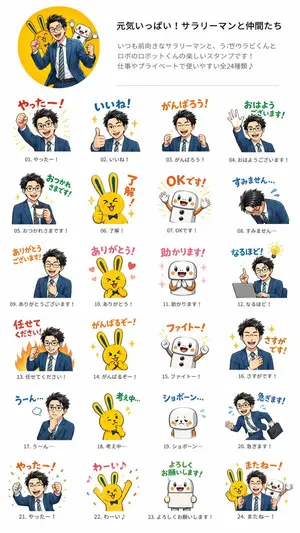
{"type":"fictional LINE sticker set presentation sheet","style":"bright commercial Japanese messaging sticker catalog, clean white background, cheerful vector-and-digital illustration hybrid, crisp outlines, saturated colors, playful hand-lettered Japanese captions, small gray item numbers and captions under every sticker","header":{"layout":"top section with a large circular yellow hero illustration on the left and text block on the right","hero_image":"a smiling energetic Japanese salaryman in a navy business suit and striped tie posing with a yellow rabbit mascot and a white round robot mascot behind him inside a yellow circle","title":"{argument name=\"headline text\" default=\"元気いっぱい!サラリーマンと仲間たち\"}","description":"Japanese promotional copy explaining that this is a fun stamp set featuring a positive salaryman, a rabbit called Rabi-kun, and a robot called Robo-kun, useful for work and private life, all 24 types"},"characters":{"main_character":"{argument name=\"main character\" default=\"cheerful Japanese salaryman\"}, black tousled short hair, navy suit, white shirt, striped blue-yellow tie, expressive business poses","mascot_1":"{argument name=\"rabbit mascot\" default=\"yellow rabbit named Rabi-kun\"}, long ears, round body, bow tie, cute energetic expressions","mascot_2":"{argument name=\"robot mascot\" default=\"white robot named Robo-kun\"}, rounded body, black button-like circles, orange cheeks, small arms, friendly face"},"layout":{"grid":"24 individual stickers arranged in a neat 4-column by 6-row catalog beneath the header, each sticker has large colorful Japanese phrase text above or beside the character art, with item number 01 to 24 and a smaller matching caption underneath","count":24,"stickers":[{"number":"01","label":"やったー!","description":"salaryman raises one fist triumphantly with yellow burst lines"},{"number":"02","label":"いいね!","description":"salaryman gives a big thumbs-up, sparkling stars around him"},{"number":"03","label":"がんばろう!","description":"salaryman clenches both fists in encouragement"},{"number":"04","label":"おはようございます!","description":"salaryman waves hello with green morning greeting text"},{"number":"05","label":"おつかれさまです!","description":"salaryman holds a drink or coffee and smiles politely with sparkles"},{"number":"06","label":"了解!","description":"yellow rabbit gives a thumbs-up with orange vertical text"},{"number":"07","label":"OKです!","description":"white robot raises both arms happily with orange OK text"},{"number":"08","label":"すみません…","description":"salaryman bows deeply in apology with blue sweat marks"},{"number":"09","label":"ありがとうございます!","description":"salaryman places a hand on his chest in gratitude"},{"number":"10","label":"ありがとう!","description":"yellow rabbit clasps hands happily surrounded by pink hearts"},{"number":"11","label":"助かります!","description":"white robot clasps hands gratefully with pink sparkles"},{"number":"12","label":"なるほど!","description":"salaryman sits at a laptop and points upward with a glowing lightbulb idea"},{"number":"13","label":"任せてください!","description":"salaryman pumps a fist with orange flames behind him"},{"number":"14","label":"がんばるぞー!","description":"yellow rabbit clenches fists with determination and sparkles"},{"number":"15","label":"ファイトー!","description":"white robot raises both fists in support with orange cheering text"},{"number":"16","label":"さすがです!","description":"salaryman touches his chest modestly while sparkles shine around him"},{"number":"17","label":"うーん…","description":"salaryman thinks with hand on chin and a small blue thought puff"},{"number":"18","label":"考え中…","description":"yellow rabbit thinks with one paw on chin and green text"},{"number":"19","label":"ショボーン…","description":"white robot looks sad and teary with blue sweat drops"},{"number":"20","label":"急ぎます!","description":"salaryman runs in a hurry carrying a black briefcase, tie flying, blue sweat drops"},{"number":"21","label":"やったー!","description":"salaryman celebrates with both fists raised and multicolor confetti"},{"number":"22","label":"わーい♪","description":"yellow rabbit jumps with both arms raised, music notes and confetti"},{"number":"23","label":"よろしくお願いします!","description":"white robot smiles while holding a blank white sign, green polite request text"},{"number":"24","label":"またねー!","description":"farewell group sticker with salaryman, yellow rabbit, and white robot waving together, orange goodbye text and sparkles"}]},"composition_notes":"Keep the sheet vertical like a product preview, generous white margins, thin divider line below the header, consistent sticker scale, Japanese captions in red, orange, blue, green, and pink hand-drawn lettering. The salaryman face should be generic and friendly, not a real person. Make it look like a plausible fictional LINE sticker pack preview.","aspect_ratio":"{argument name=\"aspect ratio\" default=\"9:16 vertical poster\"}"}
X (Twitter) MBTI analyzer web app
做一个 X MBTI 分析器:用户粘贴一条推文 → 调用后端(后端用 Gemini API 推测 MBTI)。 设计风格为 linear,仅深色模式,极简高质感,精致细节,界面为中文版本。
Explore more prompts
Browse more AI image and video prompts by category.
FAQ
- What does the progress bar track in this mockup?
- It displays the current pity counter at 4/10, promising a rare drop after six additional pulls.
- Why show both single and ten-pull buttons with different costs?
- The layout mirrors real gacha economies where the ten-pull offers a discount at 270 diamonds versus 300 for ten singles.