
Text to Image
Detailed prompt for old photo restoration using GPT Image 1.5 — AI Image Prompt
A highly detailed, structured JSON prompt designed for portrait restoration of old photos, comparing the results between Nano Banana Pro and GPT Image 1.5. The prompt focuses on maintaining identity fidelity, enhancing specific details like eyes and skin texture, and controlling lighting and image quality for an ultra-realistic, cinematic result. - AIPinMaker
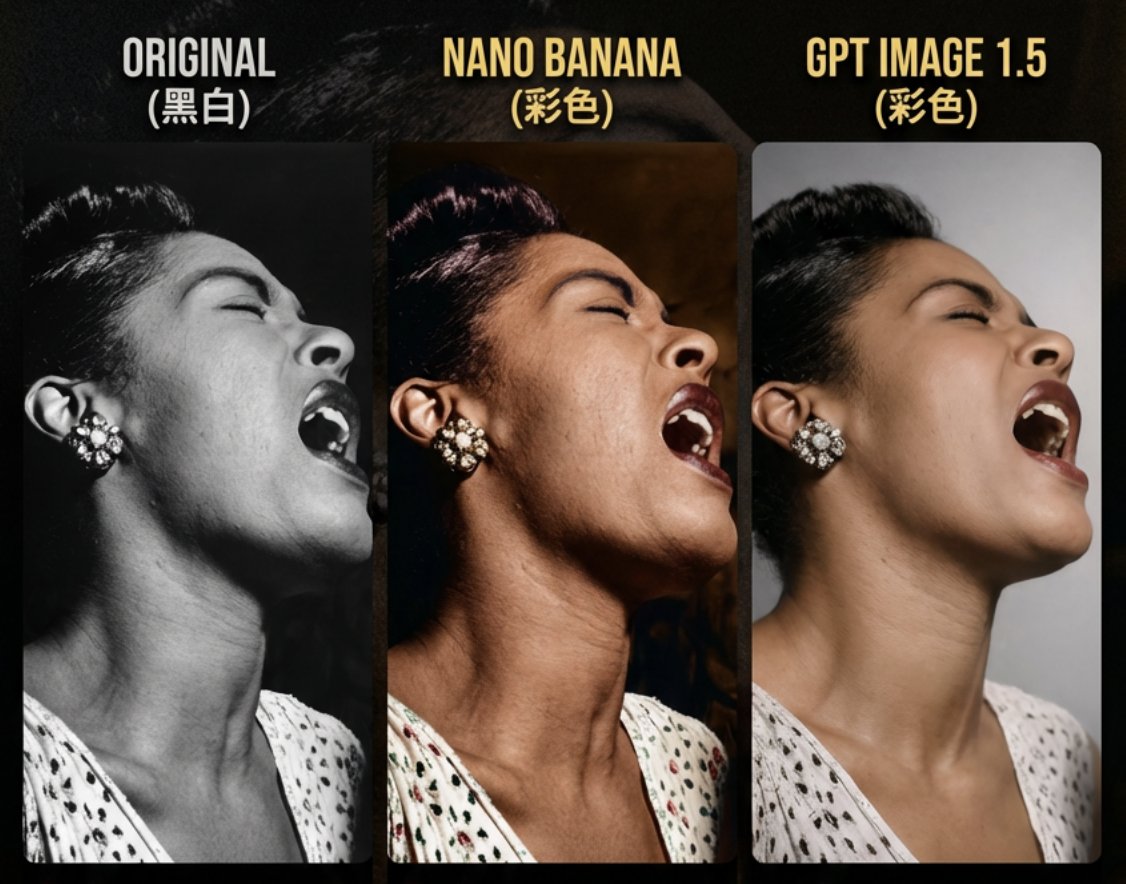
Prompt
{ "task": "portrait_restoration", "language": "zh-CN", "prompt": { "subject": { "type": "human_portrait", "identity_fidelity": "match_uploaded_face_100_percent", "no_facial_modification": true, "expression": "natural", "eye_detail": "sharp_clear", "skin_texture": "ultra_realistic", "hair_detail": "natural_individual_strands", "fabric_detail": "rich_high_frequency_detail" }, "lighting": { "exposure": "bright_clear", "style": "soft_studio_light", "brightness_balance": "even", "specular_highlights": "natural_on_face_and_eyes", "shadow_transition": "smooth_gradual" }, "image_quality": { "resolution": "8k", "clarity": "high", "noise": "clean_low", "artifacts": "none", "over_smoothing": "none" }, "optics": { "camera_style": "full_frame_dslr", "lens": "85mm", "aperture": "f/1.8", "depth_of_field": "soft_shallow", "bokeh": "smooth_natural" }, "background": { "style": "clean_elegant", "distraction_free": true, "tone": "neutral" }, "color_grading": { "style": "cinematic", "saturation": "rich_but_natural", "white_balance": "accurate", "skin_tone": "natural_true_to_subject" }, "style_constraints": { "no_cartoon": true, "no_beauty_filter": true, "no_plastic_skin": true, "no_face_reshaping": true, "no_ai_face_swap": true } }, "negative_prompt": [ "cartoon", "anime", "cgi", "painterly", "plastic skin", "over-smoothing", "over-sharpening halos", "heavy skin retouching", "face reshaping", "identity drift", "face swap", "beauty filter", "uncanny", "washed out", "color cast", "blown highlights", "crushed shadows", "banding", "jpeg artifacts", "extra fingers", "deformed eyes", "asymmetrical face", "warped features" ], "parameters": { "fidelity_priority": "identity", "detail_priority": "eyes_skin_hair_fabric", "realism_strength": 0.95, "sharpening": "micro_contrast_only", "skin_retention": "keep_pores_and_microtexture", "recommended_denoise": "low_to_medium" } }Prompt breakdown
- Subject
- human portrait with exact 100% face match from upload, natural expression, sharp clear eyes, ultra realistic skin texture, natural individual hair strands, rich high-frequency fabric detail
- Lighting
- bright clear exposure, soft studio light, even brightness balance, natural specular highlights on face and eyes, smooth gradual shadow transitions
- Composition
- full frame DSLR 85mm lens at f/1.8, soft shallow depth of field, smooth natural bokeh over clean elegant distraction-free neutral background
- Style
- cinematic color grading with rich but natural saturation, accurate white balance, true-to-subject skin tones, strict bans on cartoon anime cgi painterly plastic skin over-smoothing and beauty filters
- Mood
- natural realistic preservation of original identity and microtexture without uncanny or retouched effects
Remix ideas
- Increase realism_strength to 0.98 and set recommended_denoise to low when restoring heavily creased prints to retain more original grain
- Change background tone to a faint archival paper texture while keeping distraction_free true for period-appropriate context
- Apply micro_contrast_only sharpening exclusively to eyes and hair when the source shows significant focus loss from age
How to use this AI Image prompt template
 1
1Copy the prompt — grab this template’s prompt and negative prompt.  2
2Pick a model — choose a recommended AI model for the best match.  3
3Generate — open the studio with one click and create your result.
Related templates
Cinematic Portrait Restoration with Golden-Hour Lighting
Create a portrait image of Cinematic Portrait Restoration With Golden Hour Lighting. Style: photorealistic. Composition: balanced and well-framed. Lighting: natural with cinematic mood. Category: portrait. Reference: cinematic-portrait-restoration-with-golden-hour-lighting-9911.

Vintage Photo Restoration Prompt - Nano Banana Pro AI Prompt for Portrait / Selfie
{ "task": "image-to-image restoration", "input_image": "output_from_prompt_1", "reference_image": { "type": "face_reference", "description": "Same face as damaged photo, identity must remain unchanged" }, "restoration_settings": { "restore_face": true, "restore_skin_texture": true, "remove_damage": true, "preserve_expression": true, "preserve_pose": true }, "image_settings": { "aspect_ratio": "2:3 portrait", "resolution": "8K ultra-HD", "color_mode": "natural warm color", "clarity": "high-end modern portrait" }, "subject": { "pose": "unchanged from damaged photo", "expression": "same gentle smile", "details": "natural skin texture, realistic eyes, clean hair detail" }, "lighting": { "type": "soft cinematic studio lighting", "quality": "even, flattering, modern" }, "background": { "style": "clean neutral studio backdrop", "look": "soft bokeh, no texture damage" }, "quality_targets": [ "no scratches", "no folds", "no stains", "no blur", "no aging artifacts" ], "realism": "photorealistic modern portrait photography", "negative_prompt": [ "face alteration", "identity change", "over-smoothing", "plastic skin", "artistic illustration look" ] }

Hyper-Realistic Skin Texture Prompt for Nano Banana Pro (Detailed Version)
Create a creative image of Hyper Realistic Skin Texture Prompt For Nano Banana Pro Detailed Version. Style: photorealistic. Composition: balanced and well-framed. Lighting: natural with cinematic mood. Category: photography. Reference: hyper-realistic-skin-texture-prompt-for-nano-banana-pro-detailed-version-12235.

High-Quality Portrait Restoration
Create a portrait image of High Quality Portrait Restoration. Style: photorealistic. Composition: balanced and well-framed. Lighting: natural with cinematic mood. Category: portrait. Reference: high-quality-portrait-restoration-15895.

Old Photo Restoration Prompt
Create a creative image of Old Photo Restoration Prompt. Style: photorealistic. Composition: balanced and well-framed. Lighting: natural with cinematic mood. Category: photography. Reference: old-photo-restoration-prompt-9993.

Old Photo Restoration to DSLR Portrait
Create a portrait image of Old Photo Restoration To Dslr Portrait. Style: photorealistic. Composition: balanced and well-framed. Lighting: natural with cinematic mood. Category: portrait. Reference: old-photo-restoration-to-dslr-portrait-16890.
Explore more prompts
Browse more AI image and video prompts by category.
FAQ
- Why does this restoration prompt ban face reshaping and identity drift?
- It prevents the model from generating an idealized or altered likeness and ensures the output stays a true match to the uploaded original face.
- What upload preparation works best with the identity_fidelity setting here?
- Provide a clear front-facing scan and keep fidelity_priority set to identity with skin_retention on keep_pores_and_microtexture for faithful detail recovery.