
텍스트 투 이미지
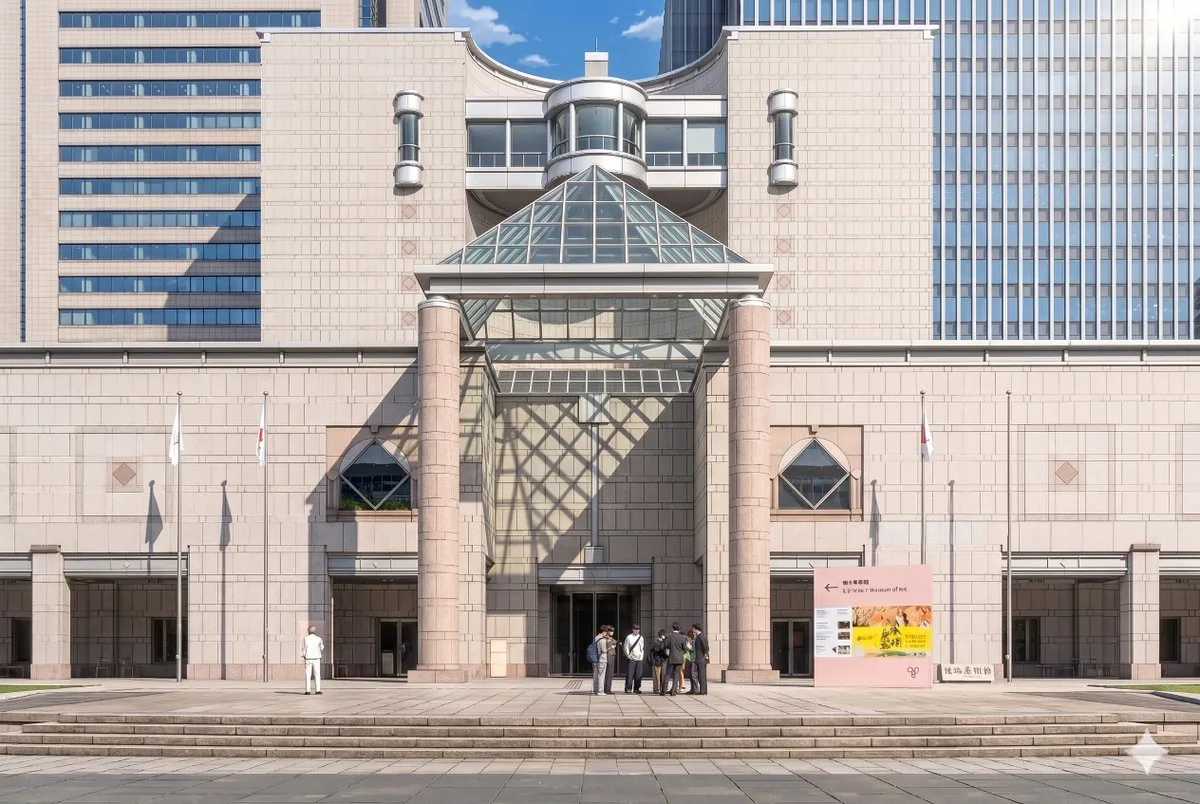
Anime Museum Background Conversion — AI 이미지 프롬프트
This prompt transforms a reference photo of a museum building into a detailed theatrical anime-style background while preserving the original composition and adding cinematic sunlight and stylized figures. - AIPinMaker
프롬프트
Turn my uploaded photo into a heartwarming whimsical {argument name="art style" default="children’s storybook illustration"}. A {argument name="subject" default="young mother holding her toddler’s hand"} beside a {argument name="object" default="vintage beige camper van"} in a cozy urban neighborhood. Transform the realistic photo into a colorful hand-drawn artwork with soft pastel tones, playful doodles, smiling sun, fluffy clouds, flowers, stars, hearts, cute plants, and string lights. Bright apartment buildings in the background reimagined in a cheerful cartoon style. Keep the characters’ pose, clothing, and interaction faithful to the original photo while adding charming storybook details and a warm family atmosphere. Style: modern children’s book illustration, kawaii aesthetic, hand-painted digital art, vibrant colors, textured brush strokes, clean outlines, adorable character design, whimsical environment, cozy neighborhood vibes, highly detailed, magical everyday life, storybook cover quality. Composition: full-body mother and child in the center, camper van behind them, colorful flowers and doodles surrounding the scene, balanced layout, white background with decorative elements, cute and uplifting mood. Lighting: soft daylight, warm highlights, dreamy glow, gentle shadows. Quality: masterpiece, ultra detailed, charming illustration, high resolution, professional children’s book artwork, joyful and nostalgic feeling.56:T5b2,Tu참고 이미지
이 AI 이미지 프롬프트 템플릿 사용 방법
 1
1프롬프트 복사 — 템플릿의 프롬프트와 네거티브 프롬프트를 가져오세요.  2
2모델 선택 — 가장 잘 맞는 추천 AI 모델을 고르세요.  3
3생성 — 클릭 한 번으로 스튜디오를 열어 결과를 만드세요.
관련 템플릿

Ghibli and Anime Style Photo Transformation
Create a anime image of Ghibli And Anime Style Photo Transformation. Style: photorealistic. Composition: balanced and well-framed. Lighting: natural with cinematic mood. Category: anime. Reference: ghibli-and-anime-style-photo-transformation-20040.

Hand-Drawn Urban Planning Map from 3D View
Create a creative image of Hand Drawn Urban Planning Map From 3d View. Style: photorealistic. Composition: balanced and well-framed. Lighting: natural with cinematic mood. Category: photography. Reference: hand-drawn-urban-planning-map-from-3d-view-1388.
Vintage Creepy Children's Book Transformation
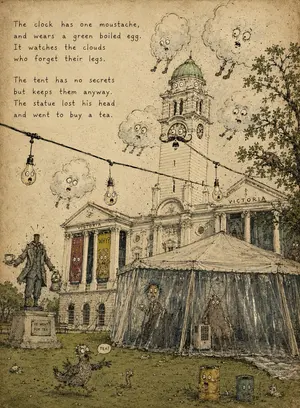
Using the provided reference photo as the scene base, transform it into a strange vintage children's picture-book illustration on aged yellow paper. Keep the same overall composition, building, clock tower, tent, lawn, statue position, string lights, tree, and dramatic cloud placement, but redraw everything as delicate ink line art with muted watercolor washes, paper grain, stains, scratches, and a slightly creepy whimsical storybook mood. Style: old absurdist children's book illustration, hand-drawn pen hatching, muted olive/sepia/gray palette, worn book-page texture, imperfect perspective, whimsical grotesque faces added to ordinary objects. Additions and changes: - Add a hand-lettered poem in the upper-left, exactly 8 lines in two 4-line stanzas: “The clock has one moustache, and wears a green boiled egg. It watches the clouds who forget their legs. The tent has no secrets but keeps them anyway. The statue lost his head and went to buy a tea.” - Turn the clock face on the tower into a surprised character with eyes, mouth, and one moustache; make the dome look like a green boiled egg. - Add exactly 5 anthropomorphic clouds with worried faces and tiny dangling legs, placed around the tower and sky. - Turn exactly 3 hanging bulbs on the string light into little worried faces. - Make the statue headless and give it a teacup and small kettle/lantern, with a small plaque reading “HE WENT FOR TEA.” - Add exactly 2 vertical poster banners on the building facade with silly monster faces and short readable words, one saying “EAT ART” and one saying “WHY?” - Add exactly 2 strange figures inside or behind the tent plastic, one tall person-like figure holding tea and one shaggy creature near the right side. - Add exactly 1 bird-like creature on the grass in the foreground with a speech bubble saying “TEA!”, plus exactly 1 small worm nearby. - Add exactly 2 rusty cylindrical bins in the lower-right foreground, each with a face. Constraints: preserve the architecture and layout from the reference, but make it look fully illustrated rather than photographic. No modern photorealism, no clean digital vector look, no extra poem text beyond the specified lines.39:T8ae,Using the pr

Nano Banana Pro torn paper style-switching edit prompt - Nano Banana Pro AI Prompt for Social Media Post
task: "edit-image: add widened torn-paper layered effect" base_image: use_reference_image: true preserve_everything: - character identity - facial features and expression - hairstyle and anatomy - outfit design and colors - background, lighting, composition - overall art style rules: - Only modify the torn-paper interior areas. - Do not change pose, anatomy, proportions, clothing details, shading, or scene elements. effects: - effect: "torn-paper-reveal" placement: "across chest height" description: - Add a wide, natural horizontal tear across the chest area. - The torn interior uses the style defined in `interior_style`. - effect: "torn-paper-reveal" placement: "lower abdomen height" description: - Add a wide horizontal tear across the lower abdomen. - The torn interior uses the style defined in `interior_style`. interior_style: mode: line-art (画風モード) style_settings: line-art: palette: "monochrome" line_quality: "clean, crisp" paper: "notebook paper with subtle ruled lines" sumi-e: palette: "black ink tones" brush_texture: "soft bleeding edges" paper: "plain textured paper" figure-render: material: "PVC-like" shading: "semi-realistic highlights" paper: "plain smooth surface" colored-pencil: stroke_texture: "visible pencil grain" palette: "soft layered hues" paper: "rough sketchbook paper" watercolor: palette: "soft transparent pigments" blending: "smooth bleeding" edges: "soft contours" paper: "watercolor paper texture" pencil-drawing: graphite_texture: "visible pencil grain" shading: "smooth gradients" line_quality: "mixed sharp and soft" tone: "gray-scale" paper: "notebook paper with faint ruled lines"3f:T770,ta

Colorized Painterly Portrait Transformation
Create a portrait image of Colorized Painterly Portrait Transformation. Style: photorealistic. Composition: balanced and well-framed. Lighting: natural with cinematic mood. Category: portrait. Reference: colorized-painterly-portrait-transformation-24530.
Anime Key Visual Composition
Turn my uploaded photo into a heartwarming whimsical children’s storybook illustration (art style). A young mother holding her toddler’s hand (subject) beside a vintage beige camper van (object) in a cozy urban neighborhood. Transform the realistic photo into a colorful hand-drawn artwork with soft pastel tones, playful doodles, smiling sun, fluffy clouds, flowers, stars, hearts, cute plants, and string lights. Bright apartment buildings in the background reimagined in a cheerful cartoon style. Keep the characters’ pose, clothing, and interaction faithful to the original photo while adding charming storybook details and a warm family atmosphere. Style: modern children’s book illustration, kawaii aesthetic, hand-painted digital art, vibrant colors, textured brush strokes, clean outlines, adorable character design, whimsical environment, cozy neighborhood vibes, highly detailed, magical everyday life, storybook cover quality. Composition: full-body mother and child in the center, camper van behind them, colorful flowers and doodles surrounding the scene, balanced layout, white background with decorative elements, cute and uplifting mood. Lighting: soft daylight, warm highlights, dreamy glow, gentle shadows. Quality: masterpiece, ultra detailed, charming illustration, high resolution, professional children’s book artwork, joyful and nostalgic feeling.6b:T5b2,Tu
더 많은 프롬프트 탐색
카테고리별 AI 이미지·영상 프롬프트를 더 찾아보세요.