
텍스트 투 이미지
Vintage Creepy Children's Book Transformation — AI 이미지 프롬프트
Transforms a real outdoor architectural photo into an aged, whimsical, slightly eerie children's book illustration with hand-lettered poem text and anthropomorphic details. - AIPinMaker
프롬프트
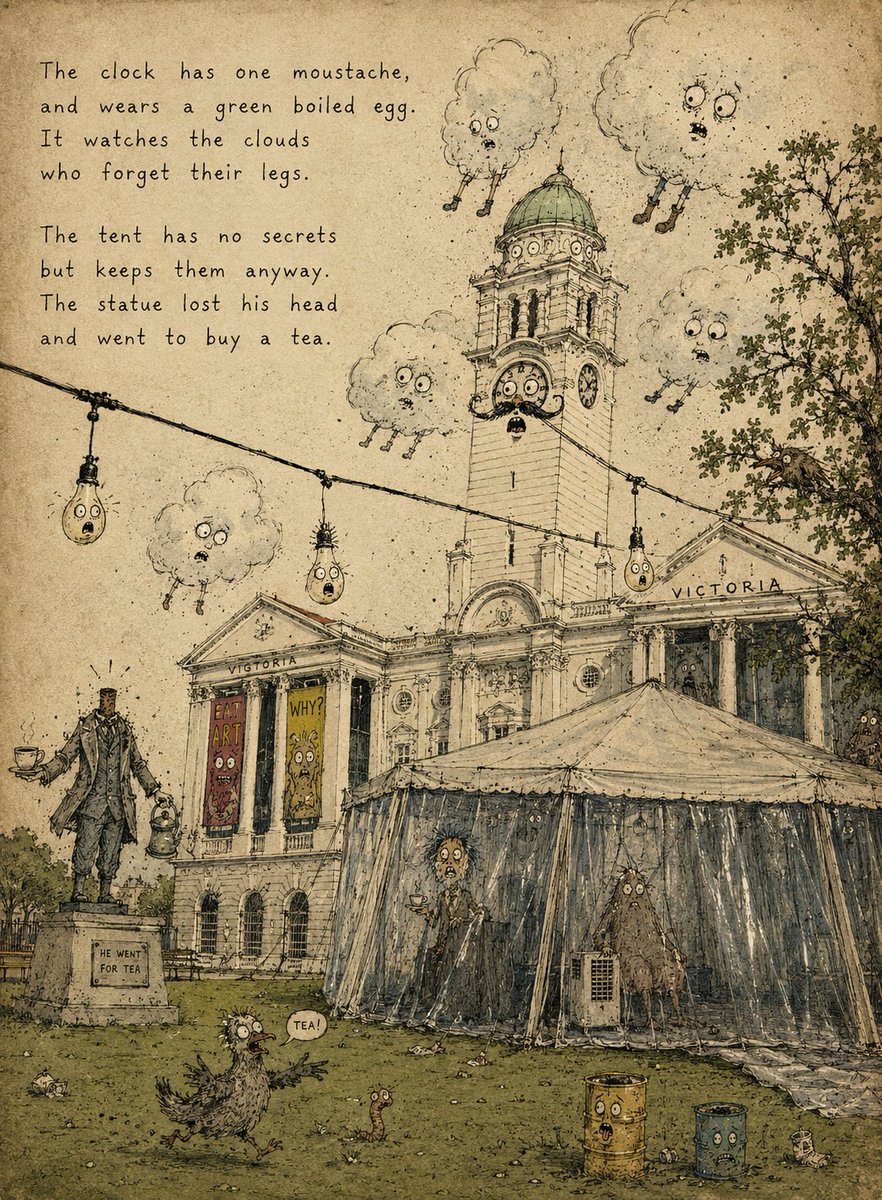
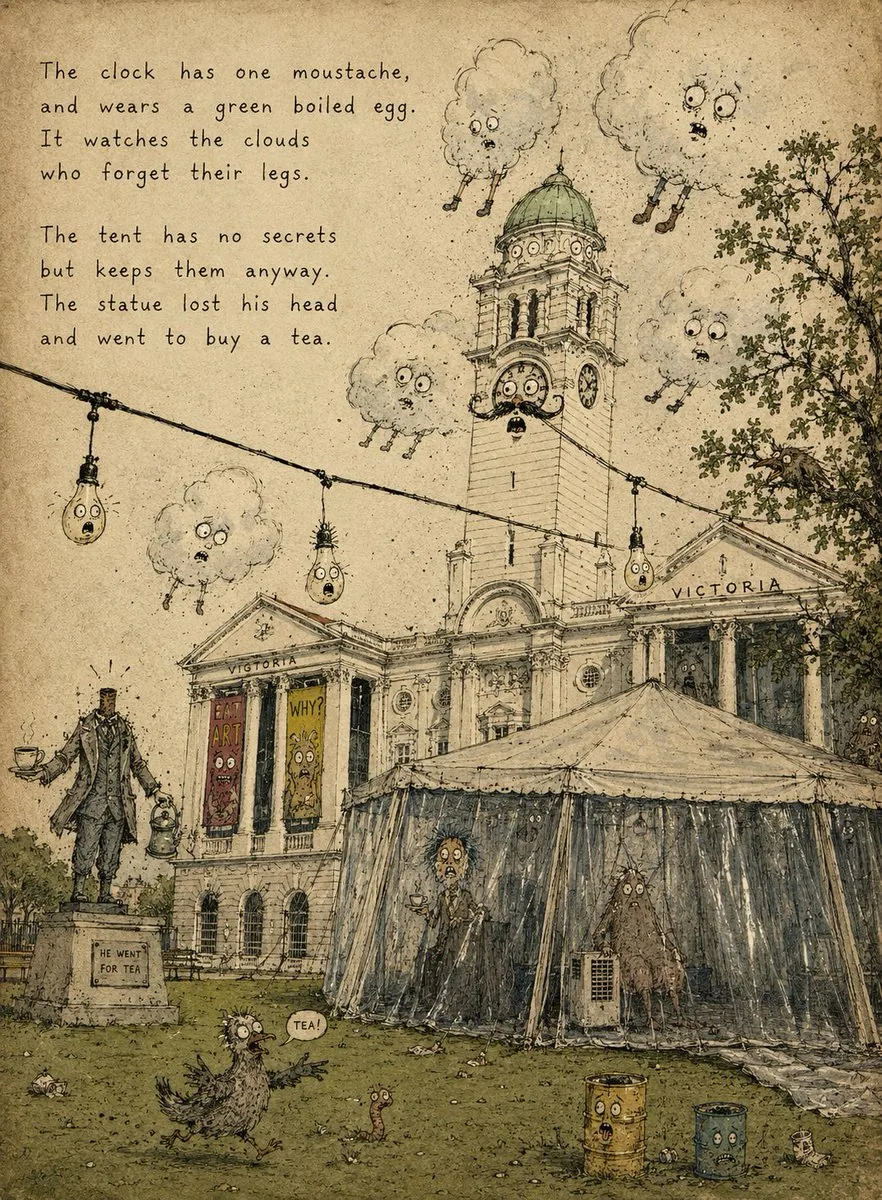
Using the provided reference photo as the scene base, transform it into a strange vintage children's picture-book illustration on aged yellow paper. Keep the same overall composition, building, clock tower, tent, lawn, statue position, string lights, tree, and dramatic cloud placement, but redraw everything as delicate ink line art with muted watercolor washes, paper grain, stains, scratches, and a slightly creepy whimsical storybook mood.

Style: old absurdist children's book illustration, hand-drawn pen hatching, muted olive/sepia/gray palette, worn book-page texture, imperfect perspective, whimsical grotesque faces added to ordinary objects.

Additions and changes:
- Add a hand-lettered poem in the upper-left, exactly 8 lines in two 4-line stanzas:
  “The clock has one moustache,
  and wears a green boiled egg.
  It watches the clouds
  who forget their legs.

  The tent has no secrets
  but keeps them anyway.
  The statue lost his head
  and went to buy a tea.”
- Turn the clock face on the tower into a surprised character with eyes, mouth, and one moustache; make the dome look like a green boiled egg.
- Add exactly 5 anthropomorphic clouds with worried faces and tiny dangling legs, placed around the tower and sky.
- Turn exactly 3 hanging bulbs on the string light into little worried faces.
- Make the statue headless and give it a teacup and small kettle/lantern, with a small plaque reading “HE WENT FOR TEA.”
- Add exactly 2 vertical poster banners on the building facade with silly monster faces and short readable words, one saying “EAT ART” and one saying “WHY?”
- Add exactly 2 strange figures inside or behind the tent plastic, one tall person-like figure holding tea and one shaggy creature near the right side.
- Add exactly 1 bird-like creature on the grass in the foreground with a speech bubble saying “TEA!”, plus exactly 1 small worm nearby.
- Add exactly 2 rusty cylindrical bins in the lower-right foreground, each with a face.

Constraints: preserve the architecture and layout from the reference, but make it look fully illustrated rather than photographic. No modern photorealism, no clean digital vector look, no extra poem text beyond the specified lines.39:T8ae,Using the pr
참고 이미지
이 AI 이미지 프롬프트 템플릿 사용 방법
 1
1프롬프트 복사 — 템플릿의 프롬프트와 네거티브 프롬프트를 가져오세요.  2
2모델 선택 — 가장 잘 맞는 추천 AI 모델을 고르세요.  3
3생성 — 클릭 한 번으로 스튜디오를 열어 결과를 만드세요.
관련 템플릿

Nano Banana Pro torn paper style-switching edit prompt - Nano Banana Pro AI Prompt for Social Media Post
task: "edit-image: add widened torn-paper layered effect" base_image: use_reference_image: true preserve_everything: - character identity - facial features and expression - hairstyle and anatomy - outfit design and colors - background, lighting, composition - overall art style rules: - Only modify the torn-paper interior areas. - Do not change pose, anatomy, proportions, clothing details, shading, or scene elements. effects: - effect: "torn-paper-reveal" placement: "across chest height" description: - Add a wide, natural horizontal tear across the chest area. - The torn interior uses the style defined in `interior_style`. - effect: "torn-paper-reveal" placement: "lower abdomen height" description: - Add a wide horizontal tear across the lower abdomen. - The torn interior uses the style defined in `interior_style`. interior_style: mode: line-art (画風モード) style_settings: line-art: palette: "monochrome" line_quality: "clean, crisp" paper: "notebook paper with subtle ruled lines" sumi-e: palette: "black ink tones" brush_texture: "soft bleeding edges" paper: "plain textured paper" figure-render: material: "PVC-like" shading: "semi-realistic highlights" paper: "plain smooth surface" colored-pencil: stroke_texture: "visible pencil grain" palette: "soft layered hues" paper: "rough sketchbook paper" watercolor: palette: "soft transparent pigments" blending: "smooth bleeding" edges: "soft contours" paper: "watercolor paper texture" pencil-drawing: graphite_texture: "visible pencil grain" shading: "smooth gradients" line_quality: "mixed sharp and soft" tone: "gray-scale" paper: "notebook paper with faint ruled lines"3f:T770,ta

Minimalist Hand-Drawn Children Illustration
Create a creative image of Minimalist Hand Drawn Children Illustration. Style: photorealistic. Composition: balanced and well-framed. Lighting: natural with cinematic mood. Category: photography. Reference: minimalist-hand-drawn-children-illustration-21281.

Hand-Drawn Urban Planning Map from 3D View
Create a creative image of Hand Drawn Urban Planning Map From 3d View. Style: photorealistic. Composition: balanced and well-framed. Lighting: natural with cinematic mood. Category: photography. Reference: hand-drawn-urban-planning-map-from-3d-view-1388.

Decorative Folk Illustration Style
Create a creative image of Decorative Folk Illustration Style. Style: photorealistic. Composition: balanced and well-framed. Lighting: natural with cinematic mood. Category: photography. Reference: decorative-folk-illustration-style-19831.

Hand-Drawn Sketch Illustration from Reference Image - Nano Banana Pro AI Prompt for Illustration
Use the uploaded image as your main reference point. Keep the same pose, facial features, proportions, and composition of the person. Turn the image into a hand-drawn illustration on lined notepad paper. The character should look like a detailed drawing in colored pencil and ink with cross-hatching and shading of the sketch. Add comic book-style drawings and notes around the character, such as arrows, doodles, “WOW”, “COOL!”and design notes. Circle the character with the smooth red-yellow glow of the sketch. Keep the concentrated composition of the portrait and the proportions of the whole body as in the original photo.The style should be similar to a conceptual drawing from a designer sketchbook: playful doodles, rough lines, warm tones, high detail. concept art for a sketchbook, drawings of characters on sheets of paper, illustrations with colored pencils, a background made of paper for a notebook, design notes made by hand You can choose the aspect ratio depending on the artificial intelligence or design you are using.3f:T415,

Minimalist Hand-Drawn Childrens Illustration
Create a creative image of Minimalist Hand Drawn Childrens Illustration. Style: photorealistic. Composition: balanced and well-framed. Lighting: natural with cinematic mood. Category: photography. Reference: minimalist-hand-drawn-childrens-illustration-21681.
더 많은 프롬프트 탐색
카테고리별 AI 이미지·영상 프롬프트를 더 찾아보세요.