
テキストから画像
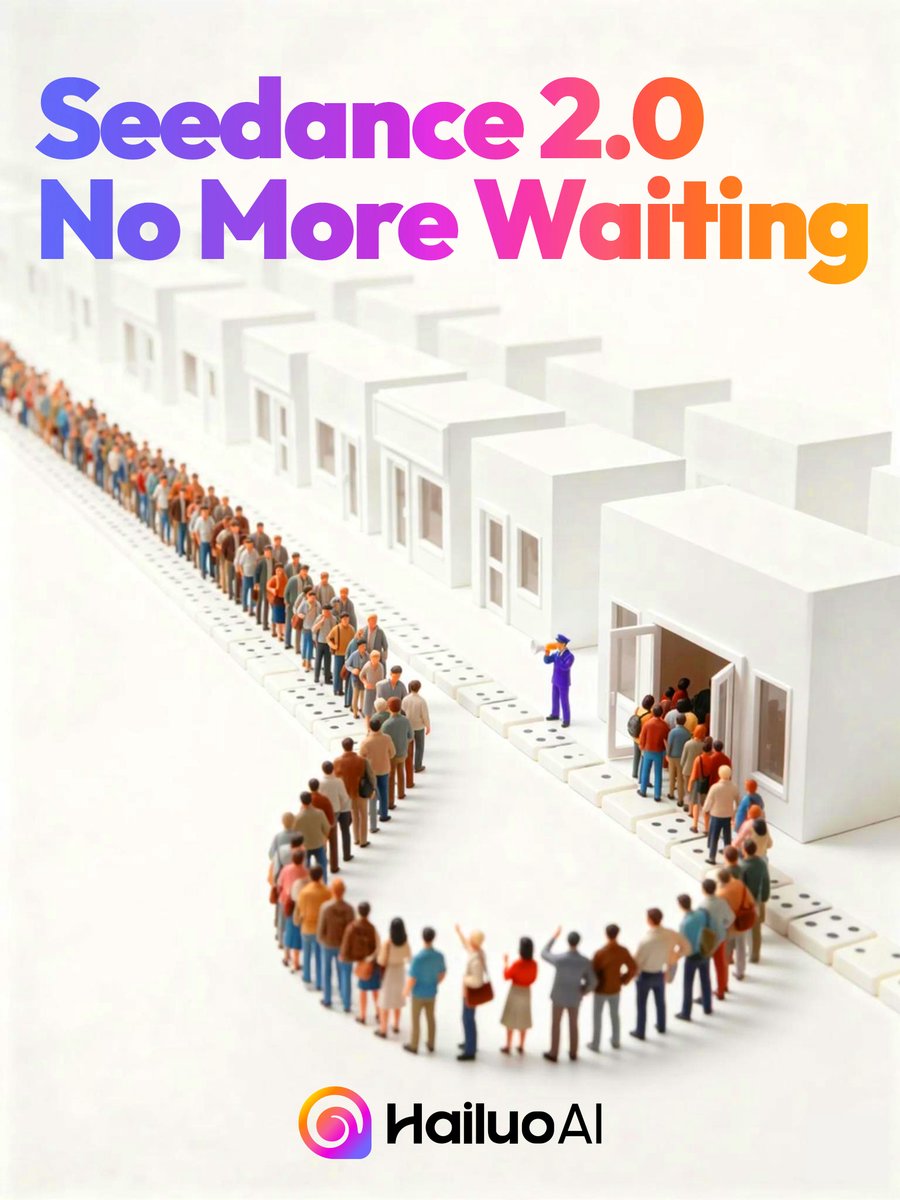
Seedance 2.0 Waiting Queue Poster — AI 画像プロンプト
Generates a polished tech-launch poster showing a long miniature queue entering white buildings beneath a bold gradient Seedance 2.0 announcement. - AIPinMaker
プロンプト
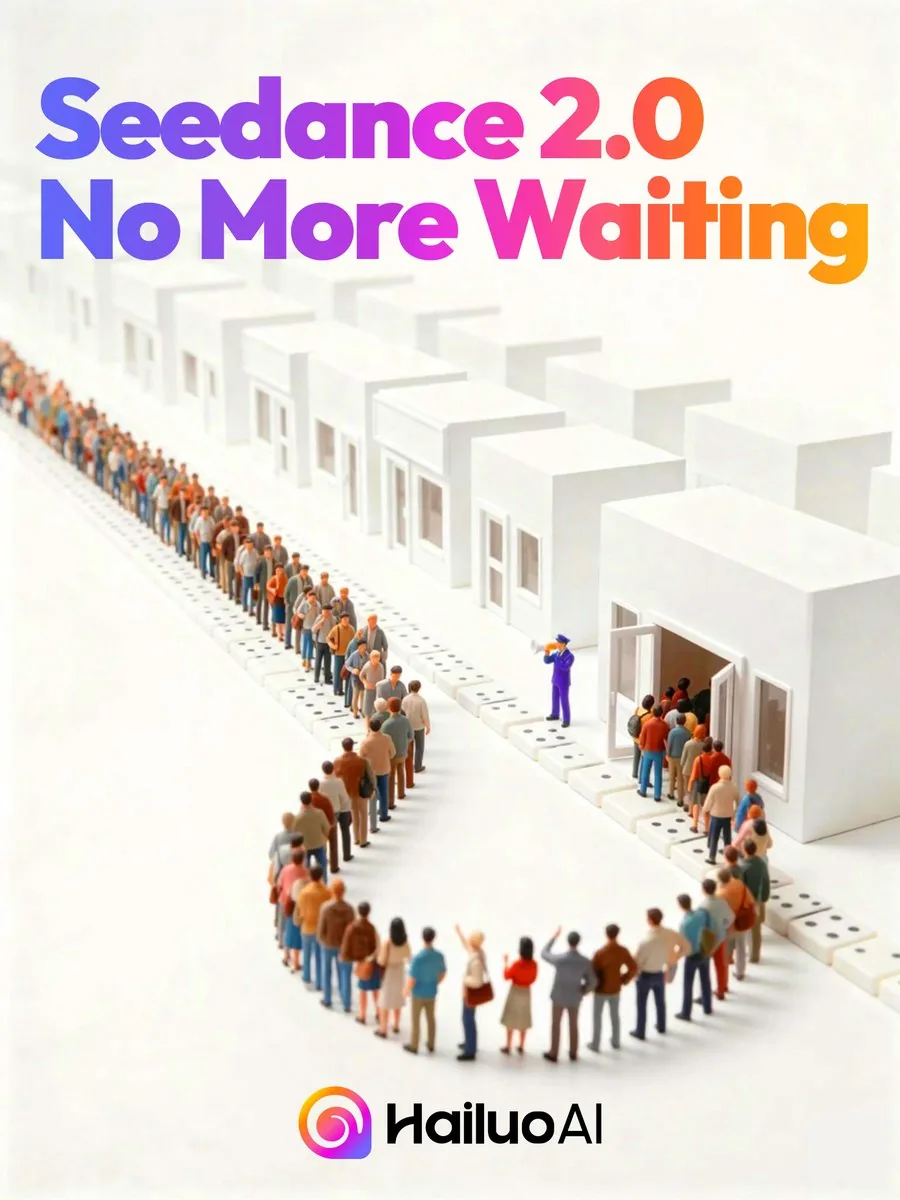
Create a clean square promotional poster with an isometric miniature 3D diorama on a warm off-white background. At the top, place huge bold rounded sans-serif headline text reading {argument name="headline text" default="Seedance 2.0 No More Waiting"}, split across 2 lines, with a vibrant left-to-right gradient from blue and violet through magenta to orange. Below the headline, show a long serpentine queue of tiny stylized people waiting in front of a row of minimalist white cube buildings; include 12 visible white building units receding into the distance, each with simple rectangular windows and doors, and one prominent open doorway on the right. The crowd should contain dozens of small diverse figures in casual clothing, arranged in a winding line that creates depth, with one purple-uniformed staff member near the open doorway gesturing people inside. Use soft studio lighting, shallow depth of field, subtle shadows, glossy clean surfaces, and a premium tech-advertising look. At the bottom center, place a colorful circular gradient app-style icon followed by the black wordmark {argument name="brand name" default="HailuoAI"}. Keep the composition airy and minimal, with the headline dominating the upper half and the queue scene occupying the middle and lower area.参照画像
このAI画像プロンプトテンプレートの使い方
 1
1プロンプトをコピー — テンプレートのプロンプトとネガティブプロンプトを取得。  2
2モデルを選ぶ — 最適な推奨AIモデルを選択。  3
3生成 — ワンクリックでスタジオを開いて作成。
関連テンプレート
Pixar Style Storyboard Poster
Create a social-media image of Pixar Style Storyboard Poster. Style: photorealistic. Composition: balanced and well-framed. Lighting: natural with cinematic mood. Category: poster. Reference: pixar-style-storyboard-poster-25798.
3D Animated Storyboard Poster Grid
Create a clean, colorful storyboard poster in a 3x4 grid layout with 12 panels on a single page. Title at the top: "[MAIN TITLE] (title)" Each panel must include: a scene number in a small circle, a short scene title, a colorful illustrated image, a 1–2 line description under the image. Main characters must remain visually consistent across all 12 panels: Character 1: [describe main character in detail] (character one) Character 2: [describe second character in detail] (character two) Theme/story: [overall story theme] (theme) Scene breakdown: [Scene title] – [what happens] [Scene title] – [what happens] [Scene title] – [what happens] [Scene title] – [what happens] [Scene title] – [what happens] [Scene title] – [what happens] [Scene title] – [what happens] [Scene title] – [what happens] [Scene title] – [what happens] [Scene title] – [what happens] [Scene title] – [what happens] [Scene title] – [what happens] Design style: cute 3D animated storybook style, warm emotional lighting, bright colors, soft shadows, child-friendly, clean panel borders, readable typography, neat poster composition, high detail. Important: Keep all 12 panels inside one single image. Make the layout clean and balanced. Keep the characters consistent in face, outfit, and colors. Make the text readable and properly placed. No cropped panels. No extra characters unless mentioned.3a:T5e5,Create a clean, co

Cream 3D China Divorce Data Chart
Goal: Create a cream-toned 3D editorial data visualization poster about 2020–2026 中国离婚人数 (headline text), showing divorce counts in China with a refined miniature diorama style. Canvas: Wide horizontal 2:1 composition, warm off-white paper background with subtle grain, soft shadows, minimalist premium infographic aesthetic. Use a muted cream, black, terracotta, sage, ochre, and beige palette. Layout: Place the main title on the upper left in large elegant black serif Chinese typography. Under it, add the subtitle 全国依法办理离婚手续 (subtitle text) with a thin horizontal rule ending in a small orange dot. The central focus is a black oval/cylindrical stage platform spanning the lower middle of the image, viewed in slight perspective. On the platform, arrange exactly 7 year positions from left to right: 2020, 2021, 2022, 2023, 2024, 2025, 2026. Data bars: Show exactly 5 solid rectangular 3D vertical bars for years 2020–2024 and exactly 2 dashed-outline placeholder bars for 2025 and 2026. Use these visible values and labels: 2020 ochre-gold tall bar labeled 433.9; 2021 terracotta bar labeled 283.9 with a small callout tag reading “2021 低点”; 2022 muted sage-green bar labeled 287.9; 2023 salmon-pink bar labeled 360.53 with a small callout tag reading “2023 回升”; 2024 beige bar labeled 351.3; 2025 dashed empty bar with a hanging tag reading “待更新”; 2026 dashed empty bar with a hanging tag reading “待更新”. Put each year label in white or pale text along the front face of the black platform beneath its position. Supporting visual elements: Include exactly 2 miniature human figures: one standing near the left side of the stage railing looking toward the chart, and one standing on the right side near the 2026 area. Include a delicate small tree with thin branches near the 2020 bar. Add one large warm yellow sun circle in the upper right. Add a tall cream rectangular architectural block at the far right behind the platform. At the lower left foreground, add exactly 3 desk-like props: one semicircular wood block, one off-white paper sheet with faint chart lines and an orange dot, and one small pale green cube. On the front lower center of the platform, add one small beige inset chart card showing a simple black line chart with an orange dot. Legend and text: In the bottom-left corner, add an orange dot followed by “单位:万对”. Keep all Chinese text crisp and readable. Use the data source/style as a polished social-media infographic, not a scientific chart. Style constraints: Soft natural lighting, realistic paper and plaster textures, subtle 3D depth, clean negative space, no watermark, no extra years, no extra bars, no additional text beyond the specified labels. Use warm ivory (background color) as the overall background tone and orange (accent color) for dots and highlights.37:Tbb4,Goal: Create a cream-toned 3D editorial data visualization poster about {argum

Japanese AI Case Study Slide
Goal: Create a polished Japanese corporate presentation slide for Galirage (company name) showing support achievements and case studies for AI implementation and AIX consulting. Canvas: 16:9 widescreen slide, white to very pale blue gradient background with subtle translucent curved wave shapes. Clean SaaS-consulting aesthetic, generous spacing, blue and teal accent colors, rounded cards, soft shadows, crisp vector icons. Header and title area: At top left, place a vertical blue accent bar followed by the small black headline 「支援実績【事例紹介】」. Below it, add a blue subheading 「多様な業界の大手企業を支援」 and a large bold main title in bright blue: AI導入・AIX支援で\n豊富な実績 (main title). To the upper center-right, place a short Japanese paragraph in black: 「製造・金融・保険・製薬・IT・通信など、多岐にわたる業界の大手企業を幅広くご支援してきました。特に『上場企業を中心とした大手企業向けのAI導入・AIX支援』において、豊富な実績を有しています。」 Logo and industry panel: At the top right, show a small abstract blue-and-red circular logo mark and the wordmark Galirage (company name). Beneath it, create a rounded rectangular outlined panel with a small blue pill label 「対応業界」 centered on its top border. Inside the panel, show exactly 6 evenly spaced blue line icons with Japanese labels, separated by thin vertical dividers: 1) factory icon labeled 「製造」, 2) bank building icon labeled 「金融」, 3) hands/heart insurance icon labeled 「保険」, 4) capsule icon labeled 「製薬」, 5) monitor with code icon labeled 「IT」, 6) radio tower icon labeled 「通信」. Main layout: Bottom two-thirds of the slide contains exactly 6 rounded white case-study cards in a 3-column by 2-row grid. Each card has a soft shadow, a diagonal numbered ribbon in the upper-left corner, a pale circular icon area on the left, a bold Japanese client-title heading on the right, three small rounded tag pills below the heading, and a short Japanese description paragraph. Use alternating blue and teal accents. Case cards, exact count and content: 1. Card number 1, title 「国内メガバンクグループ」, icon: blue bank building in a pale circle, tags: 「社内AI」 「AI駆動開発」 「研修」, description: 「グループ社員向けの社内AIシステム開発をご支援。AI駆動開発の社内標準化では、社内ツールの開発からエンジニア研修まで、一気通貫で対応しました。」 2. Card number 2, title 「大手化学メーカー」, icon: chemistry flask with bubbles, tags: 「PoC支援」 「データ分析AI」 「業務データ正規化」, description: 「研究開発部門の業務データ正規化および分析AIのPoC支援を担当。課題整理、仮説立案からシステム構築、成果物検証まで、一気通貫で対応しました。」 3. Card number 3, title 「大手製薬メーカー」, icon: medicine bottle and pill, tags: 「RAG」 「AIエージェント」 「業務効率化」, description: 「社内の業務効率化・高度化を目的としたRAG・AIエージェントのシステム開発をご支援。要件定義から本格的なシステム開発まで、一貫して担当しました。」 4. Card number 4, title 「大手保険持株会社」, icon: shield with check mark, tags: 「AIツール選定」 「セキュリティ準拠」 「ナレッジ提供」, description: 「社内セキュリティポリシーに準拠したAIツールの選定を支援。生成AI最新動向のインサイト付き定期配信とナレッジ提供を、継続的に実施しました。」 5. Card number 5, title 「大手重工メーカー」, icon: robotic arm, tags: 「ナレッジ継承」 「AIシステム構築」 「業務知識の体系化」, description: 「熟練社員が持つ暗黙知を次世代へ継承するためのAIシステム構築をご支援。現場の業務知識をデジタル化・体系化する仕組みを、設計から実装まで担当しました。」 6. Card number 6, title 「大手通信グループのIT会社」, icon: headset, tags: 「業務効率化」 「リスキリング研修」 「人材育成」, description: 「コールセンターシステムの業務効率化を支援。別案件として、社内AI人材育成に向けたリスキリング研修の設計・実施にも、幅広く対応しました。」 Typography and details: Use modern Japanese sans-serif typography, with large heavy blue title text, black section titles, small gray body copy, and blue/teal tag outlines. Add small footer copyright at bottom left: © Galirage Inc. (footer text). Keep the slide information-dense but readable, with no photos, no people, no extra cards, no extra icons, and no watermark.38:T13a2,Goal: Create a polished Japanese corporate presentation slide for Galirage (company name) showing support achievements and case studies for AI implementation and AIX consulting. Canvas: 16:9 widescreen slide, white to very pale blue gradient background with subtle translucent curved wave shapes. Clean SaaS-consulting aesthetic, generous spacing, blue and teal accent colors, rounded cards, soft shadows, crisp vector icons. Header and title area: At top left, place a vertical blue accent bar followed by the small black headline 「支援実績【事例紹介】」. Below it, add a blue subheading 「多様な業界の大手企業を支援」 and a large bold main title in bright blue: AI導入・AIX支援で\n豊富な実績 (main title). To the upper center-right, place a short Japanese paragraph in black: 「製造・金融・保険・製薬・IT・通信など、多岐にわたる業界の大手企業を幅広くご支援してきました。特に『上場企業を中心とした大手企業向けのAI導入・AIX支援』において、豊富な実績を有しています。」 Logo and industry panel: At the top right, show a small abstract blue-and-red circular logo mark and the wordmark Galirage (company name). Beneath it, create a rounded rectangular outlined panel with a small blue pill label 「対応業界」 centered on its top border. Inside the panel, show exactly 6 evenly spaced blue line icons with Japanese labels, separated by thin vertical dividers: 1) factory icon labeled 「製造」, 2) bank building icon labeled 「金融」, 3) hands/heart insurance icon labeled 「保険」, 4) capsule icon labeled 「製薬」, 5) monitor with code icon labeled 「IT」, 6) radio tower icon labeled 「通信」.

China Country Profile Infographic
Goal: Create a clean, modern country-profile infographic for China (country name), titled “CHINA COUNTRY PROFILE,” with a large central 3D raised relief map and surrounding statistical cards. Canvas: 16:9 horizontal infographic, light gray background, crisp corporate editorial style, subtle shadows, red/blue/green accent colors, high-resolution vector-meets-3D look. Main map: Place a large raised 3D topographic map of China in the center, occupying most of the canvas. Use terrain coloring: orange-brown mountains in the west, yellow central plateau, green eastern lowlands and coast. Add white province borders and black province labels. Include Taiwan, Hainan, and small South China Sea islands as separate raised pieces. Put large spaced black letters “CHINA” across the center. Mark Beijing with a red star and label it. Visible map labels should include exactly 28 province/region/city labels: Xinjiang, Tibet (Xizang), Qinghai, Gansu, Inner Mongolia (Nei Mongol), Ningxia, Sichuan, Yunnan, Guizhou, Guangxi, Guangdong, Hainan, Fujian, Zhejiang, Jiangsu, Anhui, Shandong, Hubei, Hunan, Shaanxi, Shanxi, Beijing, Tianjin, Liaoning, Jilin, Heilongjiang, Taiwan, and China. Top-left title block: Big red headline “CHINA,” dark subtitle “COUNTRY PROFILE,” a thin red divider line, and a short paragraph: “China, officially the People’s Republic of China is a country in East Asia. It is the world’s most populous country, with a population of over 1.4 billion people.” Left statistics card: A tall rounded white card with exactly 5 stacked fact rows, each with a red circular icon and text. The 5 rows are: Population — 1.41 Billion (population value) — World Rank: 1st; GDP (Nominal) — $17.79 Trillion — World Rank: 2nd; GDP Per Capita — $12,614 — World Rank: 63rd; Capital — Beijing (capital city); Official Language — Chinese (Mandarin) (official language). Use thin separators between rows. Top-right quick facts card: A rounded white card titled “QUICK FACTS” in red. Include exactly 4 rows with red icons: Government — Unitary One-Party Socialist Republic; Established — October 1, 1949; Land Area — 9.60 Million km², World Rank: 3rd; Population Density — ~147 People/km². Middle-right economic chart card: A rounded white card titled “ECONOMIC OVERVIEW” with subtitle “(Nominal GDP)” and small label “Trillion USD.” Include exactly 4 vertical bars for 2020, 2021, 2022, 2023 with values 14.72, 16.86, 17.96, 17.79. Use blue bars for 2020–2022 and a red bar for 2023. Bottom-left industry card: A rounded white card titled “INDUSTRY COMPOSITION (by GDP).” Include exactly 3-part donut chart segments: Industry 39.7% in blue, Services 53.2% in red, Agriculture 7.1% in green. Add matching legend with the same 3 labels and percentages. Bottom-center exports card: A rounded white card titled “MAJOR EXPORTS (2023).” Include exactly 5 export columns with blue line icons and red values: Electronic Products — $1.02 Trillion; Machinery & Equipment — $0.78 Trillion; Textiles & Clothing — $0.31 Trillion; Automotive Products — $0.26 Trillion; Chemical Products — $0.23 Trillion. Bottom-right trading partners card: A rounded white card titled “TOP TRADING PARTNERS (by Total Trade).” Include exactly 5 horizontal blue bars with small flag icons and values: United States — $664B; European Union — $643B; ASEAN — $596B; Hong Kong — $265B; Japan — $227B. Footer: Center a small source line reading “Source: World Bank, WTO, National Bureau of Statistics of China.” Constraints: Keep all cards aligned around the map without overlapping it, use consistent typography, red headings, blue chart elements, subtle drop shadows, rounded card corners, and no watermark.39:Tf2e,Goal: Create a clean, modern country-profile infographic for {argument name="country name" defau
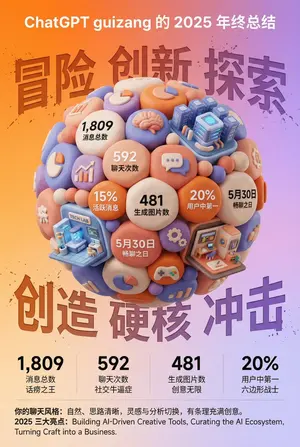
3D Clay Style Year-End Summary Poster Generator - Nano Banana Pro AI Prompt for Poster / Flyer
任务目标: 基于用户同时上传的年终总结截图中的数据和信息,设计一张风格鲜明、极具视觉冲击力的 3D 年终总结海报,用户名 [guizang] (用户名) 整体风格与情绪(固定风格): 核心风格: 融合 3D 趋势、游戏化元素和高饱和度色彩。 材质感: 画面主体呈现精致的黏土(Clay)或软塑胶材质渲染,边缘圆润,光影柔和,给人一种“盲盒玩具”的亲切感。 排版感: 整体布局要像一份精致的高级杂志,疏密有致,信息架构清晰。文字排版简洁明了,不要添加任何卡片、胶囊或底框类的装饰背景。 画面主体(核心视觉): 视觉中心是一颗巨大的、紧密堆叠的 Q 版 3D 黏土球体。球体的组成元素需要根据用户上传截图中的具体内容来动态生成: 数据气泡: 将截图中提取的关键数字和对应的标签(例如:消息总数、聊天次数、生成图片数、活跃度排名等)制作成圆润的黏土数据气泡嵌入球体。 主题图标: 根据截图体现的用户兴趣点,添加相应的通用黏土图标(例如:游戏手柄、大脑、图表、对话气泡等)。 类别建筑(核心要求): 分析截图中的内容侧重点,在球体中融入几座代表不同聊天品类的精致微缩黏土建筑。例如: 如果包含 AI/技术内容,加入一座带有科技感的未来数据中心建筑。 如果包含游戏内容,加入一座像素风格的游戏城堡。 如果包含创意/艺术内容,加入一个微型艺术工作室。 组合方式: 所有这些元素(气泡、图标、建筑)必须非常紧密、融洽地挤在一起,无缝组成一个完美的球形,不露出内部结构。 背景设计(固定框架): 底色: 采用高饱和度的暖橙色到柔和紫色的渐变背景(参考之前的风格)。 背景文字: 在星球背后,放置六个巨大的、带有喷溅纹理和反向蚀刻效果的汉字,主题可以是“冒险 创新 探索”(上排)和“创造 硬核 冲击”(下排),部分被球体遮挡,增加街头硬核感。 信息架构与排版(内容从截图中提取): 顶部 (Header): 放置白色的 ChatGPT Logo,并根据截图信息生成标题,格式为:“[从截图中提取的用户名 (用户名)] 的 [年份] 年终总结”。 底部数据区 (Data Grid): 在球体下方,创建一个极简的 2x2 纯文字数据网格。从截图中选取 4 个最核心的数据,使用超粗无衬线字体展示大数字,并配上相应的文字标签和有趣的社交属性短语(例如:“社交牛逼症”、“话痨”、“六边形战士”等,依据数据特性生成)。 页脚总结 (Footer): 在最底部用小字排版两段文字,内容直接从用户截图中的总结段落(如“你的聊天风格”和“年度亮点”)提取。3f:Tda4,Task Goal: Based on the data and information in the year-end summary screenshot uploaded by the user, design a 3D year-end summary poster with a distinct style and strong visual impact, username [guizang] (Username) Overall Style and Mood (Fixed Style): Core Style: Blending 3D trends, gamification elements, and high-saturation colors. Material Feel: The main body of the image presents exquisite clay or soft plastic material rendering, with rounded edges and soft light and shadow, giving a friendly 'blind box toy' feel. Layout Sense: The overall layout should resemble a refined, high-end magazine, well-spaced, with clear information architecture. Text layout should be concise and clear, without adding any decorative backgrounds like cards, capsules, or bottom frames. Main Visual (Core Visual): The visual center is a massive, tightly stacked Q-version 3D clay sphere. The elements composing the sphere need to be dynamically generated based on the specific content in the user's uploaded screenshot: Data Bubbles: Key numbers and corresponding labels extracted from the screenshot (e.g., total messages, chat times, images generated, activity ranking, etc.) are made into rounded clay data bubbles embedded in the sphere. Theme Icons: Based on the user's interests reflected in the screenshot, add corresponding general clay icons (e.g., game controller, brain, chart, chat bubble, etc.). Category Buildings (Core Requirement): Analyze the focus of the content in the screenshot and integrate several exquisite miniature clay buildings representing different chat categories into the sphere. For example: If it includes AI/technology content, incorporate a futuristic data center building with a sense of technology. If it includes gaming content, incorporate a pixel-style game castle. If it includes creati
他のプロンプトを探す
カテゴリ別にAI画像・動画プロンプトをもっと見る。