
テキストから画像
Chinese Wealth Typography Poster — AI 画像プロンプト
Generates a high-contrast experimental Chinese typographic poster with a giant custom wealth-themed wordmark, orbital motion lines, and technical micro-labels. - AIPinMaker
プロンプト
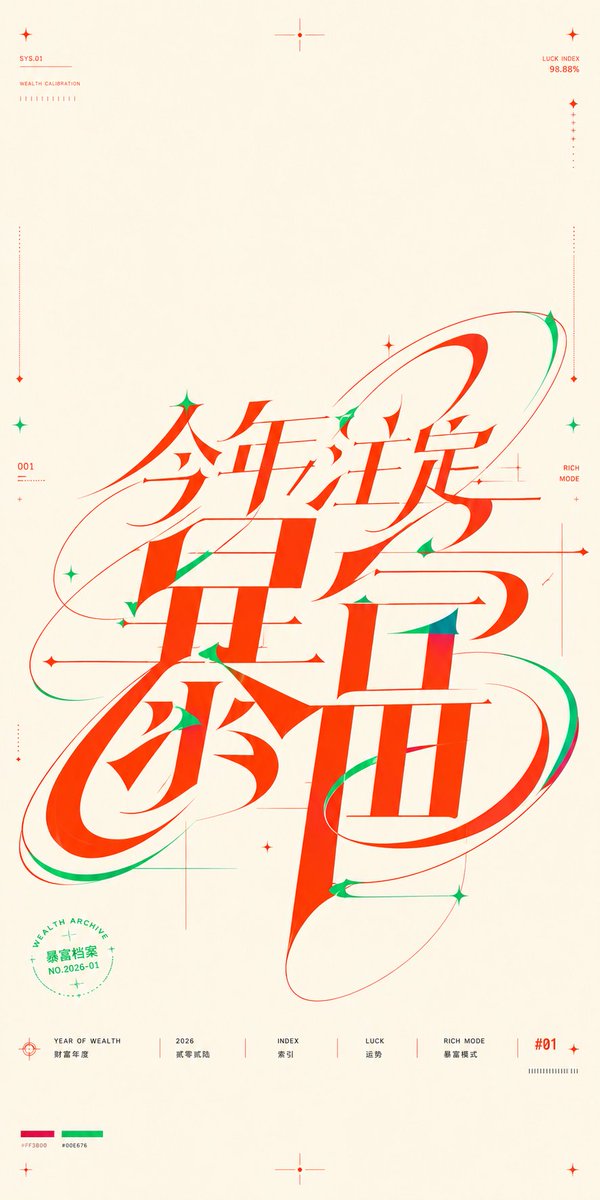
Goal: Create a near-square vertical typographic poster about {argument name="theme text" default="今年注定暴富"}, where the core message is not a normal headline but a huge custom continuous Chinese wordmark occupying the middle and lower center of the composition. The lettering should compress the phrase into one shared skeleton so the strokes feel simultaneously readable characters, motion trails, orbital paths, and precision graphic construction.

Canvas: Portrait poster, approximately 9:16 but close to a square-poster feel, warm ivory paper background with generous empty margins. Use a clean editorial graphic-design layout with thin technical guide marks and lots of negative space.

Main wordmark: Place one massive red-orange Chinese calligraphic-mechanical logotype in the center, spanning most of the height from just below center to the lower third. Use extremely high contrast strokes: thick vertical slabs, sharp triangular cuts, thin hairline crossbars, soft elongated curves, and oval loop structures. The main visible phrase should read {argument name="theme text" default="今年注定暴富"}. Make the characters interlock and overlap as a single custom glyph, with sweeping red and green orbital ribbons wrapping around it. Add small green shadow strokes and accents inside cuts and terminals, especially on curves and pointed joints. The overall feeling should be lucky, wealthy, futuristic, energetic, and precise.

Color palette: Use exactly 3 dominant colors: warm ivory background, vivid fortune red-orange for the main typography and most linework, and emerald green for secondary accents. Include tiny printed palette swatches near the bottom left labeled with hex-like values, red {argument name="red color code" default="#FF3800"} and green {argument name="green color code" default="#00E676"}.

Decorative and technical elements: Include 12 small star/cross markers distributed around the poster: 1 at the upper left, 1 at the top center, 1 at the upper right, 2 along the left side, 2 along the right side, 3 around the central wordmark, 1 at the bottom center, and 1 at the lower right. Include 4 long thin dotted vertical calibration lines near the left and right margins, each ending with tiny diamond markers. Include several ultra-thin horizontal and vertical construction lines crossing behind the wordmark, like a design grid, but keep them subtle and airy. Add 3 large elliptical orbital paths around the wordmark: one sweeping from left middle to upper right, one wrapping the lower left loop, and one long tilted oval around the lower right character.

Top micro text: At the upper left, small red technical labels read “SYS.01” and “WEALTH CALIBRATION” with a short row of tiny tick marks below. At the upper right, small red text reads “LUCK INDEX” and “98.88%” with a vertical dotted measure line below. Keep these labels tiny and precise.

Side micro text: On the left side near the middle, add “001” with miniature unreadable calibration ticks beneath. On the right side near the middle, add “RICH MODE” in small red text, aligned near a fine vertical guide.

Circular seal: In the lower left quadrant, place a small green circular seal partly under the main typography. It contains the curved English text “WEALTH ARCHIVE”, the Chinese text {argument name="seal text" default="暴富档案"}, and “NO.2026-01”, plus tiny stars and dotted ring marks.

Bottom information row: Along the bottom, create exactly 6 separated footer items with thin red dividers: 1) a target/crosshair icon with “YEAR OF WEALTH” and Chinese text “财富年度”; 2) “2026” with Chinese text “财富新船”; 3) “INDEX” with Chinese text “索引”; 4) “LUCK” with Chinese text “运势”; 5) “RICH MODE” with Chinese text “暴富模式”; 6) a red “#01” label with a small tick barcode beneath. Keep all footer text small, crisp, and aligned on a baseline.

Style constraints: High-end Chinese experimental typography poster, vector-sharp, no photography, no gradients except very subtle paper warmth, no shadows, no realistic objects. Keep the main wordmark legible enough to read while prioritizing sculptural custom lettering, extreme stroke contrast, smooth motion trails, and sparse technical-poster precision.39:T10e0,Goal: Create a near-square vertical typographic poster about {argument name="theme text" default="今年注定暴富"}, where the core message参照画像
このAI画像プロンプトテンプレートの使い方
 1
1プロンプトをコピー — テンプレートのプロンプトとネガティブプロンプトを取得。  2
2モデルを選ぶ — 最適な推奨AIモデルを選択。  3
3生成 — ワンクリックでスタジオを開いて作成。
関連テンプレート

Clean Metro Tourism Poster Recreation
Using REFERENCE_0, extract and faithfully recreate only the tourism poster artwork as a clean, flat, front-facing subway-ad poster. Remove the surrounding train interior, metal frame, glare, wrinkles, perspective skew, and reflections. Straighten the poster into a vertical 9:16 composition and enhance it into a polished print-ready public-service advertisement while preserving the same visual concept: hands forming a heart around the sun, green lotus scenery, distant pavilion, and the same green/yellow/white color scheme. Text: Keep the Chinese typography and hierarchy from the reference, making it sharp and legible. Use the top label 文明旅游 (top label), the main headline 每个人都是一道\n亮丽的风景线 (headline text), the section heading 文明旅游行为公约 (pledge heading), and the footer 中央文明办|国家旅游局 (footer text). Recreate exactly 4 visible green bullet dots in the pledge area: 1 dot before the first line, 1 dot at the end of the first line, 1 dot before the second line, and 1 dot at the end of the second line. Include the small bottom-right code 京21110 (bottom right code). Layout: Make the upper image area dominate the poster, with the headline centered over the hands. Add a clean white lower information panel separated by a slanted golden band, and a dark green footer strip at the bottom. Keep the design like an official Chinese metro public-interest poster, with no train surroundings, no frame, no watermark, and no extra text.39:T662,Using REFERENCE_0, extract and faithfully recreate only the touris

Energetic Pop Art Poster
Create a social-media image of Energetic Pop Art Poster. Style: photorealistic. Composition: balanced and well-framed. Lighting: natural with cinematic mood. Category: poster. Reference: energetic-pop-art-poster-20527.

Thumbnail text overlay based on attachment
Create a youtube-thumbnail image of Thumbnail Text Overlay Based On Attachment. Style: photorealistic. Composition: balanced and well-framed. Lighting: natural with cinematic mood. Category: poster. Reference: thumbnail-text-overlay-based-on-attachment-435.
Quirky Independent Short Film Festival Poster
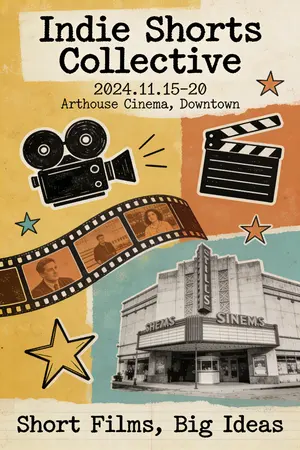
A quirky and independent-style poster for a short film festival. The design is a collage of hand-drawn doodles, film strips, and vintage photographs. The typography is a mix of different typewriter and handwritten fonts, giving it a DIY, zine-like feel. The color palette is limited and has a retro vibe. The poster should look creative, unconventional, and appeal to an arthouse audience. –ar 2:3

YouTube Dark Mode Desktop UI Mockup
{ "type": "desktop web browser UI screenshot", "environment": "{argument name=\"os environment\" default=\"Windows 11 desktop\"}", "theme": "{argument name=\"ui theme\" default=\"dark mode\"}", "browser_window": { "tabs": ["YouTube", "New Tab"], "url_bar": "youtube.com", "profile_icon": "{argument name=\"profile initial\" default=\"M\"}" }, "app_interface": { "header": { "logo": "{argument name=\"website name\" default=\"YouTube\"} GB", "search_bar": "Search", "icons": ["mic", "create", "notifications", "profile"] }, "filter_bar": { "active_filter": "{argument name=\"active filter\" default=\"All\"}", "count": 11, "labels": ["All", "Gaming", "Music", "Live", "Podcasts", "Mixes", "Science", "Lo-fi", "Thrillers", "Recently uploaded", "Watched"] }, "sidebar": { "sections": [ { "title": "Main", "count": 3, "labels": ["Home", "Shorts", "Subscriptions"] }, { "title": "You", "count": 6, "labels": ["Your channel", "History", "Playlists", "Your videos", "Watch later", "Liked videos"] }, { "title": "Subscriptions", "count": 8, "labels": ["Linus Tech Tips", "MrBeast", "Kurzgesagt - In a Nutshell", "ColdFusion", "3Blue1Brown", "Khan Academy", "Veritasium", "Show more"] }, { "title": "Explore", "count": 7, "labels": ["Trending", "Music", "Films", "Live", "Gaming", "News", "Sport"] }, { "title": "More from YouTube", "count": 3, "labels": ["YouTube Premium", "YouTube Music", "YouTube Kids"] } ] }, "main_content": { "layout": "3 columns by 4 rows grid", "count": 12, "video_cards": [ { "title": "Why Build Your Own GPU is Almost Impossible", "channel": "Linus Tech Tips", "stats": "164K views • 1 day ago", "thumbnail": "CPU/GPU chip" }, { "title": "Survive 100 Days In Circle, Win $500,000", "channel": "MrBeast", "stats": "40M views • 5 days ago", "thumbnail": "MrBeast with crowd in blue tracksuits" }, { "title": "What If We Nuke an Asteroid?", "channel": "Kurzgesagt - In a Nutshell", "stats": "4.2M views • 6 hours ago", "thumbnail": "Missile hitting asteroid in space" }, { "title": "How Dubai Became a $10 Billion City", "channel": "ColdFusion", "stats": "1.6M views • 2 weeks ago", "thumbnail": "Man and Dubai skyline" }, { "title": "The Beautiful Math of Euler's Identity", "channel": "3Blue1Brown", "stats": "2.8M views • 3 months ago", "thumbnail": "Math equation and spiral graph" }, { "title": "The World in 2040 - Population, Climate & More", "channel": "Veritasium", "stats": "7.7M views • 2 weeks ago", "thumbnail": "Lush green forest aerial view" }, { "title": "I've Been Using Linux For 12 Years, This Is What Finally...", "channel": "DistroTube", "stats": "160K views • 3 days ago", "thumbnail": "Laptop and smartphone with Linux logo" }, { "title": "Black Holes Explained - From Birth to Death", "channel": "Khan Academy", "stats": "3.9M views • 3 months ago", "thumbnail": "Glowing black hole accretion disk" }, { "title": "The Problem With Diet Advice", "channel": "Andrew Huberman", "stats": "4.4M views • 6 days ago", "thumbnail": "Man with glasses speaking" }, { "title": "How to Learn Anything (Evidence-Based)", "channel": "Ali Abdaal", "stats": "2.7M views • 3 months ago", "thumbnail": "Vector illustration of man reading a book" }, { "title": "The Last of Us Part 2 is a Masterpiece", "channel": "Naughty Dog", "stats": "2.3M views • 3 years ago", "thumbnail": "Ellie from The Last of Us" }, { "title": "lofi hip hop radio - beats to relax/study to", "channel": "Lofi Girl", "stats": "LIVE", "thumbnail": "Lofi girl studying at desk" } ] } }, "taskbar": { "os": "Windows", "icons": ["Start", "Search", "Task View", "File Explorer", "Edge", "Spotify"], "system_tray": "08:34 03/04/2024" } }3a:Tf5c,{ "type": "d
Japanese AI Creator Studio Banner
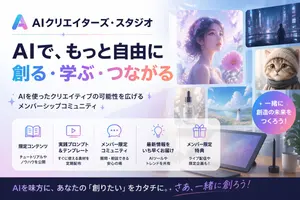
Create a polished Japanese promotional website hero banner for an AI creator community, in a clean modern tech-advertising style with a soft pastel blue, lavender, pink, and white palette. Wide 16:9 composition. On the left, place a gradient triangular abstract logo and the Japanese brand name AIクリエイターズ・スタジオ (brand name) at the top, followed by a thin horizontal divider line with a small sparkle in the middle. Below that, a very large bold Japanese headline in 2 lines: first line in dark navy, 「AIで、もっと自由に」, second line in large gradient letters from cyan to purple to pink, 「創る・学ぶ・つながる」. Under the headline, add a short Japanese subheadline with sparkle marks, 「AIを使ったクリエイティブの可能性を広げるメンバーシップコミュニティ」. On the right half, create a collage of 6 rounded-rectangle visual cards showing AI-generated creative examples: 1 large dreamy portrait of a woman in profile surrounded by flowers and butterflies in ethereal purple light, 1 small cyberpunk city nightscape with a lone figure, 1 small close-up portrait of a fluffy cat, 1 small luxury cosmetic bottle labeled “AI STUDIO”, 1 small bright seascape or flower-field landscape with a woman in white, and 1 large tablet drawing device on a desk with a stylus, plus a coffee mug and plant nearby. Add a circular gradient badge overlapping the right side with bold white Japanese text 一緒に創造の未来をつくろう! (badge text). Across the lower middle, place a translucent white rounded feature panel containing exactly 5 equal columns with thin separators and pastel line icons. Each column has an icon, a bold Japanese title, and a smaller 2-line description. The 5 titles are: 「限定コンテンツ」, 「実践プロンプト&テンプレート」, 「メンバー限定コミュニティ」, 「最新情報をいち早くお届け」, 「メンバー限定特典」. Use fitting icons for book, monitor, chat bubble, light bulb, and gift. Add concise Japanese descriptions beneath each title. At the very bottom, add a dark navy footer strip with a large Japanese call-to-action sentence in white and pink-purple gradient accent text, AIを味方に、あなたの『創りたい』をカタチに。さあ、一緒に創ろう! (footer text). Overall look: premium startup landing page, glossy soft lighting, subtle sparkles, glassmorphism panels, clean typography, Japanese text rendered accurately, highly legible, visually balanced, professional social media thumbnail quality.3a:Ta71,Create a polished Japanese promotional website hero banner for an AI creator community, in a clean modern tech-advertising style with a soft pastel blue, lavender, pink, and white palette. Wide 16:9 composition. On the left, place a gradient triangular abstract logo and the Japanese brand name AIクリエイターズ・スタジオ (brand name)
他のプロンプトを探す
カテゴリ別にAI画像・動画プロンプトをもっと見る。