
テキストから画像
YouTube Dark Mode Desktop UI Mockup — AI 画像プロンプト
A detailed UI mockup of a video streaming homepage in dark mode on a desktop OS, useful for web design references and layout generation. - AIPinMaker
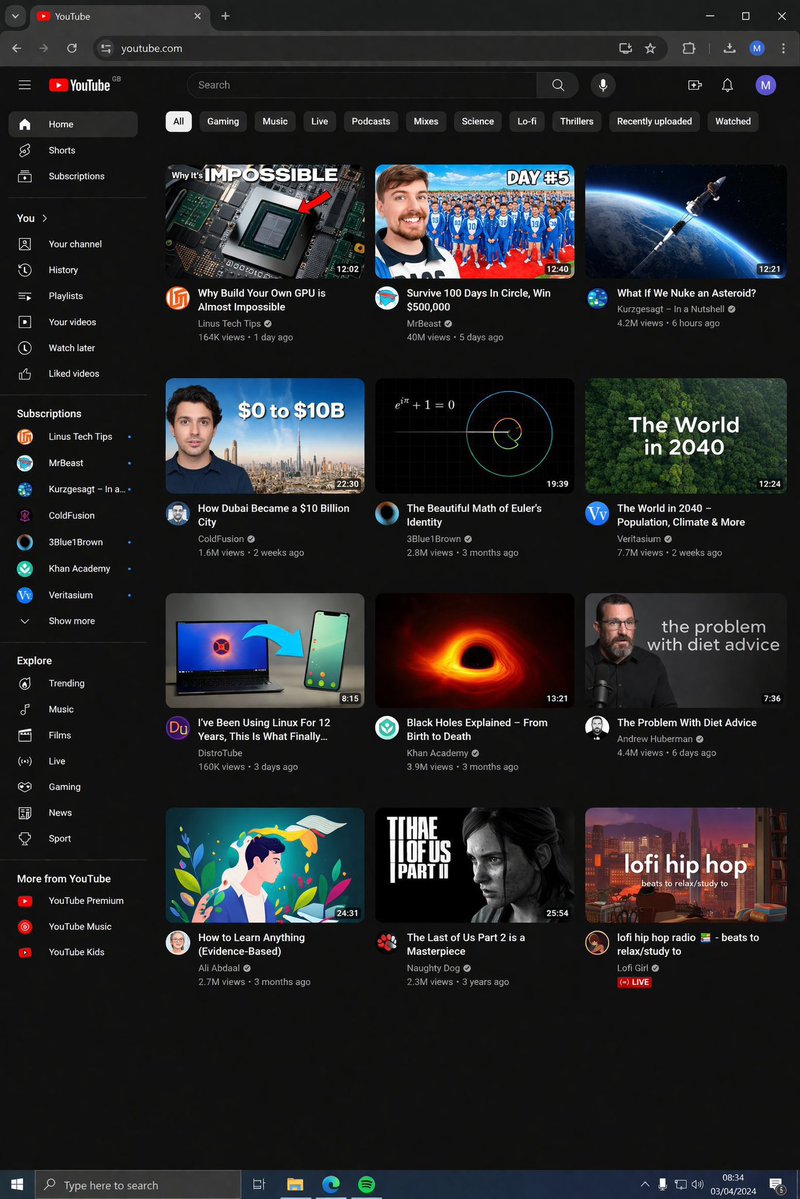
プロンプト
{
  "type": "desktop web browser UI screenshot",
  "environment": "{argument name=\"os environment\" default=\"Windows 11 desktop\"}",
  "theme": "{argument name=\"ui theme\" default=\"dark mode\"}",
  "browser_window": {
    "tabs": ["YouTube", "New Tab"],
    "url_bar": "youtube.com",
    "profile_icon": "{argument name=\"profile initial\" default=\"M\"}"
  },
  "app_interface": {
    "header": {
      "logo": "{argument name=\"website name\" default=\"YouTube\"} GB",
      "search_bar": "Search",
      "icons": ["mic", "create", "notifications", "profile"]
    },
    "filter_bar": {
      "active_filter": "{argument name=\"active filter\" default=\"All\"}",
      "count": 11,
      "labels": ["All", "Gaming", "Music", "Live", "Podcasts", "Mixes", "Science", "Lo-fi", "Thrillers", "Recently uploaded", "Watched"]
    },
    "sidebar": {
      "sections": [
        { "title": "Main", "count": 3, "labels": ["Home", "Shorts", "Subscriptions"] },
        { "title": "You", "count": 6, "labels": ["Your channel", "History", "Playlists", "Your videos", "Watch later", "Liked videos"] },
        { "title": "Subscriptions", "count": 8, "labels": ["Linus Tech Tips", "MrBeast", "Kurzgesagt - In a Nutshell", "ColdFusion", "3Blue1Brown", "Khan Academy", "Veritasium", "Show more"] },
        { "title": "Explore", "count": 7, "labels": ["Trending", "Music", "Films", "Live", "Gaming", "News", "Sport"] },
        { "title": "More from YouTube", "count": 3, "labels": ["YouTube Premium", "YouTube Music", "YouTube Kids"] }
      ]
    },
    "main_content": {
      "layout": "3 columns by 4 rows grid",
      "count": 12,
      "video_cards": [
        { "title": "Why Build Your Own GPU is Almost Impossible", "channel": "Linus Tech Tips", "stats": "164K views • 1 day ago", "thumbnail": "CPU/GPU chip" },
        { "title": "Survive 100 Days In Circle, Win $500,000", "channel": "MrBeast", "stats": "40M views • 5 days ago", "thumbnail": "MrBeast with crowd in blue tracksuits" },
        { "title": "What If We Nuke an Asteroid?", "channel": "Kurzgesagt - In a Nutshell", "stats": "4.2M views • 6 hours ago", "thumbnail": "Missile hitting asteroid in space" },
        { "title": "How Dubai Became a $10 Billion City", "channel": "ColdFusion", "stats": "1.6M views • 2 weeks ago", "thumbnail": "Man and Dubai skyline" },
        { "title": "The Beautiful Math of Euler's Identity", "channel": "3Blue1Brown", "stats": "2.8M views • 3 months ago", "thumbnail": "Math equation and spiral graph" },
        { "title": "The World in 2040 - Population, Climate & More", "channel": "Veritasium", "stats": "7.7M views • 2 weeks ago", "thumbnail": "Lush green forest aerial view" },
        { "title": "I've Been Using Linux For 12 Years, This Is What Finally...", "channel": "DistroTube", "stats": "160K views • 3 days ago", "thumbnail": "Laptop and smartphone with Linux logo" },
        { "title": "Black Holes Explained - From Birth to Death", "channel": "Khan Academy", "stats": "3.9M views • 3 months ago", "thumbnail": "Glowing black hole accretion disk" },
        { "title": "The Problem With Diet Advice", "channel": "Andrew Huberman", "stats": "4.4M views • 6 days ago", "thumbnail": "Man with glasses speaking" },
        { "title": "How to Learn Anything (Evidence-Based)", "channel": "Ali Abdaal", "stats": "2.7M views • 3 months ago", "thumbnail": "Vector illustration of man reading a book" },
        { "title": "The Last of Us Part 2 is a Masterpiece", "channel": "Naughty Dog", "stats": "2.3M views • 3 years ago", "thumbnail": "Ellie from The Last of Us" },
        { "title": "lofi hip hop radio - beats to relax/study to", "channel": "Lofi Girl", "stats": "LIVE", "thumbnail": "Lofi girl studying at desk" }
      ]
    }
  },
  "taskbar": {
    "os": "Windows",
    "icons": ["Start", "Search", "Task View", "File Explorer", "Edge", "Spotify"],
    "system_tray": "08:34 03/04/2024"
  }
}3a:Tf5c,{
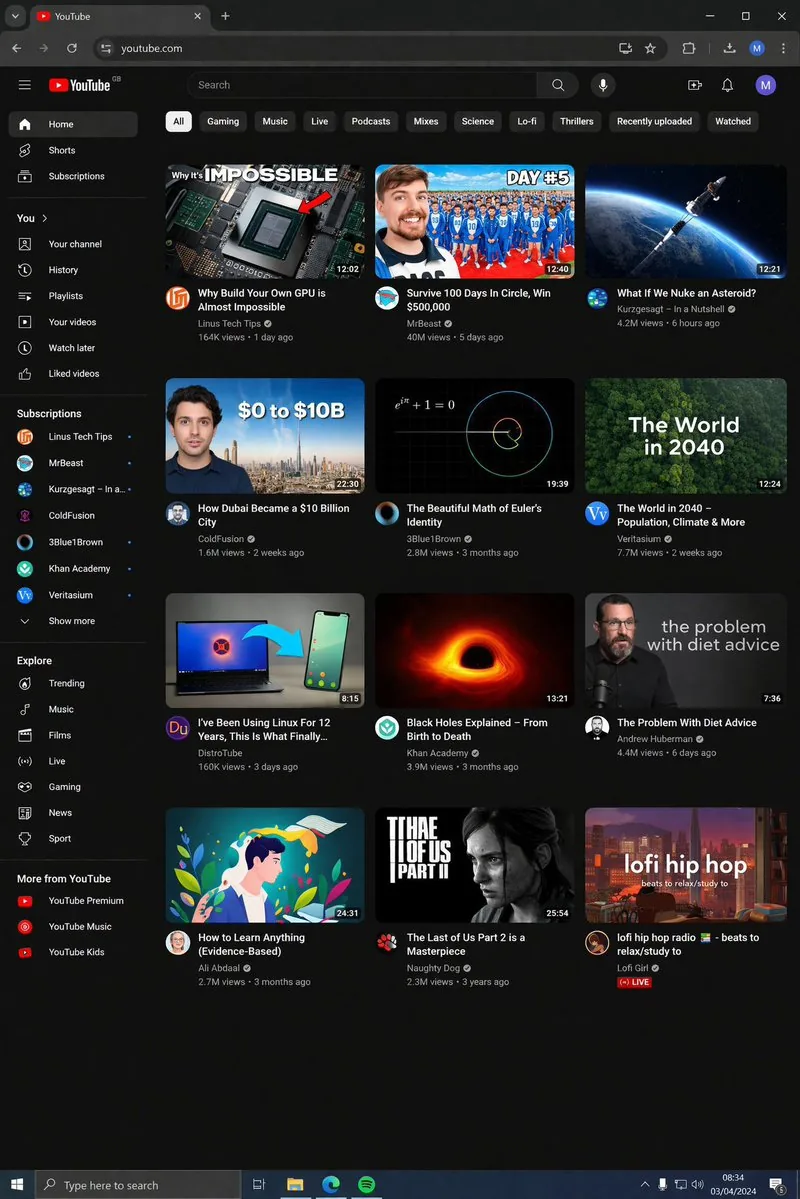
"type": "d参照画像
このAI画像プロンプトテンプレートの使い方
 1
1プロンプトをコピー — テンプレートのプロンプトとネガティブプロンプトを取得。  2
2モデルを選ぶ — 最適な推奨AIモデルを選択。  3
3生成 — ワンクリックでスタジオを開いて作成。
関連テンプレート

Thumbnail text overlay based on attachment
Create a youtube-thumbnail image of Thumbnail Text Overlay Based On Attachment. Style: photorealistic. Composition: balanced and well-framed. Lighting: natural with cinematic mood. Category: poster. Reference: thumbnail-text-overlay-based-on-attachment-435.

Multilingual font specimen sheet prompt
Create a creative image of Multilingual Font Specimen Sheet Prompt. Style: photorealistic. Composition: balanced and well-framed. Lighting: natural with cinematic mood. Category: photography. Reference: multilingual-font-specimen-sheet-prompt-14142.
GPT Image 2 Cooking Prompt Banner
Goal: Create a wide Japanese promotional thumbnail/banner for GPT Image 2 cooking image prompts (headline topic), designed like a cute handmade recipe-craft collage. Canvas: Horizontal 16:9-ish social media banner, warm cream paper background with subtle fabric texture, rounded sticker-like shapes, soft shadows, red and dark teal color palette, high readability. Main headline area: At the top, place a huge bold title reading “GPT Image 2” with “GPT Image” in dark teal and the number “2” in bright red, all with thick white sticker outlines and slight drop shadow. Below it, add a large Japanese headline reading “料理画像プロンプト32例”, with “料理画像” and “32” in red and the remaining text in dark teal, also outlined in white. Under the headline, add a dark teal rounded pill banner with white Japanese text: “写真・参考画像・オリキャラからレシピカードまで”. Mascot and decorations: Add exactly 3 appearances of a cute beige stitched cat mascot with red round glasses and a small red wand: one large mascot standing at the upper right, one tiny mascot near the bottom of the first recipe card, and one large mascot on the right movie-poster card. Add exactly 2 small red yarn-tree decorations near the top left and top right, plus small golden sparkle icons around the headline. Bottom layout: Create exactly 4 rounded rectangular showcase cards in a row across the lower half, separated by exactly 3 red triangular arrow markers pointing right between the cards. Each card has a dark teal label tab with white text at the top. Card 1: Label tab “レシピカード”. Show a clean recipe card layout with a photo of tomato basil pasta on the left and Japanese recipe text on the right. The title should read “トマトとバジルのパスタ”, followed by a small ingredient list with bullet-like lines. Include the tiny mascot at the lower right of this card. Card 2: Label tab “料理写真”. Show a warm professional food photograph of stacked pancakes topped with berries, whipped cream, mint, and syrup, centered in the card. Card 3: Label tab “写真集ページ”. Show an open photo book spread with exactly 2 visible food photos: a salad on the left page and a stew or soup bowl on the right page, with small Japanese captions beneath each photo. Card 4: Label tab “映画ポスター風”. Create a cinematic kitchen-poster style card with large Japanese copy “キッチンから、幸せを。” at the top left, a warm kitchen background, a pot of orange soup at the bottom, and the large cat mascot standing on the right. Visual style: Bright, cute, polished Japanese blog-thumbnail design; realistic food photos inside craft-paper frames; sticker outlines, rounded corners, subtle shadows, soft beige background, clean hierarchy. Keep the composition dense but readable, with no extra cards, no extra arrows, and no watermark.38:Tb9b,Goal: Create a wide Japanese promotional thumbnail/banner for GPT Image 2 cooking image prompts (headline topic), designed like a cute handmade recipe-craft collage. Canvas: Horizon

Claymation Social Banner
Create a wide 2:1 social media banner in a handcrafted claymation stop-motion style. Canvas size about 984×440 px, with a warm pastel yellow clay background and soft cinematic shadows. Center the composition around one huge raised clay fist emerging from behind a dark charcoal rounded rectangle strip across the bottom third. Behind the fist place one large red folded ribbon/banner shape spreading left and right, and one blue spiky burst shape directly behind the fist. At the top, add one oversized bold white 3D clay headline reading 懦夫救世! (headline text), with rounded puffy edges, slight red shadowing, and one red clay star used as the dot/accent near the final exclamation area. Add exactly one circular profile avatar at the lower left overlapping the dark bottom strip: a cute beige clay character with large googly eyes holding a small microphone, framed by a dark ring. Add exactly one rounded black button at the lower right with a thin light outline and small white Chinese text reading 编辑个人资料 (button text). Use soft polymer-clay texture everywhere, visible fingerprints, rounded handmade edges, macaroon warm colors, shallow depth of field, and realistic stop-motion lighting. Keep the layout clean and graphic, with exactly 5 main visible components: the white headline, the red ribbon, the central fist, the left circular avatar, and the right edit-profile button. No photorealistic skin, no flat vector look, no extra characters, no watermark.37:T600,Create a wide

Three Prompt Interpretation Storyboard Grids
{"type":"wide social-media explainer collage showing three AI image-generation result panels","canvas":"ultra-wide horizontal white background, clean screenshot-like composition, three evenly spaced vertical smartphone result mockups arranged left to right","overall_style":"realistic composite of mobile UI screenshots, crisp Japanese text, rounded black prompt boxes above rounded image grids, minimal white margins, looks like an example figure from a Japanese tech tweet about prompt interpretation across genres","layout":{"panel_count":3,"panels":[{"position":"left","theme":"old French Renaissance-era farmer interpretation","top_prompt_box":{"shape":"black rounded rectangle with a small downward chevron centered below","text":"{argument name=\"left prompt text\" default=\"以下のプロンプトを現代のことを全く知らないルネッサンス期のフランス人農家が受けとった時に、自ら自由に発想して描く頭の中の15秒の映像の印象的カット25枚を精密に再現し、それらをひとつに収めた画像を生成してください。この映像の本質は、効果の寄せ集めではなく、優れたアー\"}"},"grid":{"position":"below prompt box","shape":"large rounded rectangle phone gallery","count":25,"arrangement":"5 columns by 5 rows","thumbnail_labels":"small white numbers 1 through 25 in the upper-left corners","contents":"25 muted cinematic medieval or Renaissance rural French storyboard stills: stone buildings, cloaked figures, fields, fabric curtains, stairs, arches, silhouettes, dusty interiors, oil-painting colors, sepia and olive tones","ui_overlays":["rounded dark Edit button at bottom-left","share/upload icon at bottom-right"]}},{"position":"center","theme":"rough boy-and-girl anime from a Bon-Art style animation studio interpretation","top_prompt_box":{"shape":"black rounded rectangle with a small downward chevron centered below","text":"{argument name=\"center prompt text\" default=\"以下のプロンプトをローファイで寂しげなボッブ・アート寄りのジャパニメーションの無垢な男の子と女の子が満天の星の下でふたりで受け取った時に、自由に発想して描く頭の中の15秒の映像の印象的カット25枚を精密に再現し、それらをひとつに収めた画像を生成してください。この映\"}"},"grid":{"position":"below prompt box","shape":"large rounded rectangle phone gallery","count":25,"arrangement":"5 columns by 5 rows","thumbnail_labels":"small white numbers 1 through 25 in the upper-left corners","contents":"25 dark blue lo-fi anime storyboard stills: two simple child characters, starry night sky, glowing fireflies or floating lights, moonlit water, silhouettes, close-up faces, hands, paper or notebook, quiet emotional atmosphere","ui_overlays":["rounded dark Edit button at bottom-left","share/upload icon at bottom-right"]}},{"position":"right","theme":"three domestic cats living in a Seto Inland Sea harbor house interpretation","top_prompt_box":{"shape":"black rounded rectangle with a small downward chevron centered below","text":"{argument name=\"right prompt text\" default=\"以下のプロンプトを瀬戸内の港町にある実家で暮らす老いた三毛猫が受け取った時に、自由に発想して描く頭の中の15秒の映像の印象的カット25枚を精密に再現し、それらをひとつに収めた画像を生成してください。この映像の本質は、効果の寄せ集めではなく、優れたアーティストが、翌昼\"}"},"grid":{"position":"below prompt box","shape":"large rounded rectangle phone gallery","count":25,"arrangement":"5 columns by 5 rows","thumbnail_labels":"small white numbers 1 through 25 in the upper-left corners","contents":"25 warm photorealistic cinematic storyboard stills of cats and a Japanese seaside home: calico cats, harbor views, tatami rooms, windows with sunlight, boats, tiled streets, close-up cat eyes, fish-market or coastal-town ambience, golden afternoon light","ui_overlays":["rounded dark Edit button at bottom-left","share/upload icon at bottom-right"]}}]},"typography":"Japanese sans-serif white text inside black boxes, small numeric labels on thumbnails, mobile UI style","camera":"straight-on orthographic view of the full composite, no perspective distortion","quality":"high-resolution, sharp, readable, polished but clearly a screenshot collage","avoid":"do not add extra panels, do not replace the three 5-by-5 thumbnail grids, avoid English text inside the Japanese prompt boxes except UI labels Edit and share icon"}

GitHub Project Infographic Poster
生成一张高密度信息图海报,主题为《GitHub项目名称/链接 (项目名称) 项目详解》 【项目基础信息】 - 项目名称:项目名 (项目名) - 核心功能一句话:一句话说明项目解决什么问题 (功能说明) - 技术栈:如 Next.js / React / Node.js / Python 等 (技术栈) - GitHub定位:工具类 / UI库 / 学习项目 / SaaS / AI项目 等 (定位) 【整体风格】 - 现代极简UI + 技术感信息图风格 - 背景使用柔和浅色(奶油色 / 浅灰 / 浅蓝) - 配色低饱和(蓝 / 绿 / 紫),强调科技感 - 扁平插画 + 图标化表达(类似产品文档风) - 信息密度高,但层级清晰,适合快速扫描 【标题设计】 - 主标题:{项目名} - 副标题:一句话描述项目核心价值(吸引点击) 【内容结构(关键)】 根据项目特点自由组织模块,但建议包含: 1️⃣ 项目是做什么的(What) - 核心用途 - 解决的问题 - 适用人群 2️⃣ 核心功能(Features) - 用图标 + 短句列出 4–6 个关键功能 - 每点尽量具体(避免空泛) 3️⃣ 技术亮点(Tech Highlights) - 架构特点 - 性能优化 - 特殊设计(如 SSR / 边缘计算 / AI能力等) 4️⃣ 使用方式(How to Use) - 简要步骤(1-2-3) - 或代码/命令式表达(简化版) 5️⃣ 适用场景(Use Cases) - 用 2–4 个真实场景说明 6️⃣ 优缺点分析(Pros & Cons) - ✅ 优点(2–3条) - ⚠️ 注意点(1–2条) 7️⃣ 总结一句话(Takeaway) - 用一句话总结项目价值 【视觉要求(重点)】 - 使用卡片式布局(类似Notion / Linear风格) - 每个模块有明确分区 - 使用小图标增强理解(如 ⚙️ 🚀 📦) - 重点信息加粗或高亮 - 保持“高信息密度但不拥挤” 【输出要求】 - 所有内容为中文 - 表达简洁、有节奏感 - 避免大段文字,偏“信息块 + 标签化”10:["$","main",null,{"className":"-mt-14 bg-[#F8F3EA] pt-14 text-[#211D16]","children":[["$","div",null,{"className":"mx-auto grid max-w-[1360px] grid-cols-1 gap-8 px-6 pb-2 pt-6 md:px-12 md:pt-8 lg:grid-cols-[minmax(0,1.35fr)_minmax(340px,0.65fr)] lg:gap-10","children":["$","div",null,{"className":"min-w-0","children":["$","nav",null,{"aria-label":"Breadcrumb","className":"text-xs tracking-wide text-black/60 md:text-sm","children":["$","ol",null,{"className":"flex flex-wrap items-center gap-1.5","children":[["$","$1","Prompts-0",{"children":[false,["$","li",null,{"children":"$L33"}]]}],["$","$1","Image Prompt-1",{"children":[["$","span",null,{"aria-hidden":"true","className":"text-black/40","children":"›"}],["$","li",null,{"children":"$L34"}]]}],["$","$1","GPT Image 2-2",{"children":[["$","span",null,{"aria-hidden":"true","className":"text-black/40","children":"›"}],["$","li",null,{"children":"$L35"}]]}]]}]}]}]}],["$","div",null,{"className":"mx-auto grid max-w-[1360px] grid-cols-1 gap-8 px-6 py-8 md:px-12 md:py-10 lg:grid-cols-[minmax(0,1.35fr)_minmax(
他のプロンプトを探す
カテゴリ別にAI画像・動画プロンプトをもっと見る。