
文生图
Photoreal ML Developer Desktop — AI 图像提示词
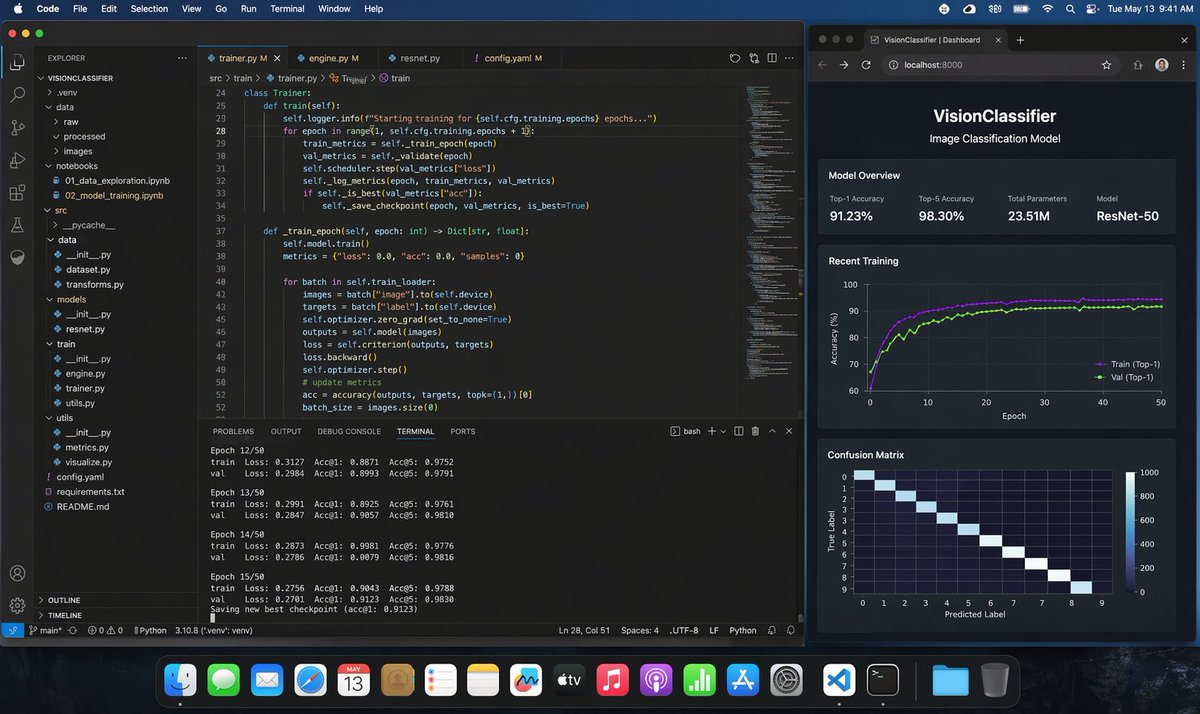
This generates a highly realistic macOS screenshot of a programmer training a Python image-classification model in VS Code with a live browser dashboard, useful for product mockups, social posts, and AI demo visuals. - AIPinMaker
提示词
A photorealistic macOS desktop screenshot of a machine learning engineer’s workspace at night, shown straight-on with a dark blue macOS menu bar and the dock visible along the bottom. The desktop contains exactly 2 main application windows side by side. On the left, a large Visual Studio Code window in dark theme occupies about two-thirds of the screen. The VS Code project is named "VISIONCLASSIFIER" in the Explorer sidebar, with a realistic Python ML folder tree including exactly 11 visible top-level or expanded items: .venv, data, raw, processed, images, notebooks, src, utils, config.yaml, requirements.txt, README.md. Inside notebooks, show exactly 2 visible files: 01_data_exploration.ipynb and 02_model_training.ipynb. Inside src, show a realistic ML code structure with dataset.py, transforms.py, models, resnet.py, train, engine.py, trainer.py, utils.py. The editor area has exactly 4 tabs open: trainer.py, engine.py, resnet.py, config.yaml. The active tab is trainer.py. Display clean, believable Python training code for a ResNet image classification pipeline, including a class Trainer, methods train(self) and train_epoch(self, epoch: int) -> Dict[str, float], references to self.cfg.training.epochs, train_metrics, val_metrics, scheduler.step, save_checkpoint, self.model.train(), batch["image"], batch["label"], optimizer.zero_grad, criterion, loss.backward, optimizer.step, accuracy(outputs, targets, topk=(1,))[0]. Make the code sharp but naturally screen-like, with line numbers visible around lines 24 to 52. At the bottom of the VS Code window, the integrated terminal is open on the TERMINAL tab and shows realistic training logs for exactly 4 epochs in view: Epoch 12/50, Epoch 13/50, Epoch 14/50, Epoch 15/50, each with train and val lines listing Loss, Acc@1, and Acc@5, plus a final line saying a new best checkpoint was saved. Keep the numbers plausible for a successful training run, with top-1 accuracy around 0.88 to 0.91 and top-5 around 0.97 to 0.98. Include the usual VS Code status bar along the bottom with Python environment details. On the right, place exactly 1 dark-themed web browser window showing a local dashboard at localhost:8000 with the page title "VisionClassifier | Dashboard" and the app header "VisionClassifier" plus subtitle "Image Classification Model". The dashboard contains exactly 3 stacked sections. The first section is "Model Overview" with exactly 4 metric cards: Top-1 Accuracy 91.23%, Top-5 Accuracy 98.30%, Total Parameters 23.51M, Model ResNet-50. The second section is "Recent Training" with a dark line chart of accuracy over 50 epochs, showing exactly 2 colored curves labeled Train (Top-1) and Val (Top-1), both rising quickly and stabilizing around the low 90s. The third section is "Confusion Matrix" showing a 10x10 heatmap with a bright diagonal and axes labeled True Label and Predicted Label. Use subtle reflections, crisp typography, realistic UI spacing, and believable screen glow. The macOS top menu bar should show common menus like Code, File, Edit, Selection, View, Go, Run, Terminal, Window, Help on the left and system icons with the time reading Tue May 13 9:41 AM on the right. The dock should contain many recognizable app icons and feel authentic but not distracting. Overall style: ultra-realistic screenshot, professional developer workstation, polished dark mode interfaces, no stylization, no illustration, indistinguishable from a real screen capture.3b
参考图片
如何使用这个 AI 图像提示词模板
 1
1复制提示词 —— 取走该模板的提示词与反向提示词。  2
2选择模型 —— 选一个推荐的 AI 模型以获得最佳匹配。  3
3生成 —— 一键打开工作台并生成你的作品。
相关模板

Mac Terminal World Sim UI
Create a creative image of Mac Terminal World Sim Ui. Style: photorealistic. Composition: balanced and well-framed. Lighting: natural with cinematic mood. Category: photography. Reference: mac-terminal-world-sim-ui-14385.

Japanese Google Homepage Screenshot
Create a clean, realistic desktop browser screenshot of the Japanese (country version) Google homepage in a Chrome-like window, viewed straight on at 4:3 aspect ratio. The browser UI shows one active tab labeled Google with the Google favicon, a plus button for a new tab, back and forward arrows, reload, a lock icon, and the address bar containing google.co.jp (website URL); at the far right are a star bookmark icon, three-dot menu, and window controls. The webpage is mostly white with the multicolor Google logo centered high on the page. In the top-right of the page are exactly 4 items: the text link “Gmail”, the text link “画像”, a 3-by-3 Google apps grid icon, and a circular user profile avatar showing a small blue mountain landscape. Centered beneath the logo is one rounded search bar with a magnifying glass icon on the left, placeholder text Google で検索または URL を入力 (search placeholder), and exactly 2 icons on the right: a microphone and Google Lens. Below it are exactly 2 light-gray buttons labeled Google 検索 (first button text) and I'm Feeling Lucky (second button text). Under the buttons is a small language line reading “Google.com in English,” with “English” in blue. At the bottom is a pale gray footer with the location “日本” on the first row and exactly 6 footer links on the second row: “広告”, “ビジネス”, “検索の仕組み”, “プライバシー”, “規約”, and “設定”. Use accurate Google colors, crisp sans-serif typography, subtle shadows, soft gray browser chrome, lots of empty white space, and photorealistic UI rendering.37:T6e7,Create a clean, realistic desktop browser screenshot of the {argument name="country version" default="Japanese

Software UI Desktop Screenshot
Create a creative image of Software Ui Desktop Screenshot. Style: photorealistic. Composition: balanced and well-framed. Lighting: natural with cinematic mood. Category: photography. Reference: software-ui-desktop-screenshot-14317.

Leaked AI Benchmark Report Photo
{ "type": "photograph of a computer monitor displaying an academic technical report", "style": "slightly angled screen photo, visible moire pattern, LCD pixel grid, slight glare, LaTeX document formatting, serif fonts", "document_header": { "left": "4 Benchmark Evaluation", "right": "{argument name=\"report title\" default=\"DeepSeek-V4 Technical Report\"}" }, "introductory_text": "Paragraph summarizing comprehensive evaluation of {argument name=\"main model name\" default=\"DeepSeek-V4\"} against {argument name=\"competitor model 1\" default=\"GPT-5.3\"}, {argument name=\"competitor model 2\" default=\"Claude Opus 4.6\"}, and {argument name=\"competitor model 3\" default=\"Gemini 3.1 Pro Preview\"}.", "visualizations": { "legend": "5 items with color codes: dark blue, grey, light grey, blue striped, light blue", "bar_charts": { "count": 6, "labels": [ "MMLU-Pro (EM)", "GPQA-Diamond (Pass@1)", "AIME 2025 (Pass@1)", "LiveCodeBench (Pass@1-COT)", "SWE-bench Verified (Resolved)", "Tau-bench (Average)" ] }, "caption": "Figure 1 | Performance comparison on core benchmarks. DeepSeek-V4 achieves state-of-the-art results across the majority of benchmarks." }, "data_table": { "columns": [ "Benchmark", "{argument name=\"main model name\" default=\"DeepSeek-V4\"}", "{argument name=\"competitor model 1\" default=\"GPT-5.3\"}", "{argument name=\"competitor model 2\" default=\"Claude Opus 4.6\"}", "{argument name=\"competitor model 3\" default=\"Gemini 3.1 Pro Preview\"}", "GPT-4.1" ], "categories": { "count": 4, "rows": [ {"label": "General", "icon": "globe/network", "sub_items": 3}, {"label": "Reasoning & Math", "icon": "calculator/clipboard", "sub_items": 3}, {"label": "Code", "icon": "code brackets", "sub_items": 3}, {"label": "Agent", "icon": "robot face", "sub_items": 3} ] } } }

WSJ-Style Business Newspaper Front Page
A photorealistic overhead three-quarter view of a folded financial newspaper on a dark wooden desk, styled like a prestigious American business daily from the 1980s–2000s, with crisp realistic newsprint texture, subtle paper wrinkles, slightly worn folded edges, and warm morning sunlight casting diagonal window-shadow bands across the page. The masthead dominates the top in large classic serif capitals reading THE WALL STREET DAILY. (newspaper name). Directly beneath it is a thin header strip with small financial-paper details: "DOW JONES", "News Corp", the date line "MONDAY, APRIL 20, 2026 – VOL. CCLXXXV NO. 90", "WSJ.com", a star rating row, and the price "$5.00". The main lead story spans the upper center-left with a huge bold serif headline reading Cook to Step Down as Apple CEO; Ternus Named Successor (main headline). Below it is a smaller serif subheadline: "Transition caps 15-year run; company pivots to AI-driven future". Add a byline line in small caps with 2 reporters: "By Tim Higgins" and "And Joanna Stern". Fill the lead article with dense, fully legible multi-column newspaper body text about Tim Cook stepping down as Apple chief executive, John Ternus succeeding him, Apple's growth, AI strategy, and corporate transition; the text should read like authentic financial journalism, not placeholder gibberish. On the right half of the lead story, place a black-and-white engraved stipple portrait of a male executive in collared shirt and jacket, centered in a rectangular image area; the face is partially obscured by a pale gray square censor block over the eyes and upper nose, creating a modern satirical effect. At the top-right, include a sidebar box titled "What’s New" with exactly 2 subsection headers, "Business & Finance" and "World-Wide", each followed by bullet-point briefs in small serif text; include exactly 3 bullets under "Business & Finance" and exactly 4 bullets under "World-Wide", all fully typeset and legible. Beneath the main story, add a secondary banner article across the page titled "Silicon Valley Braces for New Chapter in AI Arms Race" with a byline "By Liz Hoffman" and several short columns of text about big tech, startups, OpenAI, Google, Meta, chips, platforms, and AI competition. To the right of this lower-middle section, insert a compact markets table titled "Markets" with exactly 4 rows labeled "DOW JONES", "S&P 500", "NASDAQ", and "10-YR. TREASURY", with columns for index/value/change/percent and realistic numeric values in tight newspaper tabular formatting. Along the bottom strip of the front page, include exactly 3 teaser boxes: left box with section label "Heard on the Street" and headline "Why Investors Are Rethinking Big Tech" plus page marker "B12"; center box with section label "Markets" and headline "Earnings Season Lifts Stocks Despite Rate Uncertainty" plus page marker "B1"; right box with section label "Inside" and headline "Private Credit Sees Inflow Surge as Yields Stay High" plus page marker "B14". Make all typography clean, sharp, perfectly legible, and consistently aligned in authentic newspaper grid layout with thin rules between columns, justified text, classic serif fonts, and realistic print contrast. The newspaper sits slightly rotated clockwise on the desk. In the environment, show a white ceramic coffee cup filled with black coffee in the top-right corner and a pair of dark-framed eyeglasses resting near the lower-right edge of the paper. In the top-left corner, include the cropped edge of a dark cylindrical object, likely a camera lens or tumbler. Overall mood: premium editorial mock front page, serious business-news aesthetic, believable print photography, ultra-detailed, natural shadows, high resolution.3d:Tec
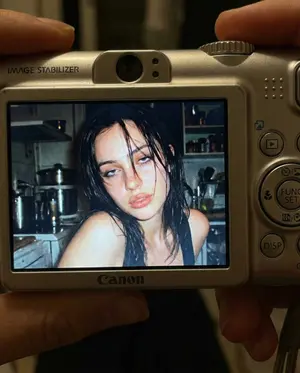
Early 2000s Digital Camera Snapshot Prompt - Nano Banana Pro AI Prompt for Social Media Post
{ "meta": { "aspect_ratio": "4:5", "quality": "ultra_photorealistic", "render_style": "raw digital snapshot realism", "grain": "authentic early-2000s compact camera noise", "no_ai_artifacts": true }, "camera": { "device": "compact Canon digital camera", "lens_equivalent": "28–35mm", "aperture": "f/2.8", "iso": 400, "shutter_speed": "1/60 with flash", "white_balance": "auto flash", "display_effect": "LCD screen glow with slight pixel texture" }, "composition": { "shot_type": "close-up", "framing": "subject centered within camera LCD screen", "outer_frame": "Canon camera body visible around screen", "details_visible": [ "FUNC/SET wheel", "DISP button", "textured plastic surface", "\"IMAGE STABILIZER\" label on side" ], "perspective": "viewer looking directly at the camera screen" }, "scene": { "location": "indoor kitchen", "time": "night", "background": { "elements": [ "cluttered countertop", "metallic kitchen appliances", "open shelves with random items" ], "focus": "softly blurred", "lighting": "dim ambient, overpowered by flash" }, "atmosphere": "candid, raw, nostalgic, early-2000s digital camera vibe" }, "lighting": { "type": "harsh direct built-in flash", "effect": [ "strong facial highlights", "hard shadow falloff", "slight shine on lips and hair", "flattened but intimate flash look" ], "contrast": "high", "color_temperature": "cool flash tones" }, "subject": { "identity": { "gender": "female", "age_vibe": "early 20s", "face_reference": "use facial structure, eye shape, nose proportion, and mouth softness from the attached photo", "body": "curvy, tight waist, round hips, full chest", "skin": "wet, glowing, subtle pink flush as if from cold night air", "hair": { "color": "dark brown", "state": "slightly wet", "behavior": "loose strands falling across face and collarbone" } }, "expression": { "eyes": "heavy-lidded bedroom eyes looking directly into lens", "mouth": "slightly parted lips, relaxed and soft", "overall": "warm, wine-softened, flirtatious confidence without posing" }, "pose": { "head": "slight tilt toward flash", "shoulders": "relaxed, close to frame edge", "energy": "caught-in-the-moment, not performing" } }, "color_grading": { "palette": "slightly muted", "undertones": "cool", "contrast": "strong flash contrast", "screen_effect": "subtle LCD pixel grain and glow" }, "restrictions": { "no_text_inside_photo": true, "no_logos_on_screen": true, "no_watermarks": true, "no_studio_lighting": true, "no_ai_symmetry": true } }3f
探索更多提示词
按分类浏览更多 AI 图像和视频提示词。