
文生图
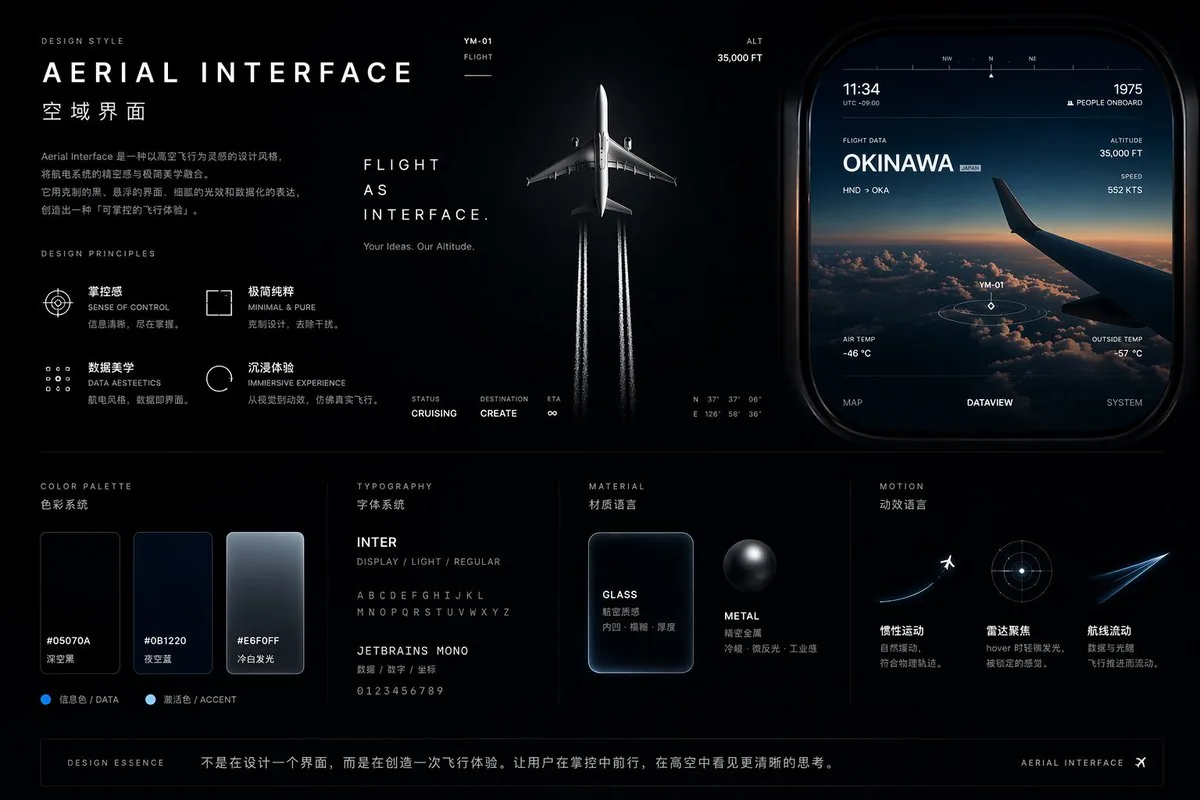
Aviation-Themed UI Design System Board — AI 图像提示词
Generates a comprehensive dark-mode UI/UX design system board featuring flight-inspired aesthetics, color palettes, typography, and interface mockups. - AIPinMaker
提示词
{
  "type": "UI/UX Design System Concept Board",
  "theme": "Aviation and flight interface",
  "overall_style": "Dark mode, sleek, modern, technical, futuristic, glassmorphism",
  "layout": {
    "top_left": {
      "section": "DESIGN STYLE",
      "title": "{argument name=\"main title\" default=\"AERIAL INTERFACE\"}",
      "subtitle": "{argument name=\"subtitle\" default=\"空域界面\"}",
      "description": "Introductory paragraph about aerial interface design",
      "principles": {
        "count": 4,
        "labels": ["SENSE OF CONTROL", "MINIMAL & PURE", "DATA AESTEETICS", "IMMERSIVE EXPERIENCE"]
      }
    },
    "top_center": {
      "imagery": "Top-down view of a commercial airplane flying upwards, leaving twin white contrails against a dark background",
      "text": ["FLIGHT AS INTERFACE.", "Your Ideas. Our Altitude."],
      "metrics": ["STATUS CRUISING", "DESTINATION CREATE", "ETA ∞"]
    },
    "top_right": {
      "section": "UI Widget",
      "imagery": "Rounded rectangular panel showing an airplane wing over clouds at sunset",
      "data_points": ["11:34", "1975 PEOPLE ONBOARD", "FLIGHT DATA {argument name=\"destination\" default=\"OKINAWA\"}", "ALTITUDE 35,000 FT", "SPEED 552 KTS"],
      "tabs": {
        "count": 3,
        "labels": ["MAP", "DATAVIEW", "SYSTEM"]
      }
    },
    "bottom_left": {
      "section": "COLOR PALETTE",
      "swatches": {
        "count": 3,
        "labels": ["#05070A", "#0B1220", "#E6F0FF"]
      }
    },
    "bottom_mid_left": {
      "section": "TYPOGRAPHY",
      "fonts": {
        "count": 2,
        "labels": ["{argument name=\"primary font\" default=\"INTER\"}", "{argument name=\"secondary font\" default=\"JETBRAINS MONO\"}"]
      }
    },
    "bottom_mid_right": {
      "section": "MATERIAL",
      "examples": {
        "count": 2,
        "labels": ["GLASS (frosted rectangle)", "METAL (dark sphere)"]
      }
    },
    "bottom_right": {
      "section": "MOTION",
      "concepts": {
        "count": 3,
        "labels": ["Airplane taking off", "Radar focus circle", "Glowing flight streak"]
      }
    },
    "footer": {
      "text": "DESIGN ESSENCE: Not just designing an interface, but creating a flight experience."
    }
  }
}3c:T8bc,{参考图片
如何使用这个 AI 图像提示词模板
 1
1复制提示词 —— 取走该模板的提示词与反向提示词。  2
2选择模型 —— 选一个推荐的 AI 模型以获得最佳匹配。  3
3生成 —— 一键打开工作台并生成你的作品。
相关模板
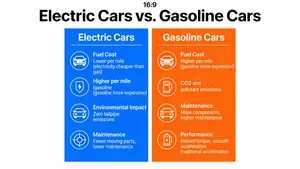
Electric vs. Gasoline Cars Comparison
A visual comparison chart (a “vs.” infographic) comparing electric cars and gasoline cars. The chart should have two columns, with icons and brief text comparing them on factors like Fuel Cost, Environmental Impact, Maintenance, and Performance. The design should be clean, modern, and easy to understand at a glance, demonstrating the ability to visually organize and present comparative data. –ar 16:9

Japanese Stormworks Guide Infographic
{"type":"Japanese game explainer infographic poster","topic":"{argument name=\"game title\" default=\"ストームワークス\"}","style":"clean illustrated infographic on aged cream paper with faint grid background, navy blue headings, rounded bordered panels, technical handbook meets playful game guide, crisp print layout, high readability, subtle weathered texture","language":"Japanese","format":"vertical poster","layout":{"header":{"title":"{argument name=\"main title\" default=\"ストームワークス 解説図鑑\"}","subtitle":"{argument name=\"subtitle text\" default=\"救助・建築・自動化を楽しむビークル開発ゲーム\"}","left_icons_count":4,"left_icons":["anchor","airplane","wrench","gear"],"top_right_icon":"compass rose"},"sections":[{"title":"1 概要","position":"upper right","count":1,"labels":["概要"],"content":"short Japanese paragraph explaining an engineering and rescue sandbox game where the player designs and builds vehicles, transports cargo, and completes missions in a harsh natural environment; mention ships, aircraft, helicopters, and land vehicles"},{"title":"2 できること","position":"right middle","count":5,"labels":["ビークルの設計・建造","Lua / マイクロコントローラ自動化","航法・センサー活用","気象・海洋での運用","ミッションプレイ"],"icon_style":"green circular line icons","content":"five vertically stacked feature cards with icon, bold heading, and two to three lines of Japanese explanatory text"},{"title":"3 主な魅力","position":"middle wide panel","count":4,"labels":["設計の自由度","リアルなシステム","エンジニアの創造性","ミッションの達成感"],"content":"four side-by-side cards with small illustrations and captions"},{"title":"4 代表的なビークル","position":"lower middle large panel","count":4,"labels":["船","飛行機","ヘリ","陸上車両"],"content":"top row contains four framed vehicle example cards, each with image and small Japanese description; bottom strip includes one systems-flow diagram and one instrument example"},{"title":"5 基本システム","position":"lower right","count":4,"labels":["開発","ジャンル","特徴","おすすめ"],"content":"four compact rows with small icons and short Japanese descriptions"}],"footer":{"left_box_title":"TIPS","left_box_bullets_count":2,"left_box_bullets":["まずはシンプルなビークルから始めて、少しずつ機能を追加していくのがおすすめ。","マイクロコントローラは『テスト→小さく作る→拡張』の順で扱うと安定。センサーや表示を活用して、状況を『見える化』すると操作しやすくなります。"],"center_icons_count":3,"center_icons":["sensor","communication tower","map pin on folded map"],"right_box_title":"ミッションの例","right_box_items_count":5,"right_box_items":["遭難者の救助","物資の輸送","山火事の消火","油漏れの回収","調査・観測"],"right_box_visual":"small island map"}},"main_image":{"position":"upper left large panel","description":"a bright orange rescue workboat traveling through dark blue ocean with white foam, viewed three-quarters from the front, black railings and deck equipment, mountainous rocky island with pine trees and lighthouse in the background, pale blue sky with stylized white polygon clouds","caption":"ゲームスクリーンイメージ","overlay_ui_count":4,"overlay_ui":["top-right small dark date/time HUD","bottom-left GPS minimap","bottom-center row of 6 square toolbar icons","bottom-right compact status panel with 3 colored bars"]},"sub_panels":{"section_3_images_count":4,"section_3_images":["blueprint-like modular ship design blocks","three round gauges with small mechanical parts","logic diagram with labeled boxes and arrows","orange rescue helicopter above sea and a small inset boat scene"],"section_4_vehicle_images_count":4,"section_4_vehicle_images":["large red ship at sea","single-engine propeller airplane in flight","orange-white helicopter","yellow off-road utility truck"],"systems_flow":{"title":"システムのつながり(一例)","count":5,"labels":["燃料タンク","エンジン","ジェネレーター","電力バス","各システム"],"arrows":["エネルギーの流れ","制御信号","センサーフィードバック"]},"instrument_example":{"title":"インストゥルメント例","gauges_count":5,"gauges":["tachometer-like dial","speedometer-like dial","pressure or temperature dial","digital volt display 25.4 VOLT","fuel gauge"]}},"visual_requirements":{"aspect_ratio":"3:4","rendering":"mix of flat infographic graphics and semi-realistic game screenshots/painted inserts","color_palette":["navy blue","forest green","orange","cream","light blue","gray"],"linework":"clean printed outlines","typography":"bold Japanese display font for titles, neat sans-serif Japanese text for body","overall_feel":"educational field guide, game manual poster, polished and friendly"}}3c:T13a8,{"type":"Japanese game explainer infographic poster","topic":"{argument name=\"game title\" default=\"ストームワークス\"}","style":"clean illustrated infographic on aged cream paper with faint grid background, navy blue headings, rounded bordered panels, technical handbook meets playful game guide, crisp print layout, high readability, subtle weathered texture","language":"Japanese","format":"vertical poster","layout":{"header":{"title":"{argument name=\"main title\" default=\"ストームワークス 解説図鑑\"}","subtitle":"{argument name=\"subtitle text\" default=\"救助・建築・自動化を楽しむビークル開発ゲーム\"}","left_icons_count":4,"left_icons":["anchor","airplane","wrench","gear"],"top_right_icon":"compass rose"},"sections":[{"title":"1 概要","position":"upper right","count":1,"labels":["概要"],"content":"short Japanese par

Submarine Cutaway Encyclopedia Poster
{"type":"publication-quality educational cutaway science encyclopedia poster","topic":"{argument name=\"poster topic\" default=\"submarine internal structure\"}","language":"Simplified Chinese visible text","aspect_ratio":"3:4 vertical poster","style":"richly colored semi-realistic illustrated infographic for children, detailed cross-section engineering diagram, clean vector-like labels mixed with painterly underwater background, high-resolution print design","main_title":"{argument name=\"headline text\" default=\"潜水艇内部大揭秘\"}","subtitle":"— 深海中的隐形探索者 —","scene":{"background":"blue underwater ocean with sunbeams from the upper left, bubbles, fish silhouettes, seaweed and coral near the bottom, a small submarine icon above the title","main_subject":"large side-view submarine cutaway spanning the center, dark navy outer hull, golden propeller at the right, transparent interior compartments with pipes, tanks, crew members, machinery, bunks, control panels, and torpedoes visible","character":"small cute naval officer mascot at upper left pointing upward beside an introductory paragraph"},"layout":{"top_intro":"short paragraph in Chinese explaining that submarines can travel underwater, spy, avoid attacks, and explore the ocean","central_cutaway":{"position":"middle","description":"one full submarine cross-section with ten numbered annotation callouts connected by dotted leader lines","callout_count":10,"callouts":[{"number":1,"label":"鱼雷舱","color":"red","description":"front torpedo storage and launch tubes"},{"number":2,"label":"指挥舱 / 控制室","color":"orange-red","description":"operators, navigation, communication and monitoring equipment"},{"number":3,"label":"潜望镜与观察系统","color":"green","description":"periscopes and optical observation masts above the conning tower"},{"number":4,"label":"船员休息区","color":"yellow","description":"bunks and compact sleeping quarters"},{"number":5,"label":"厨房与生活区","color":"purple","description":"galley and living space for food and daily needs"},{"number":6,"label":"推进器区域","color":"blue","description":"rear propulsion shaft, engine drive and steering fins"},{"number":7,"label":"声呐设备区","color":"teal","description":"sonar equipment for detecting underwater targets and terrain"},{"number":8,"label":"压载水舱","color":"light blue","description":"ballast tanks that fill and release water to control diving and floating"},{"number":9,"label":"电池舱","color":"green","description":"battery compartment supplying submarine power"},{"number":10,"label":"机舱 / 动力系统","color":"orange","description":"engine room, electric motor and power machinery"}]},"bottom_sections":{"section_count":5,"sections":[{"title":"下潜与上浮原理","position":"bottom left","count":2,"items":["下潜:打开进水阀,水进入压载水舱,使艇下沉。","上浮:压缩空气将水从压载水舱排出,艇体变轻,慢慢上浮。"],"visuals":"two small side-view submarine diagrams with arrows showing descent and ascent"},{"title":"空气循环系统","position":"bottom center","count":3,"items":["新鲜空气(净化后)","吸收二氧化碳与有害气体","舱内空气循环"],"visuals":"rounded card with central cylindrical air purifier and circular arrows"},{"title":"细节放大镜","position":"bottom right","count":2,"items":["潜望镜操作台","鱼雷装填口"],"visuals":"two inset close-up panels, one showing a sailor operating a periscope console and one showing torpedo loading"},{"title":"知识小贴士","position":"bottom left below diagrams","count":1,"items":["潜水艇在水下航行时依靠声呐‘看’世界,通信通过浮出水面的天线或浮缆装置与海面设备进行。"],"visuals":"cream note box with lightbulb icon"},{"title":"specification strip","position":"bottom right footer","count":3,"items":["长度:约60~100米","乘员:约50~90人","下潜深度:可达200~500米以上"],"visuals":"thin rounded blue footer with white submarine silhouette and three small icons"}]},"design_details":{"typography":"large bold dark navy Chinese title, rounded sans-serif annotation labels, white rounded callout cards with colored number circles","palette":"deep ocean blues, teal, cream cards, orange and green engineering accents, dark hull with warm interior lighting","quality":"crisp readable infographic, balanced spacing, accurate leader lines, detailed but friendly educational illustration, suitable for a children’s science book or classroom poster"},"customization":{"submarine_name":"{argument name=\"submarine name\" default=\"深海探索者\"}","audience":"{argument name=\"target audience\" default=\"children’s science encyclopedia readers\"}","color_mood":"{argument name=\"color mood\" default=\"bright blue underwater educational palette\"}"}}3b:T1329,{"type":"publication-quality educational cutaway science encyclopedia poster","topic":"{argument name=\"poster topic\" default=\"submarine internal structure\"}","language":"Simplified Chinese visible text","aspect_ratio":"3:4 vertical poster","style":"richly colored semi-realistic illustrated infographic for children, detailed cross-section engineering diagram, clean vector-like labels mixed with painterly underwater background, high-resolution print design","main_title":"{argument n

Desk Organization Layout Infographic
Using REFERENCE_0 as the source photo, create a clean, realistic “after organization” desktop layout plan infographic. Keep the same desk, shelves, monitor/laptop setup, PC tower position, and overall room viewpoint, but tidy the workspace: route cables neatly, clear the desktop, place items into defined storage zones, add matching storage boxes/baskets, a pegboard/accessory area, pen cup, book storage box, transparent display case, and dedicated bottle/tissue/small-tool areas. Use a green-and-white instructional poster style with a large top headline: 工作台整理布局方案图(可直接照做) (headline text). Overlay 12 green circular numbered markers on the organized photo and include a right-side panel titled 物品定位清单 (right panel title) listing exactly 12 labeled zones: ① monitor / secondary screen, ② main PC tower, ③ cable management, ④ laptop work area, ⑤ mouse pad / mouse area, ⑥ water cup / bottle area, ⑦ tissue / tool area, ⑧ left under-desk storage box, ⑨ right under-desk storage box, ⑩ book storage box, ⑪ figure display area, ⑫ common small-items area / pegboard. Add a bottom section titled 整理步骤(从上到下) (steps title) with exactly 6 step cards, each containing a small before/after-style thumbnail and short Chinese labels: ① clear desktop, ② install accessories, ③ position large items, ④ partition storage, ⑤ cable management, ⑥ final inspection. Add a bottom-left tips box titled 收纳小贴士 (tips title) with exactly 4 checkbox tips about putting frequently used items within one-hand reach, grouping similar items, checking cables weekly, and keeping only currently used items on the desk. Add a bottom-center/right recommendations row titled 推荐收纳工具 (tools title) with exactly 5 product icons: desktop organizer tray, pegboard + hooks, cable ties / cable clips, storage box with handle, transparent display box. Make the design neat, practical, bright, and directly actionable, like a home-office organization guide derived from the original photo.37:T89d,Using REFERENCE_0 as the source photo, create a clean, realistic “after organization” desktop layout plan infographic. K

Technical Cutaway Infographic Poster
Create a social-media image of Technical Cutaway Infographic Poster. Style: photorealistic. Composition: balanced and well-framed. Lighting: natural with cinematic mood. Category: poster. Reference: technical-cutaway-infographic-poster-16222.

Japanese Codex Workshop Slide Deck Grid
Goal: Create a high-density presentation overview image showing exactly 9 miniature slides from a Japanese business training deck about Codex slide creation workshop (course topic). The slides should look like a polished AI-generated corporate consulting deck, arranged as a 3 by 3 grid on a white background with thin gaps between slides, each slide in 16:9 landscape format. Canvas: Wide rectangular collage, approximately 2:1 aspect ratio, crisp vector-like slide thumbnails, white and navy color palette with small accents in blue, cyan, red, and gray. Use clean Japanese corporate typography, tiny but structured text blocks, charts, cards, icons, and slide numbers. Add a subtle professional workshop identity, like a small square “CX” logo and the label “CODEX SLIDE WORKSHOP” on multiple slides. Layout: Include exactly 9 distinct slides: 1. Title slide: minimalist white slide with a navy “CX” logo at left, small spaced text “CODEX SLIDE WORKSHOP,” bold Japanese title 「誰でも出来る!Codex スライド作成講座」, date 「2026.05.31」, and a small subtitle about AI workflow / slide production. 2. Skills slide: title 「SKILLとは?目的を達成するための“技伝のタレ”」 with dense analytical layout, left vertical icon strip, numbered skill list, two small scatter/line charts, one donut chart, and multiple navy callout boxes. 3. Formula slide: title 「キレイ式AIスライド作成実践開始」 showing a process framework with icon cards, a comparison table, a small bar chart, and a dark navy bottom message banner. 4. Workflow slide: title 「Codexの使い方の簡単な流れ」 with a horizontal sequence of exactly 8 process cards using simple icons such as target, folder, cube, document, CX logo, chat bubble, circular arrows, and checkmark; include small tables, a donut chart, and a dark navy side memo box. 5. Goal slide: title 「本日のゴール」 with three numbered goal blocks on the left, a radar chart in the middle, progress bars on the right, and a bottom section containing a checklist table and navy callout box. 6. Simple creation slide: title 「Codexで、簡単に色々出来ちゃう!」 with a left column of three icon cards, a central bar chart, a donut chart at right, and a row of six small capability cards along the bottom. 7. Usage confusion slide: title 「けど、どう使えばいいか分からない」 with a large slanted funnel/pyramid chart on the left containing four stages and percentages, plus a donut chart, a vertical bar chart, a bottom table, and a dark navy quote card. 8. Efficiency slide: title 「本当はCodexをゴリゴリ使って、いろんなことを効率化したい」 with several horizontal bar charts, a line chart trending upward, four lower KPI cards with red negative percentages, and a navy recommendation box. 9. Explanation slide: title 「Codex使ってますか?」 with three explanatory bullet sections on the left, a central donut chart, a right-side bar chart, and a bottom row of KPI cards showing large figures such as -45%, -38%, 1日→90分, and +52%. Visual style: Japanese management-consulting slide aesthetic, dense information design, crisp dark navy headers, thin gray grid lines, rounded cards, small monochrome icons, data visualization elements, and consistent spacing. Use realistic slide thumbnails rather than a single readable slide; the text may be tiny but should feel authentic and structured. Text content: Preserve the main Japanese titles exactly where visible, especially 誰でも出来る!Codex スライド作成講座 (main title), CODEX SLIDE WORKSHOP (workshop label), and section titles containing Codex (product name). Japanese body text can be small pseudo-realistic business copy, but keep headings, percentages, and chart labels consistent with the deck theme. Constraints: Show exactly 9 slides, no people, no photographs, no watermark, no browser UI, no mockup device frame. The final image should look like a screenshot of an impressive complete slide deck generated for a workshop announcement.38:T1071,Goal: Create a high-density presentation overview image showing exactly 9 miniature slides from a Japanese business training deck about Codex slide creation workshop (course topic). The slides should look like a polished AI-generated corporate consulting deck, arranged as a 3 by 3 grid on a white background
探索更多提示词
按分类浏览更多 AI 图像和视频提示词。