
文生图
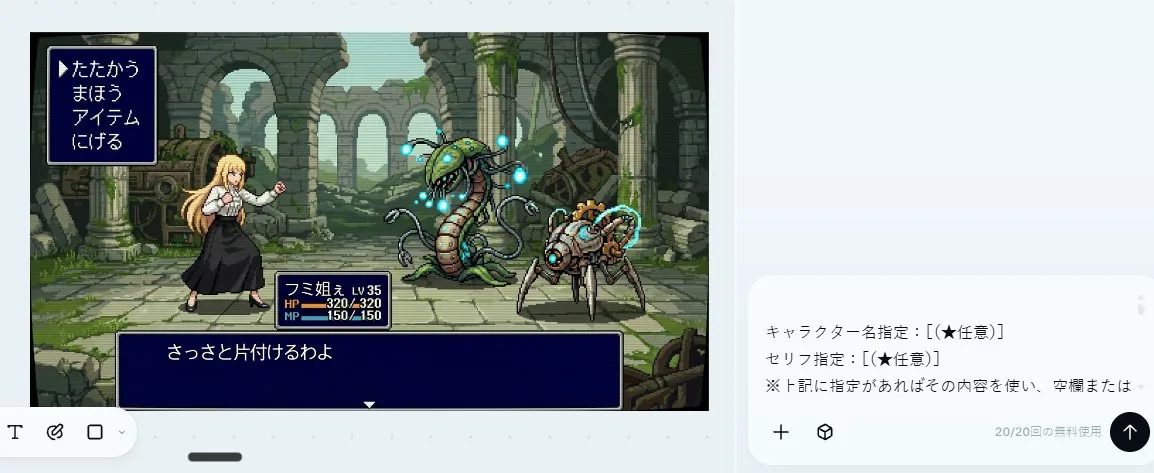
16-Bit RPG Battle Screen — AI 图像提示词
Transforms a reference character into a retro Japanese 16-bit command RPG battle scene with enemies, pixel-art ruins, and classic UI boxes. - AIPinMaker
提示词
Using the provided reference image as the character source, transform the character into a 16-bit command RPG battle screen in pixel-art style. Keep the original character’s outfit, long blond hair, general silhouette, and faceless/blurred face treatment, but redraw her as a playable battle sprite standing on the left side in a ready-to-fight pose.

Goal: Create a retro Japanese fantasy RPG combat scene, like a Super Famicom / 16-bit era command battle screen.

Scene additions: Add an ancient ruined stone arena background with broken arches, columns, moss, vines, scattered machinery, and atmospheric depth. Place exactly 2 enemy monsters on the right side: 1 tall plant/serpent-like mechanical monster with glowing blue orbs, and 1 smaller spider-like mechanical creature with cyan energy rings.

UI layout: Add exactly 3 dark navy RPG interface boxes with thin white borders: 1 command menu in the upper left, 1 character status box near the lower center-left, and 1 dialogue box across the bottom.

Text: The command menu must contain exactly 4 Japanese options in vertical order: 「たたかう」, 「まほう」, 「アイテム」, 「にげる」, with a triangular cursor pointing to the first option. The status box should show {argument name="character name" default="フミ姐ぇ"}, LV 35, HP 320/320, and MP 150/150. The bottom dialogue box should show {argument name="battle line" default="さっさと片付けるわよ"}.

Style constraints: Use crisp 16-bit pixel art, limited color palette, visible pixel edges, side-view RPG composition, no modern UI, no photorealism, no extra characters, no extra menu items, no watermark.37:T675,Using the provided reference image as the character source, transf参考图片
如何使用这个 AI 图像提示词模板
 1
1复制提示词 —— 取走该模板的提示词与反向提示词。  2
2选择模型 —— 选一个推荐的 AI 模型以获得最佳匹配。  3
3生成 —— 一键打开工作台并生成你的作品。
相关模板

Blurry Retro Pixel Parrot Jungle
A retro pixel-art style illustration of a tropical parrot perched on a short brown branch in the center of a dense jungle. The bird is shown in side profile facing right, with a bright green body, a vivid blue wing and long blue tail feathers, a yellow chest, an orange-red head and neck, a white facial patch around the eye, and a large curved black beak. The parrot is the single main subject, centered and enlarged, outlined with dark pixel edges. Surround it with thick rainforest foliage filling the entire frame: layered green leaves, twisting vines, and partial tree trunks on both sides, with 2 visible trunks and many overlapping leaf clusters. Add a soft glowing light halo behind the parrot to separate it from the darker forest background. Use a square composition, saturated colors, classic 16-bit game sprite aesthetics, chunky visible pixels, low-resolution grid-based rendering, and intentionally soft, blurry pixel edges rather than crisp modern pixel art. The mood is lush, vibrant, and nostalgic, like a tropical scene from an old video game.

Pixel Game Asset Atlas Template
请根据【游戏主题:鬼灭之刃/炭治郎 (游戏主题)】创作一张高完成度、高信息密度、适合系列化发布的「像素世界资产图鉴 / Pixel World Asset Atlas」。 这不是普通像素插画,也不是单张游戏场景图,而是一张面向游戏开发、美术设定、关卡设计和视觉提案的“2D像素游戏资产总览图”。画面需要像一张完整的游戏素材说明板,把一个【游戏类型:横版动作 (游戏类型)】所需的核心角色、敌人、道具、地形、场景、机关、Boss和装饰元素系统化整理在同一张图中,形成清晰、专业、可复用的游戏资产图鉴。 【基础设定】 主题世界观:【游戏主题】 游戏类型:【游戏类型】 时代背景:【时代背景】 主角身份:【主角身份】 敌人类型:【敌人类型】 主要场景:【主要场景环境】 整体风格:【风格方向,例如16-bit复古街机像素风 (风格)】 主色调:【主色调】 辅助色:【辅助色】 点缀色:【点缀色】 画幅比例:【画幅比例,横版4:3】 如没有填写,自动按照游戏主题最优方案进行匹配。 【整体画面要求】 画面采用横版大画布,浅色或低干扰背景,整体像一张游戏开发资产表、像素设定集展开页、说明书式资源目录。所有元素都应为统一像素密度的2D pixel art sprite,具有清晰黑色或深色描边、有限色阶、复古游戏质感。不要生成真实摄影风、3D渲染风、厚涂插画风或电影海报风。重点是“系统完整、分类清晰、资源丰富、可开发感强”。 【版式结构】 整张图采用模块化网格排版,用细线分割不同资源区域。每个区域需要有编号标题和简短分类标签,整体阅读路径为从左到右、从上到下。版式应具有说明书、游戏开发文档、素材图鉴、设定板的秩序感。信息密度要高,但不能混乱;每个模块内部的元素应等距排列,保持清晰可读。 【必须包含的模块】 1. 玩家角色模块:展示完整动作帧,包括站立、行走/奔跑、跳跃等。动作帧应横向排列,像游戏sprite sheet。 2. 敌人单位模块:设计多种敌人,包括普通、远程、重装、精英单位等。 3. 武器与道具模块:展示近战、远程、投掷物、特效、拾取物等。 4. 基础地形砖块模块:展示地面、墙体、平台、转角、不同材质地块。 5. 自然/外部场景资源模块:展示树木、草丛、石头、障碍物。 6. 建筑/基地/营地资源模块:展示门、窗、墙、梯子、营地设施。 7. 特殊地形模块:展示桥梁、水体、悬崖、洞口。 8. 室内/地下/设施资源模块:展示管道、控制台、金属门、设备。 9. Boss / 遭遇战资源模块:展示大型Boss、特殊载具、巨型机关。 10. 通用装饰与交互元素模块:展示梯子、绳索、指示牌、开关、机关。 【视觉细节要求】 所有资源需要保持统一的像素尺寸逻辑和世界观一致性。比例关系明确。动作帧需体现连续性;地形砖块可拼接;道具和机关有功能识别度;Boss元素需有压迫感。37:Tde0,Please create a high-completion, high-information-density "Pixel World Asset Atlas" suitable for serialized release based on [Game Theme: Demon Slayer/Tanjiro (game theme)]. This is not a regular pixel illustration or a single game scene, but a "2D pixel game asset overview map" for game development, art setting, level design, and visual proposals. The visual should look like a complete game material board, systematically organizing core characters, enemies, items, terrain, scenes, mechanisms, Bosses, and decorative elements required for a [Game Type: Side-scrolling action (game type)] into a single clear, professional, and reusable game asset atlas. [Basic Settings] Theme Worldview: [Game Theme] Game Type: [Game Type] Era Background: [Era Background] Protagonist Identity: [Protagonist Identity] Enemy Types: [Enemy Types] Main Scenes: [Main Scene Environment] Overall Style: [Style Direction, e.g., 16-bit retro arcade pixel style (style)] Main Color: [Main Color] Secondary Color: [Secondary Color] Accent Color: [Accent Color] Aspect Ratio: [Aspect Ratio, Landscape 4:3] If not filled, automatically match according to the optimal plan for the game theme. [Overall Visual Requirements] The visual uses a large landscape canvas with a light or low-interference background, looking like a game development asset sheet or an instruction-style resource catalog. All elements should be 2D pixel art sprites with uniform pixel density, clear black/dark outlines, limited color scales, and retro game textures. Do not generate realistic photography, 3D rendering, painterly illustration, or movie poster styles. Focus on being "systematically complete, clearly categorized, resource-rich, and high in developability." [Layout Structure] The map uses a modular grid layout with fine lines dividing different resource areas. Each area needs a numbered title and short category labels, with a reading path from left to right, top to bottom. The layout

Compilation of 18 Nano Banana Pro Prompts (Tennen's Prompt Festival) - Nano Banana Pro AI Prompt for Game Asset
1.スカウタープロンプト 参照画像の上にスカウター風のUIを重ねて描写します。キャラクターの特徴からNano Banana Proが推論して戦闘力を表示します。 2.超化プロンプト 参照画像のキャラクターの特徴を維持して、ポーズを「覚醒ポーズ」に変えて「超化」させます。「超化」は、第1形態から第3形態、さらに神形態、ブルー形態、極形態、ロゼ形態から選択できます。 3.フィールド展開プロンプト 参照画像のキャラクターを手を前方に伸ばしたポーズに変えてフィールドを展開します。 4.レトロRPGステータス画面化プロンプト 参照画像のキャラクターをドット絵に変換して、レトロRPGのステータス画面風にした画像を生成できるプロンプトです。 5.デスクトップマスコット化プロンプト 参照画像のキャラクターをデスクトップマスコット化してPC画面に配置した画像を生成するプロンプトです。 6.破れたところだけ画風を変えるプロンプト 参照画像そのものは一切変えず、破れ表現を追加し、破れた部分だけを線画・墨絵・フィギュア風・色鉛筆・水彩・鉛筆画など自由に画風を切り替えられるプロンプトです。 7.画風変換プロンプト 「破れたところだけ画風を変えるプロンプト」を改変して作った、全体の画風を変えるプロンプトです。 8.スーパーロボット大戦バトル演出化プロンプト 参照画像からスーパーロボット大戦のバトル演出風の画像を生成するプロンプトです。 9.力の解放プロンプト 球状のエネルギー空間が物体を破壊する描写の再現するプロンプトです。 10.参戦画面プロンプト 参照画像のキャラクターの「参戦画面」を生成するプロンプトです。 11.全集中プロンプト 参照画像のキャラクターをそのまま維持した上で、キャラクターの雰囲気や構えから「武器・呼吸・型・技名」を推論し描写するプロンプトです。 12.かめはめ波風プロンプト 『かめはめ波』の溜めポーズと発動ポーズを安定して生成できるプロンプトです。 13.フィギュア化+製品紹介風レイアウトプロンプト 参照画像のキャラクターをフィギュア化して、製品紹介風にレイアウトするプロンプトです。 14.ファイナルフラッシュ風プロンプト 参照画像のキャラクターを『ファイナルフラッシュ』の発動・溜め・発射ポーズに変換します。それぞれセリフ・擬音を追加できます。 15.新しいプロフィール画像生成プロンプト 参照画像のキャラクターを任意のアスペクト比で生成し、任意の文字列をロゴ風にして任意の位置に配置します。 16.プラモデルパッケージ化プロンプト 参照画像をそれぞれ正面・側面に配置し「プラモデルのパッケージ風」の画像として生成します。 17.イレイザーガン風プロンプト 参照画像のキャラクターが口からイレイザーガン風の エネルギー波を放ちます。 18.ボロクズ化プロンプト 参照画像のキャラクターを『ボロクズ化』するプロンプトです。41:Tb7d,1. Scouter Prompt Overlays a Scouter-style UI onto the reference image and infers and displays the combat power based on the character's features. 2. Super Transformation Prompt Maintains the character features from the reference image and changes the pose to an 'Awakening Pose' to 'Super Transform' them. 'Super Transformation' can be selected from Form 1 to Form 3, as well as God Form, Blue Form, Extreme Form, and Rose Form. 3. Field Deployment Prompt Changes the character in the reference image to a pose with hands extended forward and deploys a field. 4. Retro RPG Status Screen Prompt A prompt that converts the character in the reference image into pixel art and generates an image styled like a retro RPG status screen. 5. Desktop Mascot Prompt A prompt that generates an image of the character from the reference image turned into a desktop mascot and placed on a PC screen. 6. Style Change Only on Torn Parts Prompt Adds a tearing effect without changing the reference image itself, allowing the art style of only the torn part to be freely switched to line art, ink painting, figure style, colored pencil, watercolor, pencil drawing, etc. 7. Art Style Conversion Prompt A prompt created by modifying the 'Style Change Only on Torn Parts Prompt' to change the overall art style. 8. Super Robot Wars Battle Sequence Prompt A prompt that generates an image styled like a Super Robot Wars battle sequence from the reference image. 9. Power Release Prompt A prompt that reproduces the depiction of a spherical energy space destroying an object. 10. Participation Screen Prompt A prompt that generates a 'Participation Screen' for the character in the reference image. 11. Total Concentration Prompt Maintains the character from the reference image and infers and depicts 'Weapon, Breathing Style, Form, and Move Name' from the character's atmosphere and stance. 12. Kamehameha Style Prompt A prompt that can stably generate the charging pose and activation pose of 'Kamehameha.' 13. Figure Transformation + Product Introduction Layout Prompt A prompt that transforms the character in the reference image into a figure and lays it out in a product introduction style. 14. Final Flash Style Prompt Converts the character in the reference image into the activa

Pixel Art Bonsai Game UI
{"type":"pixel art mobile game UI mockup","theme":"cozy Japanese bonsai cultivation simulator","style":{"rendering":"detailed 2D pixel art, polished retro game aesthetic, crisp sprites, warm lighting, soft atmospheric background","aspect_ratio":"9:16 portrait","camera":"straight-on view of a traditional Japanese room interior framing the bonsai in the center"},"subject":{"main_object":"bonsai tree in a rectangular dark blue ceramic pot","bonsai":{"species_look":"pine-like bonsai with layered rounded foliage pads","trunk":"thick twisted brown trunk with exposed roots","placement":"on a low wooden display table","soil":"mossy green surface with 2 small visible stones"}},"environment":{"setting":"traditional Japanese tatami room with open shoji view to a garden","background_elements":["wooden beams and wall trim","hanging lantern on the left","mountains in the distance","stone lantern in the garden","pink cherry blossom tree on the right","soft blue sky with clouds"],"mood":"calm, handcrafted, meditative"},"ui":{"top_bar":{"count":5,"elements":["small bonsai icon button at top left","level badge showing \"Lv.12\"","coin counter showing \"2,450\"","blue gem counter showing \"120\"","pink blossom currency counter showing \"35\""],"top_right":"menu button with 3 horizontal lines"},"status_panel":{"position":"upper left below top bar","count":3,"rows":[{"label":"健康度","icon":"leaf","filled":5,"total":8,"color":"green"},{"label":"水分","icon":"water droplet","filled":5,"total":8,"color":"blue"},{"label":"美しさ","icon":"sparkle flower","filled":4,"total":8,"color":"gold"}]},"action_buttons":{"position":"right side vertical stack","count":5,"buttons":[{"label":"水やり","icon":"watering can","color":"blue"},{"label":"剪定","icon":"shears","color":"green"},{"label":"日光","icon":"sun","color":"gold"},{"label":"肥料","icon":"fertilizer jar","color":"purple"},{"label":"道具","icon":"pot or tools container","color":"cream"}]},"info_panel":{"position":"lower middle above navigation","count":2,"sections":[{"label":"Day 12 / 春","subitems":["flower icon","hourglass icon","text \"次の成長まで\"","countdown timer \"02:14:32\""]},{"label":"成長記録","subitems":["small bonsai thumbnail","text \"+2cm\"","green bar chart with 10 ascending bars"]}]},"bottom_navigation":{"position":"bottom","count":5,"tabs":["ホーム","図鑑","ショップ","実績","設定"],"icons":["bonsai","book","shop awning","trophy","gear"],"active_tab":"ホーム"}},"composition":"central bonsai hero object, UI panels framing the scene without covering the tree, game-ready mockup that looks like a screenshot from a finished mobile app","color_palette":{"dominant":["warm wood brown","tatami beige","moss green","sky blue","cherry blossom pink","muted gold"],"accent_buttons":["dusty blue","sage green","mustard gold","soft purple","cream"]},"quality":"clean, legible interface, professional indie game prototype, charming and highly cohesive"}
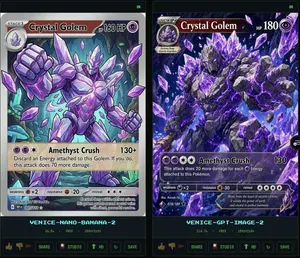
Crystal Golem Card Comparison UI
Goal: Create a dark comparison screenshot showing two fantasy trading-card designs side by side, as if from an image generation benchmark UI. Canvas: Landscape 16:9 composition, black/dark charcoal background with thin neon-green outlines. Two tall vertical panels fill the frame, left and right, separated by a narrow gap. Each panel contains one collectible monster card preview above a small status/control area. Layout: Use exactly 2 main panels. The left panel is labeled at the bottom in cyan pixel text “VENICE-NANO-BANANA-2”; the right panel is labeled “VENICE-GPT-IMAGE-2”. Each panel has a tiny green “OK” indicator in its top-right corner. Under each label, show a small metadata row with time, “FREE”, and “1500x2100”. At the very bottom of each panel, include a row of small UI buttons/icons: thumbs up, thumbs down, red flag, “SHARE”, “STUDIO”, “HD” with an up-arrow, a refresh icon, and “SAVE”. Subject: Both cards depict the same Pokémon-inspired character, Crystal Golem (character name), a massive humanoid golem made of jagged gray stone and glowing purple amethyst crystals, with violet energy cracks, crystal spikes, clenched fists, and floating crystal shards. The card type uses a purple psychic/eye symbol. Make the cards look like polished fantasy trading cards, but not an exact copy of any real copyrighted card template. Left card details: A Stage 1 card with a silver-gray border and slightly older illustrated-card look. Header text reads “STAGE 1”, Crystal Golem (card title), and “HP 160 HP”. Include a small circular evolution portrait at top left. The artwork shows the golem from the waist up inside an underground crystal cavern with teal mushrooms and glowing green cave lights, one fist raised toward the viewer, many purple crystal shards floating around. Use clean anime/comic line art, pale lavender highlights, and a holographic sheen. Attack area contains exactly 1 attack: “Amethyst Crush” with damage “130+”. Attack text: “Discard an Energy attached to this Golem. If you do, this attack does 70 more damage.” Bottom stats show weakness “×2”, resistance “-20”, and retreat with three star/colorless symbols. Include tiny illustrator/collector text and a short flavor line near the bottom. Right card details: A Stage 2 card with a darker, more cinematic high-detail look and a black/purple border. Header text reads “STAGE 2”, Crystal Golem (card title), and “HP 180”. Include a small evolution box at upper left reading “Evolves from Quartz Guardian”. The artwork fills more of the card and shows the golem lunging forward through an explosive cavern of purple crystals, with one huge open hand reaching toward the viewer, intense glowing violet eyes, black rock texture, luminous amethyst veins, and many floating crystal shards. Attack area contains exactly 1 attack: “Amethyst Crush” with damage “130”. Attack text: “This attack does 20 more damage for each Energy attached to this Pokémon.” Bottom stats show weakness “×2”, resistance “-30”, and retreat with four star/colorless symbols. Add tiny illustrator/collector text and a flavor quote: “Born from the heart of ancient caverns, it wields the power of earth and crystal in perfect harmony.” Visual style: High-contrast digital art, glossy trading-card foil effects, purple crystal magic, dark cave backgrounds, sharp details, cyan pixel UI labels, neon green UI outlines. The left card should appear cleaner and more cartoon/anime, while the right card should appear more dramatic, dense, and rendered. Constraints: Include exactly 2 card panels and exactly 1 trading card in each panel. Include exactly 1 attack on each card. Preserve all visible English labels named above. Do not add extra cards, characters, logos, watermarks, or real brand names.38:Tf6a,Goal: Create a dark comparison screenshot showing two fantasy trading-card designs side by side,

Vertical Pixel Space Shooter Background
Create a vertical retro pixel-art space shooter scrolling background, designed as a seamless mobile game asset. The canvas is a tall 9:16 portrait frame with a dark central flight corridor left mostly open for gameplay. Fill the scene with a deep black starfield, hundreds of tiny white, blue, and violet pixel stars, and two luminous vertical nebula streams: one winding down the left side in electric purple and blue, and one winding down the right side in purple with cyan highlights. Add exactly 3 visible planets: a large purple cratered planet near the upper left edge, a large blue-purple rim-lit planet partially cropped on the lower right edge, and a small purple moon just below that lower-right planet. Add exactly 22 rocky asteroids of varied sizes, irregular cratered gray-brown forms with purple shadowing, distributed around the border while keeping the center mostly clear: 1 huge asteroid near the upper right, 1 medium asteroid at the right-middle edge, 1 medium asteroid at the lower left edge, 1 large asteroid cropped at the bottom left corner, 1 large asteroid cropped at the lower right corner, plus 17 smaller asteroids scattered near the top edge, side edges, and lower border. Use crisp pixel-art rendering with high-detail dithering, chunky jagged silhouettes, bright rim highlights, no outlines that look vector-smooth, no ships, no UI, no text, no watermark. Color palette: black space, violet and magenta nebula clouds, electric blue accents, white star glints, gray rocky asteroids with cool purple shadows. The image should feel production-ready as a vertical shoot ’em up background tile, dramatic but readable, with the gameplay lane clear in the center.39
探索更多提示词
按分类浏览更多 AI 图像和视频提示词。