
Text to Image
YAML prompt conversion for images and diagrams — AI Image Prompt
A Nano Banana Pro instruction prompt that tells the model to convert the given image, photo, or diagram into a structured YAML prompt, including size and details, and output it in a code block. - AIPinMaker
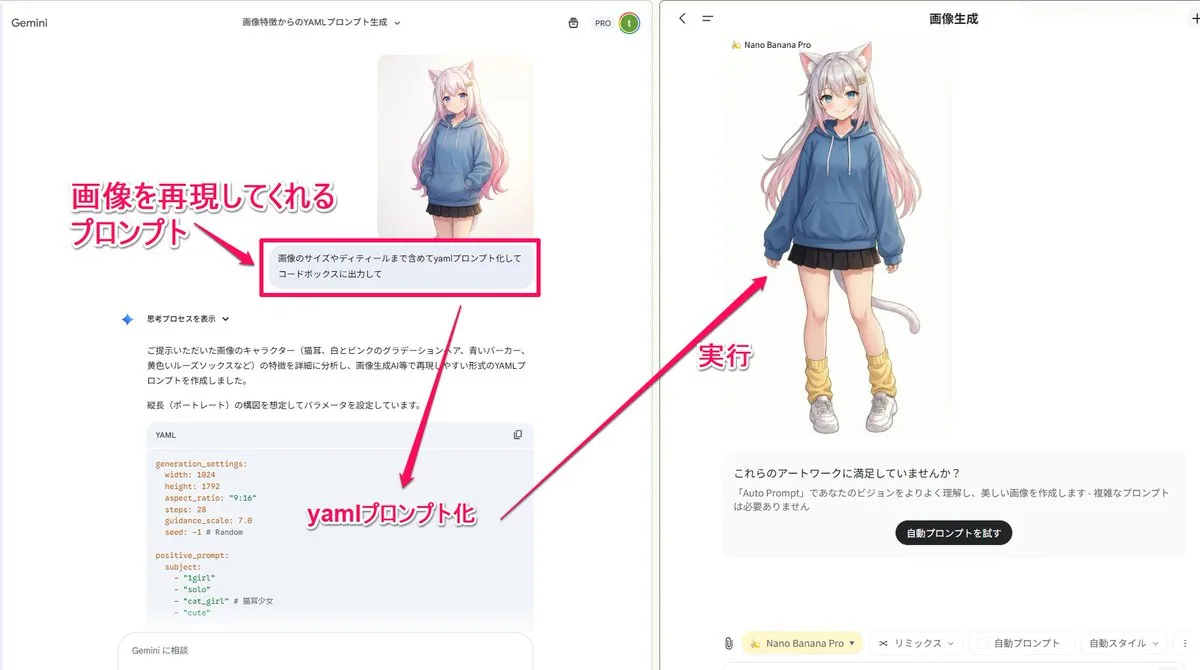
Prompt
Create a creative image of Yaml Prompt Conversion For Images And Diagrams. Style: photorealistic. Composition: balanced and well-framed. Lighting: natural with cinematic mood. Category: photography. Reference: yaml-prompt-conversion-for-images-and-diagrams-706.
Prompt breakdown
- Subject
- creative image of Yaml Prompt Conversion For Images And Diagrams
- Style
- photorealistic
- Lighting
- natural with cinematic mood
- Composition
- balanced and well-framed
- Mood
- cinematic
Remix ideas
- Overlay visible YAML syntax that morphs into diagram nodes
- Introduce subtle film-grain texture to emphasize the photography category
- Frame the conversion as a split composition showing raw YAML on one side and rendered image output on the other
Reference images
How to use this AI Image prompt template
 1
1Copy the prompt — grab this template’s prompt and negative prompt.  2
2Pick a model — choose a recommended AI model for the best match.  3
3Generate — open the studio with one click and create your result.
Related templates

Fitness Magazine Page Motion Sheet
Create a creative image of Fitness Magazine Page Motion Sheet. Style: photorealistic. Composition: balanced and well-framed. Lighting: natural with cinematic mood. Category: photography. Reference: fitness-magazine-page-motion-sheet-18085.
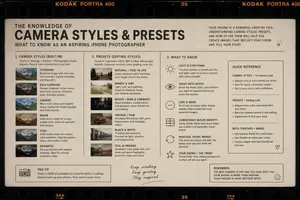
Film Style Instructional Diagram
Create a creative image of Film Style Instructional Diagram. Style: photorealistic. Composition: balanced and well-framed. Lighting: natural with cinematic mood. Category: photography. Reference: film-style-instructional-diagram-14715.

Local Web App Annotation Demo
Using REFERENCE_0 as the context, create a follow-up screenshot that shows the selected “Build Web Apps” tool in action as a local web app preview. Replace the plugin list view with a browser-like localhost workspace at 127.0.0.1:4392 (local address), clean white UI, soft shadows, and rounded panels. Main change: show an app-building/annotation interface rather than the original plugin directory. Add a top bar with the local address on the left and exactly 3 small window/control icons on the right. Add a blue annotation status pill on the upper right with the text 正在注释 (annotation status) and a vertical three-dot menu beside it. Content area: create a gallery-style UI with Chinese poster/card designs inside rounded white panels. Include a left toolbar row with a Search button and a blue comment/annotation button carrying a badge labeled “1”. Show at least two visible poster/card thumbnails, using dark brown traditional Chinese visual styling, while leaving some checkerboard transparent-placeholder areas in the right panel. Overlay: place a large floating rounded annotation input bubble centered near the top-middle of the content. It should look like an inline AI comment editor, with a sliders/settings icon on the left, Chinese instruction text 这个按钮的视觉和整体设计不符合,调整一下。 (comment text), a “取消” cancel button, a small microphone icon, and a black circular confirm button with a white checkmark. Bottom of the right preview panel: add exactly 3 action buttons labeled “Open”, “Folder”, and “Path”, each with a simple line icon. Keep the screenshot realistic, like a product demo of using Build Web Apps plus built-in HTML annotation to request UI refinements.38:T728,Using REFERENCE_0 as the context, create a follow-up screenshot that s

Convert Image to Editable PowerPoint Slide Prompt
Create a creative image of Convert Image To Editable Powerpoint Slide Prompt. Style: photorealistic. Composition: balanced and well-framed. Lighting: natural with cinematic mood. Category: photography. Reference: convert-image-to-editable-powerpoint-slide-prompt-2163.

Academic Economics Chart Simulation
Create a creative image of Academic Economics Chart Simulation. Style: photorealistic. Composition: balanced and well-framed. Lighting: natural with cinematic mood. Category: photography. Reference: academic-economics-chart-simulation-14396.

Side-by-Side PPT Reconstruction Demo
Using the provided reference image of the PowerPoint slide screenshot, recreate it as a clean, polished slide conversion result inside a side-by-side desktop comparison. Keep the same Japanese slide topic and overall layout, but remove the dense selection handles, edit boxes, and malformed vector artifacts from the reference so the slide appears properly reconstructed. Show 2 panels: on the left, a dark image viewer window displaying the exported slide image; on the right, the same slide opened in PowerPoint editing view. Preserve the original monochrome infographic style and Japanese text structure, but make the typography legible and the icons, dividers, and columns cleanly aligned. Keep the slide as a single-page infographic with 5 main content areas: 1 top title/header row, 3 mid-page comparison columns, 1 bottom use-case row containing 5 icon-labeled items. Include a footer line and the OpenAI logo at bottom right. Emphasize that this is a faithful PPT reconstruction from the uploaded image, with a realistic Windows desktop app screenshot look.
Explore more prompts
Browse more AI image and video prompts by category.
FAQ
- Why pair YAML conversion with photorealistic photography?
- The style choice makes abstract prompt mechanics feel concrete, letting users see how text structures translate into balanced, well-framed photographic results.
- How can the reference tag improve future generations?
- Using yaml-prompt-conversion-for-images-and-diagrams-706 as a consistent anchor helps track iterative tweaks across different lighting or composition variations.