
Text to Image
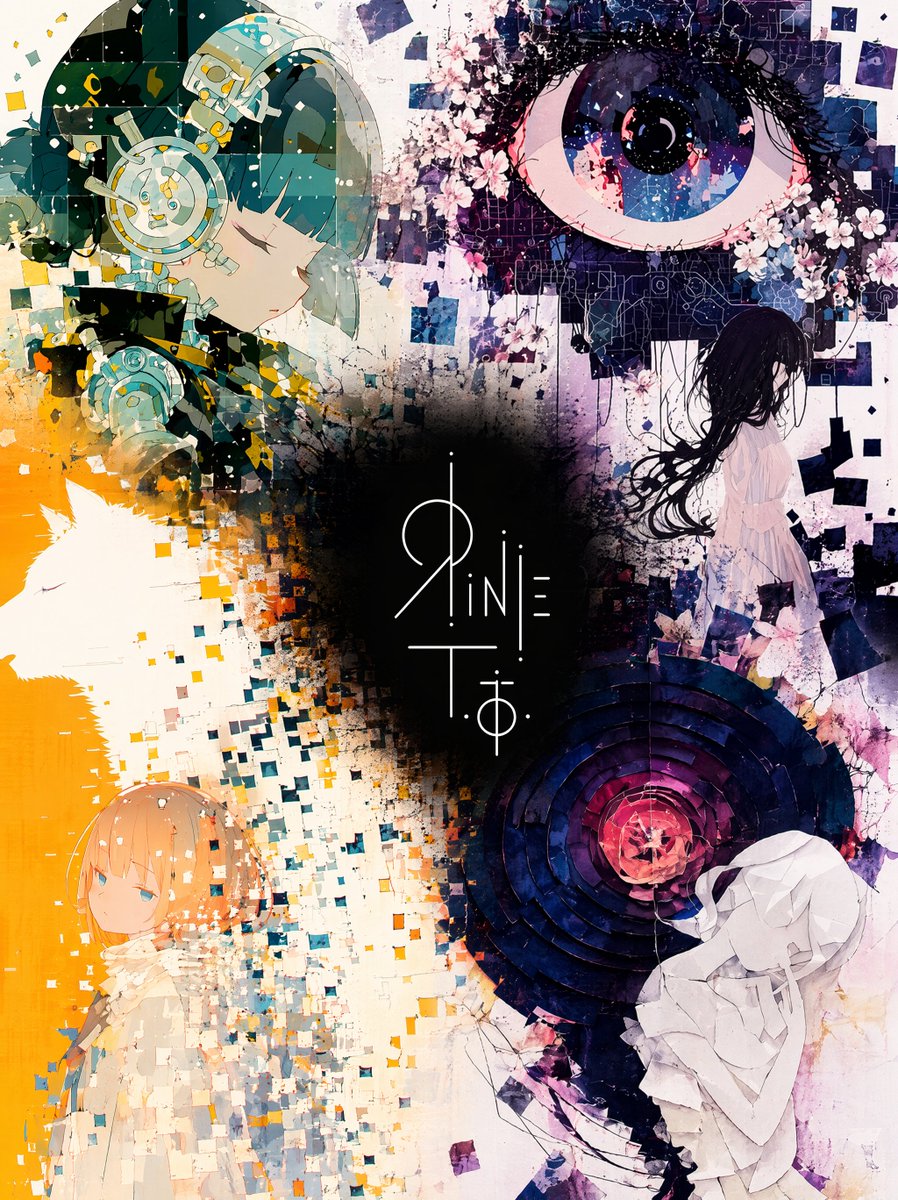
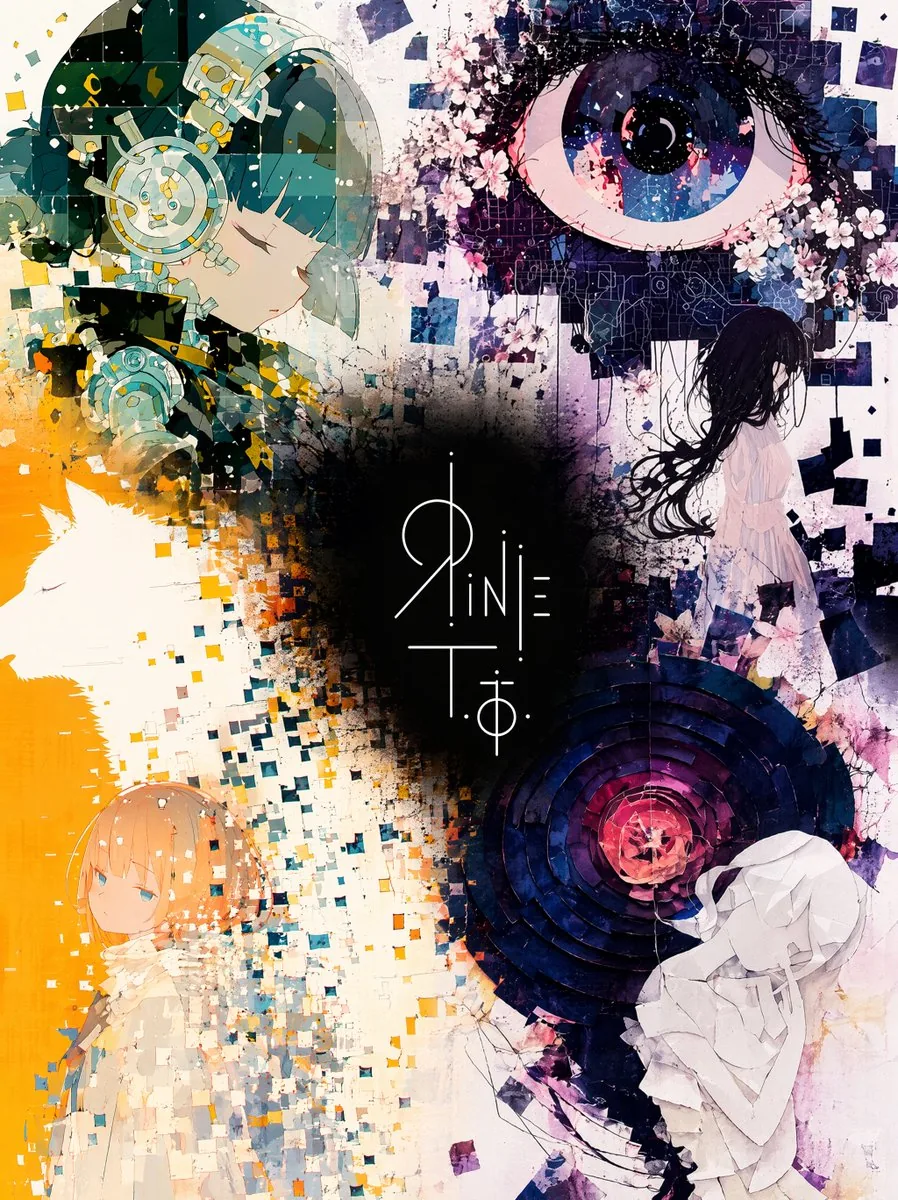
Unified Illustration and Logo Collage — AI Image Prompt
A professional-grade prompt for GPT Image 2 designed to blend four separate illustrations with a central logo into a single, cohesive composition. - AIPinMaker
Prompt
Five images are attached.
Images 1–4 are illustrations by the same artist.
Image 5 is a logo design on a {argument name="logo background" default="black"} background.

Merge the four illustrations into a single unified composition, with the logo from Image 5 placed at the {argument name="logo position" default="visual center"} as the anchor element.

[Fusion Rules]
- Each illustration appears as a partial glimpse — show faces and key elements only, not full compositions
- Blend the boundaries between illustrations naturally — no hard edges or visible seams
- Each illustration remains recognizable but flows into the next
- Generous negative space between elements — let the composition breathe
- The result should feel elegant, curated, and intentional — not busy or cluttered

[Composition]
- The logo occupies the center of the frame as the dominant focal point
- The four illustrations are distributed around the logo with natural visual balance
- No grid layout — the arrangement should feel painterly and intentional
- Clean, minimal background between the illustrations to create breathing room

[Color & Brightness]
- The illustrations surrounding the logo must be vivid and fully saturated
- Boost the brightness and chromatic richness of all illustration areas outside the logo zone
- Colors should feel alive, warm, and luminous — not muted or dark
- The contrast between the dark logo zone and the bright surrounding illustrations is intentional and dramatic

[Logo Integration]
- Reproduce the exact logo design from Image 5
- Place it at the center of the composition, large and prominent
- The logo should feel embedded in the artwork — not floating on top
- Create a subtle dark void or negative space directly behind the logo
- The dark zone is strictly limited to the immediate area behind the logo — it must not bleed into the surrounding illustrations

[Style Preservation]
- Maintain the original art style of the source illustrations exactly
- Do not introduce new elements, characters, or backgrounds not present in the originals
- Preserve the color palette and line quality of the source images39:T85f,Five imagePrompt breakdown
- Subject
- Four partial illustration fragments by one artist merged around the exact logo design from image 5
- Style
- Exact preservation of the source illustrations' line quality, color palette, and art style with no added elements
- Lighting
- Boosted brightness and full chromatic saturation in all illustration areas for warm luminous color
- Composition
- Logo as dominant center with painterly non-grid distribution of fragments and ample breathing room
- Mood
- Elegant curated feel with dramatic contrast between the contained dark logo zone and bright surroundings
Remix ideas
- Shift the logo slightly off-center while keeping the dark void size fixed to change balance
- Enlarge one illustration fragment to overlap the logo edge more for tighter integration
- Desaturate a single illustration quadrant slightly to create subtle visual hierarchy
Reference images
How to use this AI Image prompt template
 1
1Copy the prompt — grab this template’s prompt and negative prompt.  2
2Pick a model — choose a recommended AI model for the best match.  3
3Generate — open the studio with one click and create your result.
Related templates
Hand-Drawn Storyboard Previs Sketch
Create a rough hand-drawn PREVIS + rescue chase storyboard page in 16:9 horizontal format. Use an extremely simple 2D previs sketch style: - stick figures / mannequin silhouettes only - no facial detail, no costume detail, no anatomy detail - no texture, no shading, no polished rendering - black loose sketch lines - red boxes for camera framing only - blue arrows for motion / force / breath / direction only - rough director thumbnails, not concept art - if unsure, draw less detail, not more Show 8 numbered panels on one page with slightly irregular but readable placement. Subject: two close friends racing on skateboards through the sky above the clouds (subject) Environment: bright open sky, fluffy cloud pathways, floating cloud banks, distant sunlight, then a darker storm-cloud zone with wind, rain and lightning (environment) Mood: playful, adventurous, fast, funny, suspenseful for a moment, then uplifting and triumphant Sequence: during a fun cloud-skate race, one friend accidentally drifts into dangerous storm clouds and loses control, then the other friend makes a last-second rescue Beats: 1. Wide establishing shot. Two friends on skateboards surf above the clouds, side by side, racing playfully through the sky. 2. Side tracking shot. The race speeds up. One friend leans forward and gains a little lead while the other follows close behind. 3. 3/4 front angle. The leading friend accidentally veers toward a dark storm-cloud area ahead while still focused on the race. 4. Overhead shot. The storm cloud swallows the lead friend. Strong wind arrows, rain and lightning. The skateboard wobbles violently. 5. Close-up / medium action shot. The second friend notices the danger, brakes hard for a split second, then pivots and dives toward the storm. 6. Dynamic low angle. The rescuer shoots into the storm clouds on the skateboard, reaching forward through wind and lightning toward the trapped friend. 7. Hero side shot. Last-second rescue. The rescuer grabs the other friend by the arm or hoodie and pulls them free from the storm cloud just as lightning strikes behind them. 8. Wide payoff shot. Both friends burst back into the sunny clouds, regain balance, keep riding together and continue the race laughing, now side by side. Use varied camera angles: close-up, wide, low angle, overhead, side profile, rear, 3/4. Add short handwritten notes near panels. Maintain clear continuity of subject, props, environment and movement direction. Focus on staging, camera, motion, timing and continuity. Prioritize readability over drawing quality. Avoid detailed illustration, clean UI and infographic design. Tone target: fun family-animation energy, clear visual storytelling, simple readable action be
Cloudflare Catch-All Email Routing Infographic
Goal: Create a landscape hand-drawn notebook-style Chinese infographic explaining how to register multiple ChatGPT accounts by using Cloudflare Email Routing to create catch-all mailbox aliases. Canvas: Wide 16:9 whiteboard page, clean off-white background, surrounded by a thick black dashed rounded border. Use a casual marker-and-pen sketch style with slightly imperfect lines, doodle arrows, stars, question marks, pins, and small expressive icons. Title and intro: At the top center, write the bold headline 注册 ChatGPT 第 N 个账号:用 Cloudflare 造邮箱(手绘笔记) (headline text). Underline “Cloudflare” in blue. Beneath it on the left, write the pain point line: “痛点:同个邮箱只能注册一个账号,换邮箱麻烦。” Add a small curved arrow doodle and star near the title. Main layout: Use exactly 7 main content boxes/cards plus decorative doodles. Arrange them left-to-right as a process with bold black arrows connecting sections. The 7 cards are: 1 pain card, 1 solution card, 1 core-principle card, and 4 numbered step cards. Card 1, pain card: A red outlined sticky-note box on the upper left with a sad red face icon. Text: “想注册新号?没新邮箱!” Make it look like a folded-corner note. Card 2, solution card: A blue rounded rectangle in the upper middle with a blue cloud icon. Text: “解决方案:Cloudflare Email Routing(邮箱路由)”. Put a blue arrow pointing toward the core principle box. Card 3, core principle card: A large black-outlined rounded rectangle in the upper right. Header text: “核心原理:Catch-all(通配符 / 捕获所有)”. Include a funnel icon. Show exactly 4 example incoming aliases on the left: “chatgpt@”, “netflix@”, “test1@”, and “任意前缀@”. Draw arrows from all four into a large “@” symbol and “@你的域名.com”, then a thick black arrow to a mailbox icon labeled “真实邮箱(如 Gmail)”. Bottom line with green check icon: “全部自动转发,统一汇总!无需提前创建。” Step cards along the bottom: Use exactly 4 numbered boxes. Step 1 card, bottom left: Title “第一步:准备工作”. Include exactly 3 numbered requirements: “1. Cloudflare 账号(免费注册)”, “2. 你的域名(DNS 托管在 CF)”, “3. 真实邮箱(接收转发)”. Add a globe icon, a green check mark, and a yellow key icon. Below it add small text: “域名推荐:性价比高(如 top域名)”. Step 2 card, bottom center-left: Title “第二步:启用并验证目标邮箱”. Include a small computer icon labeled “CF 控制台”. Text flow: “添加域名 → 解析 → 激活”. Draw an arrow down to a mini DNS nameserver panel with two columns: left “阿里云(修改 NS)”, right “Cloudflare(等待生效,状态:活动)”. Beneath the card, draw a red circled nameserver list with exactly 2 entries: “gene.ns.cloudflare.com” and “peyton.ns.cloudflare.com”. Add a small clock icon and text “约30分钟”. Step 3 card, bottom center-right: Title “第三步:设置邮件路由”. Show a mini Cloudflare UI mockup with exactly 2 top tabs/boxes: “Email(电子邮件)” and “Email Routing(路由)”. Include a small “Get Started” button pointing to “绑定目标地址(Destination address)”. At the bottom add an envelope icon and text: “验证邮件 → 点击确认”. Under this card place a small blue status note titled “测试转发成功” with two arrow lines showing an alias forwarding to a Gmail address. Step 4 card, bottom right: Title “第四步:设置路由规则(核心步骤)”. Show a UI panel titled “Catch-all 规则设置”. Include a blue toggle switch labeled “Active(启用)”. Include a two-row table with headers and values: row 1 “Action(操作)” to “Send to(发送至)”; row 2 “Destination(目标)” to “你的真实邮箱”. Add a red star near the corner. Final result box: At the bottom right below Step 4, add a green rounded rectangle with a smiling face icon. Text: “效果:注册时随意编造前缀(例如 chatgpt@yourdomain.com)邮件全部统一汇总到真实邮箱,实现「邮箱自由」!全程免费!” Visual style: Handwritten Chinese typography, thick black marker outlines, simple vector doodles, blue/red/green/yellow accent colors, informal classroom note-taking feel. Keep all arrows bold and directional, with minor sketchy imperfections. Constraints: Keep the entire infographic in Chinese as specified, use no photorealism, no 3D rendering, no watermark, no extra sections beyond the 7 cards and final result box, and make the text legible.3b:T12a5,Goal: Create a landscape hand-drawn notebook-style Chinese infographic explaining how to register multiple ChatGPT accounts by using Cloudflare Email Routing to create catch-all mailbox aliases. Canvas: Wide 16:9 whiteboard page, clean off-white background, surrounded by a thick black dashed rounded border. Use a casual marker-and-pen sketch style with slightly imperfect lines, doodle arrows, stars, question marks, pins, and small expressive icons. Title and intro: At the top center, write the bold headline 注册 ChatGPT 第 N 个账号:用 Cloudflare 造邮箱(手绘笔记) (headline text). Underline “Cloudflare” in blue. Beneath it on the left, write the pain point line: “痛点:同个邮箱只能注册一个账号,换邮箱麻烦。” Add a small curved arrow doodle and star near the title. Main layout: Use exactly 7 main content boxes/cards plus deco
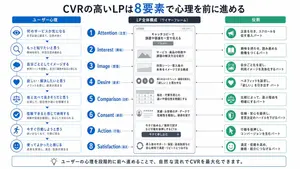
Japanese LP Psychology 8-Step Infographic
{"type":"Japanese marketing infographic","topic":"high-converting landing page structure guided by user psychology","style":{"look":"clean flat business infographic","palette":{"primary":"blue","secondary":"green","neutral":"white and light gray","accent":"dark navy headline with one highlighted blue numeral"},"background":"plain white","lines":"thin gray connectors and borders","icons":"simple circular line icons in blue and green","aspect_ratio":"16:9 landscape"},"headline":{"text":"CVRの高いLPは{argument name=\"number of elements\" default=\"8\"}要素で心理を前に進める","position":"top center","emphasis":"the numeral is large and bright blue"},"layout":{"columns":3,"sections":[{"title":"ユーザー心理","position":"left column","count":8,"items":[{"index":1,"icon":"eye","label":"何のサービスか気になる","subtext":"まずは目に留まり、注意が向く"},{"index":2,"icon":"magnifying glass","label":"もっと知りたいと思う","subtext":"興味を持ち、内容を読み進める"},{"index":3,"icon":"thought cloud","label":"自分ごととしてイメージする","subtext":"利用シーンを想像し、自分に関係があると感じる"},{"index":4,"icon":"heart","label":"欲しい・解決したいと思う","subtext":"メリットを感じ、欲求が高まる"},{"index":5,"icon":"balance scale","label":"他と比べて良さそうだと思う","subtext":"比較して、優位性や違いを理解する"},{"index":6,"icon":"check mark badge","label":"信頼できると感じて納得する","subtext":"根拠や実績を確認し、安心して決められる"},{"index":7,"icon":"running person","label":"今すぐ行動しようと思う","subtext":"迷いがなくなり、行動に移る"},{"index":8,"icon":"smiling face","label":"使ってよかったと感じる","subtext":"成果を実感し、満足・信頼が深まる"}]},{"title":"LP全体構成(ワイヤーフレーム)","position":"center column","count":8,"items":[{"index":1,"label":"Attention(注意)","wireframe":"logo at top, main hero block with headline and CTA button","text":"キャッチコピーで課題や価値を一言で伝える"},{"index":2,"label":"Interest(興味)","wireframe":"image placeholder and text block","text":"サービス・商品の特徴や課題の解決方法を紹介"},{"index":3,"label":"Image(想像)","wireframe":"wide image placeholder","text":"利用シーン・導入後の未来をイメージできる構成"},{"index":4,"label":"Desire(欲求)","wireframe":"three small circular icons and text","text":"得られるベネフィット/価値を提示し『欲しい』と思わせる"},{"index":5,"label":"Comparison(比較)","wireframe":"comparison table grid","text":"他社・代替手段との違いや優位性を明確にする"},{"index":6,"label":"Consent(納得)","wireframe":"star rating, avatar, testimonial lines","text":"実績・お客様の声・データで信頼性を補強し、納得を促す"},{"index":7,"label":"Action(行動)","wireframe":"large CTA area with dark button","text":"今すぐ始める/無料で試すなど行動を後押しするCTA"},{"index":8,"label":"Satisfaction(満足)","wireframe":"circular arrow support icon and text","text":"導入後のサポート・保証・返金制度など安心材料で満足・リピートにつなげる"}],"extra_labels":["LOGO","CTAボタン","今すぐ申し込む"]},{"title":"役割","position":"right column","count":8,"items":[{"index":1,"icon":"megaphone","text":"注意を引き、スクロールを促す導入パート"},{"index":2,"icon":"open book","text":"興味を持たせ、読み進める動機をつくるパート"},{"index":3,"icon":"picture frame","text":"自分ごと化を促し、利用イメージを具体化するパート"},{"index":4,"icon":"heart","text":"ベネフィットを訴求し、『欲しい』を引き出すパート"},{"index":5,"icon":"balance scale","text":"比較によって、選ぶ理由を明確にするパート"},{"index":6,"icon":"shield","text":"信頼・安心を提供し、意思決定のハードルを下げるパート"},{"index":7,"icon":"cursor arrow","text":"行動を後押しし、コンバージョンを生むパート"},{"index":8,"icon":"smile face","text":"満足・信頼を高め、継続・紹介につなげるパート"}]}],"connectors":"dotted horizontal guide lines connect each of the 8 center stages to matching items in the left and right columns; small downward arrows connect stacked cards in the left column"},"footer":{"style":"rounded rectangular note bar with light background and thin blue outline","icon":"light bulb","text":"ユーザーの心理を段階的に前へ進めることで、自然な流れでCVRを最大化できます。"},"composition":"top headline, three evenly spaced vertical columns beneath it, eight aligned horizontal rows across the page, symmetrical educational slide design for a landing page optimization manual","quality":"sharp vector text, presentation-slide clarity, polished corporate training material"}3d:T1407,{"type":"Japanese marketing infographic","topic":"high-converting landing page structure guided by user psychology","style":{"look":"clean flat business infographic","palette":{"primary":"blue","secondary":"green","neutral":"white and light gray","accent":"dark navy headline with one highlighted blue numeral"},"background":"plain white","lines":"thin gray connectors and borders","icons":"simple circular line icons in blue and green","aspect_ratio":"16:9 landscape"},"headline":{"text":"CVRの高いLPは{argument name=\"number of elements\" default=\"8\"}要素で心理を前に進める","position":"top center","emphasis":"the numeral is large and bright blue"},"layout":{"columns":3,"sections":[{"title":"ユーザー心理","position":"left column","count":8,"items":[{"index":1,"icon":"eye","label":"何のサービスか気になる","subtext":"まずは目に留まり、注意が向く"},{"index":2,"icon":"magnifying glass","label":"もっと知りたいと思う","subtext":"興味を持ち、内容を読み進める"},{"index":3,"icon":"thought cloud","label":"自分ごととしてイメージする","subtext":"利用シーンを想像し、自分に関係があると感じる"},{"index":4,"icon":"heart","label":"欲しい・解決したいと思う","subtext":"メリットを感じ、欲求が高まる"},{"index":5,"icon":"balance scale","label":"他と比べて良さそうだと思う","subtext":"比較して、優位性や違いを理解する"},{"index":6,"icon":"check mark badge","label":"信頼できると感じて納得する","subtext":"根拠や実績を確認し、安心して決められる"},{"index":7,"icon":"running person","label":"今すぐ行動しようと思う","subtext":"迷いがなくなり、行動に移る"},{"index":8,"icon":"smiling face","label":"使ってよかったと感じる","subtext":"成果を実感し、
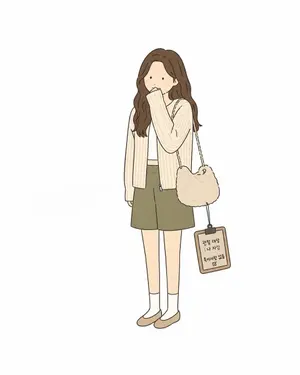
Minimal Comic Style Greeting Card
Use the main features of [same as the uploaded image] as a loose reference, with a three-quarter front-angle composition, and create a greeting card. Include only one full-body person and 1–2 distinctive objects. Make it a minimal, simple flat-color alternative comic-style illustration (style), using clean, even hand-drawn lines. Simplify the person into basic shapes, and keep the facial features minimal—dot eyes, a simple nose, and a small mouth. Give the figure slightly awkward proportions. Use solid fill colors sparingly for contrast. Keep the composition centered, leave plenty of empty space, and do not depict a background. The overall style should feel deadpan, emotionally restrained, and quietly absurd (vibe). The humor should come from a strange sense of logic, awkward visual relationships, or treating something trivial with excessive seriousness. Avoid exaggerated slapstick. Instead, include subtle humor that comes from an observational pose or situation. To convey a dry, bureaucratic absurdity, add a small, simple handwritten-style phrase in a rough, casual placement. No shading, no texture, no fine detail, and no coffee-related elements. The text should be written in uneven handwritten lettering as: [Insert Text] (handwritten text)3a:T
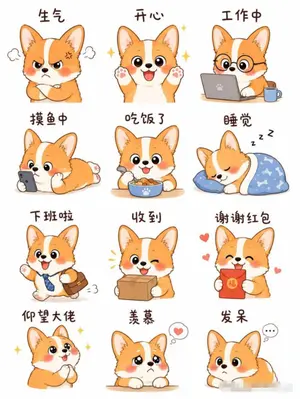
Cartoon Animal Sticker Set
Create a creative image of Cartoon Animal Sticker Set. Style: photorealistic. Composition: balanced and well-framed. Lighting: natural with cinematic mood. Category: photography. Reference: cartoon-animal-sticker-set-23198.
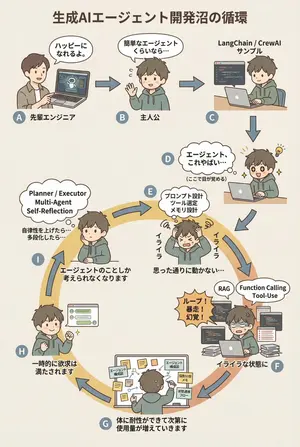
AI Agent Development 'Swamp' Diagram Prompt - Nano Banana Pro AI Prompt for Infographic / Edu Visual
diagram: title: "生成AIエージェント開発沼の循環 (図のタイトル)" style: character: "simple_editorial_cute" tone: "light_like_original" line: "soft_round" shading: "flat_minimal" palette: "muted_editorial" background: "light_beige_or_white" rule: first_character_only: "最初の人物のみ別人" others_same_character: "それ以外は全て同一人物" anxiety_requires_tech_terms: true dialogue_tone: "元図の短く軽い言い回しを維持" layout: intro_track: "上段は直線(左→右)、その後に下へ落ちて円環へ合流" loop_track: "円環(輪)として配置し、矢印は円周に沿って時計回りにカーブ" nodes: # ===== 上段:直線導入 ===== - id: A zone: "intro" position: "upper_left" actor: "別人(先輩エンジニア)" visual: "ラップトップを指差す" item: "AIエージェントのデモ画面" says: "ハッピーになれるよ。" arrow_to: { id: B, shape: "straight", direction: "right" } - id: B zone: "intro" position: "upper_center" actor: "主人公(同一人物)" visual: "軽く手を振る" says: "簡単なエージェントくらいなら…" arrow_to: { id: C, shape: "straight", direction: "right" } - id: C zone: "intro" position: "upper_right" actor: "主人公(同一人物)" visual: "サンプルコードを実行" item: "LangChain / CrewAI サンプル" arrow_to: { id: D, shape: "straight", direction: "down" } # ===== D:覚醒ポイント ===== - id: D zone: "connector" position: "right_outer_before_loop" actor: "主人公(同一人物)" visual: face: "目が見開く(かわいい)" effect: "小さなひらめき線" posture: "前のめり" state: "覚醒" says: "エージェント、これやばい…" micro_text: "(ここで目が覚める)" arrow_to: id: E shape: "gentle_curve" direction: "down_into_ring" # ===== 円環開始(必ずここから回る)===== - id: E zone: "loop" position: "loop_right_upper" actor: "主人公(同一人物)" visual: "頭を抱える(かわいい)" state: "不安・イライラ開始" says: "イライラ" thought_terms: - "プロンプト設計" - "ツール選定" - "メモリ設計" thought_text: "思った通りに動かない…" arrow_to: { id: F, shape: "curved_along_ring", direction: "clockwise" } - id: F zone: "loop" position: "loop_right_lower" actor: "主人公(同一人物)" visual: "コードとログに囲まれる" state: "イライラが定着" says: "イライラな状態に" callout: "ループ!暴走!幻覚!" thought_terms: - "RAG" - "Function Calling" - "Tool-Use" arrow_to: { id: G, shape: "curved_along_ring", direction: "clockwise" } - id: G zone: "loop" position: "loop_bottom" actor: "主人公(同一人物)" visual: "付箋と構成図だらけ" says: "体に耐性ができて次第に使用量が増えていきます" items: - "エージェント構成図" - "役割分担メモ" - "状態遷移フロー" arrow_to: { id: H, shape: "curved_along_ring", direction: "clockwise" } - id: H zone: "loop" position: "loop_left_lower" actor: "主人公(同一人物)" visual: "うまく動いて小さくガッツポーズ" state: "一時的満足" says: "一時的に欲求は満たされます" arrow_to: { id: I, shape: "curved_along_ring", direction: "clockwise" } - id: I zone: "loop" position: "loop_left_upper" actor: "主人公(同一人物)" visual: "また考え込む" state: "執着・思考占有" says: "エージェントのこと3f:Teea,diagram: title: "The Cycle of the Generative AI Agent Development Swamp (diagram title)" style: character: "simple_editorial_cute" tone: "light_like_original" line: "soft_round" shading: "flat_minimal" palette: "muted_editorial" background: "light_beige_or_white" rule: first_character_only: "Only the first person is different" others_same_character: "All others are the same person" anxiety_requires_tech_terms: true dialogue_tone: "Maintain the short, light phrasing of the original diagram" layout: intro_track: "The upper section is a straight line (left to right), then drops down to join the loop" loop_track: "Arranged as a loop (ring), with arrows curving clockwise along the circumference" nodes: # ===== Upper Section: Straight Introduction ===== - id: A zone: "intro" position: "upper_left" actor: "Different person (Senior Engineer)" visual: "Pointing at a laptop" item: "AI Agent Demo Screen" says: "It'll make you happy." ar
Explore more prompts
Browse more AI image and video prompts by category.
FAQ
- How does the prompt keep the illustrations recognizable yet blended?
- It requires partial glimpses of faces and key elements only, with natural boundary blending and no hard edges or seams between the four sources.
- Why is the dark zone limited strictly behind the logo?
- To embed the logo into the artwork without affecting the vivid saturated illustrations or allowing the darkness to bleed outward.