
Text to Image
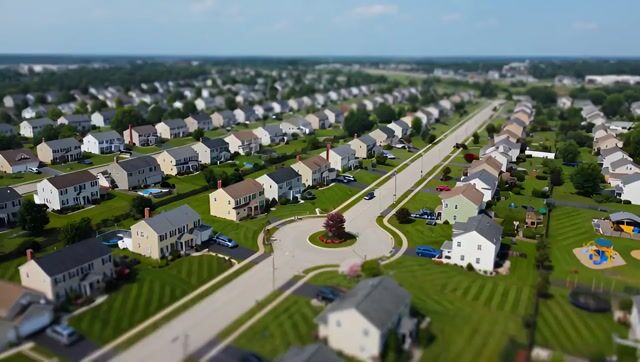
Suburban Neighborhood Drone POV Video — AI Image Prompt
Generates a cinematic drone perspective flying over a suburban area using a tilt-shift visual style. — A curated AI video prompt for Cinematic Scene Showcase, powered by Grok Imagine. Copy, paste, create. Free from AIPinMaker.
Prompt
Create a creative image of Suburban Neighborhood Drone Pov Video. Style: photorealistic. Composition: balanced and well-framed. Lighting: natural with cinematic mood. Category: photography. Reference: suburban-neighborhood-drone-pov-video-4622.
Prompt breakdown
- Subject
- Suburban neighborhood from drone POV showing rooftops, streets, and lawns
- Style
- Photorealistic
- Lighting
- Natural with cinematic mood
- Composition
- Balanced and well-framed
- Mood
- Cinematic
Remix ideas
- Lower the virtual altitude slightly to reveal backyard details and fences while keeping the drone POV intact
- Shift the angle 15 degrees to include a cul-de-sac curve instead of straight streets for added visual interest
- Introduce faint lens flare from low sun angle to strengthen the natural cinematic lighting without altering the photorealistic base
How to use this AI Image prompt template
 1
1Copy the prompt — grab this template’s prompt and negative prompt.  2
2Pick a model — choose a recommended AI model for the best match.  3
3Generate — open the studio with one click and create your result.
Related templates

Tilt-Shift Travel Map Diorama
Create a highly detailed cinematic miniature tilt-shift travel scene of [CITY NAME] (city name) featuring a realistic [VEHICLE NAME] (vehicle) driving along a winding elevated road that emerges naturally from a printed vintage-style city map (map style). The road should curve dramatically toward the background skyline and landmarks of [CITY NAME], while the vehicle remains the clear focal point in the foreground. Blend the real city seamlessly with the illustrated map surface so the road appears integrated into the map itself. Include recognizable local landmarks, waterways, architecture, vegetation, and atmosphere associated with [CITY NAME], but keep the composition clean and uncluttered. Show large bold typography of “[CITY NAME]” printed directly on the map in the foreground. Use warm golden-hour lighting, shallow depth of field, realistic textures, cinematic shadows, aerial perspective, and photorealistic detail. The overall aesthetic should feel like a premium Instagram travel poster mixed with a miniature diorama. Aspect ratio 1:1.38:T

Hyperrealistic Miniature Planet Cityscape
Create a creative image of Hyperrealistic Miniature Planet Cityscape. Style: photorealistic. Composition: balanced and well-framed. Lighting: natural with cinematic mood. Category: photography. Reference: hyperrealistic-miniature-planet-cityscape-2217.
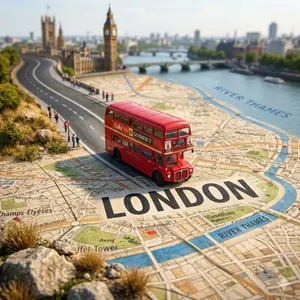
Tilt-Shift City Map Travel Scene
Create a highly detailed cinematic miniature tilt-shift travel scene of [CITY NAME] (city) featuring a realistic [VEHICLE NAME] (vehicle) driving along a winding elevated road that emerges naturally from a printed vintage-style city map. The road should curve dramatically toward the background skyline and landmarks of [CITY NAME] (city), while the vehicle remains the clear focal point in the foreground. Blend the real city seamlessly with the illustrated map surface so the road appears integrated into the map itself. Include recognizable local landmarks, waterways, architecture, vegetation, and atmosphere associated with [CITY NAME] (city), but keep the composition clean and uncluttered. Show large bold typography of “[CITY NAME] (city)” printed directly on the map in the foreground. Use warm golden-hour lighting, shallow depth of field, realistic textures, cinematic shadows, aerial perspective, and photorealistic detail. The overall aesthetic should feel like a premium Instagram travel poster mixed with a miniature diorama. Aspect ratio 1:1.38:T
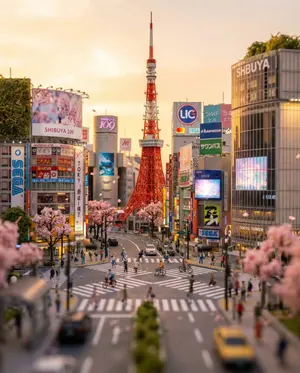
Tokyo Tilt-Shift Miniature Diorama
Create a creative image of Tokyo Tilt Shift Miniature Diorama. Style: photorealistic. Composition: balanced and well-framed. Lighting: natural with cinematic mood. Category: photography. Reference: tokyo-tilt-shift-miniature-diorama-23786.

Statue of Liberty Subject Replacement
Create a creative image of Statue Of Liberty Subject Replacement. Style: photorealistic. Composition: balanced and well-framed. Lighting: natural with cinematic mood. Category: photography. Reference: statue-of-liberty-subject-replacement-25197.
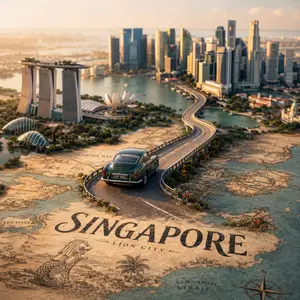
Tilt-Shift City Map Scene
Create a highly detailed cinematic miniature tilt-shift travel scene of [CITY NAME] (city) featuring a realistic [VEHICLE NAME] (vehicle) driving along a winding elevated road that emerges naturally from a printed vintage-style city map. The road should curve dramatically toward the background skyline and landmarks of [CITY NAME] (city), while the vehicle remains the clear focal point in the foreground. Blend the real city seamlessly with the illustrated map surface so the road appears integrated into the map itself. Include recognizable local landmarks, waterways, architecture, vegetation, and atmosphere associated with [CITY NAME], but keep the composition clean and uncluttered. Show large bold typography of “[CITY NAME]” printed directly on the map in the foreground. Use warm golden-hour lighting, shallow depth of field, realistic textures, cinematic shadows, aerial perspective, and photorealistic detail. The overall aesthetic should feel like a premium Instagram travel poster mixed with a miniature diorama. Aspect ratio 1:138:T
Explore more prompts
Browse more AI image and video prompts by category.
FAQ
- Why does the drone POV work especially well for this suburban scene?
- It exposes the repetitive yet orderly pattern of houses and green spaces that ground-level views obscure, giving instant context to neighborhood scale.
- How can the reference code help when iterating on this prompt?
- Appending suburban-neighborhood-drone-pov-video-4622 keeps future generations consistent in layout and framing while allowing tweaks to time of day or weather.