
Text to Image
Smart Doorbell Enclosure Product Render — AI Image Prompt
A structured prompt for generating a photorealistic multi-view CAD-style render of a DIY smart doorbell enclosure with visible internal electronics. - AIPinMaker
Prompt
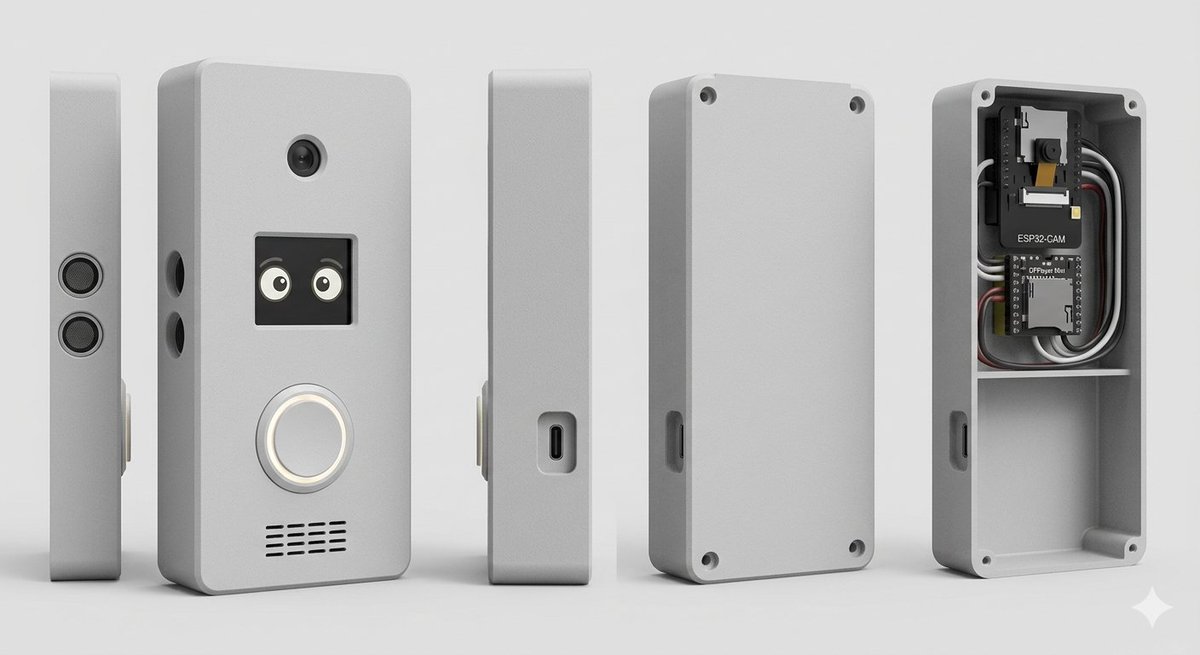
Goal: Create a clean studio product render of a custom DIY smart doorbell / intercom enclosure, shown as an exploded multi-view product lineup.

Canvas: Wide horizontal 16:9 composition on a light gray seamless studio background, soft floor shadow, orthographic product-render look, no people, no branding watermark.

Subject: A compact rectangular electronics enclosure with rounded corners, matte {argument name="enclosure color" default="light gray"} plastic, slightly beveled edges, realistic 3D CAD rendering, subtle rough texture.

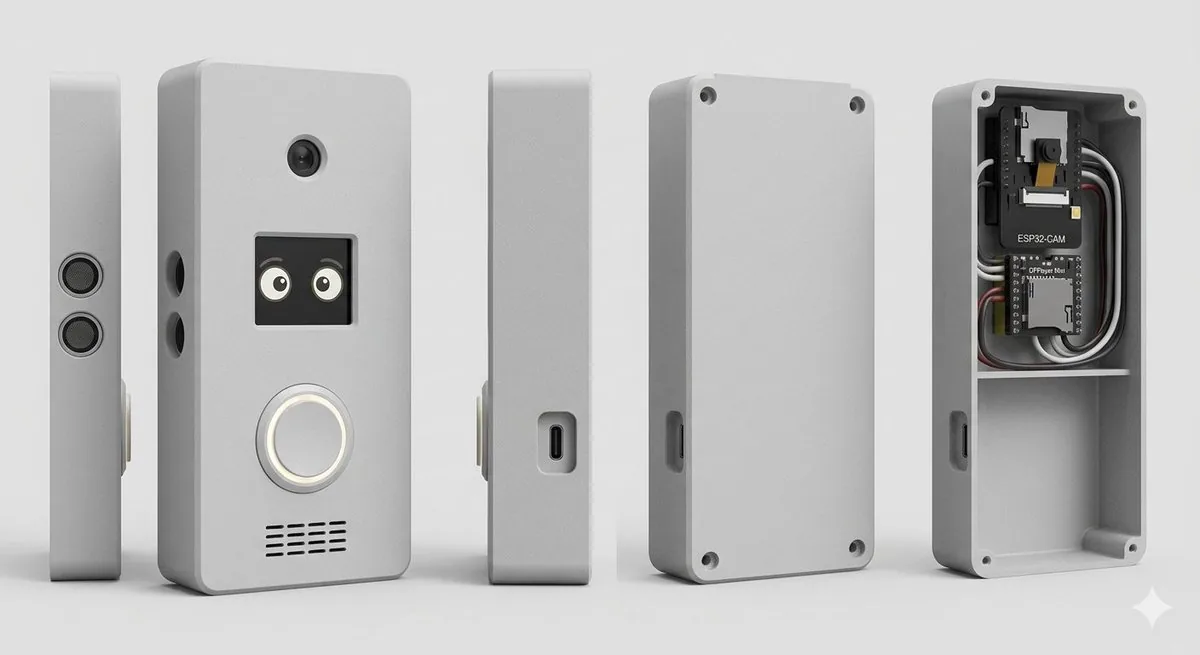
Layout: Show exactly 5 discrete enclosure views arranged left to right with even spacing: 1) a very thin left side profile standing upright with two stacked circular speaker or sensor grilles; 2) the main front face standing upright, slightly angled, with visible functional details; 3) a narrow side profile with a recessed USB-C port; 4) the rear cover plate standing upright with four corner screw holes and a side cutout; 5) the open back housing/case interior showing electronics installed in the top compartment and an empty lower compartment.

Front face details: On the main front view, include exactly 4 visible feature groups: a small round camera lens near the top center; a square black display/window below it showing two cute cartoon eyes; a large circular illuminated doorbell button below the display with a white glowing ring; and a horizontal speaker grille near the bottom made of short black slits in multiple rows. Add two small round side holes on the left edge of the main body.

Interior electronics: In the open back housing, include exactly 2 circuit boards and visible wiring: the top board is labeled {argument name="camera module label" default="ESP32-CAM"} with a small camera module, and the lower board is labeled {argument name="controller board label" default="DFPlayer Mini"}. Add neatly routed black, white, gray, and red wires around the boards. The interior should have a horizontal divider shelf separating the electronics bay from a larger empty lower cavity. Add four corner screw posts/holes inside the open case.

Style: Photorealistic 3D product visualization, high-detail industrial design concept, soft studio lighting from upper left, gentle ambient occlusion, crisp edges, realistic plastic material, neutral gray palette, shallow but clear shadows, centered composition.

Constraints: Use exactly 5 product views, keep all objects upright, no hands, no extra text beyond the two board labels, no logos, no decorative background objects.Prompt breakdown
- Subject
- compact rectangular matte light gray plastic enclosure with rounded corners and beveled edges, shown in five exact views: thin left side profile with stacked circular grilles, angled front face with camera lens and cartoon-eye display, narrow side with recessed USB-C, rear cover plate with corner screw holes, and open-back housing interior
- Style
- photorealistic 3D CAD product visualization with realistic plastic material, crisp edges, and high-detail industrial design rendering
- Lighting
- soft studio lighting from upper left, gentle ambient occlusion, shallow clear shadows on light gray floor
- Composition
- wide horizontal 16:9 layout with five upright views evenly spaced, no people, no logos, orthographic product-render style
- Mood
- clean neutral technical presentation using a restrained gray palette
Remix ideas
- swap the enclosure color argument to matte black while keeping the same five-view layout
- replace the cartoon eyes on the display with a simple status icon or blank window
- move the DFPlayer Mini label to the upper board and add extra gray wiring loops around the divider shelf
Reference images
How to use this AI Image prompt template
 1
1Copy the prompt — grab this template’s prompt and negative prompt.  2
2Pick a model — choose a recommended AI model for the best match.  3
3Generate — open the studio with one click and create your result.
Related templates
Crumple Paper Furniture Concept Design
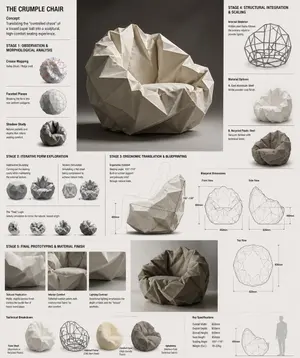
Design Concept: The Crumple Chair (furniture type) Core Philosophy: Translating the "controlled chaos" of a tossed paper ball (inspiration) into a sculptural, high-comfort seating experience.\n\nStage 1: Observation & Morphological Analysis The goal is to deconstruct the image of the crumpled paper into usable geometric data. Crease Mapping: Identify the primary "valley" and "ridge" lines. These represent potential structural ribs or seams in the chair. Faceted Planes: Break down the sphere into a series of non-uniform polygons. Each flat surface of the paper becomes a potential panel for the chair’s upholstery or shell. Shadow Study: Analyze how the "tossed" form creates deep recesses. These natural pockets guide where the user’s weight will be cradled. \n\nStage 2: Iterative Form Exploration Moving from a sphere to a seat through "Digital Crumpling." Subtractive Sculpting: Imagine the paper ball as a solid mass. Use Boolean operations to "carve out" a seating cavity that fits the human form while maintaining the external jagged texture. Tension Simulation: Use 3D software (like Rhino or Blender) to simulate a flat sheet of material being compressed. This ensures the folds look authentic and not "modeled." The "Toss" Logic: Experiment with gravity-based simulation dropping a digital mesh to see how it settles naturally, mimicking the "tossed" origin. \n\nStage 3: Ergonomic Translation & Blueprinting Refining the raw aesthetic into a functional object. The Comfort Core: Overlay a standard ergonomic template (Seating Angle: 105°–110°) over the crumpled form. Adjust the internal "folds" to provide lumbar support and pressure relief. Blueprint Generation: Create technical orthographic views (Front, Side, Top). Map out the dimensions: Seat Height: 450mm Total Width: 850mm Surface Smoothing: Maintain the sharp "paper edges" on the exterior shell while softening the interior contact points for skin comfort. \n\nStage 4: Structural Integration & Scaling Making the concept physically viable. The Skeleton: Design a hidden internal frame (likely CNC-bent steel rods or a 3D-printed lattice) that follows the most prominent ridges of the paper folds to provide rigidity. Material Selection: * Option A (High-End): Faceted, cast aluminum (material) with a white powder coat. Option B (Soft): Vacuum-formed recycled plastic shell covered in "memory-fold" technical fabric that retains a wrinkled appearance. \n\nStage 5: Final Prototyping & Material Finish Textural Replication: Apply a matte, slightly porous finish to the material to mimic the tactile feel of heavy-bond paper. Lighting Contrast: Use directional studio lighting in the final renders to emphasize the "tossed" shadows, making the chair look like a giant piece of discarded inspiration. Design Tip: To keep the "tossed" look authentic, avoid symmetry.3c:Tb6f,

Exploded View Visualization of a Drip Coffee Maker - Nano Banana Pro AI Prompt for Product Marketing
A photorealistic premium exploded view visualization of a Scarlett (appliance brand) drip coffee maker. The coffee machine, featuring a black plastic body with metal accents, is completely disassembled with all components floating in mid-air, arranged in a strict vertical composition along a central axis Floating Components (Top to Bottom) Render Style & Camera: Photorealistic 3D render, high-end appliance advertising photography level (Octane / Cinema 4D style), PBR materials, extremely high detail on plastic, glass, and metal textures. Frontal view with a slight downward tilt. Vertical aspect ratio (9:16). The object occupies approximately 70% of the frame. The mood conveys premium quality, cleanliness, engineering precision, and the concept of "seeing how coffee works Render Style & Camera: Photorealistic 3D render, high-end appliance advertising photography level (Octane / Cinema 4D style), PBR materials, extremely high detail on plastic, glass, and metal textures. Frontal view with a slight downward tilt. Vertical aspect ratio (9:16). The object occupies approximately 70% of the frame. The mood conveys premium quality, cleanliness, engineering precision, and the concept of "seeing how coffee works.

Two-Phase Prompt for Absurd Product Fusion Concepts
Create a ecommerce image of Two Phase Prompt For Absurd Product Fusion Concepts. Style: photorealistic. Composition: balanced and well-framed. Lighting: natural with cinematic mood. Category: product. Reference: two-phase-prompt-for-absurd-product-fusion-concepts-2069.

Stylized Football Figurine Popping Out of Energy Drink Can
Create a creative image of Stylized Football Figurine Popping Out Of Energy Drink Can. Style: photorealistic. Composition: balanced and well-framed. Lighting: natural with cinematic mood. Category: photography. Reference: stylized-football-figurine-popping-out-of-energy-drink-can-12348.

High-Concept Levitation Fashion Editorial
Complete STYLE (fashion style) outfit floating in its exact worn position around an invisible body with every piece suspended mid-breath, mid-billow. LOOK (bottom to top): [FOOTWEAR] → [BOTTOMS] → [TOP] → [LAYER] → [ACCESSORIES] → [JEWELLERY] → [HEADWEAR] FABRIC PHYSICS: each material true to its weight, wool hangs, silk drapes, denim holds its crease, leather keeps its shape. Every edge lifting slightly as if caught in one silent gust. LABELS: hairline leader to floating label box. "[GARMENT]" uppercase / "[FABRIC]" italic / "[ONE DEFINING DETAIL]" LIGHTING: soft directional from upper left + warm fill from below catching linings and sole edges + cool rim outlining the silhouette. BACKGROUND: COLOR (background color) seamless, fashion-forward. TITLE: "LOOK NAME (look name)" elegant serif type, top right. SUBTITLE: "[MOOD / OCCASION]" italic. Mood: high-concept levitation editorial, the outfit exists, the person is imagination. 4K, extraordinary fabric fidelity, tack sharp.3c:T441,Comp

Plush Chibi Soccer Mascot
Create a hyper-realistic collectible plush chibi soccer mascot inspired by a blond football striker (subject), standing front-facing in a premium studio setup with a smooth gradient blue background (background). The character has oversized glossy blue eyes, soft embroidered facial features, a tiny cute smile, rosy cheeks, and highly detailed fluffy fabric texture with visible stitching and luxury plush materials. Stylized proportions with an oversized head and small body, Pixar-style realism, ultra-cute aesthetic. The mascot wears a modern football jersey with premium embroidered details, alternate jersey designs, unique sponsor patches, jersey number 9 (number), fitted shorts, long socks, and detailed football boots. Generate multiple outfit variations including sky-blue, black-and-gold, red-and-white, neon yellow, and striped kits. Include different hairstyles such as slicked-back blond hair, messy textured cut, braided top knot, headband style, mullet-inspired cut, and short fluffy hair. Render as a luxury designer plush toy with cinematic studio lighting, soft shadows, realistic fabric fuzz, ultra-detailed seams, vibrant colors, centered composition, shallow depth of field, photorealistic toy photography, highly detailed embroidery, premium stitching, 8k resolution, Unreal Engine quality, sharp focus, collectible mascot aesthetic, high-end merchandise style.
Explore more prompts
Browse more AI image and video prompts by category.
FAQ
- Which board labels appear inside the open housing?
- The top board is labeled ESP32-CAM with its camera module and the lower board is labeled DFPlayer Mini, both connected by black, white, gray, and red wires.
- What functional elements are shown on the main front view?
- A round camera lens at top center, square black display with two cute cartoon eyes, large circular doorbell button with glowing white ring, and horizontal speaker grille of short black slits near the bottom.