
Text to Image
Scrapbook Byte-level BPE Explainer — AI Image Prompt
This prompt generates a wide hand-drawn educational infographic with cute mascot characters to explain byte-level BPE tokenization in a friendly Chinese science-pop style. - AIPinMaker
Prompt
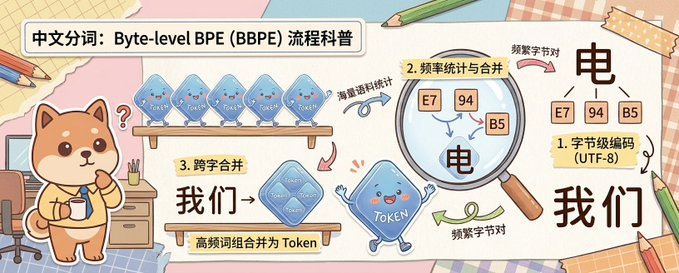
A cute horizontal educational infographic in a hand-drawn scrapbook style on a pastel desk-and-paper collage background, explaining Chinese word segmentation with byte-level BPE. The scene is divided into 3 clearly separated instructional sections arranged from left to right across a wide banner. On the far left stands a chibi Shiba Inu mascot, {argument name="character name" default="柴小七"}, with warm tan and cream fur, round face, small triangular ears, rosy cheeks, and a curious expression, holding a cup and standing beside a small desk with drawers, pencils, and a chair. Above the dog is a bold rounded white title box with black Chinese text: {argument name="headline text" default="中文分词:Byte-level BPE(BBPE)流程科普"}. In the first teaching section near the upper middle, show 4 small translucent blue token-shaped tiles lined up on a wooden shelf, each labeled “Token”, with a curved arrow and small handwritten Chinese note “词频语料统计” pointing toward the next step. In the second section, place a large magnifying glass highlighting 3 small frequency tiles labeled exactly “E7”, “94”, and “B5”, with the section label in a yellow note reading “2. 频率统计与合并”; beneath and inside the magnified area include a large black Chinese character “电”, and nearby a handwritten note “频繁字节对”. In the third section at lower middle-left, add a wooden sign and a larger merged translucent blue token tile labeled “Token”, with a small yellow note reading “3. 跨字合并”, large black Chinese text “我们→”, and a caption strip below that says “高频词组合并为 Token”. On the far right, show the final explanatory result with 3 small byte boxes labeled “E7”, “94”, and “B5” above a large black Chinese character “电”, then a note card reading “1. 字节级编码(UTF-8)”, and below that the large black Chinese word “我们”. Connect the sections with curved arrows in pink, blue, and green to show process flow. Include 1 animated blue token mascot with tiny arms and legs near the center-bottom, smiling and waving. Use soft cream, pink, beige, and light blue colors, thick clean outlines, sticker-like cutout shapes, taped paper corners, notebook textures, pencils around the edges, and a friendly hand-account illustration style suitable for a science explainer graphic.3b:T972,A cute horizontal educational infographic in a hand-drawn scrapbook style on a pastel desk-and-paper collage background, explaining Chinese word segmentation with byte-level BPE.Prompt breakdown
- Subject
- Chibi Shiba Inu mascot with token tiles, magnifying glass over bytes E7 94 B5, and merged tokens for Chinese BPE explanation
- Style
- Hand-drawn scrapbook with sticker-like cutouts, notebook textures, and taped paper corners on pastel desk background
- Composition
- Wide horizontal layout with three left-to-right sections connected by pink blue and green curved arrows
- Mood
- Friendly educational vibe using soft cream pink beige and light blue colors with thick clean outlines
Remix ideas
- Swap the Shiba Inu's cup for a small notebook to emphasize learning
- Make the magnifying glass highlight different bytes like '我们' components instead
- Add more translucent token tiles in the first section for a fuller shelf look
Reference images
How to use this AI Image prompt template
 1
1Copy the prompt — grab this template’s prompt and negative prompt.  2
2Pick a model — choose a recommended AI model for the best match.  3
3Generate — open the studio with one click and create your result.
Related templates
Cloudflare Catch-All Email Routing Infographic
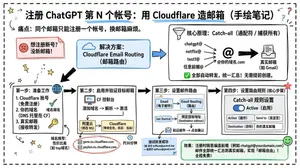
Goal: Create a landscape hand-drawn notebook-style Chinese infographic explaining how to register multiple ChatGPT accounts by using Cloudflare Email Routing to create catch-all mailbox aliases. Canvas: Wide 16:9 whiteboard page, clean off-white background, surrounded by a thick black dashed rounded border. Use a casual marker-and-pen sketch style with slightly imperfect lines, doodle arrows, stars, question marks, pins, and small expressive icons. Title and intro: At the top center, write the bold headline 注册 ChatGPT 第 N 个账号:用 Cloudflare 造邮箱(手绘笔记) (headline text). Underline “Cloudflare” in blue. Beneath it on the left, write the pain point line: “痛点:同个邮箱只能注册一个账号,换邮箱麻烦。” Add a small curved arrow doodle and star near the title. Main layout: Use exactly 7 main content boxes/cards plus decorative doodles. Arrange them left-to-right as a process with bold black arrows connecting sections. The 7 cards are: 1 pain card, 1 solution card, 1 core-principle card, and 4 numbered step cards. Card 1, pain card: A red outlined sticky-note box on the upper left with a sad red face icon. Text: “想注册新号?没新邮箱!” Make it look like a folded-corner note. Card 2, solution card: A blue rounded rectangle in the upper middle with a blue cloud icon. Text: “解决方案:Cloudflare Email Routing(邮箱路由)”. Put a blue arrow pointing toward the core principle box. Card 3, core principle card: A large black-outlined rounded rectangle in the upper right. Header text: “核心原理:Catch-all(通配符 / 捕获所有)”. Include a funnel icon. Show exactly 4 example incoming aliases on the left: “chatgpt@”, “netflix@”, “test1@”, and “任意前缀@”. Draw arrows from all four into a large “@” symbol and “@你的域名.com”, then a thick black arrow to a mailbox icon labeled “真实邮箱(如 Gmail)”. Bottom line with green check icon: “全部自动转发,统一汇总!无需提前创建。” Step cards along the bottom: Use exactly 4 numbered boxes. Step 1 card, bottom left: Title “第一步:准备工作”. Include exactly 3 numbered requirements: “1. Cloudflare 账号(免费注册)”, “2. 你的域名(DNS 托管在 CF)”, “3. 真实邮箱(接收转发)”. Add a globe icon, a green check mark, and a yellow key icon. Below it add small text: “域名推荐:性价比高(如 top域名)”. Step 2 card, bottom center-left: Title “第二步:启用并验证目标邮箱”. Include a small computer icon labeled “CF 控制台”. Text flow: “添加域名 → 解析 → 激活”. Draw an arrow down to a mini DNS nameserver panel with two columns: left “阿里云(修改 NS)”, right “Cloudflare(等待生效,状态:活动)”. Beneath the card, draw a red circled nameserver list with exactly 2 entries: “gene.ns.cloudflare.com” and “peyton.ns.cloudflare.com”. Add a small clock icon and text “约30分钟”. Step 3 card, bottom center-right: Title “第三步:设置邮件路由”. Show a mini Cloudflare UI mockup with exactly 2 top tabs/boxes: “Email(电子邮件)” and “Email Routing(路由)”. Include a small “Get Started” button pointing to “绑定目标地址(Destination address)”. At the bottom add an envelope icon and text: “验证邮件 → 点击确认”. Under this card place a small blue status note titled “测试转发成功” with two arrow lines showing an alias forwarding to a Gmail address. Step 4 card, bottom right: Title “第四步:设置路由规则(核心步骤)”. Show a UI panel titled “Catch-all 规则设置”. Include a blue toggle switch labeled “Active(启用)”. Include a two-row table with headers and values: row 1 “Action(操作)” to “Send to(发送至)”; row 2 “Destination(目标)” to “你的真实邮箱”. Add a red star near the corner. Final result box: At the bottom right below Step 4, add a green rounded rectangle with a smiling face icon. Text: “效果:注册时随意编造前缀(例如 chatgpt@yourdomain.com)邮件全部统一汇总到真实邮箱,实现「邮箱自由」!全程免费!” Visual style: Handwritten Chinese typography, thick black marker outlines, simple vector doodles, blue/red/green/yellow accent colors, informal classroom note-taking feel. Keep all arrows bold and directional, with minor sketchy imperfections. Constraints: Keep the entire infographic in Chinese as specified, use no photorealism, no 3D rendering, no watermark, no extra sections beyond the 7 cards and final result box, and make the text legible.3b:T12a5,Goal: Create a landscape hand-drawn notebook-style Chinese infographic explaining how to register multiple ChatGPT accounts by using Cloudflare Email Routing to create catch-all mailbox aliases. Canvas: Wide 16:9 whiteboard page, clean off-white background, surrounded by a thick black dashed rounded border. Use a casual marker-and-pen sketch style with slightly imperfect lines, doodle arrows, stars, question marks, pins, and small expressive icons. Title and intro: At the top center, write the bold headline 注册 ChatGPT 第 N 个账号:用 Cloudflare 造邮箱(手绘笔记) (headline text). Underline “Cloudflare” in blue. Beneath it on the left, write the pain point line: “痛点:同个邮箱只能注册一个账号,换邮箱麻烦。” Add a small curved arrow doodle and star near the title. Main layout: Use exactly 7 main content boxes/cards plus deco

Cute Totoro Puzzle Game UI
{"type":"cute vertical mobile puzzle game screen mockup","style":"soft Studio Ghibli-inspired kawaii 3D clay-toy illustration, rounded UI, pastel colors, gentle shadows, clean app screenshot composition","canvas":{"aspect":"landscape frame containing a centered portrait phone game panel","background":"pale mint green with large translucent circular shapes and a soft darker green floor band near the bottom"},"ui":{"outer_panel":"tall rounded rectangle card in very light mint with subtle drop shadow, centered","header":{"position":"top of card","components_count":4,"components":[{"text":"{argument name=\"game title\" default=\"コロコロトトロ\"}","position":"top left","style":"bold dark green Japanese sans serif"},{"text":"{argument name=\"score text\" default=\"スコア 7425\"}","position":"under title","style":"smaller dark green"},{"text":"{argument name=\"instruction text\" default=\"クリックで落とす\"}","position":"under score","style":"small dark green"},{"text":"{argument name=\"next label\" default=\"つぎ\"}","position":"top right","style":"small dark green with an acorn preview beneath it"}]},"playfield":{"position":"center","shape":"tall cream-colored rounded rectangle bordered by a thick muted forest-green outline","warning_line":{"text":"{argument name=\"game over warning\" default=\"ここを越えて詰まるとゲームオーバー\"}","position":"near top inside playfield","style":"thin red horizontal line with small red Japanese text above it"}}},"game_pieces":{"total_visible_count":25,"counts_by_type":[{"type":"gray Totoro pieces","count":2,"descriptions":["large gray Totoro floating near upper center","large gray Totoro resting mid-left"]},{"type":"blue Totoro pieces","count":2,"descriptions":["small blue Totoro near center","small blue Totoro near lower left"]},{"type":"white small Totoro ghost pieces","count":4,"descriptions":["upright white Totoro at left middle","upright white Totoro at right middle","sideways white Totoro at right center","tiny white Totoro near upper left under the warning line"]},{"type":"Catbus piece","count":1,"descriptions":["large smiling orange Catbus crouched at lower right"]},{"type":"black soot sprite pieces","count":5,"descriptions":["black soot sprite at left middle edge","black soot sprite near center-left","black soot sprite at right middle","black soot sprite near bottom center","black soot sprite at bottom right"]},{"type":"corn cob pieces","count":5,"descriptions":["corn cob at upper right","corn cob at right of center","corn cob near center-left above Catbus","corn cob at bottom left","corn cob near mid-right beside blue Totoro"]},{"type":"acorn pieces","count":6,"descriptions":["large acorn preview above playfield near next label","small acorn at upper left inside playfield","small acorn at left middle","small acorn at center-right","small acorn at lower left edge","small acorn at lower right beside Catbus"]}]},"composition":"The pieces are arranged like a Suika-style falling merge puzzle: round character tokens pile up in the lower two-thirds of the playfield, with open empty space at the top and a red game-over threshold line. Make everything soft, collectible, toy-like, cheerful, and polished, with no realistic harsh edges."}

Retro Pop-Art Comic Strip
A 4-panel comic strip in bold retro Sunday funnies / 1980s pop-art style, thick black outlines, halftone textures, vibrant saturated colors (hot pink, cyan, yellow, teal), dynamic comic lettering. Main character: A stylish young woman with wavy mint-green (hair color) hair, wearing oversized black sunglasses and a pink polka-dot strapless top (clothing). Confident expression, glossy lips, dramatic lighting. Secondary character: A cute chibi-style character in a full penguin costume (dark blue body, white belly, yellow beak hood), big sparkling eyes, small body, playful and mischievous vibe. Panel 1 (close-up, bold intro): Zoomed-in portrait of the woman, hair slightly blowing. Bright comic burst background. Text: “THE WIND IS NO MATCH FOR MY SHADES!” Speech bubble: “Bring it, breeze.” Panel 2 (beach chaos begins): Beach setting with strong wind—palm trees bending, hat, towel, and drink flying. Woman standing confidently. Penguin character appears at the side. Text box: “BEACH DAY!” Speech bubble: “Ha! Nice try, wind.” Small penguin text: “awk!” Panel 3 (wind intensifies): Stronger gusts—trash can tipping, seagull mid-air, debris flying. Woman still composed, hair dramatically flowing. Penguin laughing mischievously. Text box: “STRONGER!” Speech bubbles: “Is that all?” / penguin: “hee hee!” Panel 4 (final punchline): Reveal a big electric fan wearing sunglasses blasting air dramatically. Woman surprised. Penguin proudly next to fan. Text box: “ULTIMATE BOSS.” Speech bubbles: “Wait… no!” Big comic text: “YOU GOT BLOWN AWAY!” Caption at bottom: “RESPECT THE FAN.”38:T69c,A 4-panel comic strip in bold retro Sunday fun

4-Panel Animal Infographic Grid
{ "type": "{argument name=\"layout style\" default=\"2x2 grid infographic\"}", "panels": [ { "position": "top-left", "title": "{argument name=\"animal one\" default=\"ヒマラヤマーモット\"}", "image_description": "Himalayan marmot sitting on rocks with a snowy mountain background", "text_content": "Detailed biological facts including distribution, habitat, diet, behavior, sociality, hibernation, and characteristics", "icon_count": 4, "icons": [ {"color": "blue", "symbol": "mountain", "label": "高山性"}, {"color": "brown", "symbol": "cave", "label": "巣穴生活"}, {"color": "yellow", "symbol": "sun", "label": "昼行性"}, {"color": "blue", "symbol": "snowflake", "label": "長期冬眠"} ] }, { "position": "top-right", "title": "{argument name=\"animal two\" default=\"ウォンバット\"}", "image_description": "Wombat standing on dirt ground", "text_content": "Detailed biological facts including distribution, habitat, diet, behavior, digging ability, excretion, defense, and reproduction", "icon_count": 4, "icons": [ {"color": "purple", "symbol": "moon", "label": "夜行性"}, {"color": "brown", "symbol": "digging animal", "label": "穴掘り名人"}, {"color": "green", "symbol": "leaf", "label": "草食"}, {"color": "brown", "symbol": "acorn", "label": "有袋類"} ] }, { "position": "bottom-left", "title": "{argument name=\"animal three\" default=\"レッサーパンダ\"}", "image_description": "Red panda resting on a mossy tree branch", "text_content": "Detailed biological facts including distribution, habitat, diet, behavior, physical characteristics, sociality, conservation, and charm", "icon_count": 4, "icons": [ {"color": "green", "symbol": "tree", "label": "樹上生活"}, {"color": "green", "symbol": "bamboo", "label": "竹を食べる"}, {"color": "orange", "symbol": "tail", "label": "長い尾"}, {"color": "green", "symbol": "mountain", "label": "山地森林"} ] }, { "position": "bottom-right", "title": "{argument name=\"animal four\" default=\"ハイラックス\"}", "image_description": "Rock hyrax standing on a rocky outcrop", "text_content": "Detailed biological facts including distribution, habitat, diet, behavior, sociality, mobility, taxonomy, and characteristics", "icon_count": 4, "icons": [ {"color": "grey", "symbol": "rock", "label": "岩場適応"}, {"color": "purple", "symbol": "group of people", "label": "群れ生活"}, {"color": "yellow", "symbol": "sun", "label": "昼行性"}, {"color": "orange", "symbol": "sun", "label": "日光浴"} ] } ], "styling": { "layout": "4 equal quadrants separated by white borders", "text_panel": "Semi-transparent white vertical rectangle on the right side of each quadrant", "typography": "Large bold Japanese title at the top left of each quadrant, dense informational text in the white panel", "icon_style": "Row of 4 circular colored icons with white silhouettes and black text labels placed at the bottom edge of each quadrant" } }
Jon Jones vs Poatan Care Bears Style
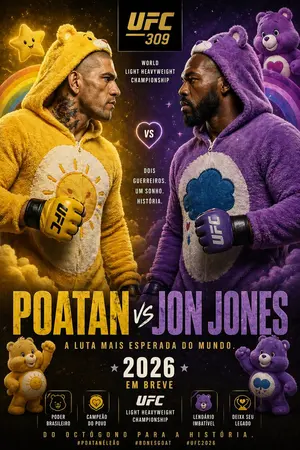
Create a creative image of Jon Jones Vs Poatan Care Bears Style. Style: photorealistic. Composition: balanced and well-framed. Lighting: natural with cinematic mood. Category: photography. Reference: jon-jones-vs-poatan-care-bears-style-15591.

Cute Chinese Tokenization Infographic
A cute hand-drawn scrapbook-style horizontal educational infographic in Chinese on a warm beige paper background with rounded borders, pastel doodles, tape stickers, tiny stars, and a classroom-notebook aesthetic. The top center has a large headline in playful handwritten Chinese: "什么是分词?" with the second half in coral pink and the rest in dark brown. On the upper left, a chibi Shiba Inu teacher character stands facing forward, wearing a pale yellow shirt and blue necktie, holding a pointer stick upward, with a speech bubble that says "今天来学习分词(Tokenization)!". On the upper right, a cute blue square token mascot labeled "TOKEN" sits smiling, with blush cheeks, tiny legs and arms, and a magnifying glass; next to it is a speech bubble saying "我是 Token!被切得越合理,模型越聪明!". Near the right edge, add a small hanging notepad card reading "知识点 收藏夹" with a heart icon. Beneath the headline, place a rounded dashed text box containing the definition: "分词是将人类可读的文本切分成 Token 的过程。" with the word "Token" highlighted in blue. Below that, add a line of explanatory text: "下面以 “程序员Left” 和 “人工智能” 为例,看看不同的分词方式:" with "程序员Left" highlighted in light blue and "人工智能" highlighted in pink. The lower half contains exactly 4 rounded pastel panels arranged left to right, each with a numbered badge and title. Panel 1 is mint green and titled "1 词级分词". It includes the subtitle "按完整语义划分文本" and exactly 3 token bubbles: "程序员", "Left", "人工智能". At the bottom of this panel, show the Shiba Inu teacher giving a thumbs up with a speech bubble saying "语义完整,容易理解!". Panel 2 is pale yellow and titled "2 字符级分词". It includes the subtitle "逐字切分文本" and exactly 9 circular token bubbles arranged in rows: "程", "序", "员", "L", "e", "f", "t", "人", "工", "智", "能"—visually presented as individual characters from the example text, in a compact grid. At the bottom, show the blue token mascot holding a pencil, with a speech bubble saying "粒度最细,但序列会很长~". Panel 3 is pale pink and titled "3 子词分词". It includes the subtitle "按词根以及前后缀划分" and exactly 5 token bubbles: "程序", "员", "Left", "人工", "智能". At the bottom, show the Shiba Inu teacher thinking with one paw at its mouth and a question mark above the head, with a speech bubble saying "折中方案,效果 often 很好!". Panel 4 is pale blue and titled "4 字节级分词". It includes the subtitle "将字词转为字节编码,根据转换后的内容进行组合和划分" and displays exactly 14 small circular code bubbles: "E7", "A8", "8B", "...", "66", "74", "E4", "BA", "BA", "E8", "83", "BD", "..." arranged in multiple rows like encoded bytes. At the bottom, show the blue token mascot again, smiling, with a speech bubble saying "适合处理任意文本!" and a tiny light bulb doodle nearby. Across the very bottom, place a rounded banner note that reads: "不同分词方式各有优势,实际应用中会根据任务和数据选择合适的方案哦!". Use soft pastel green, yellow, pink, and blue for the four panels, dark brown handwritten text, subtle shadows, rounded shapes, and adorable kawaii expressions throughout. Keep the composition balanced, clean, and friendly, like a polished social-media science explainer poster.3d:Tdb7,A cute hand-drawn scrapbook-style horizontal educational infographic in Chinese on a warm beige paper background with rounded borders, pastel doodles, tape stickers, tiny stars, and a classroom-notebook aesthetic. The top center has a large headline in playful handwritten Chinese: "什么是分词?" with the second half in coral pink and the rest in dark brown. On the upper left, a chibi Shiba Inu teacher character stands facing forward, wearing a pale yellow shirt and blue necktie, holding a pointe
Explore more prompts
Browse more AI image and video prompts by category.
FAQ
- Why include the specific bytes E7 94 B5 in the infographic?
- They represent the UTF-8 encoding for the character '电' as part of demonstrating byte-level tokenization before BPE merges.
- What makes the mascot animated in this static image prompt?
- The blue token mascot with tiny arms and legs is described as smiling and waving to add a playful interactive feel to the explainer.