
Text to Video
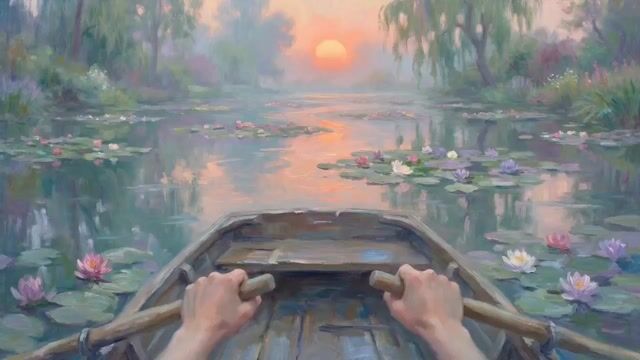
Monet Impressionist Rowing Hands — AI Video Prompt
A detailed prompt for generating a video sequence focusing on a first-person perspective of hands rowing. The style is specified as Monet impressionist oil painting, emphasizing soft skin tones and slow, continuous, and rhythmic movement. - AIPinMaker
Prompt
Create a creative video of Monet Impressionist Rowing Hands. Style: photorealistic. Composition: balanced and well-framed. Lighting: natural with cinematic mood. Category: cinematic-video. Reference: monet-impressionist-rowing-hands-2487.
Prompt breakdown
- Subject
- Monet Impressionist Rowing Hands
- Style
- Photorealistic
- Lighting
- Natural with cinematic mood
- Composition
- Balanced and well-framed
- Mood
- Cinematic
Remix ideas
- Add floating water lilies around the oars to echo Monet's Giverny series
- Shift focus to close-up calluses and wet skin details for extra photorealism
- Introduce subtle lens flare during the pull phase of each stroke
Reference images

How to use this AI Video prompt template
 1
1Copy the prompt — grab this template’s prompt and negative prompt.  2
2Pick a model — choose a recommended AI model for the best match.  3
3Generate — open the studio with one click and create your result.
Related templates

Vintage Japanese Paper Collage Animation
Create a 15-second wide cinematic landscape video intro, 16:9, using Seedance 2.0 style motion. A seamless one-take digital paper collage animation inspired by classic 1950s–1960s illustrated Japan travel books, especially the charming mood of mid-century Japanese tourism posters, vintage picture books, and editorial travel illustrations, but do not copy any exact existing artwork or page. The video combines realistic photographic magazine cutouts of Japan with hand-drawn paper illustration elements. Use stop-motion cutout animation, torn paper edges, visible paper grain, offset print texture, halftone dots, gouache color patches, pastel pencil marks, imperfect handmade shapes, and layered collage depth. The mood is nostalgic, elegant, warm, refined, optimistic, and distinctly Japanese. Keep generous off-white negative space throughout, like a sophisticated vintage travel postcard coming alive. The camera moves continuously in one smooth tracking shot, like an animated pop-up book. Paper layers slide, fold, flip, rotate, and snap into place with rhythmic motion. Use dynamic parallax between photo cutouts and illustrated paper shapes. Fast-paced but never chaotic. Premium After Effects-style paper collage motion graphics, tactile and handmade, not glossy. Timeline flow: From 0 to 4 seconds, begin on a warm off-white paper background. A realistic photographic cutout of Mount Fuji emerges from the bottom of the frame. Layered paper clouds drift gently across the scene. A stylized red torii gate pops up like a vintage travel-book illustration, painted with loose gouache strokes and pastel textures. Small paper cherry blossoms, koi fish motifs, folding fans, and tiny expressive travelers appear with stop-motion snaps. Traditional rooftops unfold in the background like paper accordion structures. From 4 to 8 seconds, the camera tracks smoothly across a Kyoto-inspired streetscape. Wooden machiya buildings are constructed from layered paper strips, combining illustrated linework with photographic architectural fragments. Decorative lantern shapes, bicycles, tea cups, and paper umbrellas briefly animate into view before sliding away. The composition remains airy with large areas of elegant off-white paper. In the distance, layered pagodas and temple silhouettes rise from textured paper cutouts. From 8 to 12 seconds, transition seamlessly into a stylized Tokyo cityscape made from layered photographic building clippings and hand-painted paper rectangles. The city feels vibrant but translated into soft printed color blocks rather than realistic neon. A simplified Tokyo Tower rises from the center like a pop-up book structure, built from cream, vermilion red, muted navy, mustard yellow, warm gray, and soft teal paper layers. Tiny illustrated figures look upward in wonder. All signs, screens, and billboards remain abstract and completely unreadable, with no real brands, logos3d

Zelda: Breath of the Wild
Create a creative video of Zelda Breath Of The Wild. Style: photorealistic. Composition: balanced and well-framed. Lighting: natural with cinematic mood. Category: cinematic-video. Reference: zelda-breath-of-the-wild-365.

Hand-Drawn Frog Cartoon Animation
Create a creative video of Hand Drawn Frog Cartoon Animation. Style: photorealistic. Composition: balanced and well-framed. Lighting: natural with cinematic mood. Category: cinematic-video. Reference: hand-drawn-frog-cartoon-animation-4460.

Magical Autonomous Painting Atelier
[CONDITION DEFINITION] Create a 15-second cinematic time-lapse video inside a warm atmospheric artist’s atelier. A blank white canvas stands on an easel from the beginning. Use the uploaded 1:1 reference image only as the subject of the final painted artwork on the canvas. Do not show the uploaded reference image itself at any time. Do not place its subject in the room as a real person, background figure, poster, printed image, overlay, or pre-existing artwork. The subject from the uploaded reference image must exist only as the final painting on the canvas. Brushes, palette knives, and the paint palette move autonomously by themselves. Colorful paint rises from the palette and dances through the air like smoke, ribbons, thread-like streams, and living brushstrokes. The final result should become a rich oil-painting interpretation of the uploaded reference image. [OPTIONAL PERFORMER LOOK] No performer. No painter. No human hands. No human arms. No visible human body. All tools move autonomously. [SHOT / FLOW] 0-2s: Establish the atelier. Blank white canvas on an easel, palette, brushes, paint tubes, warm studio light, subtle creative mess. The canvas is completely empty. 2-5s: The tools begin moving by themselves. Paint slowly lifts from the palette and starts dancing in the air. 5-9s: Fast magical paint choreography. Color trails swirl, weave, and spin through the studio like elegant smoke and ribbons. Use rapid jump cuts. The canvas remains mostly abstract, with only partial marks, incomplete colors, and no recognizable subject. 9-12s: All paint trails suddenly rush toward the canvas. In a rapid montage, sketch marks, bold color blocks, texture, highlights, and key shapes assemble quickly. Keep the image mostly abstract and incomplete until the end of this section. Do not reveal the recognizable subject before 12 seconds. 12-15s: Reveal the finished painting clearly for the first time. Show a satisfying close-up of the completed artwork, clearly based on the uploaded reference image, then a brief lingering afterglow in the atelier. [CAMERA / EDITING] Dynamic and energetic. Use quick push-ins, slight pull-backs, macro close-ups of wet paint and brush bristles, medium shots of the easel, overhead angles, side angles, and rapid jump cuts every 0.5 to 1 second. The middle section should feel like a fast magical montage, not slow continuous motion. Keep the canvas mostly abstract until 12 seconds. The studio is only the setting; the subject from the uploaded reference image must never appear outside the canvas. [SOUND] No background music. Sound effects only. Use satisfying brush strokes, wet paint movement, palette knife scraping, paint tube squeezes, soft whooshes, and subtle studio ambience. [NEGATIVE] Do not show the uploaded reference image as a separate photo, screen, comparison, poster, printed board, overlay, or background image. Do not place the uploaded subject anywhere in the studio outside the canvas. No real person version of the uploaded subject. No human hands, no human arms, no painter, no performer focus, no multiple people, no cartoon character, no mascot, no text, no captions, no numbers, no timestamp text on screen, no logo, no watermark, no signature, no split screen, no poster layout, no static single-angle shot, no early full reveal of the final painting, no unfinished ending.3d

Watercolor Cartoon Single-Shot Video Prompt
Create a creative video of Watercolor Cartoon Single Shot Video Prompt. Style: photorealistic. Composition: balanced and well-framed. Lighting: natural with cinematic mood. Category: cinematic-video. Reference: watercolor-cartoon-single-shot-video-prompt-2585.

Multi-Scene Calligraphy and Fairy Animation
Create a cinematic video of Multi Scene Calligraphy And Fairy Animation. Style: photorealistic. Composition: balanced and well-framed. Lighting: natural with cinematic mood. Category: cinematic-video. Reference: multi-scene-calligraphy-and-fairy-animation-3373.
Explore more prompts
Browse more AI image and video prompts by category.
FAQ
- How does the prompt fuse Monet's style with rowing hands?
- It keeps the impressionist color shifts and soft edges but renders the hands, oars, and water in sharp photorealistic detail under natural light.
- Why specify balanced composition for this video?
- The rowing action needs even framing so the repeating hand motion stays centered without distracting background elements overpowering the cinematic mood.