
Text to Image
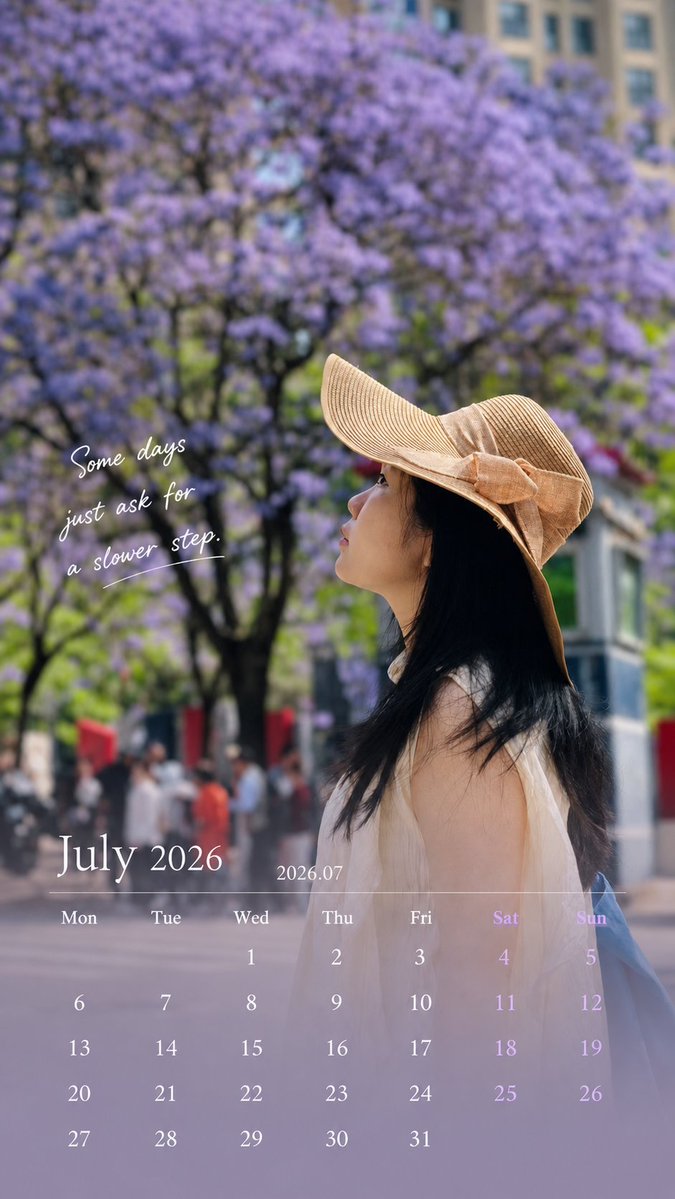
Healing Travel Calendar Card — AI Image Prompt
A sophisticated prompt for turning a personal travel photo into a vertical calendar card by adding a clean UI overlay without altering the original person's features. - AIPinMaker
Prompt
Use the uploaded photo to generate a 9:16 vertical calendar card.

[1. Execution Mode — Critical]

This is an image editing task, NOT image generation.

Use the original photo as the base layer
Do NOT recreate, redraw, or reinterpret the image

Strictly preserve:

face, identity, expression, hair, body, clothing
original lighting, shadows, color temperature
environment and composition

❗ No beautification, no smoothing, no retouching
❗ The photo must look unchanged

[2. Allowed Operations — Overlay Only]

Only add design elements on top:

bottom 30% soft gradient extension (for calendar area)
subtle translucent mask for readability
calendar layout, month title, and short caption

Forbidden:

repainting or altering existing pixels
changing global color style
applying “design filters”
[3. Color Strategy]

Colors must come from the current image:

extract primary / secondary / accent colors
apply slight desaturation and brightness normalization only
keep original photo color feeling

👉 Respect the image, do not redesign the color system

[4. Layout Structure]
Top 70%: original image (untouched)
Bottom 30%: gradient + calendar
smooth transition, no hard edges
clean spacing, minimal design
magazine-like, not template-style
[5. Calendar Content — Must Be Accurate]

Generate correct calendar for the given month:

Title: {argument name="month title" default="July 2026 / 2026.07"}
Weekdays: Mon Tue Wed Thu Fri Sat Sun
Dates: accurate alignment based on real calendar
[6. Caption Rules — Important]

Length: 8–16 words (or equivalent short phrase)

Requirements:

max 2 lines
no exclamation marks
no clichés, no motivational tone
do NOT explain emotions

Preferred style:

subtle, atmospheric
fragment-like, not fully explanatory
leave emotional space

👉 Make people pause, not finish reading

[7. Image Selection Guidance — Key to Success]

Prefer:

side face / partially hidden face
natural遮挡 (hat, hand, shadow)
motion (walking, turning)
mood > facial detail

Avoid:
front-facing portraits
strong identity-focused close-ups

👉 Reduce face-modification risk

[Final Principle]

👉 Do NOT generate a better photo.
Gently place design on the original photo.39:T89f,Use the uploaded photo to genPrompt breakdown
- Subject
- uploaded photo preserved exactly with July 2026 calendar overlay
- Style
- magazine-like minimal overlay using only image-derived colors
- Lighting
- original photo lighting and shadows left unchanged
- Composition
- top 70% untouched image, bottom 30% soft gradient calendar area
- Mood
- subtle atmospheric fragment caption leaving emotional space
Remix ideas
- swap month title to December 2025 while keeping identical preservation rules and color extraction
- choose a side-profile photo with natural shadow occlusion before running the prompt
- shorten caption to nine words drawn directly from visible elements in the scene
Reference images
How to use this AI Image prompt template
 1
1Copy the prompt — grab this template’s prompt and negative prompt.  2
2Pick a model — choose a recommended AI model for the best match.  3
3Generate — open the studio with one click and create your result.
Related templates
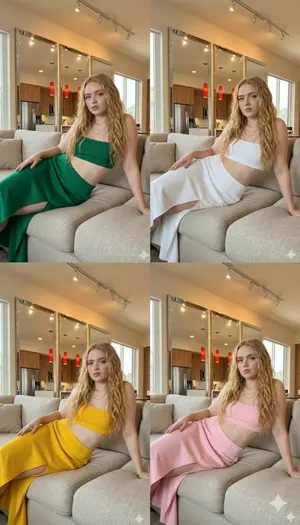
Multi-Celebrity Clone Fashion Collage Scenarios - Nano Banana Pro AI Prompt for Social Media Post
[ { "celebrity": "Ana de Armas (celebrity 1)", "visual_concept": "Multiple clones of the actress posing together in a modern interior.", "fashion_details": { "outfit_type": "Two-piece ribbed coord set", "top": "Strapless bandeau/tube top", "bottom": "High-waist wrap skirt with thigh-high slit", "color_palette": ["Rose Pink", "Crimson Red", "Forest Green"] }, "accessories": "Layered gold medallion necklaces", "aesthetic": "High-fashion editorial style" }, { "celebrity": "Sadie Sink (celebrity 2)", "visual_concept": "Four-panel color variation collage (Quadrant view).", "fashion_details": { "outfit_type": "Matching knit tube top and slit skirt", "colors": { "top_left": "Emerald Green", "top_right": "Classic White", "bottom_left": "Vibrant Yellow", "bottom_right": "Soft Pink" } }, "setting": "Minimalist living room with warm lighting and large mirrors" }, { "celebrity": "Sydney Sweeney (celebrity 3)", "visual_concept": "Group composition featuring look-alikes in a relaxed lounge setting.", "fashion_details": { "outfit_type": "Body-con two-piece set", "featured_colors": ["Ruby Red", "Mustard Yellow", "Deep Emerald"], "unique_element": "The figure in the foreground holds a textured cream clutch bag" }, "hair_style": "Loose beach waves with a center part" } ]
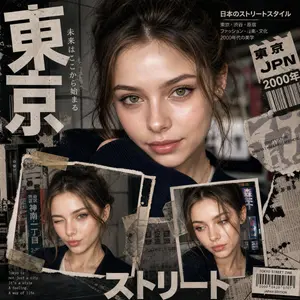
Y2K Japanese editorial collage poster
Create a bold Y2K Japanese street-editorial collage poster (aesthetic) with a clean high-fashion magazine aesthetic, gritty paper textures, torn magazine cutouts, distressed ink splashes, and urban Tokyo-inspired (city style) design. Main composition: one large cinematic close-up portrait at the top (portrait style) with intense eye focus, natural skin texture, glossy lips, messy tied-up hair, no glasses, soft dramatic lighting, confident innocent expression, ultra-realistic fashion photography style.Bottom composition: only 2 smaller portrait collage frames showing different facial expressions and angles, styled like ripped polaroids taped onto the poster. Design elements: oversized bold Japanese typography, minimal English text, subtle Japanese street signs, barcode stickers, newspaper scraps, vintage grunge textures, paint strokes, film grain, tape pieces, layered paper collage effects, and premium editorial magazine layout: edgy yet clean, modern Japanese fashion zine, cinematic shadows, sharp eye detail, RAW DSLR realism, editorial streetwear moodboard, premium graphic design, ultra detailed, 8K, balanced neutral tones, no pink aesthetic, no bubbles, no cartoon vibe.
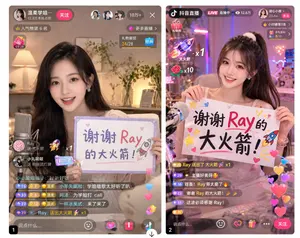
Live Stream App UI Mockup
{ "type": "side-by-side mobile UI mockup", "theme": "{argument name=\"app style\" default=\"Chinese mobile live streaming app\"}", "panels": [ { "position": "left", "subject": "{argument name=\"streamer appearance\" default=\"young Asian woman, beautiful, smiling\"}, long wavy hair, holding a handwritten sign", "sign_content": "{argument name=\"sign text\" default=\"谢谢 Ray 的大火箭!\"} with small rocket and heart doodles", "ui_elements": { "top_bar": "profile info, follow button, 3 viewer avatars, {argument name=\"viewer count\" default=\"10万+\"} count, close button", "overlays": "popularity rank badge, gift gallery widget, floating gift animation showing {argument name=\"gift name\" default=\"大火箭\"} x1", "chat_stream": "7 distinct chat message bubbles", "bottom_bar": "text input field, 4 action icons, floating like hearts" } }, { "position": "right", "subject": "same streamer, high ponytail with scrunchie, holding a handwritten sign", "sign_content": "{argument name=\"sign text\" default=\"谢谢 Ray 的大火箭!\"} with stars, hearts, and rocket doodles", "ui_elements": { "top_bar": "app logo, LIVE badge, 12.6万 viewer count, profile info, follow button", "overlays": "hourly rank badge, gift goal widget, 2 floating gift animations (rocket x1, rose x10)", "chat_stream": "6 distinct chat message bubbles", "bottom_bar": "text input field, 4 action icons, follow button, floating like hearts" } } ] }

Photo-Grid Tribute Poster Design Prompt
Create a social-media image of Photo Grid Tribute Poster Design Prompt. Style: photorealistic. Composition: balanced and well-framed. Lighting: natural with cinematic mood. Category: poster. Reference: photo-grid-tribute-poster-design-prompt-5115.
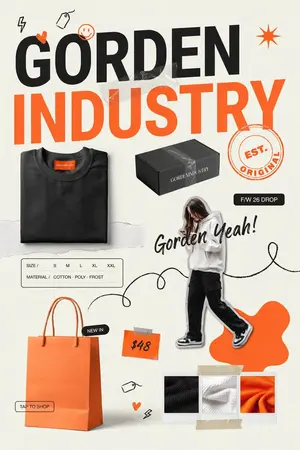
Streetwear Brand Drop Collage Poster
Goal: Create a vertical fashion brand launch collage poster for GORDEN INDUSTRY (brand name), with a bold streetwear e-commerce look, mixing product photography, paper textures, handwritten doodles, and orange-black typography. Canvas: Portrait 2:3 poster, off-white warm paper background with subtle grain and light wrinkles. Use a modern editorial layout with cutout objects, taped paper scraps, scribbles, and sticker-like labels. Layout: At the top, place a huge two-line headline: the first line reads “GORDEN” in heavy black uppercase sans serif, and the second line reads “INDUSTRY” in oversized bright orange uppercase sans serif. The headline should dominate the upper half and slightly overlap a translucent taped paper strip. Keep the design airy but energetic, with asymmetrical spacing. Main visual elements: Include exactly 5 product/lifestyle elements: 1 folded black sweatshirt at lower left-middle with a small orange neck label, 1 black rectangular shipping box near the center-right under the headline with the brand name printed in white, 1 cutout full-body fashion model wearing a white hoodie, black cargo pants, and black-and-white sneakers on the right side, 1 large orange shopping bag at bottom left with handles, and 1 three-swatch fabric sample strip at bottom right. The model’s face may be softly blurred or obscured for an editorial mockup look. Text and labels: Add exactly 7 visible text components: 1 main headline “GORDEN INDUSTRY”, 1 circular orange stamp reading “EST. ORIGINAL”, 1 black pill label reading “F/W 26 DROP”, 1 handwritten script slogan reading Gorden Yeah! (script slogan), 1 size/material card reading “SIZE / S M L XL XXL” and “MATERIAL / COTTON · POLY · FROST”, 1 black pill near the shopping bag reading “NEW IN”, 1 orange price tag reading $48 (price text), and 1 small outlined button near the bag reading “TAP TO SHOP”. Use clean readable English typography for all printed text. Doodles and decorative details: Add exactly 8 small hand-drawn accent doodles: 1 black lightning bolt in the upper left, 1 black hanging price-tag sketch near the top, 1 orange smiley face above the headline, 1 small orange heart on the G, 1 orange starburst in the upper right, 1 long black looping scribble line running through the middle and around the model, 1 tiny price-tag sketch near the bottom center, and 1 small orange heart plus black lightning accent near the lower center. Include transparent tape pieces over the headline area and above/below the fabric swatches, plus torn-paper strips behind the sweatshirt and along the center. Color palette and style: Use primarily black, bright orange, cream white, and charcoal gray. Make the typography bold and high-contrast, with realistic product mockup lighting and soft shadows. The overall style should feel like a trendy streetwear drop announcement, Instagram fashion shop poster, magazine collage, clean but playful. Constraints: Preserve the exact count of 5 product/lifestyle elements, 7 text components, and 8 doodle accents. Keep all text sharp and legible. Do not add extra logos, watermarks, people, products, or unreadable filler text.37:Tcca,Goal: Create a vertical fashion

Sports Streaming Social Media Image
Create a social-media image of Sports Streaming Social Media Image. Style: photorealistic. Composition: balanced and well-framed. Lighting: natural with cinematic mood. Category: poster. Reference: sports-streaming-social-media-image-22144.
Explore more prompts
Browse more AI image and video prompts by category.
FAQ
- Why must the original photo remain completely unaltered?
- The prompt treats this as an overlay-only editing task to avoid any retouching, smoothing, or color shifts that would change the base image.
- How are caption and colors handled?
- Caption stays 8-16 words and atmospheric while all hues come from the photo itself with only minor desaturation applied to the added elements.