
Text to Image
Fake Japanese Newspaper in ChatGPT UI — AI Image Prompt
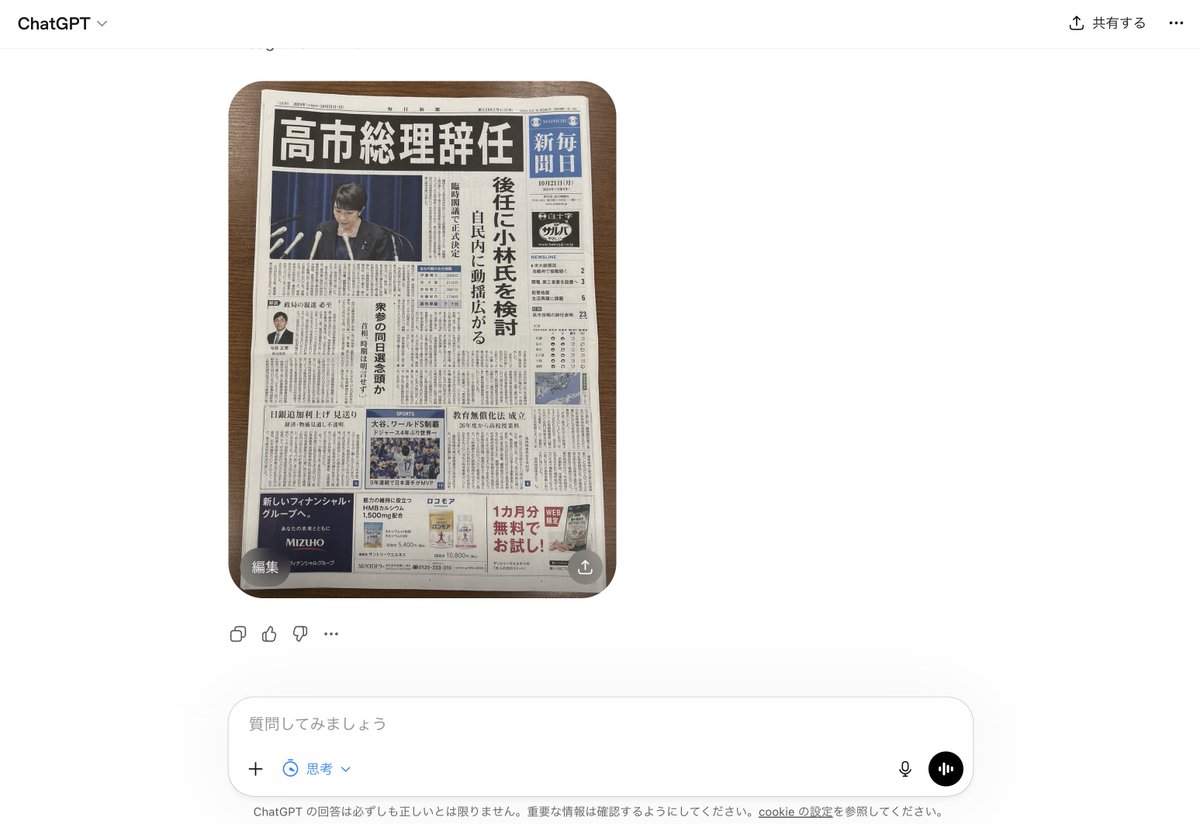
This generates a photorealistic screenshot of the ChatGPT interface displaying a fabricated but convincing Japanese newspaper front page, useful for mockups about AI-generated fake news. - AIPinMaker
Prompt
A realistic smartphone screenshot of the ChatGPT web interface in Japanese, shown on a clean white background. Centered in the chat is a single generated image: a top-down photo of 1 Japanese newspaper placed neatly on a medium-dark wooden tabletop with rounded table corners visible. The newspaper dominates the image and looks highly believable, like a fake but convincing breaking-news front page. The masthead area is dense and traditional, with a huge bold black Japanese headline across the top reading 「高市総理辞任」. Beneath it is a large main photo of 1 politician at a press conference podium with multiple microphones, face intentionally blurred or obscured, in front of a dark blue curtain. Along the right side is 1 vertical blue newspaper nameplate area with white Japanese text resembling a major national daily. A tall vertical subheadline column in Japanese runs beside the main image, suggesting discussion of a successor candidate. The front page includes exactly 4 visible advertisement blocks near the bottom and lower side areas, 1 small portrait photo of a suited man in a left-side article, 1 sports photo block in the lower middle, 1 weather or data box on the right, and many tightly packed columns of Japanese body text throughout. The newspaper should feel authentic, serious, and editorial, with realistic print texture, slight page curl, subtle shadows, and credible Japanese typography. Around the image, include the visible ChatGPT UI chrome: top-left “ChatGPT”, top-right Japanese sharing controls, a small circular overlay button labeled 「編集」 at the lower-left corner of the image, a small share-style overlay icon at the lower-right corner of the image, reaction/action icons beneath the image, and a bottom input bar with Japanese placeholder text 「質問してみましょう」 plus microphone and voice buttons. Overall style: photorealistic screenshot, modern web app interface, fake-news newspaper front page, crisp legible layout, natural lighting, minimal perspective distortion.3c:T7fe,A realistic smartphone screenshot of the C
Prompt breakdown
- Subject
- Top-down photo of a fake Japanese newspaper with headline 「高市総理辞任」 on medium-dark wooden table, framed inside ChatGPT smartphone UI
- Style
- Photorealistic screenshot of modern web app interface with authentic print texture, slight page curl, and credible Japanese typography
- Lighting
- Natural lighting with subtle shadows and minimal perspective distortion
- Composition
- Centered newspaper dominating the frame, vertical subheadline column, nameplate on right, ads and photos at bottom and sides
- Mood
- Serious, editorial fake-news front page
Remix ideas
- Swap the headline for 「岸田総理続投」 while keeping the blurred politician photo
- Change the tabletop to light oak with stronger wood grain and adjust shadow direction
- Replace the ChatGPT input placeholder with 「もっと詳しく教えて」 and add an extra Japanese reaction icon row
Reference images
How to use this AI Image prompt template
 1
1Copy the prompt — grab this template’s prompt and negative prompt.  2
2Pick a model — choose a recommended AI model for the best match.  3
3Generate — open the studio with one click and create your result.
Related templates

Glossy magazine article layout from long text
Create a creative image of Glossy Magazine Article Layout From Long Text. Style: photorealistic. Composition: balanced and well-framed. Lighting: natural with cinematic mood. Category: photography. Reference: glossy-magazine-article-layout-from-long-text-33.

Glossy magazine article with full text
Create a creative image of Glossy Magazine Article With Full Text. Style: photorealistic. Composition: balanced and well-framed. Lighting: natural with cinematic mood. Category: photography. Reference: glossy-magazine-article-with-full-text-118.
WSJ-Style Business Newspaper Front Page
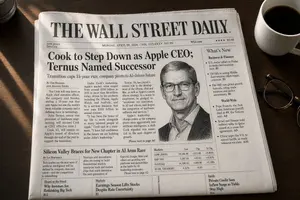
A photorealistic overhead three-quarter view of a folded financial newspaper on a dark wooden desk, styled like a prestigious American business daily from the 1980s–2000s, with crisp realistic newsprint texture, subtle paper wrinkles, slightly worn folded edges, and warm morning sunlight casting diagonal window-shadow bands across the page. The masthead dominates the top in large classic serif capitals reading THE WALL STREET DAILY. (newspaper name). Directly beneath it is a thin header strip with small financial-paper details: "DOW JONES", "News Corp", the date line "MONDAY, APRIL 20, 2026 – VOL. CCLXXXV NO. 90", "WSJ.com", a star rating row, and the price "$5.00". The main lead story spans the upper center-left with a huge bold serif headline reading Cook to Step Down as Apple CEO; Ternus Named Successor (main headline). Below it is a smaller serif subheadline: "Transition caps 15-year run; company pivots to AI-driven future". Add a byline line in small caps with 2 reporters: "By Tim Higgins" and "And Joanna Stern". Fill the lead article with dense, fully legible multi-column newspaper body text about Tim Cook stepping down as Apple chief executive, John Ternus succeeding him, Apple's growth, AI strategy, and corporate transition; the text should read like authentic financial journalism, not placeholder gibberish. On the right half of the lead story, place a black-and-white engraved stipple portrait of a male executive in collared shirt and jacket, centered in a rectangular image area; the face is partially obscured by a pale gray square censor block over the eyes and upper nose, creating a modern satirical effect. At the top-right, include a sidebar box titled "What’s New" with exactly 2 subsection headers, "Business & Finance" and "World-Wide", each followed by bullet-point briefs in small serif text; include exactly 3 bullets under "Business & Finance" and exactly 4 bullets under "World-Wide", all fully typeset and legible. Beneath the main story, add a secondary banner article across the page titled "Silicon Valley Braces for New Chapter in AI Arms Race" with a byline "By Liz Hoffman" and several short columns of text about big tech, startups, OpenAI, Google, Meta, chips, platforms, and AI competition. To the right of this lower-middle section, insert a compact markets table titled "Markets" with exactly 4 rows labeled "DOW JONES", "S&P 500", "NASDAQ", and "10-YR. TREASURY", with columns for index/value/change/percent and realistic numeric values in tight newspaper tabular formatting. Along the bottom strip of the front page, include exactly 3 teaser boxes: left box with section label "Heard on the Street" and headline "Why Investors Are Rethinking Big Tech" plus page marker "B12"; center box with section label "Markets" and headline "Earnings Season Lifts Stocks Despite Rate Uncertainty" plus page marker "B1"; right box with section label "Inside" and headline "Private Credit Sees Inflow Surge as Yields Stay High" plus page marker "B14". Make all typography clean, sharp, perfectly legible, and consistently aligned in authentic newspaper grid layout with thin rules between columns, justified text, classic serif fonts, and realistic print contrast. The newspaper sits slightly rotated clockwise on the desk. In the environment, show a white ceramic coffee cup filled with black coffee in the top-right corner and a pair of dark-framed eyeglasses resting near the lower-right edge of the paper. In the top-left corner, include the cropped edge of a dark cylindrical object, likely a camera lens or tumbler. Overall mood: premium editorial mock front page, serious business-news aesthetic, believable print photography, ultra-detailed, natural shadows, high resolution.3d:Tec

Cookie Cutter Visualization Prompt
Create a infographic image of Cookie Cutter Visualization Prompt. Style: photorealistic. Composition: balanced and well-framed. Lighting: natural with cinematic mood. Category: illustration. Reference: cookie-cutter-visualization-prompt-10791.

Mac Terminal World Sim UI
Create a creative image of Mac Terminal World Sim Ui. Style: photorealistic. Composition: balanced and well-framed. Lighting: natural with cinematic mood. Category: photography. Reference: mac-terminal-world-sim-ui-14385.

Notebook Spread with 3D Model Analysis Diagrams
{ "type": "photograph of an open notebook", "setting": "wooden desk surface, top-down angle", "subject": { "hands": "two hands visible at the bottom, wearing a dark blue ribbed sweater, right hand holding a red pen labeled {argument name=\"pen brand\" default=\"PILOT G-TEC-C4\"} writing on the page", "notebook": "open A5 dot-grid notebook with handwritten notes and diagrams in black, blue, green, and red ink" }, "layout": { "left_page": { "header": "{argument name=\"main title\" default=\"「GPT-Image-2」による3Dモデル三面図生成の検証\"}", "sections": [ { "title": "1. 検証フロー (Workflow):", "content": "text flow and a flowchart diagram", "flowchart_elements": 5, "flowchart_labels": ["Input (Prompt)", "GPT-Image-2", "正面図", "側面図", "背面図"] } ] }, "right_page": { "sections": [ { "title": "2. 結果分析", "target_box": "Target [{argument name=\"target object\" default=\"椅子\"}] => [3D Model & 3面図 images]", "bullet_points_count": 3, "bullet_point_topics": ["精度: ★★★☆☆", "整合性", "課題"], "diagram_count": 3, "diagram_labels": ["正面", "側面", "背面"], "diagram_description": "sketches of chairs with red correction notes on the front view" } ], "bottom_right_corner": { "doodle": "cute anime-style line drawing of a smiling girl with short hair", "label": "{argument name=\"character name\" default=\"あいちゃん\"} {argument name=\"date\" default=\"3/15\"}" } } } }3f:T698,{ "type": "photograph of an open notebook", "setting": "wooden desk surface, top-down angle", "subject": {
Explore more prompts
Browse more AI image and video prompts by category.
FAQ
- What real-world newspaper layout details does the prompt copy?
- Dense traditional masthead, vertical blue nameplate with white text, tall subheadline column, exactly four ad blocks, small suited-man portrait, sports photo, weather box, and tightly packed body-text columns.
- Which ChatGPT UI elements are explicitly required around the generated newspaper image?
- Top-left “ChatGPT” label, top-right Japanese sharing controls, lower-left 「編集」 circular button, lower-right share icon, reaction icons, and bottom input bar with 「質問してみましょう」 plus mic and voice buttons.