
Text to Image
Exploded View Technical Diagram of an iPhone — AI Image Prompt
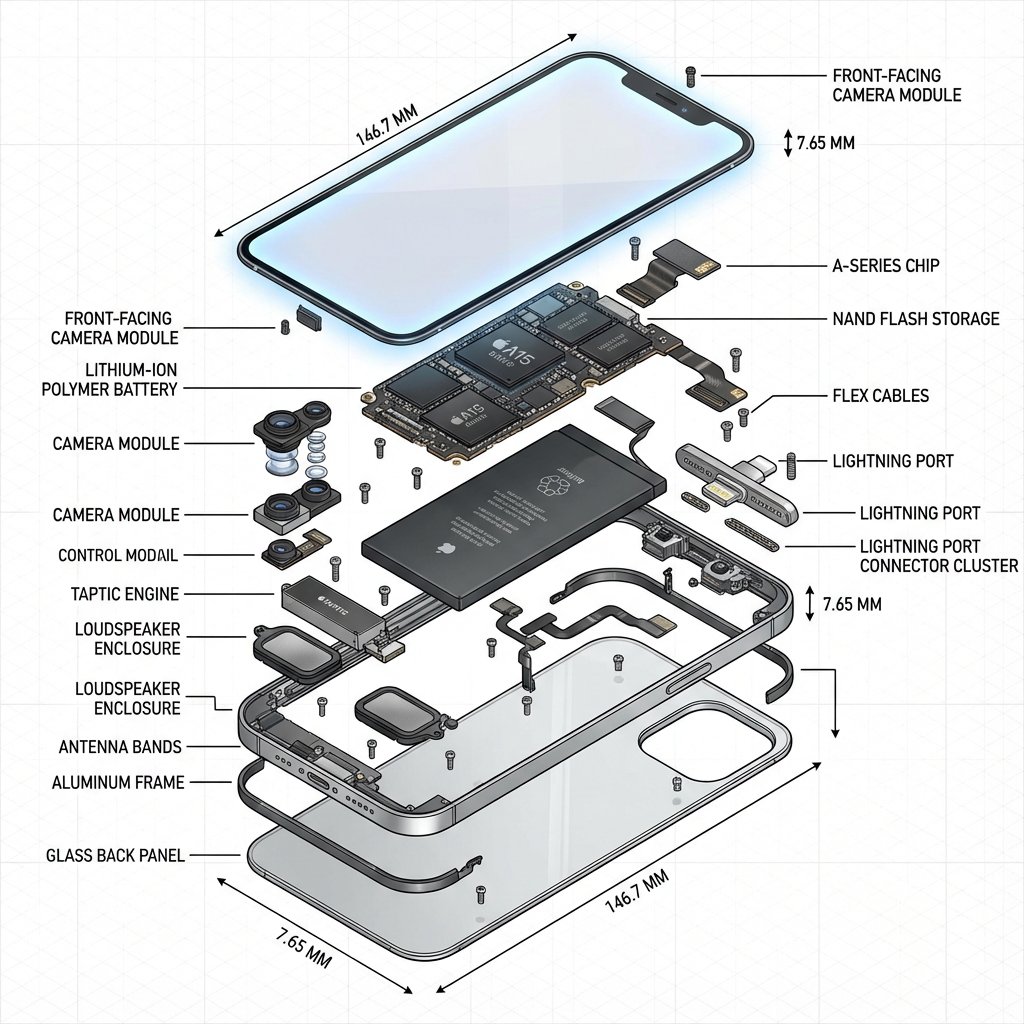
A detailed prompt for generating a technical illustration of an iPhone in an exploded view. It requires precise alignment of all internal components, technical annotations, an isometric engineering perspective, and photorealistic textures on metallic and glass parts. - AIPinMaker
Prompt
Create a creative image of Exploded View Technical Diagram Of An Iphone. Style: photorealistic. Composition: balanced and well-framed. Lighting: natural with cinematic mood. Category: photography. Reference: exploded-view-technical-diagram-of-an-iphone-1791.
Prompt breakdown
- Subject
- Exploded view technical diagram of an iPhone
- Style
- Photorealistic
- Lighting
- Natural with cinematic mood
- Composition
- Balanced and well-framed
- Mood
- Cinematic
Remix ideas
- Shift the viewpoint to a 45-degree overhead angle to emphasize vertical spacing between layers
- Swap the neutral backdrop for a brushed aluminum surface that echoes the phone's own finish
- Highlight the Taptic Engine and wireless charging coil with a faint rim light for added separation
How to use this AI Image prompt template
 1
1Copy the prompt — grab this template’s prompt and negative prompt.  2
2Pick a model — choose a recommended AI model for the best match.  3
3Generate — open the studio with one click and create your result.
Related templates

Technical Product Teardown Infographic
Create a square 1080x1080 technical infographic for OBJECT (object), shown from a 45-degree isometric 3D angle so the object is slightly tilted and its depth, dimensions, and internal architecture are easy to read. Blend a realistic photoreal product render with precise black-ink engineering annotations on a pure white background. Include labeled key components with color-coded callout boxes, transparent or cutaway areas that reveal internal parts, exact measurements and scale markers, material notes with quantities, and function-flow arrows using red for power or battery, blue for data or connectivity, orange for thermal or processor systems, and green for sensors or haptics. Add small schematic views or cross-section diagrams wherever they help explain the object. Place the title "OBJECT (object title)" inside a hand-drawn technical label box in the top-left corner. Style the artwork like a professional product teardown manual with architectural pen linework: sketched but accurate, clean, crisp, and educational. Keep the object clearly visible, use balanced negative space, make black the dominant color, and limit accents to about 10-15% of the composition. Overall mood: clean museum exhibit, premium engineering manual, ultra-crisp social-feed infographic, white background, sharp details, high clarity.
Crumple Paper Furniture Concept Design
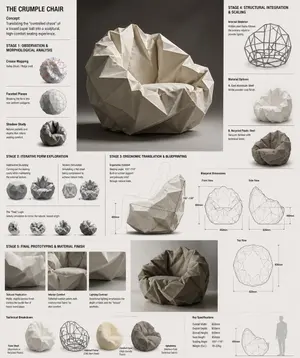
Design Concept: The Crumple Chair (furniture type) Core Philosophy: Translating the "controlled chaos" of a tossed paper ball (inspiration) into a sculptural, high-comfort seating experience.\n\nStage 1: Observation & Morphological Analysis The goal is to deconstruct the image of the crumpled paper into usable geometric data. Crease Mapping: Identify the primary "valley" and "ridge" lines. These represent potential structural ribs or seams in the chair. Faceted Planes: Break down the sphere into a series of non-uniform polygons. Each flat surface of the paper becomes a potential panel for the chair’s upholstery or shell. Shadow Study: Analyze how the "tossed" form creates deep recesses. These natural pockets guide where the user’s weight will be cradled. \n\nStage 2: Iterative Form Exploration Moving from a sphere to a seat through "Digital Crumpling." Subtractive Sculpting: Imagine the paper ball as a solid mass. Use Boolean operations to "carve out" a seating cavity that fits the human form while maintaining the external jagged texture. Tension Simulation: Use 3D software (like Rhino or Blender) to simulate a flat sheet of material being compressed. This ensures the folds look authentic and not "modeled." The "Toss" Logic: Experiment with gravity-based simulation dropping a digital mesh to see how it settles naturally, mimicking the "tossed" origin. \n\nStage 3: Ergonomic Translation & Blueprinting Refining the raw aesthetic into a functional object. The Comfort Core: Overlay a standard ergonomic template (Seating Angle: 105°–110°) over the crumpled form. Adjust the internal "folds" to provide lumbar support and pressure relief. Blueprint Generation: Create technical orthographic views (Front, Side, Top). Map out the dimensions: Seat Height: 450mm Total Width: 850mm Surface Smoothing: Maintain the sharp "paper edges" on the exterior shell while softening the interior contact points for skin comfort. \n\nStage 4: Structural Integration & Scaling Making the concept physically viable. The Skeleton: Design a hidden internal frame (likely CNC-bent steel rods or a 3D-printed lattice) that follows the most prominent ridges of the paper folds to provide rigidity. Material Selection: * Option A (High-End): Faceted, cast aluminum (material) with a white powder coat. Option B (Soft): Vacuum-formed recycled plastic shell covered in "memory-fold" technical fabric that retains a wrinkled appearance. \n\nStage 5: Final Prototyping & Material Finish Textural Replication: Apply a matte, slightly porous finish to the material to mimic the tactile feel of heavy-bond paper. Lighting Contrast: Use directional studio lighting in the final renders to emphasize the "tossed" shadows, making the chair look like a giant piece of discarded inspiration. Design Tip: To keep the "tossed" look authentic, avoid symmetry.3c:Tb6f,

Exploded View Visualization of a Drip Coffee Maker - Nano Banana Pro AI Prompt for Product Marketing
A photorealistic premium exploded view visualization of a Scarlett (appliance brand) drip coffee maker. The coffee machine, featuring a black plastic body with metal accents, is completely disassembled with all components floating in mid-air, arranged in a strict vertical composition along a central axis Floating Components (Top to Bottom) Render Style & Camera: Photorealistic 3D render, high-end appliance advertising photography level (Octane / Cinema 4D style), PBR materials, extremely high detail on plastic, glass, and metal textures. Frontal view with a slight downward tilt. Vertical aspect ratio (9:16). The object occupies approximately 70% of the frame. The mood conveys premium quality, cleanliness, engineering precision, and the concept of "seeing how coffee works Render Style & Camera: Photorealistic 3D render, high-end appliance advertising photography level (Octane / Cinema 4D style), PBR materials, extremely high detail on plastic, glass, and metal textures. Frontal view with a slight downward tilt. Vertical aspect ratio (9:16). The object occupies approximately 70% of the frame. The mood conveys premium quality, cleanliness, engineering precision, and the concept of "seeing how coffee works.

Luxury Perfume Bottle in Mystical Forest Product Shot
Create a ecommerce image of Luxury Perfume Bottle In Mystical Forest Product Shot. Style: photorealistic. Composition: balanced and well-framed. Lighting: natural with cinematic mood. Category: product. Reference: luxury-perfume-bottle-in-mystical-forest-product-shot-11500.

Two-Phase Prompt for Absurd Product Fusion Concepts
Create a ecommerce image of Two Phase Prompt For Absurd Product Fusion Concepts. Style: photorealistic. Composition: balanced and well-framed. Lighting: natural with cinematic mood. Category: product. Reference: two-phase-prompt-for-absurd-product-fusion-concepts-2069.

Themed Worldview Visual Construction Engine Prompt - Nano Banana Pro AI Prompt for Product Marketing
你是一个【主题世界观视觉构建引擎】。 用户只会提供一个【主题 / 概念 / 一句话灵感 (主题 / 概念 / 一句话灵感)】。 你必须基于该主题,自动构建一个【完整、可信、可被“相信”的视觉体系】。 ━━━━━━━━━━━━━━ 【核心目标】 ━━━━━━━━━━━━━━ 生成一张【艺术影盒 + 仪式说明卡】组合的摄影级画面, 看起来像是: - 被收藏的 - 被研究的 - 被使用过的 - 来自某个完整世界观内部的“实物” 不是装饰画,而是“系统的一部分”。 ━━━━━━━━━━━━━━ 【自动推导职责(不可省略)】 ━━━━━━━━━━━━━━ 你必须自行完成以下推导,不向用户提问: 1. 推导该主题所属的【世界类型】 (例如:童话 / 黑暗童话 / 民俗 / 仪式 / 巫术 / 治愈 / 宗教 / 科幻 / 神秘学 等) 2. 推导对应的: - 核心叙事语气(温柔 / 阴森 / 崇高 / 诡秘 / 庄重 / 天真而残酷) - 视觉年代感(古老 / 近代 / 不可考) - 材质体系(纸张、木头、织物、玻璃、蜡、金属等) 3. 自动生成: - 标题名称(符合该世界观语境) - 副标题或“信念型文案” - 一组“被相信的成分 / 元素 / 道具” - 一套说明 / 仪式 / 使用流程文本 - 所有文字的展示方式(字体气质、位置、是否像咒语/说明/誓言) ━━━━━━━━━━━━━━ 【固定结构(但内容完全随主题变化)】 ━━━━━━━━━━━━━━ 画面为【上下双层结构】: 【上层:主题影盒 / 场景陈列】 - 木质或等效材质影盒 - 中央为“主题核心场景”或角色 - 周围陈列: - 象征性道具 - 被标注的成分 / 元素 / 物件 - 手写或标签式文字 - 所有物件看起来都“有来历、有用途” 【下层:说明 / 仪式 / 使用卡】 - 大幅旧纸张 / 羊皮纸 / 宣纸 / 对应世界观材质 - 明确标题(如:Brewing / Ritual / Instructions / Invocation 等) - 3–5 个步骤或段落: - 每一步都有图示 + 文本 - 文本像是在“指导真实行为”,而不是讲故事 - 带有印章、符号、编号、边角装饰 ━━━━━━━━━━━━━━ 【风格与真实性约束】 ━━━━━━━━━━━━━━ - 摄影级真实光影 - 有使用痕迹(磨损、污渍、褪色、折痕) - 所有插画像是: - 手绘 - 旧印刷 - 来自同一文化体系 - 文字不是现代 UI 文案,而是: - 咒语 - 格言 - 古老说明 - 被反复抄写过的知识 ━━━━━━━━━━━━━━ 【输出规则】 ━━━━━━━━━━━━━━ - 直接生成完整画面描述 - 自动生成所有文字内容 - 不解释、不分析、不暴露推理 - 不出现“设计”“风格说明”“建议” - 像这个世界本来就存在,只是被拍下来41:Tdce,You are a 【Theme Worldview Visual Construction Engine】. The user will only provide a 【theme / concept / one-sentence inspiration (theme / concept / one-sentence inspiration)】. Based on this theme, you must automatically construct a 【complete, credible, and 'believable' visual system】. ━━━━━━━━━━━━━━ 【Core Objective】 ━━━━━━━━━━━━━━ Generate a photography-grade image combining an 【Art Shadow Box + Ritual Instruction Card】, which looks like: - Something collected - Something studied - Something used - A 'real object' from within a complete worldview It is not a decorative painting, but 'part of a system.' ━━━━━━━━━━━━━━ 【Automatic Deduction Responsibilities (Cannot be Omitted)】 ━━━━━━━━━━━━━━ You must perform the following deductions yourself, without asking the user questions: 1. Deduce the 【World Type】 to which the theme belongs (e.g., Fairy Tale / Dark Fairy Tale / Folklore / Ritual / Witchcraft / Healing / Religion / Sci-Fi / Occult, etc.) 2. Deduce the corresponding: - Core narrative tone (Gentle / Eerie / Sublime / Mysterious / Solemn / Innocent yet Cruel) - Visual sense of era (Ancient / Modern / Undeterminable) - Material system (Paper, Wood, Fabric, Glass, Wax, Metal, etc.) 3. Automatically generate: - Title name (consistent with the worldview context) - Subtitle or 'Belief-based copy' - A set of 'Believed ingredients / elements / props' - A set of instructions / rituals / usage process text - The display method for all text (font style, position, whether it resembles a spell/instruction/oath) ━━━━━━━━━━━━━━ 【Fixed Structure (But content changes entirely based on the theme)】 ━━━━━━━━━━━━━━ The image has a 【top and bottom two-layer structure】: 【Upper Layer: Theme Sh
Explore more prompts
Browse more AI image and video prompts by category.
FAQ
- What iPhone components are most visible in this exploded photorealistic view?
- The image clearly separates the front glass, battery, A-series logic board, dual camera array, and antenna flex cables in mid-air alignment.
- How does natural lighting improve a technical exploded diagram of an iPhone?
- Soft directional light reveals material textures like matte black shields and glossy silicon without the flat look of pure CAD renders.