
Text to Image
Dragons in Moonlit Forest — AI Image Prompt
A high-quality cinematic slow-motion prompt of a golden and purple dragon interacting tenderly in an enchanted forest. - AIPinMaker
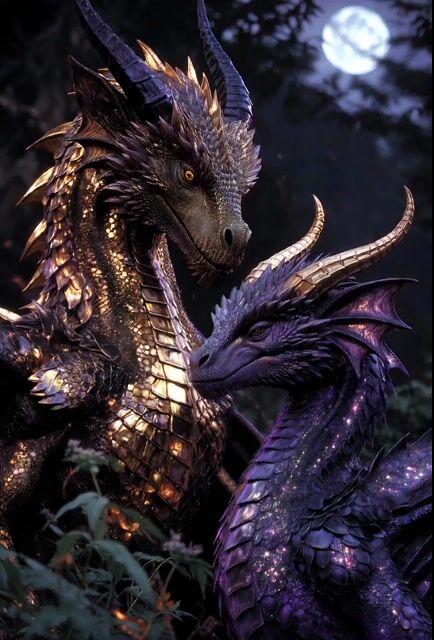
Prompt
Create a creative image of Dragons In Moonlit Forest. Style: photorealistic. Composition: balanced and well-framed. Lighting: natural with cinematic mood. Category: photography. Reference: dragons-in-moonlit-forest-4625.
Prompt breakdown
- Subject
- Dragons gliding through a dense moonlit forest
- Style
- Photorealistic photography
- Lighting
- Natural moonlight with cinematic mood
- Composition
- Balanced and well-framed
- Mood
- Cinematic and mysterious
Remix ideas
- Add subtle mist rising from the forest floor to catch more moonlight
- Change one dragon to a darker obsidian color for stronger contrast against the trees
- Shift to a slightly lower camera angle to emphasize the dragons' size relative to the trunks
Reference images

How to use this AI Image prompt template
 1
1Copy the prompt — grab this template’s prompt and negative prompt.  2
2Pick a model — choose a recommended AI model for the best match.  3
3Generate — open the studio with one click and create your result.
Related templates

Cozy Bedroom Nap With Cat
Create a warm, realistic nighttime lifestyle photo in a small apartment bedroom: an adult person with medium brown (hair color) hair lies asleep on their side on a white bed, face intentionally covered by a solid square privacy censor block, wearing a white sleeveless tank top (top clothing) and dark navy shorts (bottom clothing). In the foreground beside their arm, an orange tabby cat named Kinako (cat name) sleeps curled on the bed, its head resting near the person’s relaxed hand. Add one paperback book lying face-up near the person’s hip on the wrinkled white bedding. The room should feel cozy and quiet after a long day, lit by one warm bedside lamp on the left. Background details: beige textured wall, white pillow, tall window with sheer curtains and heavier beige drapes, a small bookshelf on the right with books and small objects, and a wall-mounted air conditioner near the ceiling. Use portrait orientation, natural smartphone-photo framing, soft shadows, warm indoor color temperature, realistic fabric wrinkles, shallow but believable depth of field, no visible text overlays, no watermark.38:T

Steampunk Elephant Guardian Awakening
Create a creative image of Steampunk Elephant Guardian Awakening. Style: photorealistic. Composition: balanced and well-framed. Lighting: natural with cinematic mood. Category: photography. Reference: steampunk-elephant-guardian-awakening-4907.

The Praying Paws Cinematic Scene
Create a cinematic image of The Praying Paws Cinematic Scene. Style: photorealistic. Composition: balanced and well-framed. Lighting: natural with cinematic mood. Category: cinematic-video. Reference: the-praying-paws-cinematic-scene-4944.

Space Kitten Astronaut
Create a creative image of Space Kitten Astronaut. Style: photorealistic. Composition: balanced and well-framed. Lighting: natural with cinematic mood. Category: photography. Reference: space-kitten-astronaut-4085.

Scary Water Creature Emergence
Create a creative image of Scary Water Creature Emergence. Style: photorealistic. Composition: balanced and well-framed. Lighting: natural with cinematic mood. Category: photography. Reference: scary-water-creature-emergence-5043.
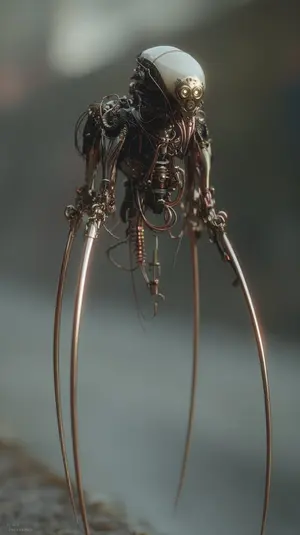
Image Editing Prompt: Adding Creatures to Background
Create a creative image of Image Editing Prompt Adding Creatures To Background. Style: photorealistic. Composition: balanced and well-framed. Lighting: natural with cinematic mood. Category: photography. Reference: image-editing-prompt-adding-creatures-to-background-2340.
Explore more prompts
Browse more AI image and video prompts by category.
FAQ
- How does moonlight interact with the dragons here?
- It creates soft highlights along wing edges and scale ridges while leaving undersides and shadowed areas in deep natural darkness.
- What reference code is tied to this exact prompt?
- The image uses the internal reference dragons-in-moonlit-forest-4625 for consistent regeneration.