
Text to Image
Dark Mode Marketing Case Study UI — AI Image Prompt
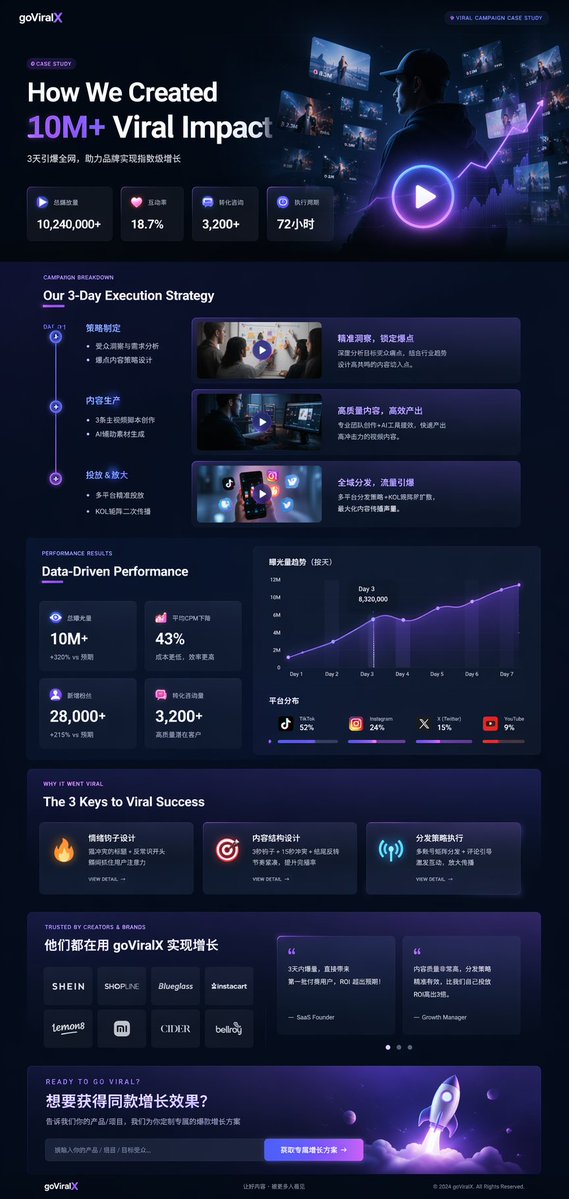
A comprehensive, data-dense landing page mockup for a marketing agency featuring timelines, charts, and glowing neon accents. - AIPinMaker
Prompt
{
  "type": "UI/UX landing page mockup",
  "theme": "dark mode, sleek modern aesthetic, glassmorphism, {argument name=\"primary accent color\" default=\"neon purple and blue\"} glowing accents",
  "header": {
    "logo": "{argument name=\"brand name\" default=\"goViralX\"}",
    "top_right_tag": "VIRAL CAMPAIGN CASE STUDY"
  },
  "layout": {
    "sections": [
      {
        "name": "Hero",
        "headline": "{argument name=\"hero headline\" default=\"How We Created 10M+ Viral Impact\"}",
        "subheadline": "3天引爆全网, 助力品牌实现指数级增长",
        "stats_row": {
          "count": 4,
          "labels": ["总播放量", "互动率", "转化咨询", "执行周期"],
          "values": ["{argument name=\"main statistic\" default=\"10,240,000+\"}", "18.7%", "3,200+", "72小时"]
        },
        "visual": "cinematic shot of a person in a hoodie looking at glowing digital screens and graphs, large play button overlay"
      },
      {
        "name": "Strategy",
        "title": "Our 3-Day Execution Strategy",
        "layout_type": "vertical timeline",
        "steps_count": 3,
        "elements_per_step": ["timeline node", "title", "bullet points", "video thumbnail with play button", "description box"]
      },
      {
        "name": "Performance",
        "title": "Data-Driven Performance",
        "left_column": {
          "stat_cards_count": 4,
          "values": ["10M+", "43%", "28,000+", "3,200+"]
        },
        "right_column": {
          "charts_count": 2,
          "chart_1": "line graph showing 7-day growth peaking at Day 3",
          "chart_2": "horizontal segmented bar chart showing platform distribution (TikTok 52%, Instagram 24%, X 15%, YouTube 9%)"
        }
      },
      {
        "name": "Keys to Success",
        "title": "The 3 Keys to Viral Success",
        "cards_count": 3,
        "card_elements": ["glowing icon (fire, target, antenna)", "title", "description", "VIEW DETAIL link"]
      },
      {
        "name": "Social Proof",
        "title": "TRUSTED BY CREATORS & BRANDS",
        "left_column": {
          "logos_count": 8,
          "grid": "2x4",
          "brands": ["SHEIN", "SHOPLINE", "Blueglass", "instacart", "lemon8", "mi", "CIDER", "bellroy"]
        },
        "right_column": {
          "testimonial_cards_count": 2,
          "elements": ["quote", "author title (SaaS Founder, Growth Manager)"]
        }
      },
      {
        "name": "Call to Action",
        "title": "READY TO GO VIRAL?",
        "interactive_elements": ["text input field", "glowing button with text '{argument name=\"call to action text\" default=\"获取专属增长方案 ->\"}'"],
        "visual": "3D render of a rocket ship taking off with purple and blue flames"
      }
    ]
  }
}Prompt breakdown
- Subject
- UI/UX landing page mockup for goViralX viral campaign case study with hero stats, 3-step timeline, performance charts, and rocket CTA
- Style
- dark mode sleek modern aesthetic with glassmorphism panels and neon purple and blue glowing accents
- Lighting
- neon purple and blue glowing accents on icons, buttons, charts, and play overlays
- Composition
- multi-section vertical layout: hero with cinematic visual, vertical timeline with video thumbnails, two-column performance area, three-card keys section, 2x4 logo grid plus testimonials, and bottom CTA with 3D rocket
- Mood
- professional yet dynamic data-driven marketing aesthetic
Remix ideas
- change the hero visual to a drone shot of city lights with overlaid metrics
- swap the platform bar chart percentages to emphasize YouTube at 35%
- replace the three success cards with four and add a new antenna icon for reach
Reference images
How to use this AI Image prompt template
 1
1Copy the prompt — grab this template’s prompt and negative prompt.  2
2Pick a model — choose a recommended AI model for the best match.  3
3Generate — open the studio with one click and create your result.
Related templates

Chinese AI Prompt Comparison Poster
{"type":"Chinese vertical social media promotional infographic poster","canvas":{"aspect_ratio":"3:4","size":"768x1024","background":"solid black with subtle dark gradient","style":"high-contrast tech marketing, bold typography, clean card layout"},"theme":{"primary_colors":["black","white","bright yellow"],"accent_colors":["red","green","deep navy","warm cream","blue link"],"typography":"heavy bold sans-serif Chinese headline, large condensed display text, rounded card labels"},"headline_section":{"position":"top","text_lines":[{"text":"AI 工具都一样,","color":"white","size":"very large"},{"text":"为什么别人出图你出糊?","color":"bright yellow","size":"very large"}],"badge":{"text":"99% 的原因:prompt 写得烂","position":"below headline","style":"rounded yellow pill with black bold text"}},"comparison_section":{"position":"upper middle","container":"dark rounded rectangle","count":2,"panels":[{"label":"❌ 你出的图","position":"left","image_description":"intentionally blurry low-quality portrait of a young woman with long dark hair indoors, face covered by a square mosaic privacy block, muted gray background","bottom_caption":"模糊、细节差、没质感","caption_style":"dark translucent rounded label with white text"},{"label":"✅ 别人出的图","position":"right","image_description":"clear detailed lifestyle portrait of a young woman with long dark hair at a sunny beach, ocean horizon in background, face covered by a square mosaic privacy block, warm natural light, high texture and detail","bottom_caption":"清晰、细节丰富、有质感","caption_style":"dark translucent rounded label with yellow text"}]},"middle_message":{"position":"center below comparison","count":2,"lines":[{"text":"与其研究哪个模型更强","color":"white","size":"large bold"},{"text":"不如先把别人跑通的 prompt 抄完","color":"bright yellow","size":"extra large bold"}]},"product_card":{"position":"lower middle","style":"large deep navy rounded rectangle card with subtle border","brand":"{argument name=\"website domain\" default=\"opennana.com\"}","brand_style":"very large white bold centered domain","description_text":"有人在做 GPT Image 2、 Seedance 2.0、 Banana 的\nprompt 案例库,效果图 + 完整提示词全有","highlight_terms":["GPT Image 2","Seedance 2.0","Banana"],"feature_boxes":{"count":4,"items":[{"icon":"image/photo outline icon","title":"海量案例","subtitle":"每日更新\n高质量案例"},{"icon":"document outline icon","title":"完整 Prompt","subtitle":"完整提示词\n直接复制使用"},{"icon":"overlapping squares comparison icon","title":"效果对比","subtitle":"效果图对比\n一目了然"},{"icon":"star outline icon","title":"多模型支持","subtitle":"支持多种\n主流 AI 工具"}]}},"call_to_action":{"position":"bottom","style":"wide warm cream rounded banner","left_icon":"black rocket icon","main_text":"别再瞎折腾了,去 {argument name=\"website domain\" default=\"opennana.com\"} 抄作业吧!","main_text_color":"black with domain in bright blue","sub_text":"让好的 prompt 帮你出好图","sub_text_color":"black"},"composition_notes":"Use tight margins, centered alignment, strong hierarchy, large readable Chinese text, two photographic example panels, no extra decorations beyond icons and rounded cards, poster optimized for mobile social feed readability."}

Energetic Pop Art Poster
Create a social-media image of Energetic Pop Art Poster. Style: photorealistic. Composition: balanced and well-framed. Lighting: natural with cinematic mood. Category: poster. Reference: energetic-pop-art-poster-20527.
Quirky Independent Short Film Festival Poster
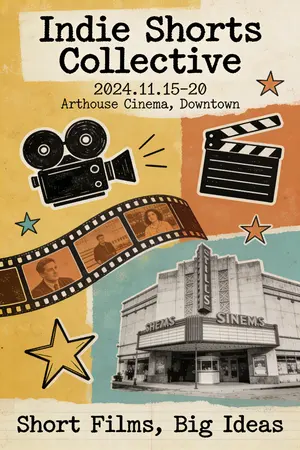
A quirky and independent-style poster for a short film festival. The design is a collage of hand-drawn doodles, film strips, and vintage photographs. The typography is a mix of different typewriter and handwritten fonts, giving it a DIY, zine-like feel. The color palette is limited and has a retro vibe. The poster should look creative, unconventional, and appeal to an arthouse audience. –ar 2:3

Luxury Gucci-Style Fashion Ad Prompt
Luxury fashion advertisement poster for a premium brand (GUCCI (brand name) style), minimal modern layout, soft gradient background (pastel green to light blue (background color)). Centered large circular frame showing a stylish young woman walking confidently in a rainy neon-lit city street (Times Square style), reflections on wet road, cinematic lighting. Model wearing black leather jacket and black leather pants, holding a bold red (handbag color) luxury handbag, wearing red high-heel boots. Face: highly attractive, symmetrical, sharp features, glowing skin, confident expression. Hair: long, voluminous, soft curly hair flowing naturally. Pose: walking forward, slightly turned back toward camera, dynamic fashion pose. Composition: Large circle (dominant, increased size ~70–80% width) Model slightly breaking the circle boundary for depth Clean background with subtle oversized faded letter (like “G”) behind Branding: “GUCCI” in elegant serif font at top center Small GUCCI logo at bottom center No extra text, no social handles, no watermarks Style: ultra HD, sharp, premium editorial, high contrast, cinematic color grading, glossy fashion magazine look, luxury aesthetic Lighting: soft diffused + cinematic highlights, detailed shadows Quality: 4K, hyper-detailed, realistic, professional fashion campaign3b:T581,Lu
Immersive Music Player UI Poster
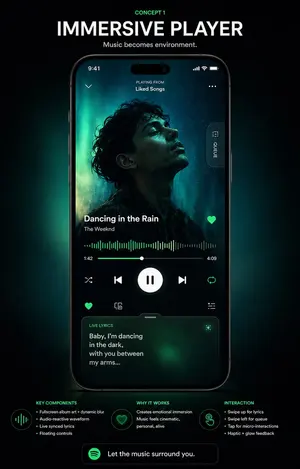
{"type":"music app UI concept poster","style":"premium futuristic mobile app showcase, dark mode, cinematic product presentation, Spotify-inspired green neon glow, high contrast, sleek glassmorphism, polished tech advertising aesthetic","format":"vertical poster with centered smartphone mockup on a black background","headline":{"kicker":"CONCEPT 1","title":"IMMERSIVE PLAYER","subtitle":"Music becomes environment."},"device":{"type":"modern black smartphone","position":"center","screen":{"app":"immersive music player","status_bar":{"time":"9:41","icons_count":3},"top_area":{"left_icon_count":1,"center_text_lines":2,"texts":["PLAYING FROM","Liked Songs"],"right_icon_count":1},"artwork":{"shape":"large full-screen background portrait with a centered square album cover overlay","subject":"moody silhouette portrait of a curly-haired singer against teal aurora-like lighting","dominant_colors":["deep black","teal","emerald green","cyan glow"]},"side_tab":{"count":1,"label":"QUEUE","orientation":"vertical pill button on right edge"},"track_info":{"song_title":"{argument name=\"song title\" default=\"Dancing in the Rain\"}","artist_name":"{argument name=\"artist name\" default=\"The Weeknd\"}","favorite_icon":true},"playback":{"waveform":"audio-reactive neon green waveform spanning the width","time_labels":["1:42","4:09"],"progress_slider":true,"main_controls":{"count":5,"items":["shuffle","previous","large play/pause button","next","repeat"]},"secondary_controls":{"count":4,"items":["favorite","device or connect icon","settings or sliders icon","small utility icon row integrated above lyrics card"]}},"lyrics_card":{"title":"LIVE LYRICS","text":"{argument name=\"lyric text\" default=\"Baby, I’m dancing in the dark, with you between my arms...\"}","style":"rounded translucent card with green atmospheric glow","bottom_position":true}}},"layout":{"sections":[{"title":"KEY COMPONENTS","position":"bottom left","count":4,"labels":["Fullscreen album art + dynamic blur","Audio-reactive waveform","Live synced lyrics","Floating controls"]},{"title":"WHY IT WORKS","position":"bottom center","count":2,"labels":["Creates emotional immersion","Music feels cinematic, personal, alive"]},{"title":"INTERACTION","position":"bottom right","count":4,"labels":["Swipe up for lyrics","Swipe left for queue","Tap for micro-interactions","Haptic + glow feedback"]}],"footer_cta":{"count":1,"text":"{argument name=\"cta text\" default=\"Let the music surround you.\"}","icon":"green circular music app logo"}},"lighting":"soft emerald backglow radiating behind the phone, subtle vignette, luminous edges, premium showroom feel","color_palette":["black","charcoal","white","Spotify green","emerald","teal"],"quality":"high-end UI case study render, sharp typography, realistic device reflections, clean spacing, presentation-ready Behance/Dribbble poster"}3a
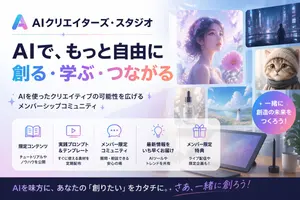
Japanese AI Creator Studio Banner
Create a polished Japanese promotional website hero banner for an AI creator community, in a clean modern tech-advertising style with a soft pastel blue, lavender, pink, and white palette. Wide 16:9 composition. On the left, place a gradient triangular abstract logo and the Japanese brand name AIクリエイターズ・スタジオ (brand name) at the top, followed by a thin horizontal divider line with a small sparkle in the middle. Below that, a very large bold Japanese headline in 2 lines: first line in dark navy, 「AIで、もっと自由に」, second line in large gradient letters from cyan to purple to pink, 「創る・学ぶ・つながる」. Under the headline, add a short Japanese subheadline with sparkle marks, 「AIを使ったクリエイティブの可能性を広げるメンバーシップコミュニティ」. On the right half, create a collage of 6 rounded-rectangle visual cards showing AI-generated creative examples: 1 large dreamy portrait of a woman in profile surrounded by flowers and butterflies in ethereal purple light, 1 small cyberpunk city nightscape with a lone figure, 1 small close-up portrait of a fluffy cat, 1 small luxury cosmetic bottle labeled “AI STUDIO”, 1 small bright seascape or flower-field landscape with a woman in white, and 1 large tablet drawing device on a desk with a stylus, plus a coffee mug and plant nearby. Add a circular gradient badge overlapping the right side with bold white Japanese text 一緒に創造の未来をつくろう! (badge text). Across the lower middle, place a translucent white rounded feature panel containing exactly 5 equal columns with thin separators and pastel line icons. Each column has an icon, a bold Japanese title, and a smaller 2-line description. The 5 titles are: 「限定コンテンツ」, 「実践プロンプト&テンプレート」, 「メンバー限定コミュニティ」, 「最新情報をいち早くお届け」, 「メンバー限定特典」. Use fitting icons for book, monitor, chat bubble, light bulb, and gift. Add concise Japanese descriptions beneath each title. At the very bottom, add a dark navy footer strip with a large Japanese call-to-action sentence in white and pink-purple gradient accent text, AIを味方に、あなたの『創りたい』をカタチに。さあ、一緒に創ろう! (footer text). Overall look: premium startup landing page, glossy soft lighting, subtle sparkles, glassmorphism panels, clean typography, Japanese text rendered accurately, highly legible, visually balanced, professional social media thumbnail quality.3a:Ta71,Create a polished Japanese promotional website hero banner for an AI creator community, in a clean modern tech-advertising style with a soft pastel blue, lavender, pink, and white palette. Wide 16:9 composition. On the left, place a gradient triangular abstract logo and the Japanese brand name AIクリエイターズ・スタジオ (brand name)
Explore more prompts
Browse more AI image and video prompts by category.
FAQ
- How does the bilingual subheadline integrate with the rest of the design?
- The Chinese line "3天引爆全网, 助力品牌实现指数级增长" sits directly under the English headline in the hero, using the same glassmorphism container and neon accent styling so it reads as a natural extension rather than an add-on.
- What makes the performance section feel interactive in a static image?
- The line graph peaks at Day 3 and the segmented bar chart includes clear percentage labels plus the four stat cards above it, all rendered with subtle glows and shadows that suggest clickable dashboard elements.