
Text to Image
Cybernetic Space Book Promotion — AI Image Prompt
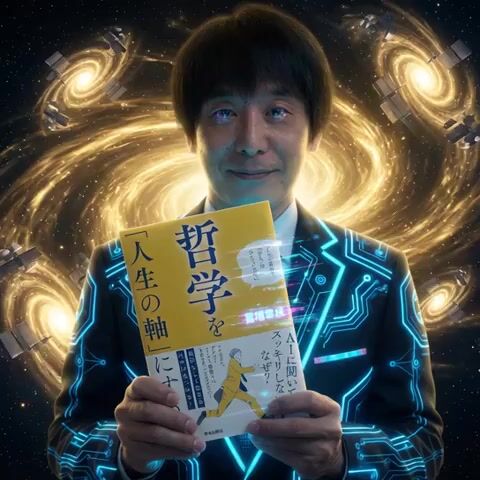
A creative video prompt for a book advertisement set in space, featuring swirling golden Starlink satellites and a cybernetic suit transformation. - AIPinMaker
Prompt
この本を両手で持って前にかざして宣伝、背景は宇宙。スターリンク衛星が黄金の光をはなってうずまいている、サイバー風にスーツが光る。富増章成のロゴが点滅してサイバー化。最後はサイバーアンドロイド化する、激しく点滅する
Prompt breakdown
- Subject
- Person gripping a book with both hands and thrusting it forward for promotion, Starlink satellites swirling in space, glowing cyber suit, 富増章成 logo transforming into cyber form, final cyber android conversion
- Style
- Cyberpunk with digital distortion, glowing neon lines, and android morphing on the logo and figure
- Lighting
- Golden radiance emitted by orbiting Starlink satellites combined with rapid, intense flashing from the cyberized logo and suit
- Composition
- Book centered in foreground held prominently toward viewer, satellites forming a dynamic swirling backdrop that frames the cyber transformations
- Mood
- High-energy promotional intensity driven by relentless flashing and the dramatic shift from human to cyber android
Remix ideas
- Swap the golden Starlink light for pulsing electric blue to shift the cyber palette while keeping the swirling satellite motion
- Slow the logo’s flashing sequence so the 富増章成 characters gradually pixelate before the full android reveal
- Replace the book with a different title but keep the same two-handed forward thrust and final intense flashing android effect
Reference images

How to use this AI Image prompt template
 1
1Copy the prompt — grab this template’s prompt and negative prompt.  2
2Pick a model — choose a recommended AI model for the best match.  3
3Generate — open the studio with one click and create your result.
Related templates
Laser eye effect web demo with Mediapipe and Three.js
Use the computer's front-facing camera Use `mediapipe` lib to capture facial landmarks Use `threejs` to apply a LASER EYE effect to the face captured by the camera based on the real-time 3D landmark information provided by `mediapipe`

Cybernetic Motion Graphic Logo Reveal
Create a creative video of Cybernetic Motion Graphic Logo Reveal. Style: photorealistic. Composition: balanced and well-framed. Lighting: natural with cinematic mood. Category: cinematic-video. Reference: cybernetic-motion-graphic-logo-reveal-3301.

Military Thriller Typography Animation
Ultra-clean Hollywood military thriller typography animation on black background. The text: SECTOR 14 Animation style: Distorted Frequency Reveal mixed with Classified HUD motion graphics. The text should NOT appear instantly. Start with: faint signal interference fragmented waveform distortions subtle digital frequency noise low-opacity fragmented symbols soft corrupted scan lines Then: individual letter fragments slowly begin assembling through signal distortion. Letters briefly glitch and warp as if affected by an unstable transmission frequency. A thin horizontal scanning line passes through the center of the text while it stabilizes. Typography style: thin modern military font cinematic typography cold white text with extremely subtle red interference accents restrained animation Motion behavior: smooth cinematic easing synchronized to deep bass pulses subtle digital instability Background: pure black. Sound design: deep atmospheric bass pulse, dark cinematic drone, The sound and animation must synchronize precisely together like a high-end movie trailer title card.

High-Tempo 9-Image Glitch Edit
15秒・9枚画像ハイテンポ編集プロンプト 使用画像はimage1、image2、image3、image4、image5、image6、image7、image8、image9のみ。指定以外の画像は生成しない。映像全体はMV・CMレベルのテンポ感と編集密度を重視し、常に画面が変化し続ける構成とする。 0〜2秒 0.1秒ごとに高速切り替え。 表示順 image1→image2→image3→image4→image5→image6→image7→image8→image9→以降ランダム。 Flash Cut、Smash Cut、Glitch、RGB Split、White Flash、Strobe、Film Burn、Motion Blurをランダム使用。 --- 2〜4秒 3×3グリッド表示。 9マスに image1 image2 image3 image4 image5 image6 image7 image8 image9 を配置。 0.3〜0.5秒ごとに各マスが独立してランダム入れ替えされ、全マス同時ではなくバラバラに更新される。 Split Screen、Sliding Panel、Tile Shuffle、Push、Pull、Flip、Mask Revealを使用。 --- 4〜6秒 画面を多数の小さなタイルへ分割。 各タイルにはimage1〜image9をランダム表示。 タイルは高速でシャッフルされ、Checker、Random Block、Diagonal、Crossパターンへ次々変化する。 --- 6〜8秒 円形グリッド演出。 image1〜image9を円周上へ均等配置。 高速回転しながら配置順がランダムに入れ替わる。 Rotate、Spin、Circular Wipe、Radial Blurを組み合わせる。 --- 8〜10秒 縦9分割、横9分割、ストライプ分割を高速で切り替える。 各帯にはimage1〜image9をランダム表示。 帯は左右・上下からスライドし、絶えず画像が入れ替わる。 --- 10〜12秒 コラージュ演出。 大小さまざまな矩形へimage1〜image9をランダム配置。 出現・消失・拡大・縮小・回転を高速で繰り返し、画面全体が絶えず再構成される。 Grid Animation、Mosaic Reveal、Tile Shuffle、Alpha Dissolveを使用。 --- 12〜14秒 9枚を同時表示。 グリッド配置→円形配置→横一列→縦一列→ランダム配置を高速で切り替える。 各レイアウト間はFlash Cut、Glitch、Sliding Panelで接続する。 --- 14〜15秒 9枚が高速シャッフルされながら一瞬ずつ全面表示。 最後に最も印象的な1枚を画面いっぱいに表示し、 White Flash →Bloom →Light Leak →Freeze Frame で締める。 使用推奨トランジション・編集効果 Flash Cut、Smash Cut、Jump Cut、Match Cut、Glitch、RGB Split、Strobe、Film Burn、White Flash、Split Screen、Grid Animation、Tile Shuffle、Mosaic Reveal、Sliding Panel、Push、Pull、Flip、Rotate、Spin、Circular Wipe、Diagonal Wipe、Checker Wipe、Random Block、Mask Reveal、Alpha Dissolve、Motion Blur、Radial Blur、Zoom Cut、Freeze Frame、Echo Frame。 同じ演出を連続使用せず、15秒間を通して画面構成が絶えず変化する、情報量と勢いのある映像として表現する。3b:Tb66,15-Second / 9-Image High-Tempo Editing Prompt Use only image1, image2, image3, image4, image5, image6, image7, image8, and image9. Do not generate images other than those specified. The overall video should emphasize an MV/CM-level sense of tempo and editing density, with a composition that constantly changes the screen. 0–2 seconds: High-speed switching every 0.1 seconds. Display order: image1→image2→image3→image4→image5→image6→image7→image8→image9→random thereafter. Use Flash Cut, Smash Cut, Glitch, RGB Split, White Flash, Strobe, Film Burn, and Motion Blur randomly. --- 2–4 seconds: 3x3 grid display. Place image1 through image9 in the 9 slots. Each slot independently and randomly switches every 0.3 to 0.5 seconds; slots update separately rather than all at once. Use Split Screen, Sliding Panel, Tile Shuffle, Push, Pull, Flip, and Mask Reveal. --- 4–6 seconds: Split the screen into many small tiles. Randomly display image1 through image9 in each tile. Tiles are shuffled at high speed, changing through Checker, Random Block, Diagonal, and Cross patterns. --- 6–8 seconds: Circular grid effect. Arrange image1 through image9 evenly on a circumference. Rotate at high speed while the arrangement order switches randomly. Combine Rotate, Spin, Circular Wipe, and Radial Blur. --- 8–10 seconds: High-speed switching between

Tank-Bike Transformation Video Prompt
Starting from the image of the man on the tank-bike, the camera tracks forward at a high speed. The motorcycle's rear tracks churn against the wet asphalt, kicking up spray and thick white smoke. The man grips the handlebars tightly, leaning into the wind. The background city blurs with motion. mechanical armor plates begin to manifest on the rider's back. A glowing red circular lens ignites on the front of the motorcycle’s chassis, resembling a robotic eye. The bike's engine glows with internal red heat as it accelerates through the foggy city. rider has back armor, heavy mechanical exoskeleton limbs snap into place over his arms and shoulders. The rider raises his arms as the suit locks in. A large Gatling gun barrel emerges from the right side of the motorcycle. Sparking metal and shifting gears are visible. a sleek black robotic helmet snaps shut over the man’s head, completely hiding his face. The motorcycle’s front end expands, and a second Gatling gun barrel rotates into position. The rider hunches forward, becoming one with the machine. his entire body is now encased in heavy, futuristic black armor plating. The bike grows larger and more aggressive, with multiple gun ports opening. The camera pans slightly to the side to show the immense scale of the tank-bike hybrid as it thunders down the road. The Gatling guns on the bike begin to spin rapidly and fire continuous streams of orange fire and tracer bullets. Rockets launch from pods at the rear, leaving smoke trails. The environment erupts in explosions and fire as the bike speeds through the warzone. High-octane action, camera shakes, intense muzzle flashes, cinematic destruction.3f:T68

Motion Graphics Intro: Chaos Unit
Based on the three characters in the reference images. High definition, Unreal Engine rendering, cinematic quality, candy-colored palette, Japanese-style aesthetics, artistic, with strong sense of rhythm. 0–2s: Empty scene, a small dot at the center, thin-line UI frame, subtle particles. Text: “STATUS: STANDBY” “SYSTEM: INIT”. 2–4s: The fox on the left from image2 appears, riding a hovering skateboard, waves toward the camera. Curved motion trails behind. Text: “ID: 01” “CODENAME: RED” “ROLE: TACTICIAN”. 4–6s: The rabbit on the right from image1 appears, swings a carrot weapon and takes a combat stance. Circular motion trails. Text: “ID: 02” “CODENAME: KANA” “ROLE: EXECUTIONER” “WEAPON: CARROT”. 6–8s: The corgi from image3 appears, looks left and right, showing a simple, friendly smile. Concentric circle UI under its feet. Text: “ID: 03” “CODENAME: Arthur” “ROLE: COMMANDER”. 8–15s: The three characters align horizontally, from left to right: FIREBIRD, SAGE, MAD RABBIT. Snap alignment, unified circular platform beneath. Text: “SYSTEM SYNC COMPLETE” “UNIT READY”. Add UI overlay to each character: tracking frames, data bars, simplified charts. Text: “TRACKING” “ANALYSIS” “LOCKED”. Large title “CHAOS UNIT” appears, breaking into geometric fragments that expand outward. Text: “SYSTEM ERROR” “DATA BREAK”. The fragments then reassemble into “CHAOS UNIT”, centered layout with subtle circular guide lines. Text: “REBUILD COMPLETE” “SYSTEM ONLINE” “KANAWORKS_AI”. Final frame: “CHAOS UNIT” at the top, the three characters standing side by side below, with a clean circular platform at the bottom. Text: “STATUS: LOCKED” “UNIT: ACTIVE”.3d:T6ec,Based on the three characters in the reference images. High definition, Unreal Engine rendering, cinematic qua
Explore more prompts
Browse more AI image and video prompts by category.
FAQ
- Why do the Starlink satellites appear in this book promo?
- They create a cosmic backdrop that emits golden light, emphasizing the cyber suit glow and making the promoted book stand out against the swirling orbital pattern.
- What occurs during the final stage of the prompt?
- The 富増章成 logo and figure undergo rapid flashing as they fully convert into a cyber android, delivering the intense blinking climax of the scene.