
Text to Image
Complex AI Model Infographic Board — AI Image Prompt
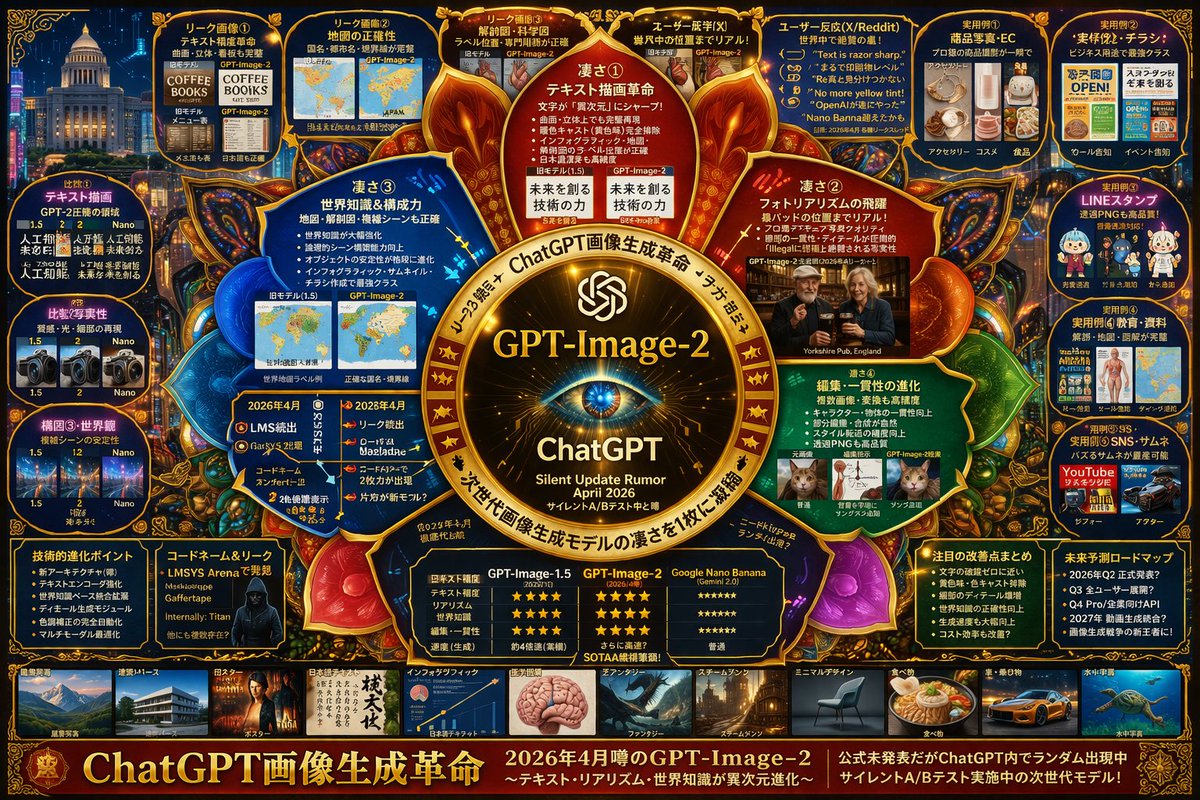
Generates a highly dense, futuristic infographic board detailing the features, comparisons, and rumors of a next-generation AI model. - AIPinMaker
Prompt
{
  "type": "highly dense futuristic tech infographic board",
  "theme": {
    "colors": "{argument name=\"theme color\" default=\"gold and deep blue\"}",
    "style": "dark mode, glowing neon borders, complex mind-map layout, cyber-tech aesthetic"
  },
  "centerpiece": {
    "description": "glowing golden circular emblem resembling an eye or camera lens",
    "text": ["{argument name=\"main title\" default=\"GPT-Image-2\"}", "ChatGPT", "Silent Update Rumor {argument name=\"release date\" default=\"April 2026\"}"]
  },
  "layout": {
    "top_left": {
      "title": "Leak Images",
      "count": 4,
      "items": ["text rendering coffee menu", "world map", "anatomical diagram", "photorealistic pub"]
    },
    "top_right": {
      "title": "Use Cases and Reactions",
      "count": 5,
      "items": ["e-commerce products", "business flyers", "chat stickers", "educational materials", "YouTube thumbnails"]
    },
    "left_side": {
      "title": "Version Comparisons",
      "count": 3,
      "items": ["text rendering comparison", "photorealism comparison", "composition stability comparison"]
    },
    "inner_ring": {
      "title": "Core Features",
      "count": 4,
      "items": ["text drawing revolution", "photorealism leap", "world knowledge", "editing consistency"]
    },
    "bottom_left": {
      "title": "Technical Specs",
      "count": 2,
      "items": ["technical evolution bullet points", "hacker silhouette with codenames"]
    },
    "bottom_center": {
      "title": "Model Comparison Table",
      "columns": 3,
      "headers": ["GPT-Image-1.5", "{argument name=\"main title\" default=\"GPT-Image-2\"}", "{argument name=\"competitor model\" default=\"Google Nano Banana\"}"],
      "rows": ["text accuracy", "realism", "world knowledge", "editing", "speed"]
    },
    "bottom_right": {
      "title": "Future Outlook",
      "count": 2,
      "items": ["notable improvements list", "future roadmap timeline"]
    },
    "bottom_edge": {
      "title": "Genre Gallery",
      "count": 10,
      "items": ["architecture", "poster", "japanese text", "infographic", "fantasy", "steampunk", "minimal design", "food", "car", "underwater"]
    },
    "footer": {
      "title": "Main Banner",
      "text": ["{argument name=\"subtitle\" default=\"ChatGPT 画像生成革命\"}", "Next generation model in silent A/B testing"]
    }
  }
}3a:T941,{Prompt breakdown
- Subject
- highly dense futuristic tech infographic board on GPT-Image-2 with leak images, version comparisons, and model table
- Style
- dark mode cyber-tech aesthetic, complex mind-map layout, glowing neon borders
- Lighting
- glowing neon borders and central golden circular emblem resembling an eye or lens
- Composition
- mind-map with top-left leak images panel, inner-ring core features, bottom model comparison table, and bottom-edge genre gallery
- Mood
- speculative high-tech atmosphere focused on silent updates and future roadmaps
Remix ideas
- Swap the centerpiece text to emphasize "photorealism leap" instead of the release date
- Replace two bottom-edge genre items with "portrait" and "abstract" to shift focus
- Alter the theme colors argument from gold and deep blue to electric purple and cyan for a fresh neon variant
Reference images
How to use this AI Image prompt template
 1
1Copy the prompt — grab this template’s prompt and negative prompt.  2
2Pick a model — choose a recommended AI model for the best match.  3
3Generate — open the studio with one click and create your result.
Related templates
Futuristic 3D Graffiti Mural
Create a highly detailed photorealistic 3D graffiti mural on a concrete wall, spelling the word GeniArt (graffiti text) in huge wildstyle bubble letters. The lettering is split visually into two color families: the left half in glossy deep magenta, burgundy, violet, and black with white rim highlights, and the right half in vivid orange, red-orange, black, and purple with sharp angular extensions. Use thick extruded 3D letterforms with strong shadows cast onto the wall, metallic enamel shine, beveled edges, layered outlines, and dramatic perspective depth. Integrate exactly 3 distinctive tech-art details: one pink brain sitting above the center letters, one triangular black-and-cyan digital panel embedded inside the capital A, and one orange molecular/network structure crossing the A with glowing nodes and connecting rods. Add many aggressive spikes, arrows, shards, and abstract graffiti splinters around the letters, especially purple shards behind the left word and orange shards behind the right word. The background is an indoor urban concrete wall with subtle stains, vertical grime, faint circuit-board patterns, cyan and yellow digital markings, and a muted yellow-to-cool-blue wash of light; the floor is bare gray concrete visible along the bottom. Style should feel like a futuristic cyberpunk street-art installation, ultra sharp, high contrast, cinematic lighting, realistic wall texture, realistic depth and cast shadows, no people, no extra readable words, landscape 16:9 composition.

Futuristic cryptocurrency dashboard UI
复刻一个未来感的深色模式加密货币数据看板:整体采用高对比度的黑曜石背景、渐变描边的玻璃拟态 UI 元素、纤细的 Inter 字体排版,以及带有霓虹光效的金融数据可视化

Futuristic animated landing page for AI game
I want to design the landing page for a new AI game (product_type). We want it to be futuristic and all that, and use animations as much as possible.
Futuristic Tech Strategy Slide
{ "type": "presentation slide infographic", "style": { "theme": "{argument name=\"theme color\" default=\"neon blue\"}", "background": "{argument name=\"background style\" default=\"dark blue futuristic tech with glowing data streams and an ascending arrow\"}" }, "header": { "title": "{argument name=\"main title\" default=\"核心抓手\"}", "subtitle": "{argument name=\"english title\" default=\"Key Levers\"}", "description": "构建可复制、可放大、可持续的增长引擎" }, "layout": { "type": "circular flow diagram", "center_node": { "title": "{argument name=\"center node title\" default=\"P7 Core System\"}", "subtitle": "战略落地 · 高效执行 · 持续进化", "visual": "glowing tech sphere" }, "surrounding_nodes": { "count": 5, "connection": "glowing blue arrows forming a clockwise cycle", "nodes": [ { "position": "top", "icon": "robotic arm", "english_label": "Automation Pipeline", "chinese_label": "自动化", "description": "减少人工干预,提升交付效率" }, { "position": "right", "icon": "monitor with chart", "english_label": "Data Feedback Loop", "chinese_label": "数据驱动", "description": "数据洞察,持续优化决策" }, { "position": "bottom right", "icon": "clipboard with checkmarks", "english_label": "Standardization", "chinese_label": "标准化", "description": "统一规范,降低复杂度" }, { "position": "bottom left", "icon": "coins", "english_label": "Cost Efficiency", "chinese_label": "成本优化", "description": "资源精准投入,效益最大化" }, { "position": "left", "icon": "stacked cubes", "english_label": "Reusable Components", "chinese_label": "模块化", "description": "复用加速,质量一致" } ] } } }

Anatomy Visualization Prompt Template (Great White Shark Example) - Nano Banana Pro AI Prompt for Infographic / Edu Visual
A digital illustration of a great white shark (subject) in mid-hunting approach (action/state), portrayed with a network of glowing cold bioluminescent blue (primary color) lines mapping its sensory and predatory anatomy (system type). The cartilaginous skeleton is rendered as flexible geometric framework, the lateral line system as a full-body motion detector array. The image is set against abyssal ocean black, depth pressure readings floating at the margins. The ampullae of Lorenzini, hundreds of electroreceptor pores clustered on the snout (area of interest), are emphasized with a pulsing red-orange (accent color) glow, indicating active electromagnetic detection: the prey's heartbeat rendered as intercepted signal waves feeding into the shark's targeting consciousness (condition). The teeth are visualized as serrated replacement queues. The style merges marine biology research documentation with military targeting system aesthetics, designed to resemble a naval analysis of nature's most refined predator, clinically respectful of four hundred million years of evolution.

Surreal Action RPG Boss Fight UI
{ "type": "action RPG video game screenshot", "environment": "{argument name=\"environment\" default=\"dark, gritty tavern interior with wooden structures, lanterns, and scattered debris\"}", "characters": { "player": { "description": "female warrior with red hair in dark leather armor", "action": "{argument name=\"player action\" default=\"swinging a glowing sword that emits bright sparks and light trails\"}" }, "boss": { "description": "giant {argument name=\"boss type\" default=\"broccoli\"} head attached to human female legs wearing fishnet stockings and black high heels", "pose": "floating or jumping in the center of the room" } }, "layout": { "ui_components": [ { "position": "top center", "type": "boss health bar", "text": "{argument name=\"boss name\" default=\"ブロッコリーヌ\"}", "value": "33,333" }, { "position": "center", "type": "floating damage number", "text": "{argument name=\"damage number\" default=\"3,333\"}", "icon": "green leaf" }, { "position": "left edge", "type": "party roster", "count": 7, "description": "vertical column of small character portrait thumbnails" }, { "position": "bottom left", "type": "control prompts", "count": 4, "labels": ["[RT] グラディエント", "[RB] パリィ", "(B) 回避", "(A) ジャンプ"] }, { "position": "bottom right", "type": "party status bars", "count": 3, "description": "character portraits with HP/MP bars and numeric values like 2333/2333" }, { "position": "mid-right", "type": "stance info panel", "style": "ink-splatter frame", "labels": ["構えなし", "スキルを使うと構えが生成されません。構えを生成するには攻撃する。"] } ] } }
Explore more prompts
Browse more AI image and video prompts by category.
FAQ
- What specific leak images appear in the top-left panel?
- The top-left "Leak Images" section shows four examples: text rendering coffee menu, world map, anatomical diagram, and photorealistic pub.
- Which models are compared in the bottom-center table?
- The table pits GPT-Image-1.5 against GPT-Image-2 and Google Nano Banana across rows for text accuracy, realism, world knowledge, editing, and speed.