
Text to Image
Codex Jigsaw Puzzle Tech Banner — AI Image Prompt
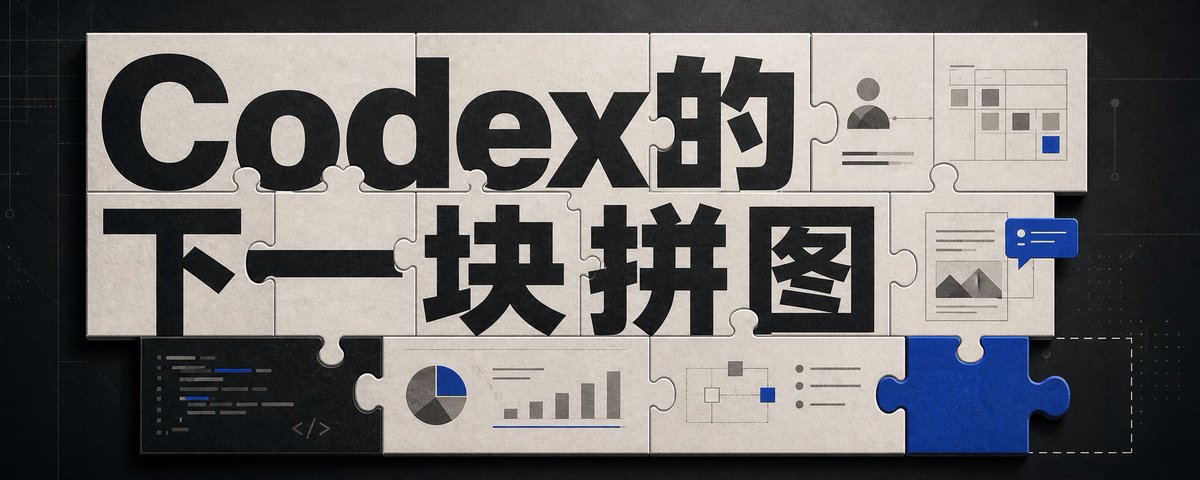
A wide editorial tech banner using interlocking puzzle pieces, bold Chinese headline typography, and small AI workflow UI motifs to illustrate Codex as the next missing piece. - AIPinMaker
Prompt
Goal: Create a wide editorial hero banner about {argument name="headline topic" default="Codex的下一块拼图"}, showing a jigsaw-puzzle metaphor for AI coding, visual design, and missing capabilities.

Canvas: Ultra-wide horizontal banner, approximately 5:2 aspect ratio, dark charcoal technical background with faint grid lines, subtle blueprint marks, tiny dots, and thin circuit-like guide lines. Center the artwork with a large off-white paper/cardboard jigsaw puzzle assembly casting soft shadows.

Layout: Use exactly 15 visible puzzle elements: 13 off-white connected puzzle pieces forming a rectangular mosaic, 1 vivid cobalt-blue puzzle piece inserted at the bottom-right edge, and 1 dashed-outline empty missing-piece slot immediately to the right of the blue piece. The puzzle should look physical, with rounded tabs and sockets, slight bevels, paper texture, seams, grime, and realistic shadowing.

Text content: The main typography dominates the puzzle surface. Use huge bold black sans-serif Chinese type reading {argument name="main title text" default="Codex的"} across the top row and {argument name="subtitle text" default="下一块拼图"} across the middle row. Make the letters oversized, cropped slightly by puzzle seams, and integrated into the tile layout. Keep the text crisp and high contrast.

Visible graphic elements: Include exactly 7 small embedded UI/diagram motifs on puzzle pieces: 1 dark code editor panel in the lower-left with short colored code lines and a small </> symbol; 1 pie chart combined with a small bar chart along the lower middle; 1 simple node-and-connector flow diagram near the lower center-right; 1 bullet-list panel with three round bullets to the right of the flow diagram; 1 user profile card in the upper-right with avatar icon and horizontal text lines; 1 small spreadsheet/dashboard grid in the top-right corner with gray cells and one blue highlighted cell; 1 document/image card on the right side with small mountain thumbnail lines, overlapped by a blue chat bubble containing two white dots and two white horizontal lines.

Visual style: Premium tech editorial illustration, cinematic lighting, tactile paper puzzle texture, muted monochrome palette of black, warm off-white, gray, and accent cobalt blue {argument name="accent color" default="cobalt blue"}. Add subtle scratches, dust, and paper grain. Use realistic shadows between pieces, but keep the whole image clean and readable.

Constraints: No people, no extra logos, no watermark, no random English words beyond tiny unreadable code strokes, and no additional large text. The blue puzzle piece should feel like the key missing component that completes the system, while the dashed empty slot hints that another piece is still absent.37:Tacc,Goal: Create a wPrompt breakdown
- Subject
- 13 off-white connected puzzle pieces forming a rectangular mosaic plus 1 cobalt-blue piece and 1 dashed empty slot, with embedded code editor, pie/bar charts, node flow diagram, bullet list, user profile card, spreadsheet grid, and document-plus-chat-bubble motifs, overlaid by huge bold Chinese type reading Codex的 and 下一块拼图
- Style
- Premium tech editorial illustration with paper texture, seams, grime, bevels, subtle scratches, dust, and paper grain on a dark charcoal technical background
- Lighting
- Cinematic lighting creating soft realistic shadows between puzzle pieces and on the off-white cardboard surface
- Composition
- Ultra-wide 5:2 horizontal layout centered on the assembled puzzle with 15 total elements, faint grid lines and circuit guides framing the scene
- Mood
- Technical anticipation, emphasizing the blue piece as the key addition and the empty slot as the next absent capability
Remix ideas
- Change the cobalt accent to another brand color while keeping the blue chat bubble
- Move the code-editor motif to the upper-left piece and add one extra node to the flow diagram
- Slightly rotate two connected pieces on the left edge to suggest the assembly is still in progress
Reference images
How to use this AI Image prompt template
 1
1Copy the prompt — grab this template’s prompt and negative prompt.  2
2Pick a model — choose a recommended AI model for the best match.  3
3Generate — open the studio with one click and create your result.
Related templates

Chinese VPS Comparison Cover
Create a clean modern Chinese tech blog cover in a wide 16:9 layout with a soft light-gray background, rounded-corner canvas, and minimalist dashboard aesthetic. On the left, place a small rounded category pill near the top with a yellow dot icon and the text “VPS 实测 · 购买参考”. Below it, set a very large bold dark navy Chinese headline in two stacked lines: “DMIT涨价之后” and “我把搬瓦工”. Under the headline, add a short yellow underline accent and then a medium-gray subheading reading “先看重点再下单”. The typography should feel premium, editorial, and highly legible, with strong contrast and generous spacing. On the right, show a floating desktop-app style server monitoring panel with a white card body, subtle shadow, rounded corners, and a pale beige browser top bar with three small circular window buttons. The panel header should read “BandwagonHost – CN2 GIA”, with a smaller line underneath “洛杉矶 · CN2 GIA” and a green status label “运行中”, plus on the top-right a small clock icon and the text “运行时长 27 天”. Inside the panel, include exactly 5 metric cards across the top row labeled “CPU” showing “12%”, “内存” showing “28%”, “硬盘” showing “18%”, “带宽” showing “1.2 Mbps”, and “延迟(本地)” showing “156 ms”, each with a small teal icon and a thin teal progress bar. Below, place a large line chart card on the left titled “稳定性(近 7 天)” with a top-right annotation “可用性 99.92%”, a teal fluctuating line, a vertical scale from 97% to 100%, and date labels from “05-13” through “05-19”. To the right of the chart, add a specs card titled “配置摘要” listing exactly 5 rows: “CPU 2 vCPU”, “内存 2 GB”, “硬盘 40 GB SSD”, “流量 1 TB/月”, and “系统 CentOS 7.9 64bit”. In the lower-left area overlapping between the text block and the dashboard, add a smaller white recommendation card with rounded corners and shadow. Its title line should include a yellow bookmark icon and read “购买参考 · 重点看这几项”. Inside, list exactly 4 rows: “线路质量 CN2 GIA”, “稳定性 ★★★★☆”, “性价比 中上”, and “适用场景 建站 / 中转 / 轻应用”. Add soft decorative elements in the background: a pale mint abstract rounded shape in the bottom-left corner, a faint dotted mint pattern above it, and a light dotted curved connector line arcing from the left text area toward the top of the dashboard, with a small yellow dot on the curve. Place a small rounded yellow name tag in the bottom-right corner of the canvas with the text “小墨同学”. Use a restrained palette of dark navy, teal, yellow, white, and light gray, with crisp vector-style rendering, subtle shadows, spacious composition, and a polished AI-generated editorial cover look for a VPS comparison article.39:Tb80,Create a clean modern Chinese tech blog cover in a wide 16:9 layout with a soft light-gray background, rounded-corner canvas, and minimalist dashboard aesthetic. On the left, place a small rounded category pill near the top with a yellow dot icon and the text “VPS 实测 · 购买参考”. Below it, set a very large bold dark navy Chinese headline in two stacked li
AI Inspiration Gallery Grid
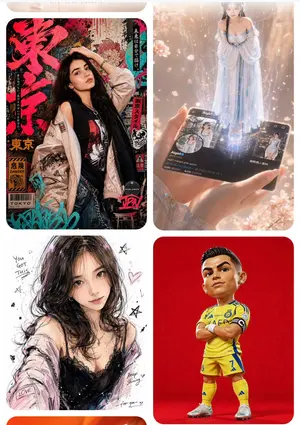
Goal: Create a clean mobile-style inspiration gallery screen showing four rounded image cards in a 2-column grid, like a GPT Image 2 prompt inspiration website. The overall feeling should be glossy, creative, trend-focused, and suitable for showcasing different AI image prompt examples. Canvas: Vertical smartphone screenshot aspect ratio, white background, soft margins, rounded card corners, no visible browser chrome. At the very top, include a very subtle pale beige pill-shaped header area with tiny centered uppercase text reading “LIVE · LOVE · LICENSE” or similarly faint decorative navigation text. Layout: Use exactly 4 visible cards arranged in a 2-by-2 grid with narrow white gutters and large rounded corners. The bottom edge may crop slightly as if the page continues below. Each card should have a different visual style and subject. Card count and descriptions: 1. Top-left card: A cyberpunk Japanese street-poster fashion portrait of a young woman with long dark hair (main character). She poses in front of a dense Tokyo grunge poster wall filled with large red Japanese brush lettering, warning labels, barcode graphics, graffiti tags, black-red-turquoise accents, and sticker-like typography. Outfit: oversized pale satin bomber jacket worn off one shoulder, black graphic tank top, denim jeans, metal chain belt, necklace, bracelets, one hand lifted to her head. Include readable English fragments such as “TOKYO,” “DANGER,” and “WORLDWIDE,” plus vertical Japanese-style text strips. 2. Top-right card: A magical hologram scene in warm peach-pink light. Two hands hold a glossy black social-media profile card or smartphone card labeled Aigirl (profile name). From the card rises a full-body translucent holographic woman in a flowing pale blue off-shoulder gown, standing in a column of sparkling light. Add small profile thumbnails, UI icons, follower-like numbers, faint city imagery, drifting petals, bokeh, and cinematic lens glow. 3. Bottom-left card: A loose fashion illustration/sketch portrait of a young woman with messy dark shoulder-length hair (sketch subject) on a white paper background. Style: expressive black pencil lines, watercolor blushes, pink-purple highlights, imperfect ink splatters, hearts, stars, handwritten motivational doodles. Outfit: black lace camisole with a pale pink cardigan slipping from the shoulders. Include small handwritten English phrases such as “You got this,” “LOVE,” “Keep shining,” and “for you.” 4. Bottom-right card: A stylized 3D caricature football figure on a solid vivid red studio background. The player has an oversized head and short body, standing arms crossed in a confident pose. Outfit: bright yellow football kit with blue trim (team kit color), matching yellow socks, white cleats, black captain armband, jersey number 7 visible, polished toy-figurine rendering with realistic fabric and shoes. Visual style: High-resolution polished AI gallery aesthetic, sharp image cards, soft rounded corners, realistic lighting in some cards and illustration style in others. Make the cards look like curated prompt examples from an inspiration website rather than a single unified scene. Constraints: Use exactly four main image cards. Keep the grid clean and evenly spaced. Do not add extra cards, watermarks, captions outside the cards, or heavy interface controls. Faces may be softly obscured or simplified, but the pose, clothing, card composition, and style differences must remain clear.38:Te1d,Goal: Create a clean mobil
Informative Climate Change Seminar Poster
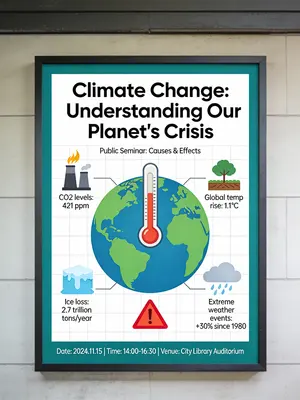
An informative and engaging poster for a public seminar on climate change. The poster is designed as a mini-infographic, with a large, central graphic showing the earth with a thermometer, and smaller icons and data points around it explaining the causes and effects. The design is clean, organized, and aims to educate the viewer quickly and effectively. –ar 3:4

1990s Time Traveler Magazine Cover
Create a creative image of 1990s Time Traveler Magazine Cover. Style: photorealistic. Composition: balanced and well-framed. Lighting: natural with cinematic mood. Category: photography. Reference: 1990s-time-traveler-magazine-cover-14330.

Thumbnail text overlay based on attachment
Create a youtube-thumbnail image of Thumbnail Text Overlay Based On Attachment. Style: photorealistic. Composition: balanced and well-framed. Lighting: natural with cinematic mood. Category: poster. Reference: thumbnail-text-overlay-based-on-attachment-435.

YouTube Dark Mode Desktop UI Mockup
{ "type": "desktop web browser UI screenshot", "environment": "{argument name=\"os environment\" default=\"Windows 11 desktop\"}", "theme": "{argument name=\"ui theme\" default=\"dark mode\"}", "browser_window": { "tabs": ["YouTube", "New Tab"], "url_bar": "youtube.com", "profile_icon": "{argument name=\"profile initial\" default=\"M\"}" }, "app_interface": { "header": { "logo": "{argument name=\"website name\" default=\"YouTube\"} GB", "search_bar": "Search", "icons": ["mic", "create", "notifications", "profile"] }, "filter_bar": { "active_filter": "{argument name=\"active filter\" default=\"All\"}", "count": 11, "labels": ["All", "Gaming", "Music", "Live", "Podcasts", "Mixes", "Science", "Lo-fi", "Thrillers", "Recently uploaded", "Watched"] }, "sidebar": { "sections": [ { "title": "Main", "count": 3, "labels": ["Home", "Shorts", "Subscriptions"] }, { "title": "You", "count": 6, "labels": ["Your channel", "History", "Playlists", "Your videos", "Watch later", "Liked videos"] }, { "title": "Subscriptions", "count": 8, "labels": ["Linus Tech Tips", "MrBeast", "Kurzgesagt - In a Nutshell", "ColdFusion", "3Blue1Brown", "Khan Academy", "Veritasium", "Show more"] }, { "title": "Explore", "count": 7, "labels": ["Trending", "Music", "Films", "Live", "Gaming", "News", "Sport"] }, { "title": "More from YouTube", "count": 3, "labels": ["YouTube Premium", "YouTube Music", "YouTube Kids"] } ] }, "main_content": { "layout": "3 columns by 4 rows grid", "count": 12, "video_cards": [ { "title": "Why Build Your Own GPU is Almost Impossible", "channel": "Linus Tech Tips", "stats": "164K views • 1 day ago", "thumbnail": "CPU/GPU chip" }, { "title": "Survive 100 Days In Circle, Win $500,000", "channel": "MrBeast", "stats": "40M views • 5 days ago", "thumbnail": "MrBeast with crowd in blue tracksuits" }, { "title": "What If We Nuke an Asteroid?", "channel": "Kurzgesagt - In a Nutshell", "stats": "4.2M views • 6 hours ago", "thumbnail": "Missile hitting asteroid in space" }, { "title": "How Dubai Became a $10 Billion City", "channel": "ColdFusion", "stats": "1.6M views • 2 weeks ago", "thumbnail": "Man and Dubai skyline" }, { "title": "The Beautiful Math of Euler's Identity", "channel": "3Blue1Brown", "stats": "2.8M views • 3 months ago", "thumbnail": "Math equation and spiral graph" }, { "title": "The World in 2040 - Population, Climate & More", "channel": "Veritasium", "stats": "7.7M views • 2 weeks ago", "thumbnail": "Lush green forest aerial view" }, { "title": "I've Been Using Linux For 12 Years, This Is What Finally...", "channel": "DistroTube", "stats": "160K views • 3 days ago", "thumbnail": "Laptop and smartphone with Linux logo" }, { "title": "Black Holes Explained - From Birth to Death", "channel": "Khan Academy", "stats": "3.9M views • 3 months ago", "thumbnail": "Glowing black hole accretion disk" }, { "title": "The Problem With Diet Advice", "channel": "Andrew Huberman", "stats": "4.4M views • 6 days ago", "thumbnail": "Man with glasses speaking" }, { "title": "How to Learn Anything (Evidence-Based)", "channel": "Ali Abdaal", "stats": "2.7M views • 3 months ago", "thumbnail": "Vector illustration of man reading a book" }, { "title": "The Last of Us Part 2 is a Masterpiece", "channel": "Naughty Dog", "stats": "2.3M views • 3 years ago", "thumbnail": "Ellie from The Last of Us" }, { "title": "lofi hip hop radio - beats to relax/study to", "channel": "Lofi Girl", "stats": "LIVE", "thumbnail": "Lofi girl studying at desk" } ] } }, "taskbar": { "os": "Windows", "icons": ["Start", "Search", "Task View", "File Explorer", "Edge", "Spotify"], "system_tray": "08:34 03/04/2024" } }3a:Tf5c,{ "type": "d
Explore more prompts
Browse more AI image and video prompts by category.
FAQ
- What does the single cobalt-blue piece represent in this Codex banner?
- It stands for the critical new capability being added to complete the AI coding system, contrasting the mostly assembled off-white sections.
- Why are there exactly seven small UI motifs scattered across the puzzle?
- They illustrate the concrete coding, analytics, and interface features already integrated into Codex while leaving room for the missing next piece.