
Text to Image
Cinematic Censored Portrait — AI Image Prompt
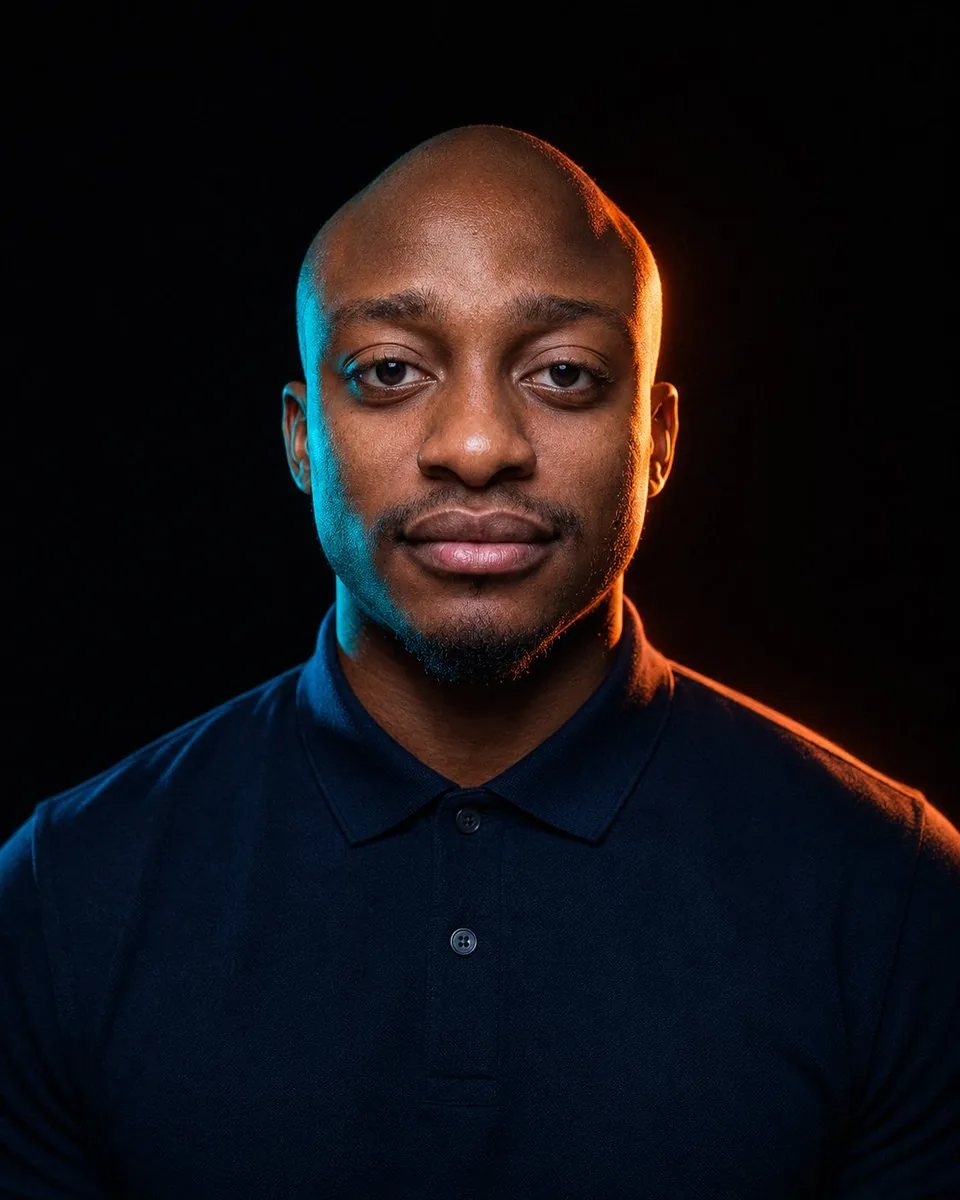
A photorealistic low-key studio portrait with blue and orange rim lighting and a square censor block over the subject's face. - AIPinMaker
Prompt
Create a dramatic studio portrait of {argument name="subject" default="a bald adult man with a short dark beard"} facing straight toward the camera, framed from upper chest to just above the head against a nearly black background. The subject wears {argument name="shirt color" default="a dark navy blue"} polo shirt with a collar and two visible buttons, shoulders broad and centered, posture upright and still. Use cinematic low-key lighting with strong colored rim lights: cool cyan-blue light along the left side of the head, ear, neck, and shoulder, and warm orange light along the right side, ear, neck, and shoulder, creating a high-contrast moody look. Place one large opaque square censor block directly over the center of the face, covering the forehead, eyes, nose, mouth, and most facial features while leaving the top of the bald head, ears, beard edge, neck, shirt, and shoulders visible; the square should have a muted dark gray-to-warm brown gradient matching the surrounding lighting. Make the image vertical, photorealistic, sharp, with subtle skin texture and fabric detail, no text, no watermark, no additional objects.Prompt breakdown
- Subject
- bald adult man with short dark beard in dark navy blue polo shirt with collar and buttons
- Style
- photorealistic cinematic studio portrait
- Lighting
- low-key cinematic with cool cyan-blue rim on left head/ear/neck/shoulder and warm orange rim on right
- Composition
- vertical frame upper chest to above head, broad centered shoulders, large opaque gradient censor square over face center
- Mood
- high-contrast moody dramatic
Remix ideas
- Swap the censor square for a thin horizontal bar across the eyes only while keeping the gradient
- Change the polo to charcoal gray and add subtle fabric texture highlights
- Reverse the rim colors so orange falls on the left side and cyan on the right
Reference images
How to use this AI Image prompt template
 1
1Copy the prompt — grab this template’s prompt and negative prompt.  2
2Pick a model — choose a recommended AI model for the best match.  3
3Generate — open the studio with one click and create your result.
Related templates

Cinematic Black and White Studio Portrait
Create a portrait image of Cinematic Black And White Studio Portrait. Style: photorealistic. Composition: balanced and well-framed. Lighting: natural with cinematic mood. Category: portrait. Reference: cinematic-black-and-white-studio-portrait-17275.

High-Contrast Monochrome Studio Portrait of a Man
Create a portrait image of High Contrast Monochrome Studio Portrait Of A Man. Style: photorealistic. Composition: balanced and well-framed. Lighting: natural with cinematic mood. Category: portrait. Reference: high-contrast-monochrome-studio-portrait-of-a-man-2511.

Cinematic Dual-Tone Studio Portrait
Create a cinematic, ultra-realistic studio upper-body portrait of any man (subject), preserving his natural hairstyle, beard style, eyewear or accessories if present in the reference, and overall facial appearance without changing his natural look. Frame the subject from the upper chest to the head, with the black crew-neck sweatshirt (clothing) clearly visible. The man should face the camera naturally with his chin slightly raised and eyes looking slightly upward, wearing a soft, calm, confident expression with a very subtle relaxed smile, not overly joyful and not serious. Use a deep solid black studio background with no distractions. Lighting should be dramatic but controlled: add vibrant magenta/purple accent light from one side, mainly touching the hair, cheek edge, beard edge, neck, and shoulder, and cool cyan/teal accent light from the opposite side, mainly creating a soft rim and side highlight. Keep the center of the face naturally lit with realistic skin tones; do not make the entire face look painted, neon, or harshly split into two colors. The dual-tone effect should feel like professional studio gel lighting, not a cyberpunk color mask. Maintain smooth but natural skin texture, sharp facial details, realistic beard texture if present, bright clear eyes, and crisp focus on the face. Professional editorial photography style, shallow depth of field, soft rim light, high dynamic range, 85mm lens look, f/1.8 aperture, photorealistic studio quality, high-resolution detail, modern cinematic aesthetic. Vertical 4:5 aspect ratio.

Confident Studio Suit Portrait
Create a portrait image of Confident Studio Suit Portrait. Style: photorealistic. Composition: balanced and well-framed. Lighting: natural with cinematic mood. Category: portrait. Reference: confident-studio-suit-portrait-22798.

Ultra-Realistic Cinematic Male Portrait Prompt
Create a portrait image of Ultra Realistic Cinematic Male Portrait Prompt. Style: photorealistic. Composition: balanced and well-framed. Lighting: natural with cinematic mood. Category: portrait. Reference: ultra-realistic-cinematic-male-portrait-prompt-9106.

Noir Detective High-Fashion Portrait - Nano Banana Pro AI Prompt for Product Marketing
Ultra-realistic high-fashion studio portrait of a confident seductive male model (25–30 (age range)), olive skin, lean athletic build, waist-up, centered, eye-level shot on an 85mm portrait lens. Sharp oval face, deep-set almond eyes with a tired seductive gaze, thick natural brows, straight nose, slightly parted lips, light stubble beard and moustache. Jet-black slicked-back hair with natural volume. Wearing a tailored charcoal-grey three-piece pinstripe suit, white spread-collar shirt, deep burgundy tie with gold tie bar, white pocket square, luxury metal watch. Silver ring on index finger. Left hand in trouser pocket, right hand raised near lips holding a toothpick, relaxed yet dominant posture. Black ink neck tattoo visible, subtle finger tattoos. Professional cinematic studio lighting: soft frontal key light, subtle fill, gentle rim light. Deep burgundy gradient background, smooth matte texture. Warm cinematic color grading, shallow depth of field, extreme realism, luxury fashion editorial,3d
Explore more prompts
Browse more AI image and video prompts by category.
FAQ
- Why does the censor block use a dark gray-to-warm brown gradient?
- The gradient matches the cyan and orange rim lighting so the block integrates naturally with the skin tones and shadows instead of appearing as a flat overlay.
- How does leaving the beard edge and ears visible affect the final image?
- These remaining details preserve enough recognizable human texture and shape to make the obscured face feel more deliberate and intriguing rather than simply erased.