
Text to Image
Chroma Key Video Editor Screenshot — AI Image Prompt
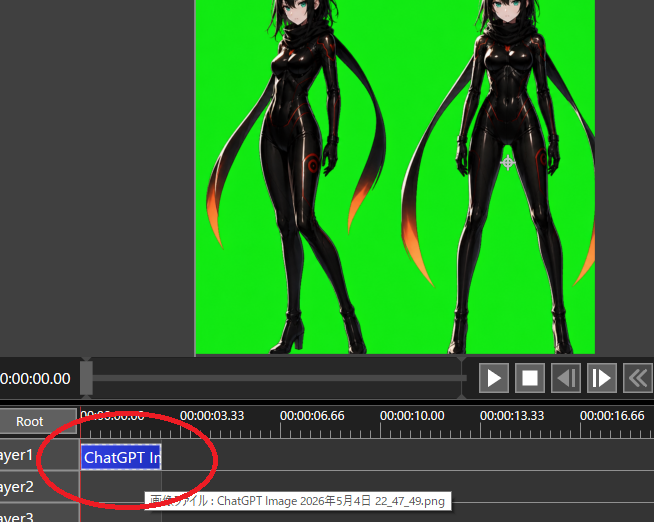
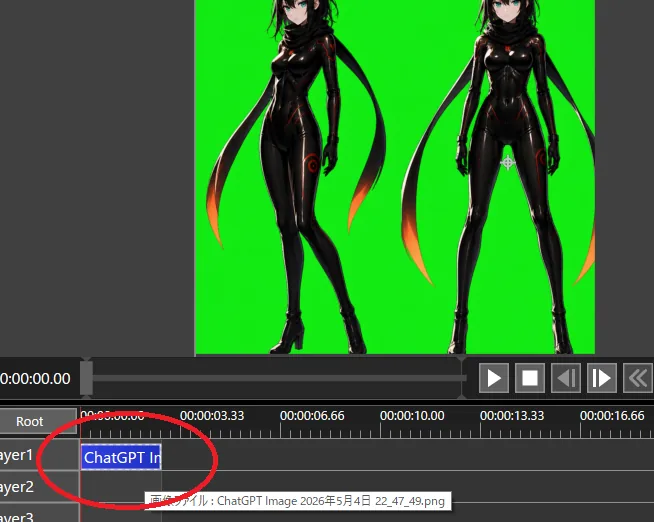
Creates a dark video editing interface screenshot showing two anime characters on a green screen with a circled timeline clip for transparency workflow tutorials. - AIPinMaker
Prompt
Goal: Create a screenshot-style image of a video editing/compositing workspace demonstrating chroma-key preparation for transparency.

Canvas: 654×522 pixel landscape screenshot, dark gray software interface, no browser chrome or desktop frame. The main preview occupies the upper half, timeline occupies the lower half.

Preview area: Center a bright pure green chroma-key background rectangle. On it, place exactly 2 full-body anime cyber-ninja women as imported image artwork: the left figure is a three-quarter pose with one leg crossed forward, the right figure is front-facing with legs apart. Both have {argument name="hair color" default="black"} hair, pale skin, teal eyes, glossy black bodysuits with subtle red/orange glowing seams, black gloves, high-heeled boots, and long black scarf/ribbon shapes trailing behind them with orange-red glowing tips. Crop the top of both heads slightly at the top edge of the preview, matching a real editor viewport. Leave dark gray margins outside the green preview.

Interface layout: Below the preview, show a playback bar and transport controls. Include exactly 6 visible transport buttons on the right: play triangle, stop square, step/back button, step/forward button, double-chevron rewind, and a partially visible extra control at the far right. At the left of the time display, show white timecode text {argument name="current timecode" default="0:00:00.00"}. Use small white UI text and gray panels.

Timeline: Show a ruler with time labels exactly 5 visible labels: 0:00:00.00, 0:00:03.33, 0:00:06.66, 0:00:10.00, and 0:00:13.33, plus a partially visible 0:00:16.66 at the far right. Show exactly 3 layer rows labeled Layer1, Layer2, and Layer3, with a Root row above them. Add a red vertical playhead at the start near 0:00:00.00. On Layer1, place one blue selected clip beginning at the start, labeled {argument name="clip label" default="ChatGPT Im"}. Draw a thick hand-drawn red oval/circle around the Layer1 clip and the beginning of the timeline, as if annotating where to click. Show a small tooltip near Layer2 with Japanese text beginning with {argument name="tooltip text" default="画像ファイル : ChatGPT Image 2026年5月4日 22_47_49.png"}.

Visual style: Realistic low-resolution software screenshot, crisp UI elements, slight aliasing, functional dark theme, no decorative framing. The anime artwork should look like polished AI-generated character art embedded in the editor rather than a flat icon.

Constraints: Keep the chroma-key green solid and vivid. Do not add extra characters, extra clips, or extra annotation circles. Do not include watermarks. Preserve the screenshot crop so the right-side controls and far-right time label are partially cut off.39:Tab2,Goal: CreatPrompt breakdown
- Subject
- 654×522 screenshot of chroma-key workspace with green rectangle holding two anime cyber-ninja women and timeline below showing Layer1-3, Root, blue clip, red oval annotation, and Japanese tooltip
- Style
- Realistic low-resolution software UI screenshot, crisp elements with slight aliasing, dark gray panels, functional theme, polished AI character art embedded in editor
- Composition
- Upper half preview centered on green key background with cropped-head figures; lower half timeline with 5 time labels, 6 transport buttons, white timecode, and red playhead at start
- Mood
- Technical and instructional, mimicking real editing software during transparency prep
Remix ideas
- Swap the hair color argument to white or neon pink to test character variants on the green screen
- Shift current timecode to 0:00:06.66 so the playhead lands inside the blue clip
- Replace the tooltip Japanese text with a different file path while keeping the same formatting
Reference images
How to use this AI Image prompt template
 1
1Copy the prompt — grab this template’s prompt and negative prompt.  2
2Pick a model — choose a recommended AI model for the best match.  3
3Generate — open the studio with one click and create your result.
Related templates
Cyber-Grunge Surveillance Fashion Editorial - Nano Banana Pro AI Prompt for Social Media Post
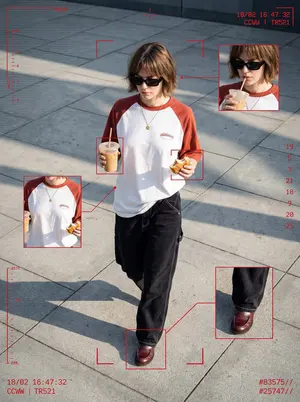
Cyber-grunge surveillance fashion editorial, 8K Ultra-HD 4:5 (1440×1920). Full-body shot from a high-angle CCTV vantage, 35 mm lens, deep focus. A cool detached woman (early 20s) mid-stride across sun-bleached grey plaza tiles, late-afternoon golden-hour light carving harsh diagonal shadows leftward. Chin-length textured bob with casual bangs, thick black sunglasses, head slightly down. Oversized white tee with rust-red raglan sleeves and small chest logo, loosely tucked into baggy black carpenter jeans (white stitching), burgundy loafers, fine gold pendant. In left hand iced-coffee/chocolate plastic cup with straw, right hand half-eaten pastry. Hyperreal skin pores, fabric weave, pavement grit. Cool urban palette: neutral greys, white, rust-red, denim black, punctuated by vivid crimson tactical HUD overlays: red bounding boxes, crosshairs, telemetry glyphs, scanlines, timecode “18/02”, ID strings “CCWW | TR521”, numeric stream “19 5 3 21 18 9 20 25”, hashtags “#83575// #25747//”. Fragmented layout: main full-body frame plus three inset crops (face/drink, torso, pants cuff) linked by thin red vector lines. Grain, subtle chromatic aberration, high sharpness, raw photoreal fidelity. Mood: Y2K streetwear, dystopian chic, candid privacy-invasion moment, urban nonchalance under omnipresent gaze.3f:T530,Cyber-gru

Video Generation Workflow Prompt (Text/LLM)
Create a creative image of Video Generation Workflow Prompt Textllm. Style: photorealistic. Composition: balanced and well-framed. Lighting: natural with cinematic mood. Category: photography. Reference: video-generation-workflow-prompt-textllm-6914.

Photorealistic Candid Lifestyle Photo with ControlNet - Nano Banana Pro AI Prompt for Social Media Post
"subject": "Young woman, long brown hair, wearing a yellow string bikini with blue trim and logos. Tattoos on right arm and fingers. Wearing a delicate necklace.", "pose": "Sitting in a wicker chair, leaning slightly forward. Hands resting on outer hips, touching bikini bottoms. Direct gaze.", "environment": "Semi-outdoor bar area. Wicker chair. White counter and slush machine to the right. Man sitting facing away in background left. Blue sky.", "camera": "Mid-shot, slightly elevated angle. Shallow depth of field with blurred background.", "lighting": "Bright, natural daylight. Even illumination with soft shadows under chin and chest.", "mood_and_expression": "Neutral expression, direct eye contact.", "style_and_realism": "Photorealistic candid lifestyle photograph.", "colors_and_tone": "Vibrant palette. Dominant yellow and blue, warm skin tones, bright blue sky.", "quality_and_technical_details": "Sharp focus on subject, natural skin texture, standard digital camera resolution.", "aspect_ratio_and_output": "3:4", "controlnet": { "pose_control": { "model_type": "OpenPose", "purpose": "Match sitting posture and hand placement on hips.", "constraints": "Maintain torso angle and arm positioning exactly.", "recommended_weight": 0.8 }, "depth_control": { "model_type": "MiDaS", "purpose": "Maintain spatial separation between subject, bar counter, and background.", "constraints": "Preserve 3D volume of body and chair.", "recommended_weight": 0.75 } }, "negative_prompt": "stylization, distortion, proportion changes, depth flattening, beautification filters, cartoon, painting, unnatural anatomy, weird hands"

Pleiadian Woman Crystal City
Create a creative image of Pleiadian Woman Crystal City. Style: photorealistic. Composition: balanced and well-framed. Lighting: natural with cinematic mood. Category: photography. Reference: pleiadian-woman-crystal-city-4766.

Catgirl Hardbass Alley Dancers
Create a cinematic photorealistic urban night scene in a narrow wet brick alley after rain, with exactly two young anime-inspired cat-eared female street dancers as the main subjects, both faces obscured by soft square blur blocks. The left dancer wears a white (left outfit color) zip-up tracksuit with black triple side stripes, white sneakers, a small black paw-print emblem on the chest, black cat ears, and very long black hair with red streaks, red bead tassels, and floral hair ornaments; she is squatting low in a dynamic breakdance pose with one leg kicked toward the camera, one arm raised in a hand sign, and the other arm bent across her face. The right dancer wears a black (right outfit color) zip-up tracksuit with white triple side stripes, black chunky shoes, a white paw-print emblem on the chest, white cat ears, and extremely long flowing silver-white hair with black floral hair ornaments; she mirrors the same low squat dance pose with one leg extended forward, one arm raised in a hand sign, and the other arm bent across her face. Include exactly five blurred background onlookers in dark streetwear: one standing in the center distance, one crouching behind the dancers, one small figure between them, and two figures on the far right. Place a dark old sedan on the left with bright headlights and a visible Russian-style license plate, beside graffiti reading HARD BASS (graffiti text) and CYKA (secondary graffiti) with a simple cat doodle. The alley should have black brick walls, metal fire escapes, overhead industrial lamps, misty backlight, puddles, glossy reflections, dramatic rim lighting, shallow depth of field, motion blur in the kicking shoes and flying hair, high-contrast cyberpunk street photography, ultra-detailed fabric folds, wet asphalt texture, and a low wide-angle camera viewpoint at ground level. Use a gritty but polished 2026 AI-image aesthetic, realistic lighting, 4:3 composition, no extra main characters, no readable text besides the graffiti and license plate.

Cyberpunk Magical Girl Sabrina Carpenter Prompt for Nano Banana Pro - Nano Banana Pro AI Prompt for Social Media Post
{ "image_generation_prompt": { "subject": { "description": "Young woman with a strong resemblance to Sabrina Carpenter.", "hair": "Long straight twin-tails with blunt bangs.", "face": "Soft coy expression, wide eyes, glossy lips.", "body": "Slender build, shiny skin on legs." }, "attire": { "clothing": "Intricate pink and white ruffled corset dress with sheer tutu skirt and metallic tech hardware.", "style": "Cyberpunk magical girl." }, "styling_and_accessories": { "jewelry": [ "Cat-ear headphones", "Choker with bell", "Wrist cuffs", "Thigh garters with heart gems", "Metallic platform heels" ] }, "environment": { "setting": "Grungy abandoned concrete corridor.", "background": "Peeling walls, exposed pipes, scattered debris.", "water": "Wet concrete floor with reflective puddles." }, "pose": { "posture": "Standing with legs spread wide.", "arms": "Hands held delicately near the chin.", "angle": "Low-angle full body shot." }, "lighting_and_mood": { "lighting": "Bright frontal flash contrasting with dark background.", "mood": "Gritty yet vibrant.", "colors": "Neon pinks, crisp whites, industrial greys." }, "camera_and_technical": { "style": "Ultra Photorealistic, RAW photo.", "lens": "35mm", "aperture": "f/2.8", "quality_tags": [ "8k resolution", "highly detailed", "volumetric lighting", "ray tracing reflections", "hyper-realistic texture", "Hasselblad photography" ] } } }
Explore more prompts
Browse more AI image and video prompts by category.
FAQ
- Why crop the tops of the characters' heads at the preview edge?
- It replicates how real editor viewports often clip imported footage, adding authenticity to the chroma-key demo.
- What is the red oval around Layer1 meant to show?
- The hand-drawn circle acts as an on-screen annotation highlighting exactly where to click or select the clip for keying adjustments.